Surface-level feature lists rarely tell the complete story when you evaluate managed WordPress hosting for development. You need to understand how PHP thread allocation impacts concurrent request handling, how multiple caching layers work together to reduce database load, and whether containerization actually prevents problems under real-world conditions.
This guide breaks down Kinsta’s technical architecture for PHP thread management, multi-layer caching, and container isolation. We also include quotes from Nikola Djuric, a senior support engineer on the Kinsta team, on the intricacies of PHP thread management.
Let’s start with how PHP actually handles requests.
Understanding PHP threads and why they matter for WordPress performance
PHP threads process incoming uncached requests. Each thread handles one request at a time, so your available thread count directly affects how many visitors your site can serve simultaneously.
When a visitor loads an uncached page, submits a form, or adds an item to their cart:
- The web server receives the request and hands it to PHP-FPM.
- PHP assigns the request to an available thread.
- That thread executes the PHP code, fetches database data, and generates dynamic output.
- Once complete, the thread becomes available again.
Most people do not know that an uncached request uses one PHP thread and that processing speed depends on PHP plus MySQL response time.
Cached requests skip this entire process (they don’t touch PHP at all), which is why cache HIT rates are the single biggest factor in how many threads you actually need.
WooCommerce sites, membership dashboards, REST API traffic, and headless setups all bypass caching far more often, which means they consume threads quickly.
For example, if your average API response takes 250 milliseconds, each thread can process four requests per second. With eight threads, your theoretical maximum throughput is 32 requests per second. However, this is only if every request completes in exactly 250ms.
How concurrent traffic consumes PHP threads
Your thread count matters most during concurrent traffic. If your site has four threads and receives six simultaneous uncached requests:
- Four requests start processing immediately.
- Two wait for a free thread.
If new traffic arrives faster than threads can free up, the backlog grows.
Slow database queries make this worse. For example, a database query that takes 10 seconds locks one thread for that entire duration. If you receive three concurrent requests that each trigger slow queries, you’ve consumed three threads for a total of 30 seconds. During that time, your remaining threads handle all other traffic.
When you add WooCommerce filters, account pages, or checkout workflows, thread pressure climbs even higher.
For PHP threads, simple sites need only four. But for e-commerce, anything under six is low because of the high bypass cache ratio.
The relationship between thread count and execution time
A rough way to estimate thread needs:
Required threads ≈ (Uncached Requests per Second × Average Execution Time)
Based on this, a site with 10 uncached requests per second and an average execution time of 0.5 seconds needs approximately five threads to handle the load without queuing.
This explains why simply adding more threads doesn’t guarantee better performance. If slow database queries cause your average execution time to climb from 0.5 seconds to two seconds, your thread requirements quadruple.
The solution is faster code execution. Optimizing queries, reducing external API calls, and implementing proper object caching can dramatically reduce execution time and the threads needed to handle your traffic.
PHP thread allocation across Kinsta plans
Kinsta assigns PHP threads based on the CPU and RAM resources available to each site’s container (every Kinsta site runs in its own LXD container, so resources are isolated).
General patterns across plans:
- Entry-level: 2–4 threads at 256MB per thread. This is ideal for blogs and static content sites with high cache HIT rates.
- Mid-tier: 6–8 threads at 256MB per thread, with some agency plans increasing memory to 512MB per thread.
- Upper-tier: 10–16 threads with 512MB per thread, suitable for high-traffic or complex sites.
- Multisite: 8–14 threads depending on tier.
You can adjust thread allocation inside MyKinsta > Info > PHP performance, increasing the memory pool or thread count based on your site’s traffic patterns.
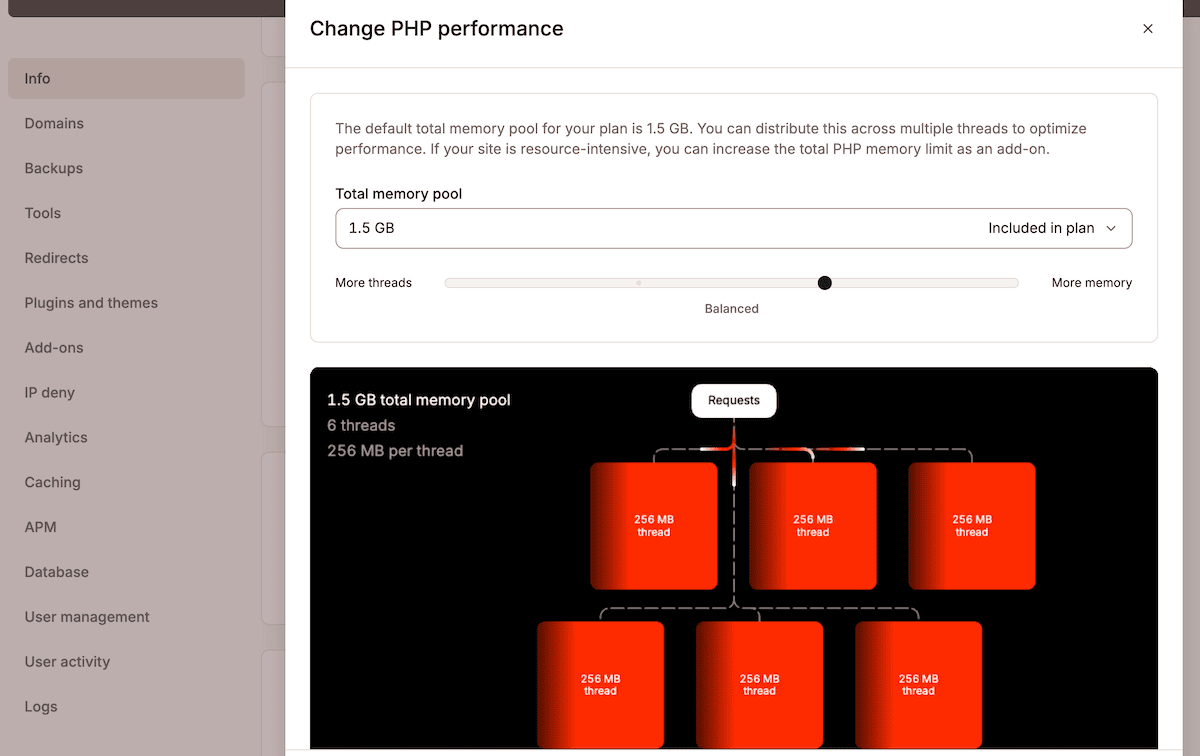
This flexibility lets you tune PHP to your actual workload, rather than relying on defaults.
Estimating PHP thread requirements for your site
Different site types need custom thread allocations based on how much traffic bypasses the cache:
- Static content sites. 2–4 threads are usually enough because cached pages serve almost all traffic.
- WooCommerce stores. Start with 8–12 threads depending on catalog size, filtering complexity, and checkout volume.
- API-heavy or headless apps. Estimate based on execution time (e.g., 0.25s requests = about 4 per second per thread).
- Membership sites and LMS platforms. Logged-in users bypass caching entirely, so they behave similarly to e-commerce.
The analytics within MyKinsta helps you identify your current thread usage patterns.
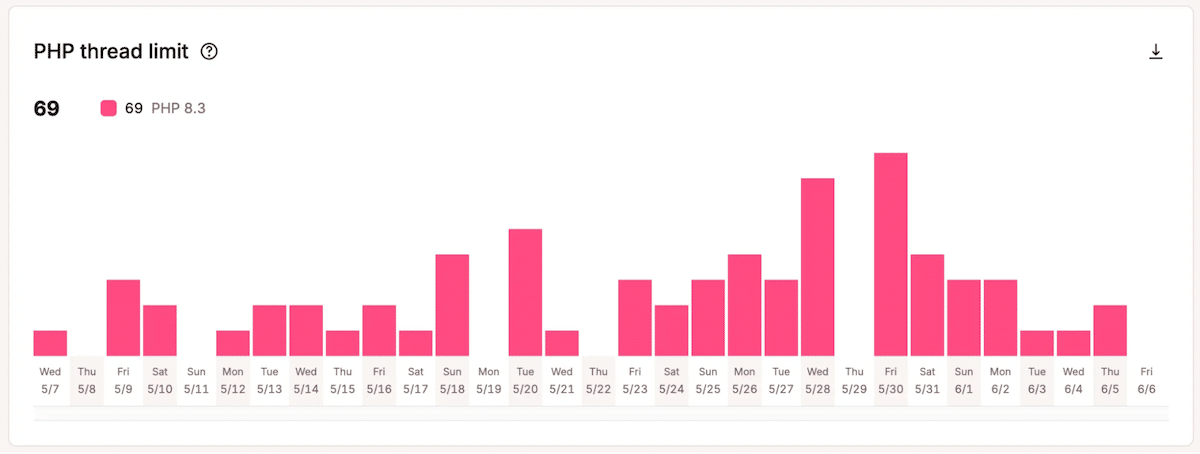
If you see request queuing or timeout errors during high-traffic windows, your thread allocation likely needs adjustment.
What happens when you exceed your PHP thread limit
Thread exhaustion follows a predictable pattern:
There is no queue for requests. The number of PHP threads your site has determines how many uncached requests can be processed at once. When a request comes in and no thread is available, it waits for a thread to free up. If that doesn’t happen quickly enough, you’ll see 502 or 503 bad gateway timeout errors.
Typical symptoms:
- Requests queue inside NGINX/PHP-FPM when all threads are busy processing.
- End users experience delay first, such as spinning loaders, slow checkout steps, or broken AJAX calls.
- 502 or 504 errors appear once the queue capacity fills completely.
- Recovery typically happens within 30–120 seconds after slow functions finish and the cache ‘warms’.
Slow database queries are the most common cause.
Slow database queries take more time to be processed by PHP threads and that’s how they typically kill site performance.
External API calls create similar problems. Payment gateways, tax calculation services, and shipping APIs frequently block threads during checkout.
Diagnosing thread exhaustion requires examining multiple data sources. Kinsta’s APM Tool traces slow requests and identifies bottlenecks, while slow query logs reveal database performance problems. Nginx queue metrics show request backlog patterns and cache HIT/MISS ratios indicate whether your caching is working.
The solution is to optimize the execution time:
- Slow database queries need indexing, query optimization, or reduced query counts.
- Heavy plugins might require replacement with lighter alternatives.
- Cron tasks should shift to off-peak hours.
- External API calls benefit from caching, background processing, or circuit breakers.
Optimization should come before adding more threads. Increasing thread count only helps after average execution time is under control.
Kinsta’s multi-layer caching architecture
Caching reduces the frequency with which requests reach PHP. Kinsta uses three layers:
- Edge caching serves static content from global locations close to visitors.
- Object caching with Redis reduces database load by storing query results in memory.
- The Kinsta CDN delivers static assets from distributed edge locations.
These layers work together to minimize the requests reaching your PHP threads and database.
Edge caching through Cloudflare
Cloudflare’s global edge network serves cached HTML pages based on cache keys that factor in:
- URL and query parameters
- certain cookies
- authentication state
- WooCommerce cart/session cookies
This prevents personalized content from being served to the wrong users.
Cache bypass rules also prevent caching dynamic content that must remain fresh, such as WordPress admin areas or WooCommerce checkout pages.
The performance difference means that edge-cached requests bypass PHP threads entirely and never reach your WordPress installation. A site where 80% of requests hit edge cache only needs PHP threads for the remaining 20% of traffic.
Object caching with Redis
Kinsta provides Redis as an add-on rather than requiring third-party plugins, which can ensure Redis works with WordPress’s object caching system.
Redis stores database query results in memory, so the server doesn’t need to repeat executing those queries.
Redis is a performance multiplier for well-structured sites—not a band-aid for heavy queries or unindexed tables.
Redis helps when:
- Many users load the same data (posts, products, categories)
- WooCommerce stores perform category lookups or product checks
- APIs repeat identical queries
However, Redis doesn’t speed up inherently slow PHP logic, blocking external API calls, or poorly optimized loops.
Kinsta CDN for global asset delivery
Kinsta CDN serves static assets from over 260 global locations. This approach reduces latency for international visitors and eliminates static asset loads from your origin server. It also automatically converts images to the WebP format when browsers support it.
Cache control headers determine how long the CDN stores assets. You can configure the cache duration for different asset types based on their frequency of change. Core CSS, for example, can live with an extended cache period. Cache purging for both layers is handled through MyKinsta, either individually or for both.
Between the Kinsta CDN and Edge caching, you can handle HTML pages, dynamic content, and static assets. Together, they ensure most requests never reach your origin server or consume PHP threads.
Container isolation: solving the noisy neighbor problem
Shared hosting environments often suffer when one site consumes too many resources. Kinsta avoids this entirely through LXD container isolation, giving each site its own:
- dedicated CPU
- dedicated RAM
- isolated file system
- independent software stack
Other sites cannot “steal” your resources, and issues in one container cannot impact others.
Containers run on optimized compute hardware, ensuring stable, predictable performance even during traffic spikes.
Scaling for your site’s needs
When your site consistently needs more resources than your current plan provides, you have options to scale vertically within your container.
For instance, the PHP performance add-on provides additional threads and memory for sites that need more computational power.
You can also move to a higher-tier plan, thereby increasing your container’s allocated resources, thread count, and memory per thread. This suits sites that might be outgrowing their current plan’s capacity.
The key is understanding whether you need optimization or additional capacity. If your threads saturate but CPU usage remains low, the problem is slow queries or external API calls, not thread count. Adding threads without addressing slow execution simply lets more requests wait longer for slow processes to complete.
Summary
PHP thread management, multi-layer caching, and container isolation all play critical roles in WordPress performance at scale. Understanding how threads work and how caching reduces the load they handle makes it easier to choose the right plan and optimize your site effectively.
If you’re ready to see how Kinsta’s infrastructure handles your WordPress workloads, explore Kinsta’s managed hosting platform today.