Add as a preferred source on Google
Automation is taking over more of the WordPress operations that once required someone at a keyboard.
Deployments, updates, security responses, and infrastructure changes can all now run without a person watching each step. However, the part that’s not yet solved is knowing which of those steps still need human eyes on the process.
There are four categories of operations in WordPress to focus on, but with Kinsta’s functionality and infrastructure, your server is already built around them.
An agent that doesn’t know when to stop is an automation risk
Because it’s a machine, an AI agent will always look to carry out your wishes. For instance, it can carry out a whole workflow that includes pushing a WooCommerce update to production, running passing visual regression tests, clearing the cache, and updating the logs as successful. However, a client can still call with a broken checkout later on.
At first, it seems like an AI problem. If a regression test checks the page layout but doesn’t check the payment gateway integration underneath it, this will cause errors. Here, the AI agent does exactly what it was built for, so it won’t know what else needs oversight. Instead, this is a human problem.
However, this isn’t an argument against automation. However, a workflow needs deliberate pause points to carry out the necessary checks. While most WordPress workflows don’t need moments where an AI agent can explain what it knows and wait for a decision, some do. This is especially true for more complex workflows, but it isn’t always obvious.
Zylos Research’s analysis of agent-to-human handoff patterns notes that production AI deployments settle around a 70–80% automated decision ratio, with the remaining being human-reviewed.
For WordPress operations, you can still plan ahead using these splits in a few ways:
- Deployments split cleanly between a routine file push and a database migration that touches live orders.
- Updates split between a low-risk plugin patch and anything touching a payment gateway or membership system.
- Content publishing splits between scheduled posts and anything containing pricing, legal, or safety-critical information.
- Security events can split between automatic containment and a judgment call about what triggered it.
- Infrastructure and billing changes split between a usage alert and a decision to upgrade, downgrade, or transfer a site.
A split isn’t simply about handling a leftover category of unautomated tasks. Anything outside a pattern an AI agent has already seen (such as irreversible changes or live transactions) is where the mistakes cost the most.
A bad escalation costs more than the automation saves
MIT’s NANDA found that 95% of enterprise generative AI pilots show no measurable return on profits or losses. There’s a familiar pattern that backs this up:
- A team will automate the easy majority of a workflow first.
- Next, they treat what’s left as an afterthought.
- Finally, they absorb the cost when that smaller fraction turns out to be risk-heavy.
A content pipeline that occasionally needs a human edit is forgiving, such as when a draft sits for an extra hour. However, a deployment pipeline that occasionally corrupts a live order isn’t forgiving in the same way, because a few kinds of mistakes don’t average out:
- A failed database migration mid-checkout can lose orders placed between the backup and the failure, not just delay them.
- Broken payment gateways keep taking traffic and losing sales for however long it goes unnoticed.
- A mishandled security response can turn a contained incident into a longer outage than the original attack would have caused.
Current reports find that 85% of Customer Experience (CX) leaders say a single unresolved issue is enough to lose a customer. While a workflow that automates confidently and escalates rarely seems like an efficient and optimal outcome, this will eventually hand a customer an unresolved issue where there’s no person in the loop to catch it.
5 WordPress operations where a human decision belongs
The better plan is to automate what’s reversible, then escalate the rest. A change that’s reversible (or at least low cost if wrong) and matches a pattern the workflow has handled before is safe to automate.
Irreversible or expensive changes, along with those outside of a recognized pattern, should be escalated instead. Here’s how these splits play out across the five categories that make up most of a WordPress operation’s day-to-day work.
1. Deployments: automate the push and escalate the migration
A task such as a file push to a content site is forgiving if something goes wrong. You simply restore the backup and push again, which takes a few minutes. However, a mid-checkout database migration on a live WooCommerce store is a different kind of mistake. Orders placed between the backup and the failure won’t exist in the restored copy, so a rollback won’t undo the damage.
Kinsta’s selective push functionality gives you a way to act on these types of incidents. Instead of pushing the entire environment, you can choose to push only the files, database, or both at once. Kinsta takes an automatic backup of the target environment before any of it runs.
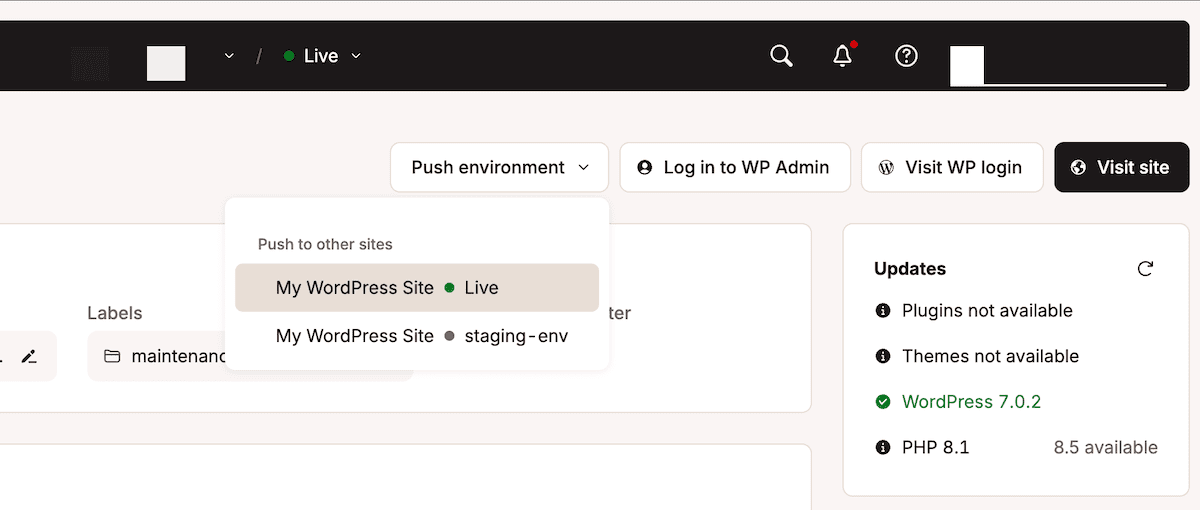
Using this can give an automation layer enough information to treat a routine file sync differently from a migration that deserves a second pair of eyes.
For deployments built on the Kinsta API, the reliable sequence is:
POST/sites/environments/{env_id}/manual-backupscreates a backup with a logged timestamp before anything touches production.PUT/sites/{site_id}/environmentspushes staging to live.POST/sites/cdn/clear-cacheclears the CDN cache afterward.
Each step returns an operation_id that the script polls before proceeding. If any step fails, the workflow stops rather than continuing past the failure into a state nobody planned for. The full endpoint sequence is documented here, along with examples of how agencies wire it into CI/CD pipelines.
Kinsta customer Sod knows exactly what happens when this distinction isn’t built into a workflow. The Melbourne agency manages more than 400 WordPress sites and once it stopped treating every site the same way, the team saw greater benefits:
[QUOTE]”The Kinsta API has enabled us to develop internal tools that automate crucial processes like site provisioning and perform bulk operations across our websites, saving us considerable time and effort.” – Pete Brundle, Development Lead at Sod[/QUOTE]
2. Updates: automate the patch and escalate the payment gateway
Many site errors are low-stakes issues, such as a plugin update on a brochure site, since the worst outcome is a broken layout you’ll notice and fix. It’s functionality under the hood that can trip you up, such as a store with a payment gateway or a membership system. While a checkout page can look completely normal, the transaction underneath might stop working where it’s difficult to catch.
This is where you employ Kinsta’s Automatic Updates. The tool lets you set a schedule and a time window to enable updates to plugins and themes. It automates the taking and comparison of site screenshots before and after each update to catch anything that’s visibly changed. For any differences, it restores the pre-update backup on its own.
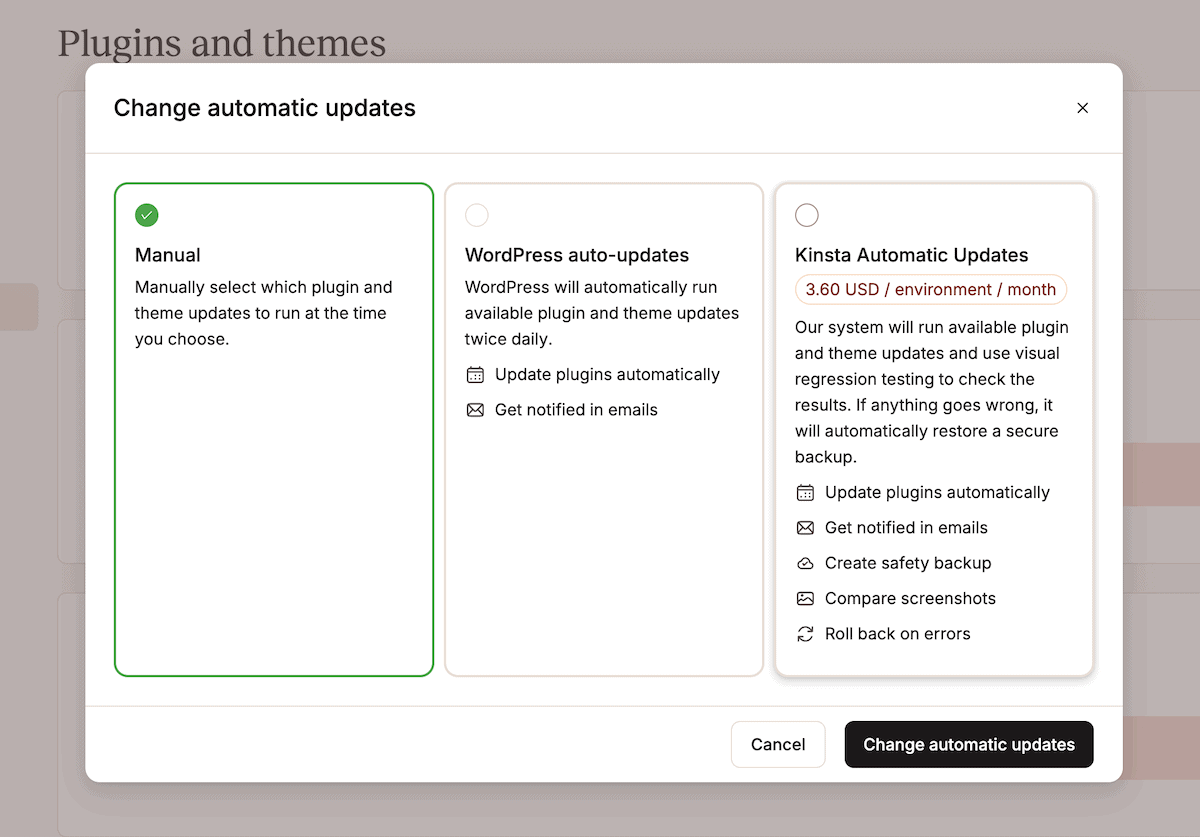
However, the difference between what a visual test can or can’t see is exactly why WP Umbrella built its own monitoring layer using Kinsta’s infrastructure rather than relying on updates alone.
[QUOTE]”We made a ticket, and within hours, the problem was solved. Believe me, having contacted several hosts, it is rarely so easy.” – Aurelio Volle, Co-founder at WP Umbrella[/QUOTE]
WP Umbrella now has clear data on how much difference a fast, human response makes once something does slip through.
3. Content publishing: automate the schedule and escalate the substance
A publishing pipeline can handle scheduling, SEO metadata, cache warming after publish, and social distribution without any human input. The category that trips people up is content that carries real-world consequences if wrong.
A blog post explaining how to install a plugin is low-stakes if it has an error. An article quoting pricing, making medical recommendations, explaining legal requirements, or covering a product launch with a specific date is different. If an AI-assisted draft publishes an incorrect price or outdated safety guidance, the damage is immediate and specific.
The escalation trigger isn’t “was this written by AI?” It’s “does this content carry consequences if it’s wrong?” Price changes, YMYL topics (health, finance, legal), dated product launches, and security advisories all belong in a human review queue before they publish, regardless of how the content was produced.
Automating the pipeline is efficient, but automating the judgment about what goes into it is how a specific, avoidable problem gets published at scale.
4. Security: automate containment and escalate the response
Speed is of the essence during an active attack on your site and server. Once you contain that attack, the next right move is judgment. Both call for different actions and processes.
For example, blocking a confirmed malicious IP is the same correct action every time, which is why this is safe to leave to an AI agent. However, deciding whether a traffic spike is a competitor scraping your prices, a broken integration, an AI crawler, or something else worth letting through needs context an automated system doesn’t have.
Kinsta’s Bot Protection classifies incoming traffic in real time and contains malicious actors through four preset protection levels you can apply per site or in bulk. A dedicated toggle blocks AI crawlers specifically, while verified bots (such as Googlebot) always pass through untouched. It means your search visibility never becomes collateral damage in a decision about AI traffic.
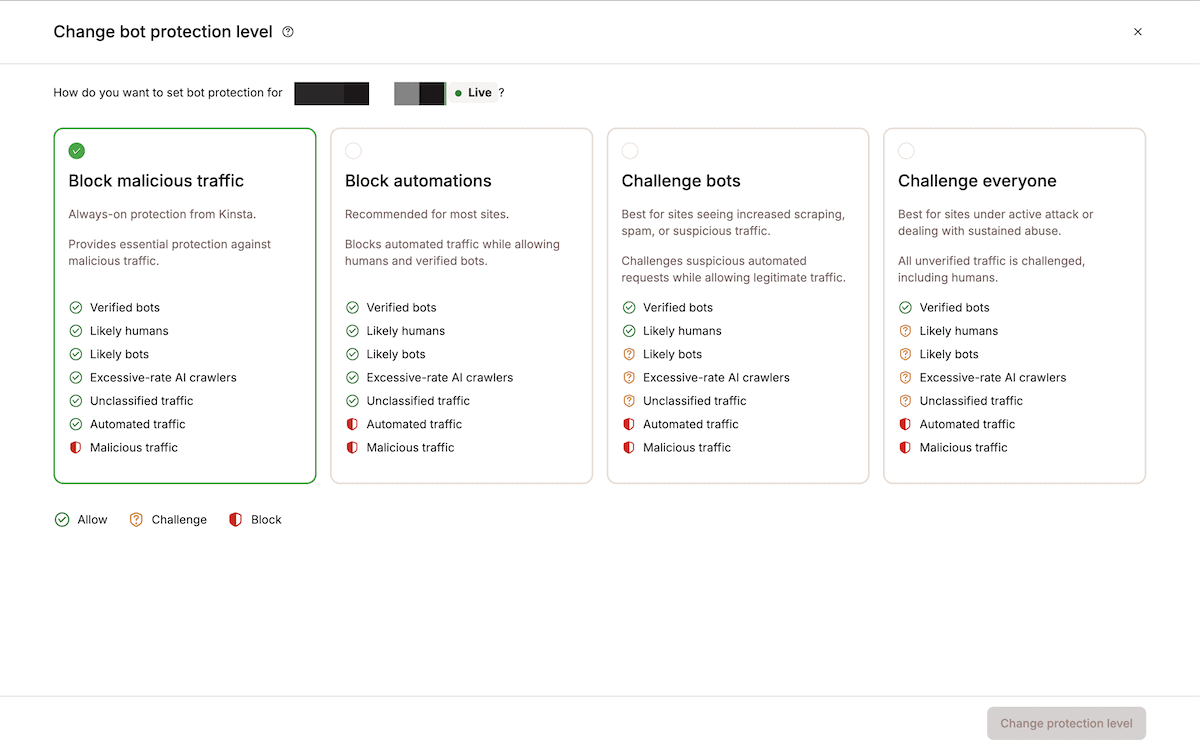
However, what the tool doesn’t do is decide whether an unusual pattern is worth a closer look, which is why you need human intervention here.
For Adapting Social, getting the containment right means the team doesn’t spend as much time firefighting anymore:
[QUOTE]”We needed a hosting solution that matched our commitment to excellence and gave us the confidence to offer hosting services to our clients. One that was reliable, performed well, and kept our clients’ websites safe and secure. That’s when we discovered Kinsta.” – Christopher Iafelice, COO at Adapting Social[/QUOTE]
5. Infrastructure and billing: automate the alert and escalate the decision
Infrastructure and billing changes have the least ambiguity of the five categories, which means it’s easy to get wrong. It’s safe enough to automate the detection of a problem. Acting on it is almost never safe, though, because tasks such as a site transfer or DNS change (and many others that affect live traffic) aren’t reversible the way a cache clear is.
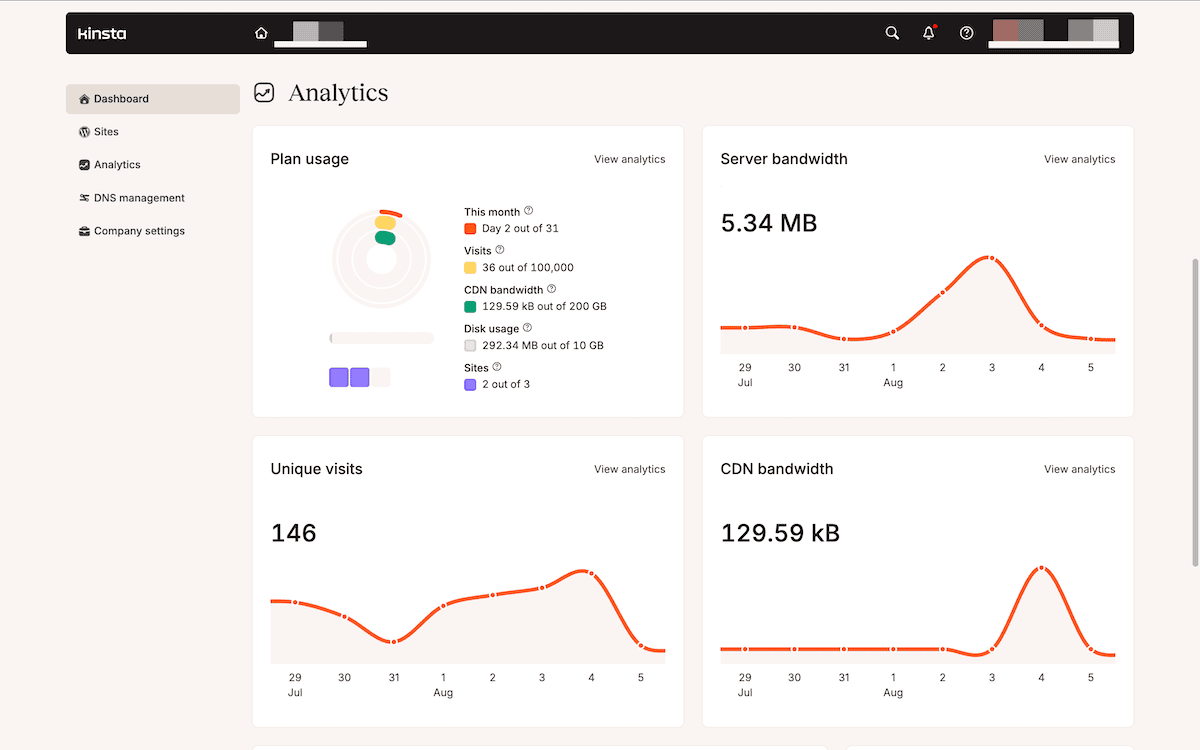
Kinsta’s plan structure lets you embrace these aspects rather than fight them:
- Usage notifications at 80% and 100% of your visit, storage, or bandwidth allowance can be sent automatically, well before any overage fee applies.
- A decision to upgrade the plan, add a disk space add-on, or absorb an occasional overage depends on budget and context, so these stay with a person.
- Plan changes, company-level user additions, or billing updates are restricted in MyKinsta to a Company Owner or Company Administrator, regardless of who else has access to the account.
That last point is the same ‘automate-and-escalate’ principle applied to people rather than workflows: whoever’s accountable for the account makes the financial call, not whoever happens to be logged in when a threshold is crossed. For an agency running hundreds of client environments, this structure is what keeps an unexpected spike from turning into client arguments.
Look to give your clients context instead of sending an alert
If your escalation procedure only discusses what needs attention, the receiving person has to reconstruct what happened before they can decide anything. This is a big delay and can impact the speed of any potential escalation.
A well-designed handoff includes three elements instead of leaving that work to whoever picks it up:
- What the workflow was doing when it paused, so nobody has to guess at the wider task.
- The specific trigger for the pause, in plain language rather than buried in a log file.
- Whether a decision is now waiting on a person, which should be presented as a singular and clear choice rather than an open-ended problem.
In a nutshell, someone picking up a paused deployment should be able to see the pending push, the environment it targets, and the regression result that stopped it all in one place. The workflow should also resume from that exact point once someone approves it, rather than starting over.
For a deployment built on the Kinsta API, it means the backup will already exist and the staging push will be prepared. It gives a decision maker a single task rather than parsing through the whole pipeline.
Kinsta’s own activity logs and User activity screens reflect this same instinct on a smaller scale. Every entry shows who took an action, when, and whether it succeeded.
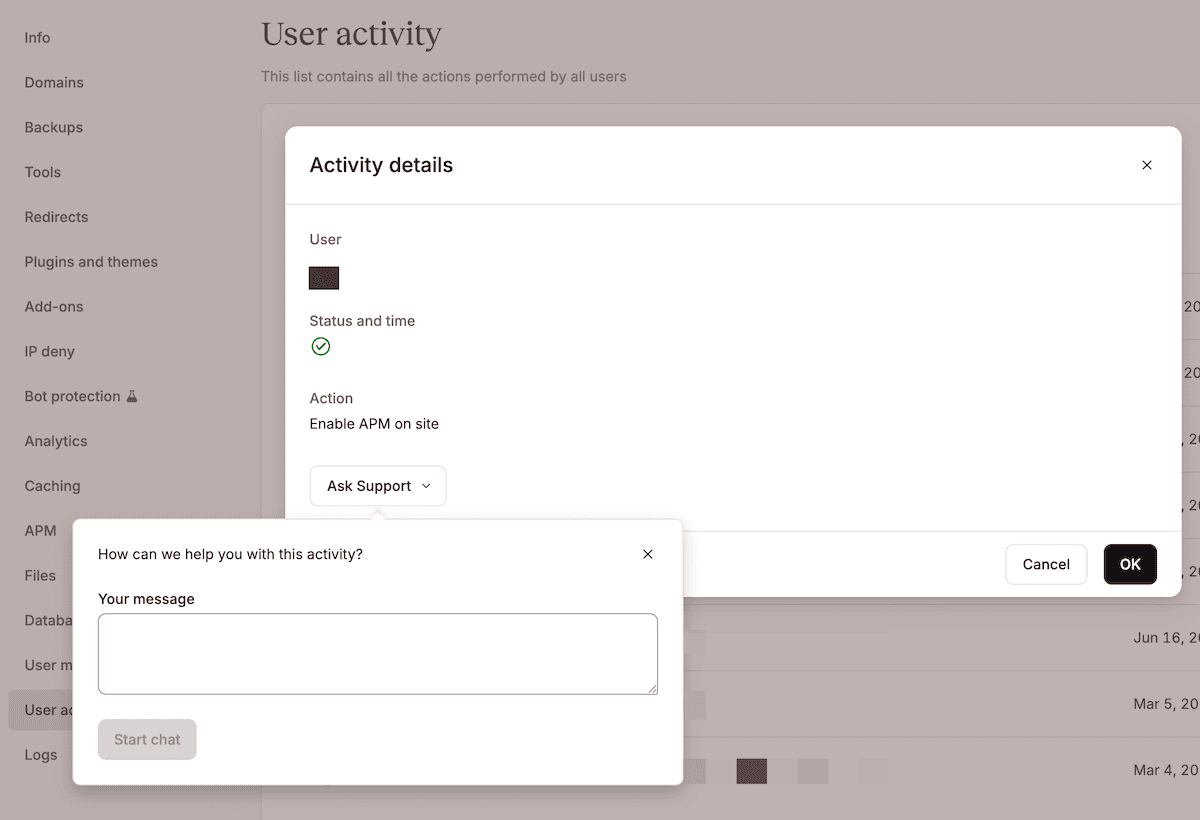
Opening an entry’s full detail gives you a direct way to raise a question about an action with Kinsta’s support team, rather than starting from a blank description of a problem someone else has to piece back together.
Automation handles the predictable, while judgment handles the rest
Rather than worry about whether a step can be automated within your WordPress workflow (because almost any step can be), your concern should be with what happens when your workflow runs into something outside its expected parameters.
Getting this right comes down to automating what’s reversible so the majority of a workflow can run. From there, you can define the escalation thresholds in writing, and package the context with every handoff. This means whoever picks it up can act immediately instead of starting from zero.
Explore the Kinsta API to start building workflows with a defined handoff point, or see how Kinsta’s agency hosting supports teams managing dozens of client sites at once.