Add as a preferred source on Google
Most credibility advice focuses primarily on your content. This values real experiences, credentialed authors, original research, and relying on humans across anything AI-assisted. All of that is correct and should already be on your checklist.
What it misses is that search engines, AI search engines, and your visitors read a second layer of signals such as speed, uptime, security, and error rates before they reach your content. Those signals come from your infrastructure, and they’re judged continuously rather than once during a redesign.
This piece covers what those signals are, how they’re evaluated, and where to check them in MyKinsta.
Credibility has a technical layer that gets judged first
E-E-A-T (Experience, Expertise, Authoritativeness, and Trustworthiness) comes from Google’s Search Quality Rater Guidelines. It’s used to judge page quality, which feeds into ranking systems.
Most content advice covers the first three components well, but Google calls Trustworthiness the most important. Unlike the other three aspects, it depends on more than accurate copy:
- Secure infrastructure that includes HTTPS held in a valid, unexpired state rather than configured once and forgotten about.
- Consistent uptime. A page unreachable by a crawler can’t be judged as trustworthy.
- Fast, stable performance, measured continuously rather than checked once during a redesign.
Your site’s performance runs through Google’s Core Web Vitals. Largest Contentful Paint, Interaction to Next Paint, and Cumulative Layout Shift are all scored against real visitor data from the Chrome User Experience Report. A page only passes when 75% of real visits hit the ‘good’ threshold on all three.
As such, a site’s technical credibility score moves with its actual performance regardless of whether anyone touches a word of content.
Why AI-generated content raises the stakes on technical signals
Content is now cheaper to produce, which changes any meaningful credibility signals. Elements such as author credentials, original experience, and first-hand knowledge still make a difference and have importance, but they’re also easy to fake.
In the real world, a fabricated bio reads the same as a genuine one (at least until it’s checked by a human). However, technical signals don’t have that weakness:
- Sustained uptime can’t be manufactured after the fact.
- A clean security record can’t be claimed once a site has already served malware.
- A consistent sub-2.5 second LCP means you have a fast infrastructure held in place over time.
These signals take time and resources (and, by extension, a budget) to earn, which is what makes them hard to fake and even harder to catch up on quickly if neglected. In a nutshell, a site with both strong content and technical infrastructure has a much greater advantage than a content-only strategy.
3 moments that cost a website its credibility
Credibility tends to fail across a handful of specific moments rather than gradually. The fallout is different, though, depending on whether a search crawler, AI system, or site visitor ‘sees’ it.
In each case, the initial event (the outage, the slow load, and the security warning) turns out to be a smaller part of the story than what happens to your credibility afterward.
An outage costs more than the downtime itself
Outages are often measured in minutes, since that’s what a status page shows. However, a more useful measurement is what the visitor and the crawler do while it’s happening. These reactions are what determine the cost to you based on the reaction it gets:
- A visitor who lands mid-outage typically forms a judgment about how reliable you are, closes the tab, then heads off to find the same product or answer somewhere else. Often, you won’t know why they bounced either.
- Googlebot tolerates a short outage since it simply checks again a day later. However, errors that persist for more than a couple of days are taken as a sign the pages are gone, and Googlebot drops them from the index.
- An AI crawler will time out more readily than Googlebot does because it often fetches a page in real time rather than working from a cached index. Failures here cost a citation rather than a ranking position.
Visitor bounces tend to show up as a slightly lower conversion rate a few weeks later with no obvious cause, and that’s if you can spot it at all. The search reaction is more measurable, as a multi-day outage is something you can look at within your analytics. Even so, full visibility could take months after you get the site stable. For AI search reactions, early research suggests that pages failing more than 75% of crawler requests received roughly 18 times fewer citations than stable pages.
WP Umbrella, a WordPress monitoring tool used by agencies, recognized these patterns from the other side of the relationship. Its former host had recurring outages, with pages loading noticeably slower during peak traffic. Both of these affected SEO and the user experience of a company whose entire business is telling other people how reliable their sites are.
As WP Umbrella’s team put it:
To be a credible player in WordPress management tools, we need to have a site that loads very quickly and is always available.
A slow page loses the visitor before they read anything
An outage is at least visible in comparison to a slow page. It’s easy to underestimate its impact, however, as the visitor doesn’t see an error message telling them something is wrong. Instead, the additional wait becomes the first impression your site makes rather than your expertise, credentials, content, or any other facet.
There are some solid numbers behind your first impression to note:
- Google’s own mobile research found that 53% of mobile visits are abandoned once page load passes the three-second mark.
- Portent’s analysis of over 100 million page views found that a site loading in one second converts roughly three times better than one loading in five.
- Vodafone’s tests on two otherwise identical landing pages found that a 31% improvement in Largest Contentful Paint alone produced 8% more sales, a 15% lift in lead-to-visit rate, and an 11% lift in cart-to-visit rate.
The Vodafone result is insightful since the only changing variable between the two pages was loading speed. This alone is a direct demo of how a page can lose a visitor’s confidence purely on infrastructure terms.
A security warning is instant and hard to undo
An outage or a slow page still gives the visitor the choice to wait or come back later. However, a visitor won’t stick around if the browser tells them your site may be harmful. Even worse, the warning can keep showing up in search results after you’ve fixed the problem, which means the reputational damage will run on.
WordPress sites carry more of this risk, not because it’s insecure or buggy, but simply because of how much of the web runs on it. Patchstack’s State of WordPress Security in 2026 whitepaper lays out the details:
- 11,334 new vulnerabilities were discovered across the WordPress ecosystem in 2025, up 42% on the year before.
- 91% of them were found in plugins rather than in WordPress core itself.
- A five-hour median was the weighted time between a vulnerability becoming public and someone actively exploiting it. 20% of the most heavily targeted vulnerabilities were exploited within six hours.
Your planning will lean heavily on that exploitation time. For instance, if you work through updates once a month, you likely won’t be running a security process against a five-hour exploitation window.
Stuurlui, a WordPress agency that holds ISO 27001 and Dutch government BIO certification, has built its entire client offering around not being caught out this way. Security sits alongside performance and accessibility as one of three pillars the agency treats as non-negotiable on every site it builds, rather than a box to tick after launch.
As the Stuurlui team explains:
Our clients expect reliable websites that perform well, meet the highest security standards, and comply with accessibility guidelines. These pillars are embedded in our approach.
How to check your own site’s credibility signals in MyKinsta
Despite knowing where the damage happens, it’s nothing without you proactively checking for any exposure, rather than waiting for a customer complaint or a ranking drop to tell you. MyKinsta gives you a direct view of the relevant signals you need based around uptime, performance, and security.
Uptime monitoring
The uptime monitoring tool checks each site every three minutes, 480 times a day, so it’s a baseline signal for everything else.
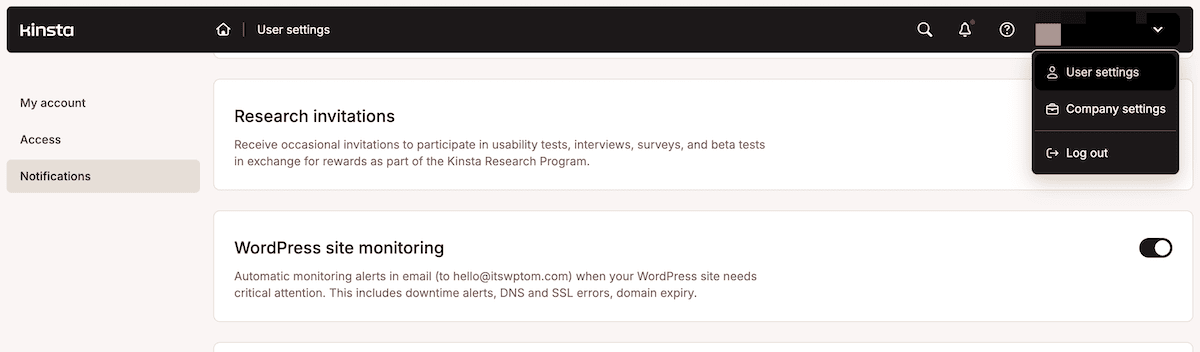
You can find it within MyKinsta under User Settings > Notifications, where you can enable alerts that cover three critical areas of attention:
- Site Errors flag a problem detected on the site itself.
- SSL Errors flag a certificate or configuration issue before it turns visitors away.
- Domain Expiration flags an expiring domain before it lapses.
Alerts only fire after three consecutive failed checks, which filters out momentary blips. With this enabled, you and Kinsta learn about a problem at the same time rather than you finding out from a customer.
If an alert fires, the first stop is Analytics > Response to see the error code breakdown. That tells you what kind of problem you’re dealing with before you start investigating.
Performance data
Speed problems are easy to guess at but hard to diagnose without data. Sites > {sitename} > Analytics > Performance gives you the numbers behind a slow page rather than a hunch:
- Average PHP and MySQL response time shows how long the application takes to compile and query each uncached request, so a recent spike tells you where a regression started.
- Top maximum upstream time lists the slowest paths on your site, pointing you straight at the specific page or endpoint dragging your average up.
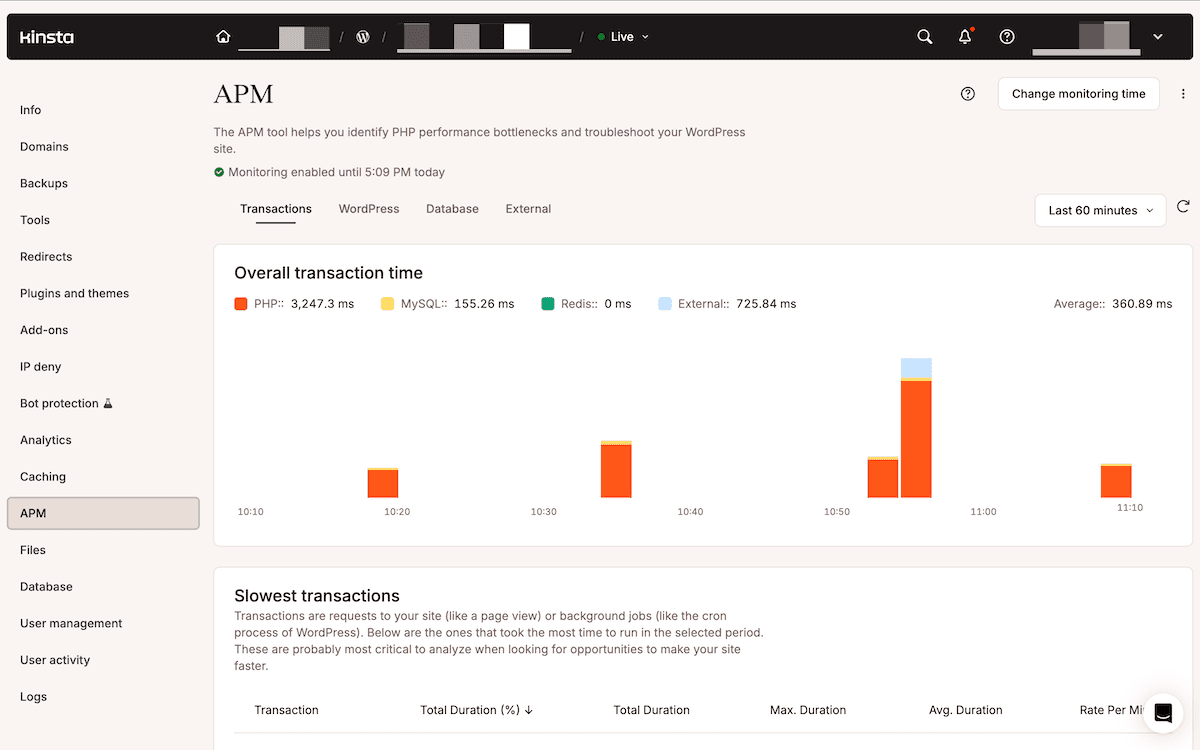
Once you’ve narrowed down a slow page, Kinsta’s APM tool traces it back to the specific plugin or database query causing the delay. You enable it for a monitoring window of two to 24 hours, reproduce the issue, then read the results across four views: Transactions, WordPress, Database, and External.
A slow Largest Contentful Paint is often a caching problem rather than a code problem. The Cache section of Analytics splits every request into HIT, BYPASS, or MISS, and a healthy site should lean heavily on HITs.
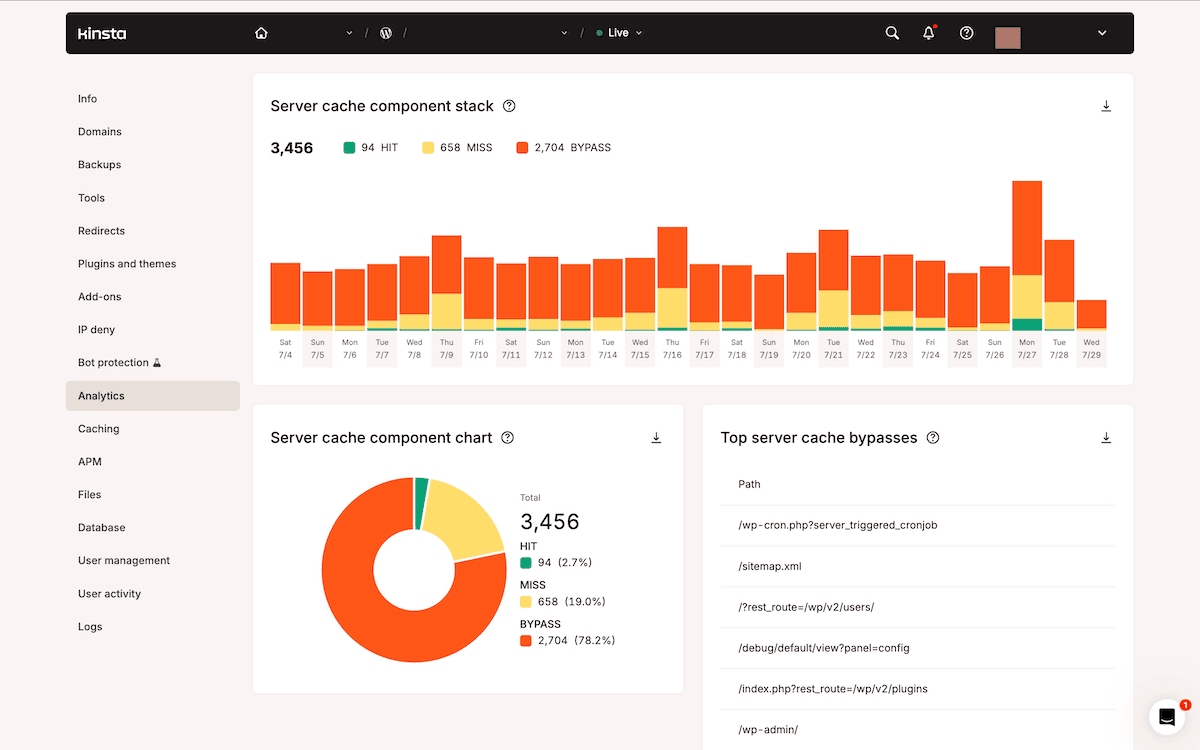
When the BYPASS rate climbs, the Top server cache bypasses report names the specific paths skipping the cache, which is usually a faster route to a passing Core Web Vitals score than a full rebuild.
If you want Core Web Vitals checked automatically rather than manually, the Kinsta API can pull your site URLs and send them to the PageSpeed Insights API. From there, you can implement alerts the moment a metric drops below your chosen threshold, which turns a periodic manual check into a standing early-warning system.
Security
Every site on Kinsta sits behind a Cloudflare integration that filters code injection, SQL injection, and Layer 7 DDoS traffic before it reaches your server. You can see and adjust this directly under Sites > sitename > Bot protection:
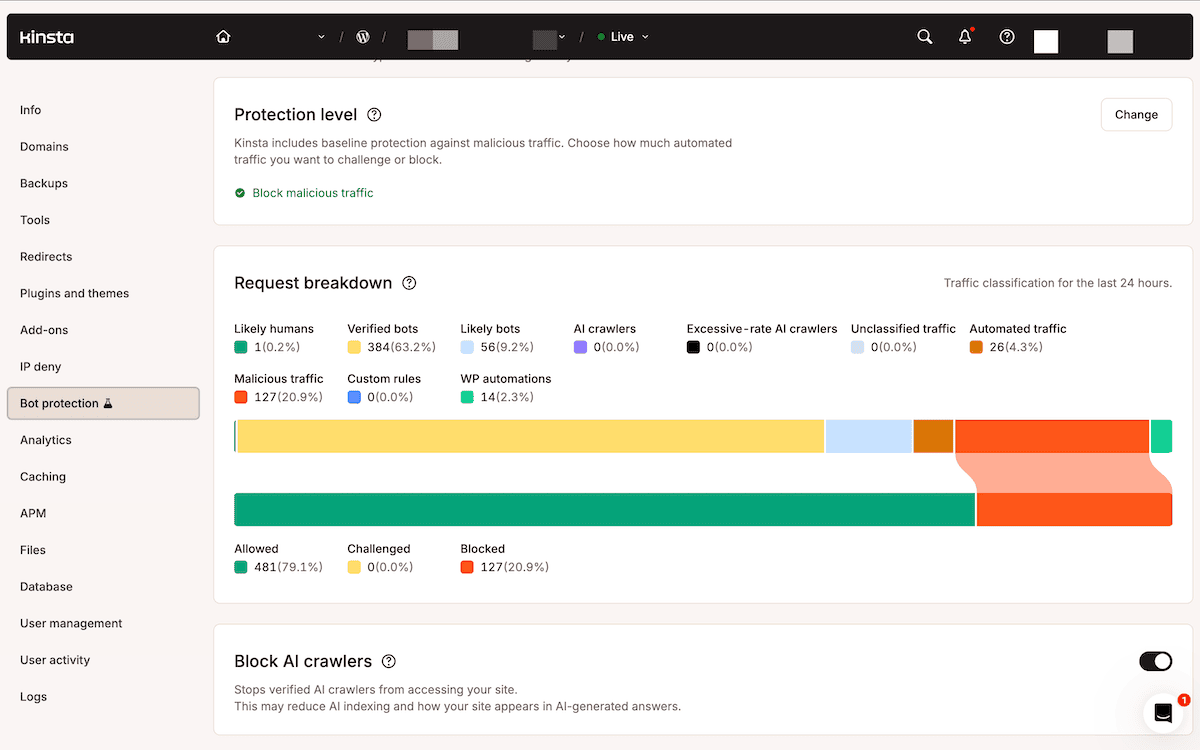
If something does get through despite SSL certification, malware scanning, bot protection, and more, the Malware Security Pledge covers the cleanup at no extra cost.
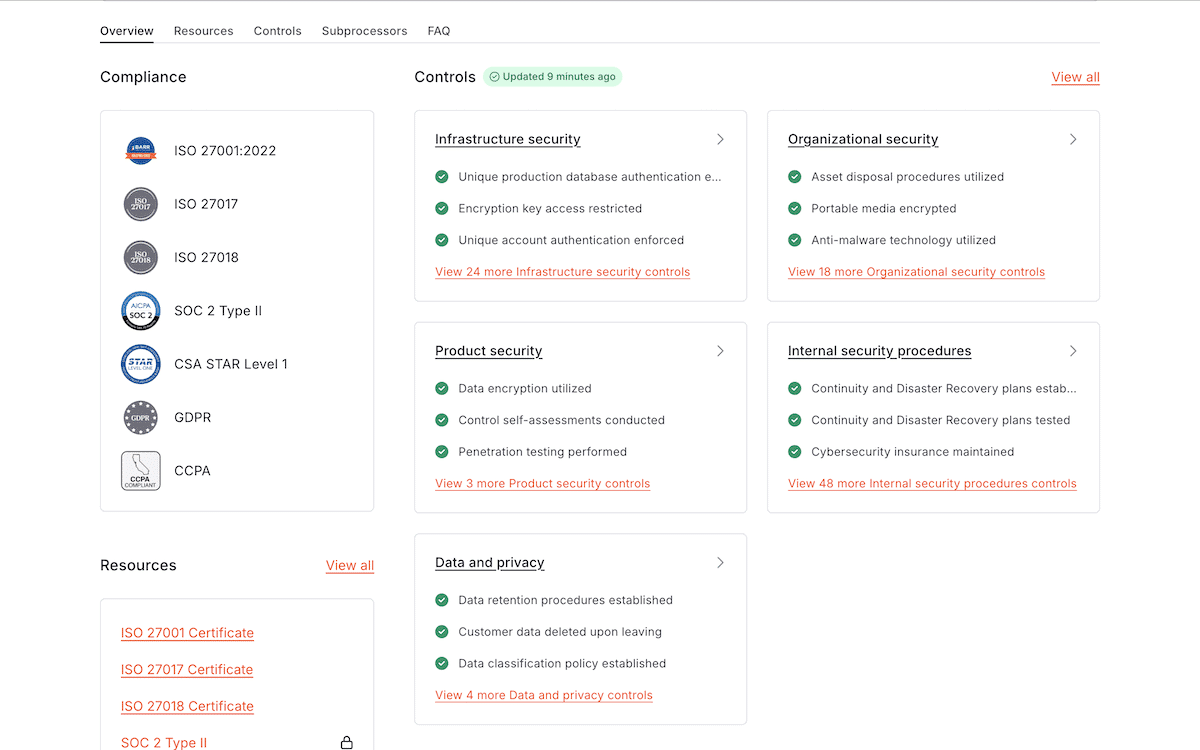
For clients whose own compliance requirements are part of the picture, Kinsta’s SOC 2 Type II and ISO 27001 certifications (on the Trust Center) serve as independent verification that these processes run consistently rather than being claimed once in a sales conversation.
Treat hosting as part of your credibility stack
Content credibility is necessary, but whether or not you’re doing the work, it will always sit on a technical foundation judged in parallel. A slow, occasionally unavailable, or security-flagged site undermines that work regardless of how well it’s written.
Before you touch your content strategy again, check three things: your uptime alerts, your Core Web Vitals against real performance data, and whether your security setup runs continuously or waits for something to go wrong.
Kinsta’s managed WordPress hosting handles uptime monitoring, performance infrastructure, and security as one layer rather than three separate concerns to manage independently.