Add as a preferred source on Google
Bot traffic is no longer a background problem for WordPress site owners. In our AI & Bot Traffic Report, we analyzed more than 10 billion requests across Kinsta-managed infrastructure and found that automated traffic is now an infrastructure problem, not just a footnote in security or analytics.
Crawlers are hitting dynamic endpoints, getting trapped in query-string loops, bypassing cache, and creating traffic patterns that look less like normal indexing and more like broken automation at scale.
That shift has made bot protection an important part of running a WordPress site. It’s also why we released Kinsta Bot Protection, a built-in tool that helps WordPress site owners identify and manage unwanted automated traffic directly from MyKinsta.
But if you already use Cloudflare, you may be wondering how Kinsta Bot Protection fits into the picture. Is it the same as Cloudflare Bot Fight Mode? Should you use both? Does one replace the other? And if you’re running your own Cloudflare account in front of your site, what happens when you turn Kinsta’s protection on too?
We got a lot of these exact questions during our recent Bot Traffic Reality Check webinar, so this post answers them directly, with input from Laszlo Farkas, our Director of Engineering.
TL;DR
- Kinsta Bot Protection is not just Cloudflare Bot Fight Mode with a Kinsta label. It uses Cloudflare’s bot detection and challenge capabilities, but adds Kinsta’s WordPress-specific tuning and managed defaults.
- For most WordPress sites hosted on Kinsta, Kinsta Bot Protection is the better starting point. It’s built into MyKinsta, tuned for WordPress traffic, and doesn’t require you to create or maintain custom bot rules.
- Cloudflare Bot Management may be better for advanced teams. If you need endpoint-level rules, custom bot scores, deep forensic investigation, and have the expertise to manage rules yourself, Cloudflare gives you more flexibility.
- Using both is usually unnecessary. Running overlapping bot protection tools can create duplicate challenges or add friction for real visitors.
- The main trade-off is between control and operational simplicity. Cloudflare gives advanced teams more control. Kinsta gives WordPress teams a managed solution that works out of the box for most use cases.
Kinsta Bot Protection and Cloudflare are not the same thing
Kinsta’s hosting stack runs on Cloudflare for CDN, WAF, and DDoS mitigation. That’s not something we try to hide.
Bot protection sits on the same foundation. So if the question is whether Kinsta Bot Protection uses Cloudflare’s detection engine under the hood, the answer is yes.
But “uses the same engine” and “is the same product” aren’t the same claim, and conflating them is where confusion comes from. As Laszlo put it when we asked him directly about this:
We use the same infrastructure as Cloudflare. We have the same knowledge and same options as Cloudflare, but we have the deep expertise to have a better default sets we can give our customers to handle WordPress traffic.
Kinsta layers its own classification rules on top of Cloudflare’s bot list, and that layering matters in practice. Cloudflare assigns every request a machine learning–based bot score from 1 to 99, where 1 indicates highly likely to be automated, and 99 indicates most likely human. Kinsta uses that score as input but adds its own logic on top of it, so that an AI crawler making an unusually high volume of requests can be reclassified as an “excessive-rate AI crawler” and challenged, even if Cloudflare’s own list marks it as a verified bot.
Cloudflare’s bot tools are built for a wide range of websites, applications, and traffic patterns. Kinsta Bot Protection is tuned specifically for WordPress sites hosted on Kinsta, so its defaults can reflect the WordPress traffic patterns, endpoints, automations, and integrations we see every day.
Understanding the Cloudflare bot protection options
Before comparing Kinsta Bot Protection with Cloudflare, it helps to be precise about what “Cloudflare bot protection” actually means, since Cloudflare doesn’t offer just one product. It has three tiers, each with a different level of control and operational complexity.
Cloudflare Bot Fight Mode
Bot Fight Mode is the simplest option, available as a single on/off toggle, and it comes with every Cloudflare plan, including Free. Its main advantage is simplicity: You can turn it on and get basic bot mitigation without writing a single rule.
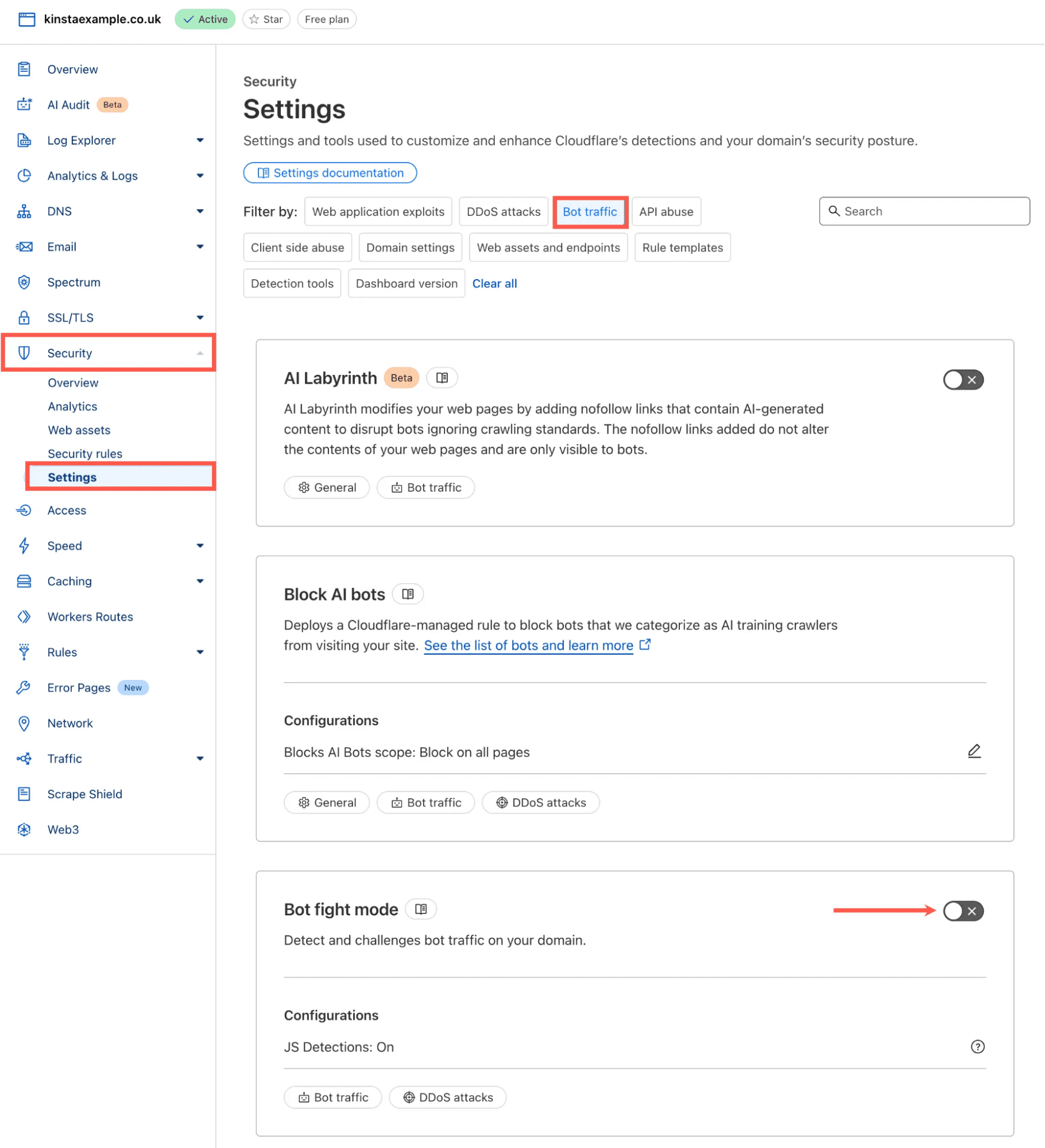
The trade-off is control. Cloudflare’s documentation is explicit that Bot Fight Mode protects entire domains and cannot be bypassed or skipped using WAF custom rules or Page Rules, because it doesn’t run on Cloudflare’s Ruleset Engine at all. In practical terms, if Bot Fight Mode challenges traffic you didn’t want challenged, your only real options are to turn it off entirely or upgrade.
This tradeoff can be a problem for WordPress sites with legitimate automated traffic, such as API clients, monitoring tools, plugin integrations, payment workflows, or other services that need predictable access.
Cloudflare Super Bot Fight Mode
Super Bot Fight Mode (available on Pro, Business, and Enterprise plans without the Bot Management add-on) gives you more control than the basic toggle. It lets you choose separate actions such as allow, challenge, or block for broad traffic categories like “definitely automated,” “likely automated,” and “verified bots.”
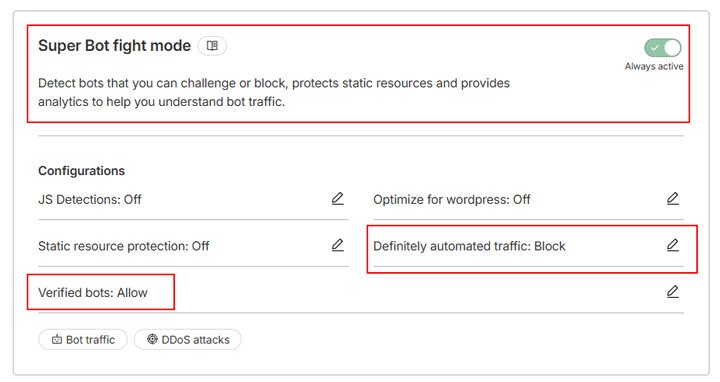
Unlike Bot Fight Mode, it runs on the Ruleset Engine, which means you can use WAF custom rules with a Skip action to carve out exceptions for specific traffic.
That extra control is useful, but it’s still a broad-domain tool. It doesn’t offer per-endpoint targeting or the granular, per-request bot scoring that Bot Management provides. For that level of control, Cloudflare itself points users to Bot Management.
Cloudflare Bot Management and custom rules
Bot Management is Cloudflare’s most flexible option, available as an Enterprise add-on. It generates a 1–99 bot score for every request and lets you take action on it using WAF custom rules or Workers, referencing signals like bot score, URI path, country, ASN, IP range, headers, and user agent.
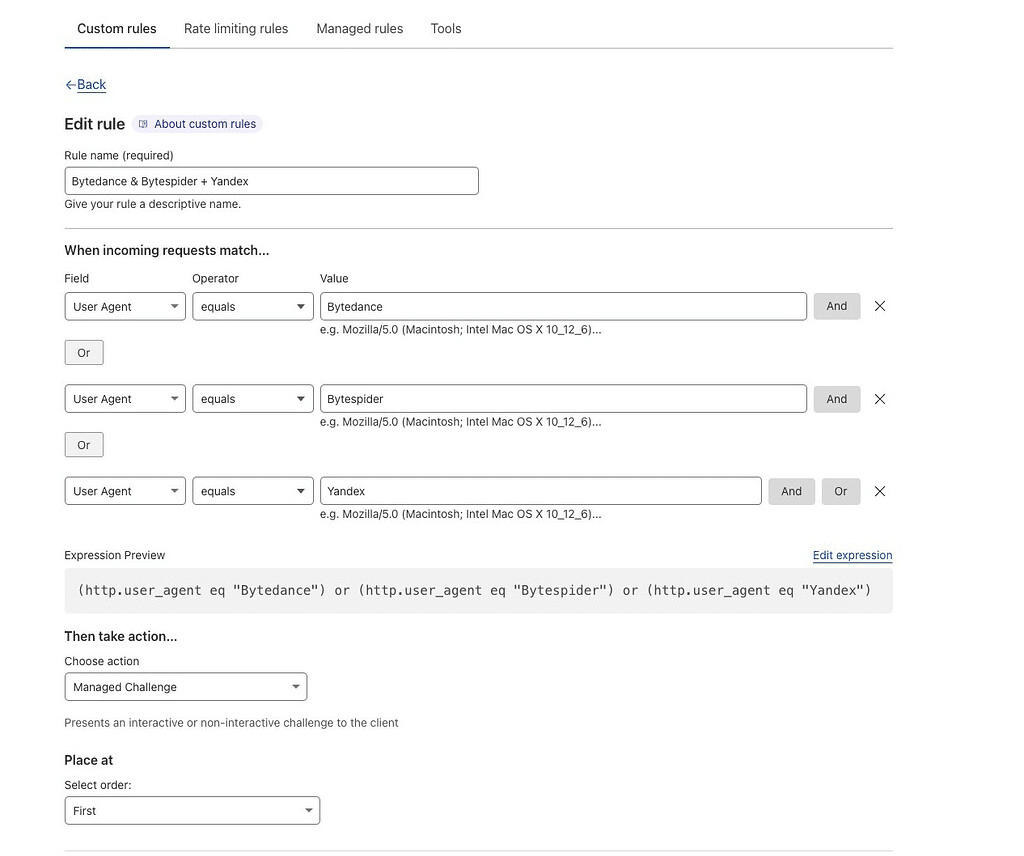
This is where Cloudflare becomes genuinely powerful. You could challenge low-scoring requests on a login page while leaving a public blog untouched, for example.
But that flexibility comes with real responsibility. You need to understand your traffic, build the rules, test for false positives, monitor the results, and keep tuning as bot behavior shifts.
Where Kinsta Bot Protection fits
Kinsta Bot Protection sits between Cloudflare Bot Fight Mode and Cloudflare Bot Management with custom rules. It’s more WordPress-aware than a broad on/off toggle, but it doesn’t ask you to build and maintain a custom bot management strategy from scratch.
Instead of starting with raw bot scores, rule expressions, or endpoint-level logic, Kinsta Bot Protection starts with the WordPress hosting context: normal visitors, search crawlers, AI crawlers, uptime monitors, WordPress automations, plugin integrations, e-commerce activity, admin workflows, and suspicious automated requests.
A simple way to frame it is:
| Approach | What it gives you | What it asks of you |
| Cloudflare Bot Fight Mode | Broad bot mitigation | Very little setup, but limited control |
| Kinsta Bot Protection | Managed WordPress-specific protection | Choose the right protection level and monitor the impact |
| Cloudflare Bot Management | Deep customization | Build, test, monitor, and maintain the rules yourself |
What Kinsta adds on top of Cloudflare capabilities
Kinsta Bot Protection adds a managed WordPress-specific layer on top of Cloudflare’s bot detection and challenge capabilities. Here’s what that looks like in practice.
Four protection levels instead of a single toggle
Kinsta Bot Protection offers four preset levels, applied per environment:
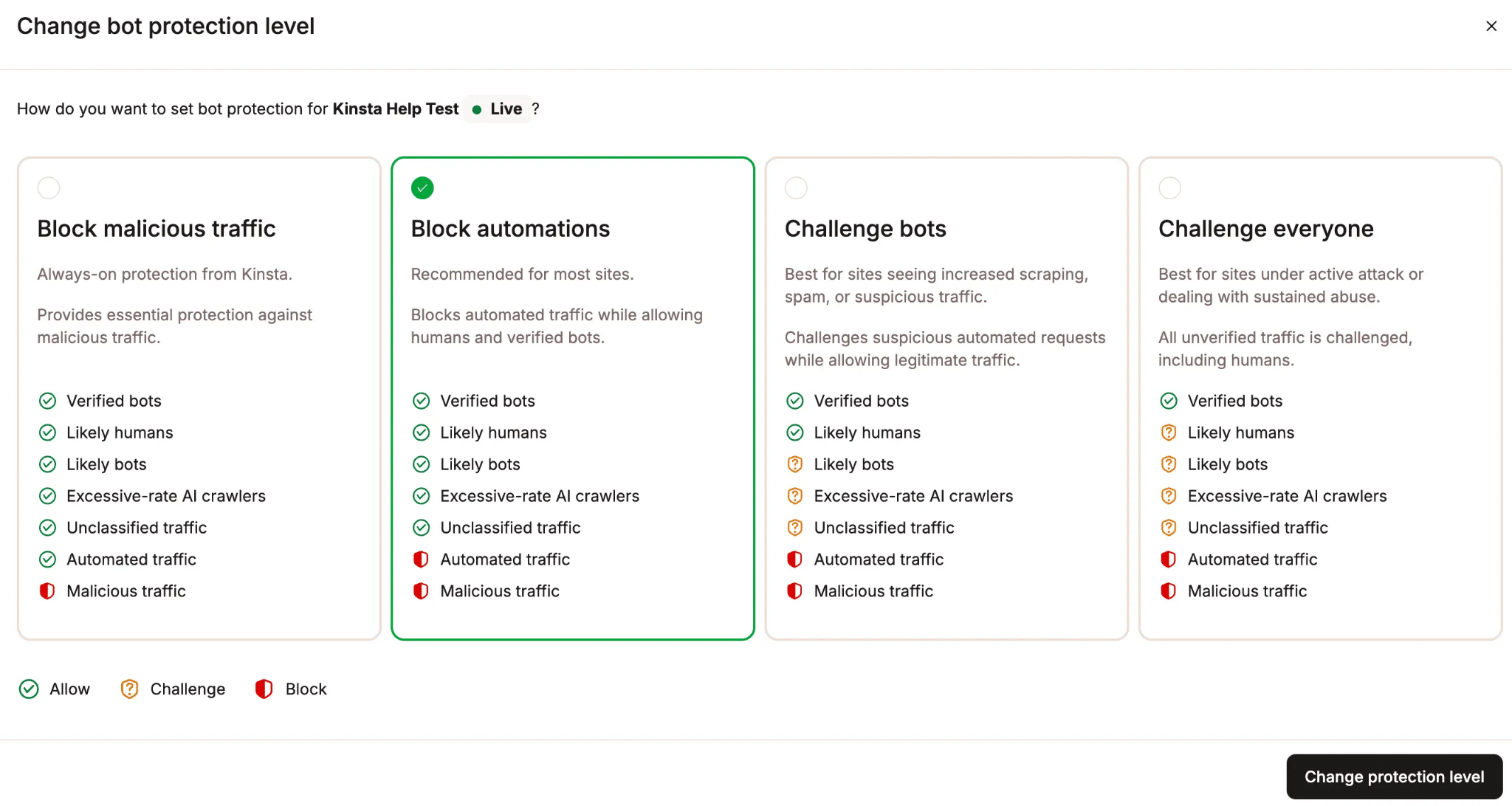
The four levels are:
- Block malicious traffic: The baseline applied to every Kinsta site by default, at no extra setup. This includes DDoS mitigation and global rules for IPs and endpoints used exclusively by malicious traffic. On its own, this baseline layer typically filters roughly 15–20% of clearly malicious traffic before it ever reaches your site.
- Block automations: Blocks both automated and malicious traffic.
- Challenge bots: Blocks automated and malicious traffic, then challenges likely bots and unclassified traffic.
- Challenge everyone: The strictest setting. Blocks automated and malicious traffic, and challenges likely humans, bots, and unclassified traffic. Best reserved for a site under active attack or an unusual spike that needs immediate mitigation.
Because these levels are set per environment, you can run a stricter setting on production while keeping staging permissive, or vice versa.
A challenge doesn’t always mean a visible CAPTCHA. It can be a browser-based check, background validation, or an interactive test. Legitimate human visitors typically pass with little or no visible interruption, and once a visitor clears a challenge, they won’t be challenged again for at least 10 days as long as they keep using the same browser and IP address.
Traffic classification
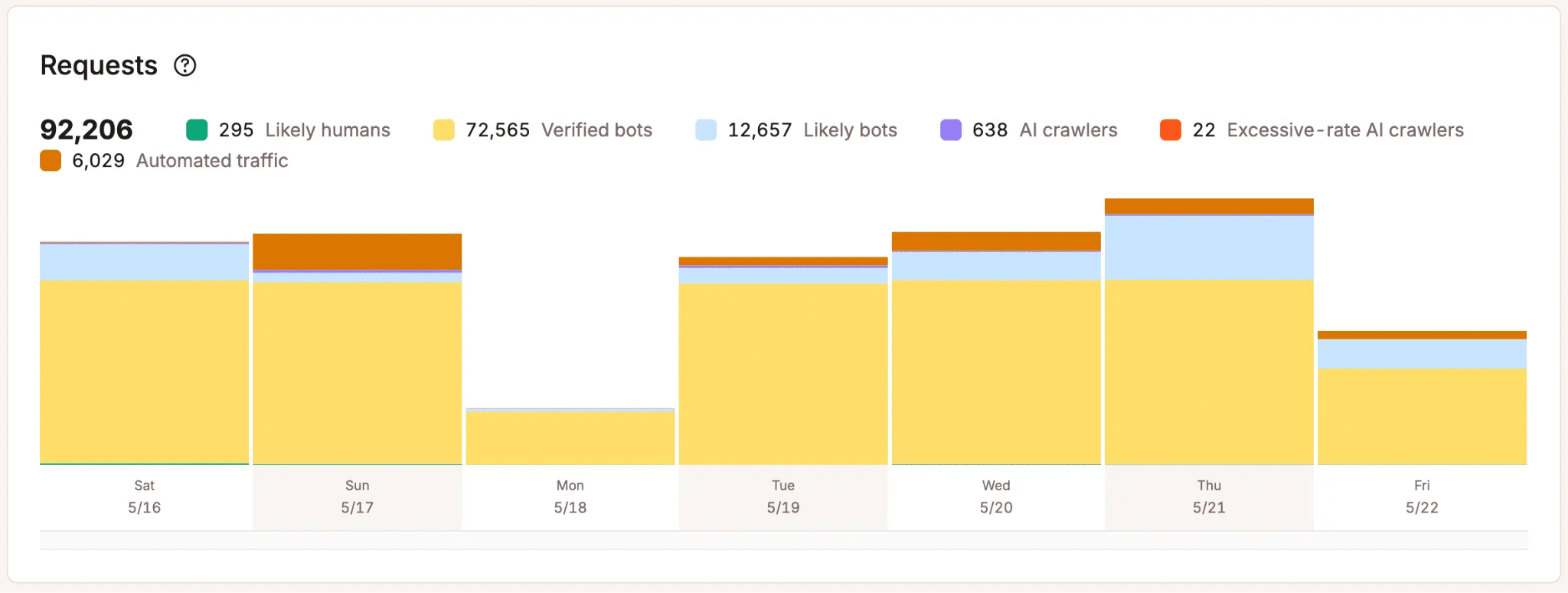
MyKinsta’s Analytics shows how every request was classified: likely humans, verified bots, likely bots, unclassified traffic, automated traffic, malicious traffic, and excessive-rate AI crawlers.
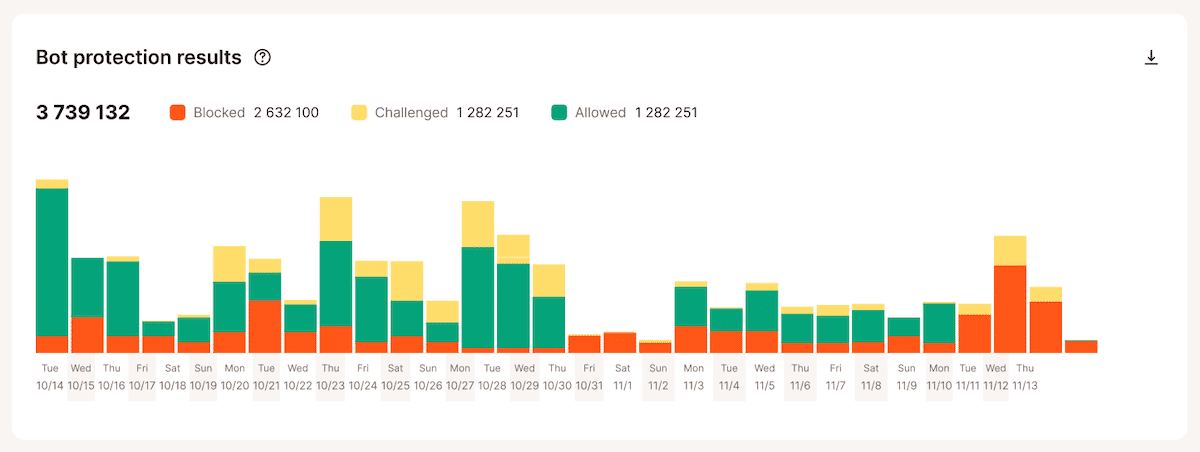
It also shows how each request was ultimately handled, whether they are allowed, challenged, or blocked.
This distinction matters because “automated” doesn’t automatically mean “unwanted.” Automated traffic can include perfectly legitimate tools that aren’t yet on anyone’s verified bot list, such as custom API integrations, uptime monitors, or deployment scripts.
A system that only thinks in “allow or block” is too blunt for how WordPress sites actually work.
A managed allow list built for WordPress
WordPress sites depend on a lot of legitimate automated activity, such as REST API requests, scheduled tasks, plugin integrations, form submissions, SEO tools, sync tools, and e-commerce workflows.
If stricter bot protection starts interfering with any of that, you can enable Allow typical WordPress automations, which turns on Kinsta’s managed allowlist of trusted WordPress endpoints and services.

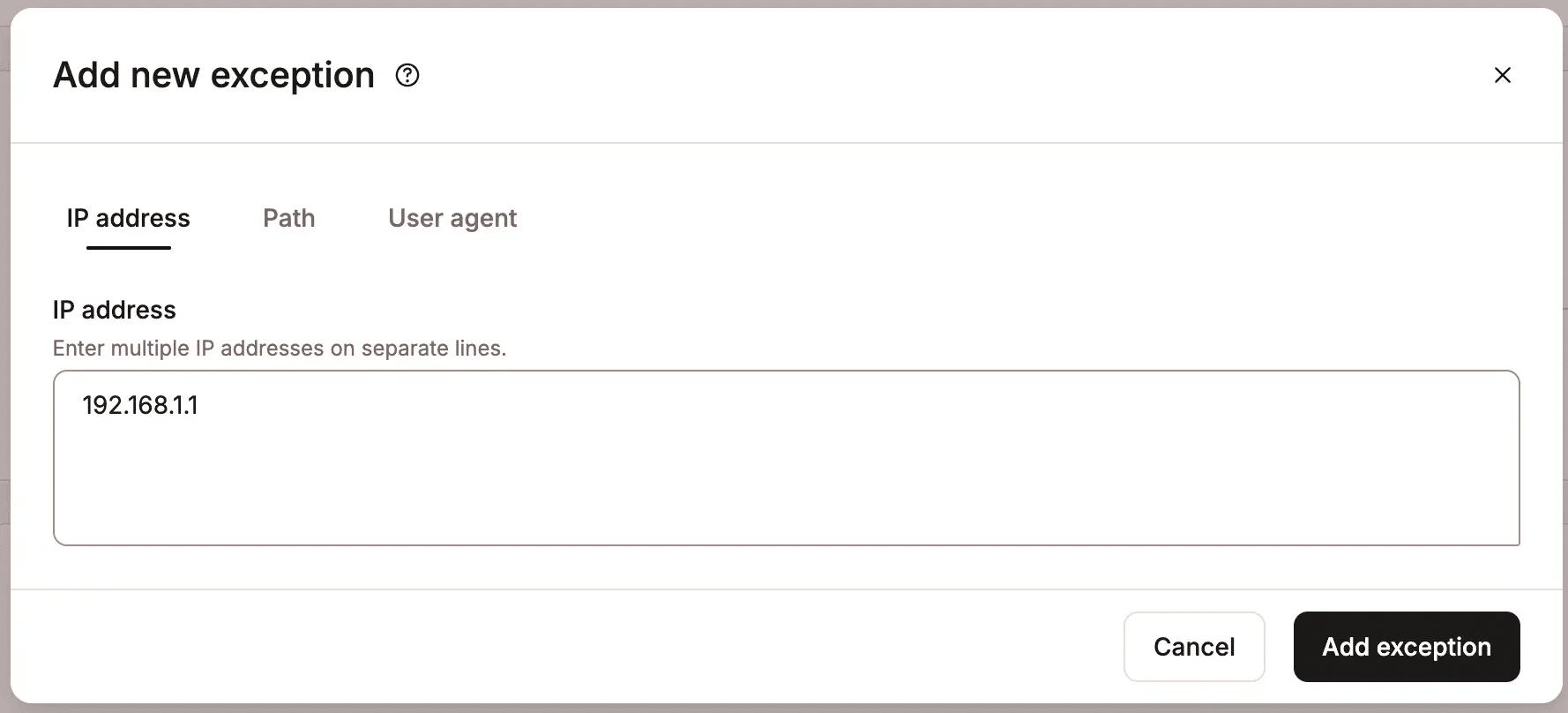
Or add a specific exception under Always Allow using an IP address, path, or user agent.
We’re not asking every customer to rediscover independently which integrations need protection from stricter bot rules. The allowlist is maintained and expanded on your behalf.
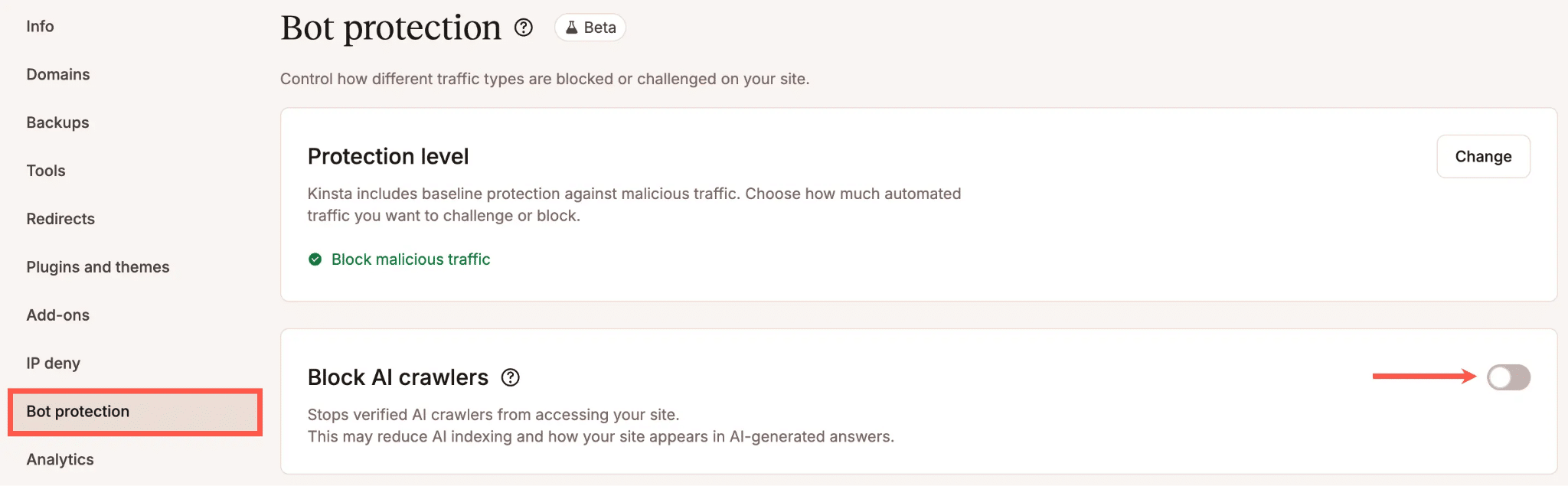
A separate control for AI crawlers
AI crawler management is deliberately split out from the general protection level because AI crawlers aren’t automatically the same thing as malicious bots. Some identify themselves clearly and respect crawl limits. Others create load simply by crawling aggressively or hitting expensive, uncached paths.
Kinsta’s dedicated Block AI crawlers toggle blocks AI crawlers entirely, including verified ones, without touching search engine crawlers like Googlebot or Bing. It’s a separate lever precisely because AI crawler traffic and general bot traffic often call for different decisions.
Bulk controls across environments
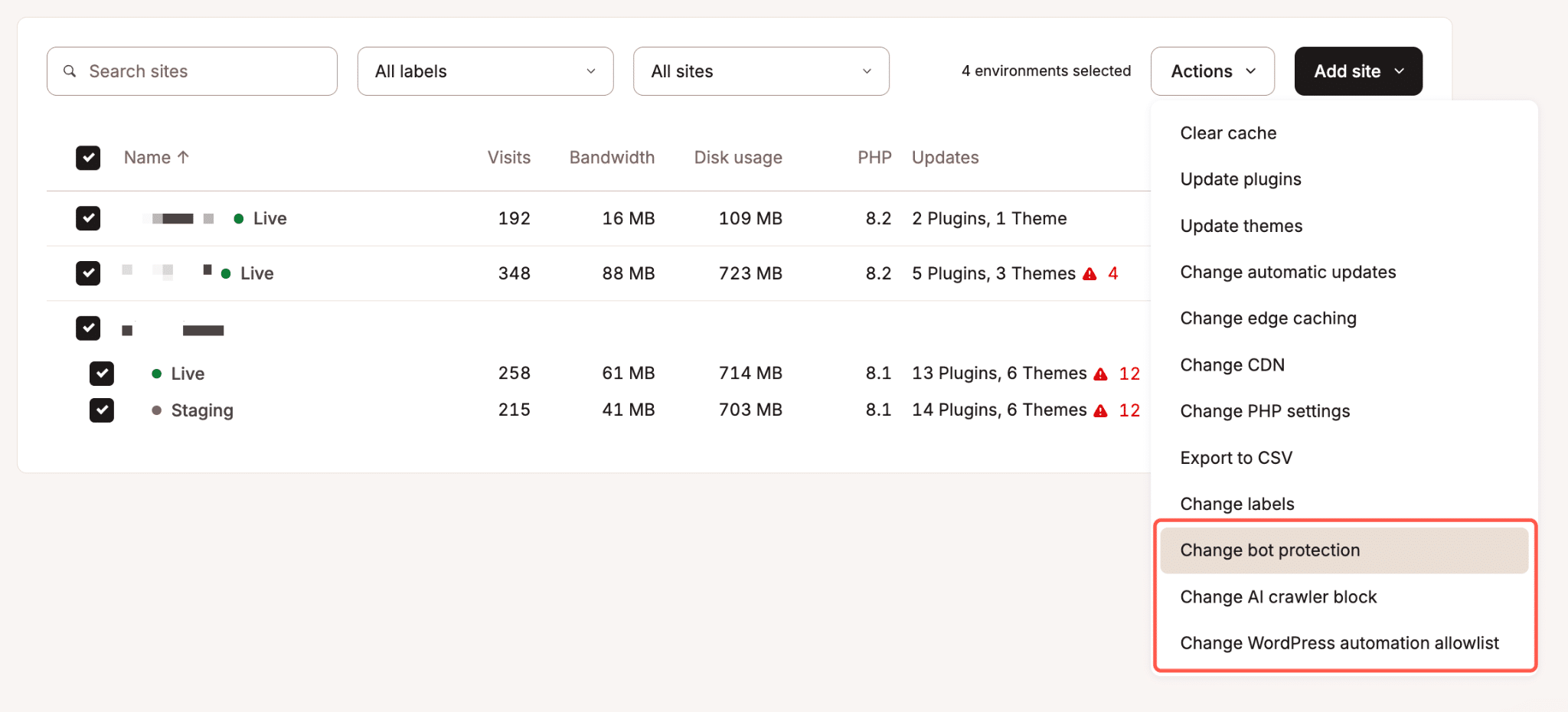
Bot traffic is rarely a one-site problem for agencies. Kinsta supports bulk actions from the WordPress sites list, so you can change protection levels, allow or block AI crawlers, and update the WordPress automation allowlist across multiple environments at once, without opening each site individually.
Support from people who know WordPress hosting
Bot traffic issues are rarely isolated from the rest of the WordPress stack. A sudden spike might be malicious bots, an AI crawler, a misconfigured integration, a plugin conflict, a WooCommerce sync job, or a legitimate marketing campaign.
With Kinsta Bot Protection, support happens inside the same team that already understands your hosting environment, rather than requiring you to correlate two separate dashboards from two separate vendors.
If you’re already using your own Cloudflare account
This is the single most common question we got during the webinar, so it’s worth being precise about, rather than folding it into a general “don’t run both” statement.
On running Cloudflare’s own bot features (Bot Fight Mode, Super Bot Fight Mode, or Bot Management) alongside Kinsta Bot Protection, Laszlo was clear that this technically works, it’s just not something he’d recommend:
Technically, they work together, but I generally wouldn’t recommend enabling both… Running both can also introduce unnecessary friction. For example, a visitor could end up seeing multiple managed challenges instead of just one at their first visit.
Asked live during the webinar, our CTO, Daniel Pataki, put it even more simply: “You can use both, but there’s no real reason to. It’s much safer just to use one or the other.” So in this scenario, the downside is friction and redundant challenges for real visitors, not a broken setup.
We also don’t recommend putting another CDN, reverse proxy, or WAF in front of your site alongside Kinsta Bot Protection. This includes your own Cloudflare account if it’s actively proxying traffic with its WAF or bot features enabled, as well as other services like AWS, Microsoft Azure, Sucuri, or Fortinet that act as reverse proxies. When something else sits in front of your traffic and handles it first, Kinsta can no longer see the real origin of each request, which means bot protection can’t reliably tell automated traffic from human traffic.
If you’re currently running your own Cloudflare account with custom bot or WAF rules in front of a Kinsta site and you’re not sure which of these two situations applies to your setup, the safest move is to check with Kinsta Support before making changes, rather than guessing.
Monitoring: Cloudflare vs. Kinsta
Where should you actually watch your traffic day to day? It depends on what you’re looking for.
Cloudflare gives you significantly more flexibility for investigation. You can drill into individual requests with custom filters and search on almost any request attribute. But Cloudflare’s bot analytics are based on sampled data, not a full count of every request, which makes it excellent for spotting patterns and investigating incidents, but less reliable as a source of exact traffic numbers.
Kinsta, by contrast, reports on 100% of requests hitting your site, with aggregated hourly and daily statistics in MyKinsta. That makes it the better source for accurate, platform-level counts and trends, even though it doesn’t give you Cloudflare’s ad hoc, drill-down filtering.
So, if you need deep forensic investigation into a specific incident, Cloudflare’s tooling wins. If you want accurate, trustworthy metrics on what’s actually hitting your site over time, Kinsta has the edge.
What layer does Kinsta Bot Protection run at?
Kinsta Bot Protection runs at the edge, at Layer 7 (the application layer), the same layer where HTTP requests are evaluated.
When both a customer’s Cloudflare protection and Kinsta Bot Protection are active on the same request path, Cloudflare’s processing occurs first, and Kinsta’s logic runs afterward. This is one more reason that overlapping the two rarely adds value. By the time a request reaches Kinsta’s logic, Cloudflare has already made its own decision.
Which approach should you use?
The right choice depends on how much control you need and how much of the bot management work your team wants to own.
Use Kinsta Bot Protection if you want managed WordPress protection
If you host WordPress on Kinsta and do not want bot mitigation to become a recurring task on someone’s calendar, Kinsta Bot Protection is the right default.
That covers most WordPress sites: agencies managing traffic across dozens of clients, teams without a dedicated security function, and anyone who would rather spend time running the business than maintaining bot rules.
Use Cloudflare’s advanced bot tools if you need full control
Cloudflare may be the better choice if you are using its more advanced bot controls, such as Super Bot Fight Mode together with WAF/custom rules, and you have the time and expertise to manage that setup properly.
This is not the same as basic Cloudflare Bot Fight Mode, which is closer to a broad on/off control. The advanced Cloudflare route makes sense when you know your traffic in detail, have specific endpoints that need different handling, and want to define custom behavior for certain request patterns.
That precision is real, but it comes with an ongoing cost, as it assumes continuous attention rather than a one-time configuration. As Laszlo put it:
If you have the expertise and the time to fine-tune this yourself, that’s probably the better choice for you. If you don’t, and you want to focus on your business rather than the nitty-gritty traffic control details, Kinsta’s solution is the better option because it’s managed, fine-tuned for WordPress, and maintained for you.
Avoid using both unless you have a specific reason
In most cases, choose one primary bot protection layer:
- If you’re using Cloudflare Bot Fight Mode or Super Bot Fight Mode on a Kinsta-hosted site, Kinsta Bot Protection is usually the better place to do this work, since it’s tuned for WordPress and managed inside your hosting platform.
- If you’re running Cloudflare Bot Management with an established custom rule set, the decision is more situational; it depends on what those rules do, how they’d interact with Kinsta Bot Protection, and whether they’re still needed once Kinsta’s managed protection is on. Review this setup with Kinsta Support rather than relying on a blanket answer.
- If you’re running your own separate Cloudflare account as a proxy in front of Kinsta, see the section above; this is the one case where combining the two isn’t just “unnecessary friction,” it can actively prevent bot protection from working as intended.
Bot protection is becoming part of WordPress operations
Bot protection is no longer something site owners can treat as a one-time security setting. As Daniel Pataki explained during our webinar, bots are a double-edged sword: they can create performance, cost, and analytics problems, but they also help make the web useful.
As crawlers, AI tools, scrapers, and automated systems become more active across the web, WordPress teams need a way to manage non-human traffic without turning every site into a custom rule-building project. That’s the role Kinsta Bot Protection is built to play: a managed starting point with protection levels, AI crawler controls, WordPress-aware defaults, and visibility inside MyKinsta.
To go deeper, watch the Bot Traffic Reality Check webinar, read Kinsta’s AI & Bot Traffic Report, or enable Bot Protection from your MyKinsta dashboard to see what automated traffic is actually hitting your site.