Add as a preferred source on Google
Most WordPress performance problems get traced back to the hosting environment, which is sometimes the right diagnosis. However, third-party dependencies trigger the same alarm bells, yet live outside the host’s control.
Timed-out payment gateways, unresponsive shipping APIs, and slow analytics scripts are all failures you can only implement damage control for. However, this depends on your hosting infrastructure and what you can do at the application level to keep your site functioning when dependencies fail.
Why third-party dependencies create cascading WordPress failures
A modern WordPress site rarely runs in isolation. For instance, think about what a WooCommerce checkout flow depends on at a given moment:
- Payment gateways process the transaction.
- Shipping APIs calculate live rates.
- Tax services handle compliance.
Other sites might load an analytics tracker, a CRM sync script, a live chat widget, and many other dependencies, each hosted on a different external server.
When any of these slows down or stops responding, the effect doesn’t stay contained to that specific feature. Instead, it spreads through the PHP execution layer and creates a problem that can affect the entire site. This is because, when WordPress serves a page that needs an external API response, a thread waits before it completes the request.
So, a payment gateway that times out after 30 seconds ties up one thread for the entire duration and can’t process anything else in the meantime. If several visitors reach that slow checkout at once, several threads can delay page loads for the entire chain. With shared hosting, sites share a pool of threads.
The visibility gap: internal vs external performance issues
As such, it doesn’t take many concurrent timeouts to exhaust a shared pool entirely. Once that happens, the external API times out, and your remaining visitors receive timeout-related errors, such as 502 or 504, while waiting for a free thread.
However, a 504 error looks exactly the same regardless of origin. For these types of error responses, you typically investigate CPU, memory, and infrastructure metrics first. This can look like hosting is the problem, even when the real issue is an external dependency.
How Kinsta’s container architecture limits third-party failure impact
Kinsta runs every WordPress site in its own isolated container, which determines the ‘blast radius’ when a third-party service fails.
Each container has its own dedicated pool of PHP threads that other sites on the platform cannot access. This means PHP thread exhaustion stays within your container without affecting other sites on the same infrastructure. Also, when external API calls occupy all of your container’s PHP threads, incoming requests queue inside Nginx and PHP-FPM rather than immediately returning errors.
In practice, a payment gateway outage that would take down every site on a shared server only affects your container on Kinsta. The thread pool inside your container comes under stress, but neighboring sites are completely unaffected.
Request timeout limits prevent indefinite blocking
When left unchecked, a PHP thread could hold a connection to a failing external API for an extended period. To counter this, Kinsta sets max_execution_time to a 300-second default, which limits how long a PHP script can actively execute.
There’s a separate HTTP timeout that determines when the browser-to-server connection gives up and returns a 504 error to the visitor, which on Kinsta fires after 180 seconds.
Together, these limits mean your worst-case scenario has a defined endpoint from the visitor’s perspective. However, neither limit reliably cuts off a blocked outbound API call on its own. On Linux, PHP’s execution timer does not count time spent waiting on stream operations, which is what an outbound HTTP request through WordPress’s HTTP API is.
A thread blocked on a payment gateway response accumulates almost no execution time from PHP’s perspective, so the 300-second ceiling offers less protection here than it might appear. This is why setting explicit timeouts inside plugins via http_request_timeout is the most reliable way to end a hanging external call at the application level.
When a request times out, the thread frees up, and the container begins a recovery that typically takes a couple of minutes.
Using Kinsta APM to distinguish hosting from third-party bottlenecks
Kinsta’s APM tool captures timestamped data on PHP processes, MySQL queries, and external HTTP calls. It’s the way to monitor the performance gap between your hosting and third-party dependencies.
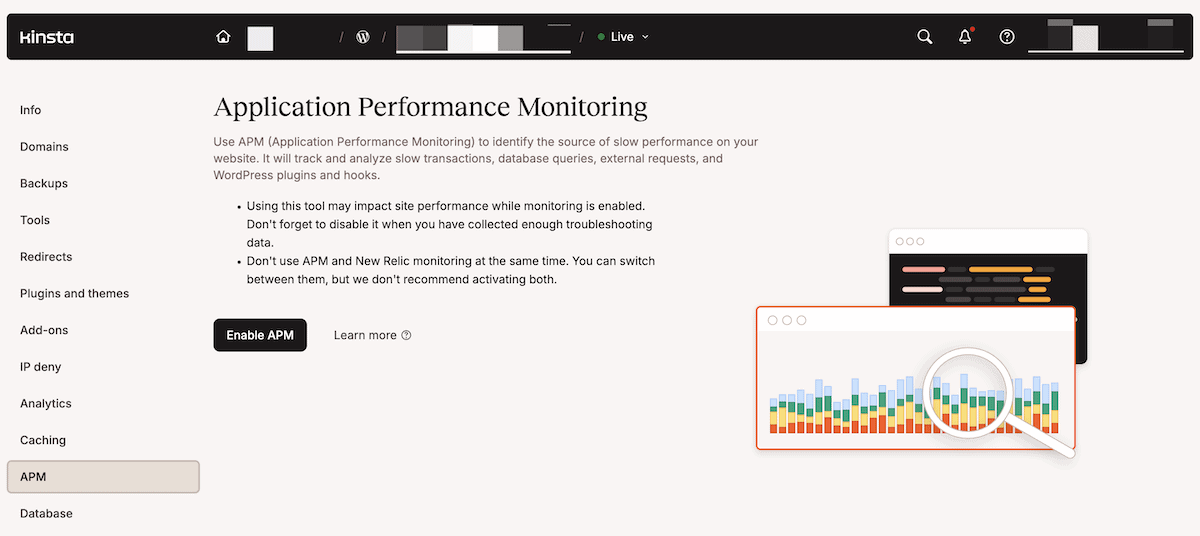
You enable APM from the APM section in MyKinsta, then choose a monitoring window from four preset options between two and 24 hours. Since the Kinsta APM uses additional server resources, the right approach is to enable it when you suspect an issue is occurring or can be reproduced.
Once the APM is running, you can look at a number of charts, graphs, and displays across four sections: Transactions, WordPress, Database, and External. The latter is key to understanding where bottlenecks occur.
Using the External screen in Kinsta APM
The External tab lists every external HTTP request your site makes, including calls initiated by plugins and themes for payment processing, shipping calculations, CRM integrations, and analytics. Each entry shows the total, maximum, and average durations, along with the request rate per minute.
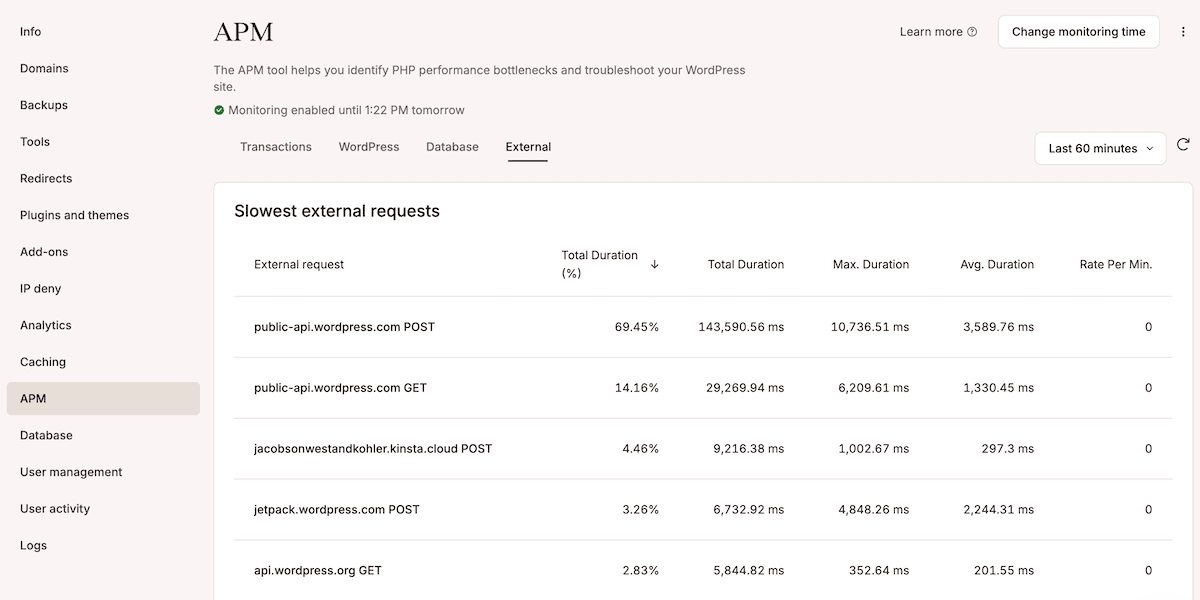
For example, a payment API appearing at the top of the list, with a maximum duration measured in multiple seconds, clearly indicates that the gateway is the source of the problem.
Transaction tracing
Clicking on a request URL in the External tab opens a list of transaction samples. Selecting a specific sample then opens the transaction trace timeline, which shows a complete breakdown of every process that occurred, with each process shown as a timed span.
Spans consuming more than 5% of the total transaction time appear in orange; those consuming more than 25% appear in red.
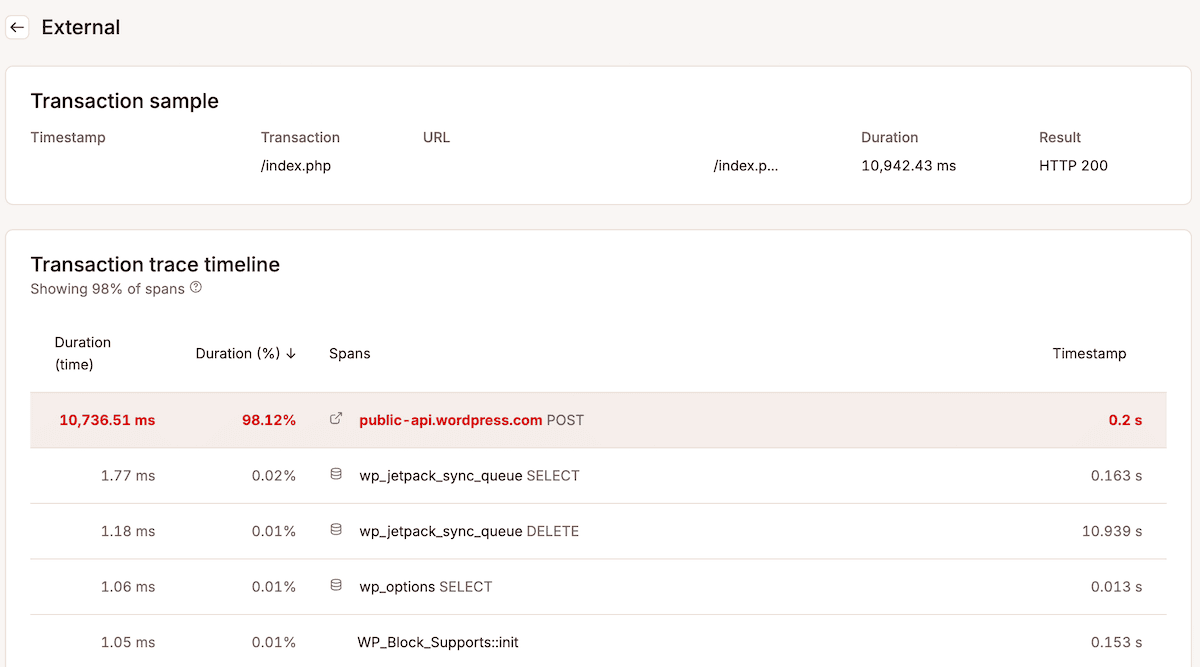
Traces help you prioritize which dependencies to optimize or replace first. For instance, if an external HTTP call to a payment API occupies five seconds of a 5.5-second transaction, the hosting infrastructure handled everything else in half a second.
To use the Kinsta APM during a suspected issue, the workflow runs as follows:
- Enable APM monitoring and select a duration that covers the problem window.
- Reproduce the issue if it isn’t currently occurring (or wait for the tool to capture live data).
- Let data accumulate, then open the External tab, click into any external request to open the transaction trace, and examine the span durations.
If external HTTP calls appear at the top of the results with durations that account for most of the transaction time, you have the information you need to begin to fix the problem.
Operational strategies for managing third-party dependencies
Container isolation limits the damage from external failures, but so does how you load and call external services. Even with well-architected hosting underneath you, third-party dependencies need proactive management at the application level.
Asynchronous loading patterns for non-critical scripts
WordPress loads scripts synchronously by default, which means a script in the document head blocks the browser from displaying content until it finishes downloading and executing. For analytics scripts, heat mapping tools, and marketing automation, that means a slow third-party server holds up your entire page.
The distinction to understand here is that loading through sync and async produces different outcomes when an external server is slow:
- Synchronous (blocking) loading halts HTML parsing until the script downloads and runs. If the external server is under load, your page waits.
- Asynchronous loading lets the browser continue parsing HTML and rendering content while the script loads in the background. If the external server is slow, your page renders anyway.
WordPress has native support for async and defer loading strategies through wp_enqueue_script(). Both prevent non-critical scripts from blocking page rendering, but they behave differently: defer executes scripts in order (so it’s good for scripts with dependencies), while async executes scripts as soon as they load, regardless of order.
Using async is ideal for standalone trackers where execution order doesn’t matter.
add_action( 'wp_enqueue_scripts', function() {
    // Analytics — deferred so it doesn't block the critical path.
    wp_enqueue_script(
        'google-analytics',
        'https://www.googletagmanager.com/gtag/js?id=G-XXXXXXXX',
        [],
        null,
        [ 'strategy' => 'defer', 'in_footer' => false ]
    );

    // Marketing script — async because execution order doesn't matter.
    wp_enqueue_script(
        'hotjar',
        'https://static.hotjar.com/c/hotjar-XXXXXX.js',
        [],
        null,
        [ 'strategy' => 'async', 'in_footer' => false ]
    );
} );
However, checkout-critical scripts often need more careful loading behavior than analytics or marketing tags, and some payment integrations may need to remain blocked or ordered to avoid breaking checkout. In short, non-critical scripts that can fail without breaking the page get async or defer; scripts that the user needs to complete a transaction don’t.
Timeout configuration for external API calls
Kinsta’s default max_execution_time is long enough for complex operations, but far too long to keep a user waiting. As such, a plugin making external API calls should set its own timeout ceiling rather than falling back on the server-level limit.
WordPress defaults to a 5-second HTTP timeout for external requests unless a plugin or filter overrides it. If a plugin needs a different limit, WordPress provides a filter for this: http_request_timeout. It runs before a request is made and accepts both the current timeout value and the target URL, so you can set different limits for different services:
add_filter( 'http_request_timeout', function( $timeout, $url ) {
    if ( str_contains( $url, 'api.example.com' ) ) {
        return 10; // Don't wait longer than 10 seconds.
    }
    return $timeout;
}, 10, 2 );
This kind of ceiling means a failing service returns an error to your user fast, rather than occupying a PHP thread. Keeping plugin-level timeouts well below the server ceiling is what stops a single slow API from consuming a thread for an unreasonable amount of time.
However, increasing timeout values doesn’t fix slow APIs but prevents premature failures when a service is working but under load. The right approach is a short timeout that fails fast and hands off to a fallback.
Fallback mechanisms and graceful degradation
Fallbacks keep your site functional during external failures rather than displaying an error. The pattern uses WordPress transients to cache successful API responses, then serves cached data when a live call fails.
Here’s an example:
function get_shipping_rates_with_fallback( $package ) {
    $cache_key  = 'live_shipping_rates_' . md5( serialize( $package ) );
    $backup_key = 'backup_shipping_rates_' . md5( serialize( $package ) );
    // Return fresh cached rates if they're available.
    $cached = get_transient( $cache_key );
    if ( $cached !== false ) {
        return $cached;
    }
    // Attempt the live API call with a short timeout.
    $response = wp_remote_post( 'https://api.example.com/rates', [
        'timeout' => 8,
        'body'    => [
            'destination' => $package['destination'],
            'weight'      => $package['contents_weight'],
        ],
    ] );
    // On success: cache the result and update the longer-lived backup.
    if ( ! is_wp_error( $response ) && wp_remote_retrieve_response_code( $response ) === 200 ) {
        $rates = json_decode( wp_remote_retrieve_body( $response ), true );
        set_transient( $cache_key, $rates, HOUR_IN_SECONDS );
        set_transient( $backup_key, $rates, DAY_IN_SECONDS );
        return $rates;
    }

    // On failure: serve stale backup rates rather than an error.
    $backup = get_transient( $backup_key );
    if ( $backup !== false ) {
        return $backup;
    }
    // No cached data at all: return a flat-rate fallback.
    return [
        [ 'id' => 'fallback_flat', 'label' => 'Standard Shipping', 'cost' => 9.99 ],
    ];
}
The one-hour transient handles normal caching to stop unnecessary API calls. The 24-hour transient updates only when the live API returns a successful response, which allows your site to fall back to the most recent successful response. When the API goes down, your site serves yesterday’s shipping rates instead of an error.
Graceful degradation keeps your core functionality running even when external services are unavailable. It works best alongside a hosting infrastructure that restricts failures to the container level, so one dependency problem won’t consume resources.
Your hosting should do more than give your site speed
Third-party failures are part of running a WordPress site with real-world dependencies. What you can control is how much of your site goes with them, which is determined by how your hosting environment responds.
Using an infrastructure that implements container isolation, a dedicated PHP thread pool, built-in timeout limits, and application monitoring lets you understand a hosting problem from a dependency problem.
If you’re ready to see how Kinsta’s infrastructure handles this for your WordPress sites, explore Kinsta’s hosting plans. Alternatively, speak to the team about how Kinsta can benefit your specific setup.