Add as a preferred source on Google
Kinsta analyzed more than 10 billion HTTP requests across its hosting infrastructure and found that bots hit add-to-cart URLs on WordPress sites 7.67 million times in a single 24-hour period. One crawler alone generated 550 million requests over 30 days before a rule stopped it.
None of those requests converted. None of them referred a visitor back to the site. They just kept arriving by hitting cart pages, filtered product URLs, search queries, and AJAX endpoints, each one forcing the server to execute PHP, run a database query, and handle a session for traffic that would never become a customer.
The sites absorbing this load weren’t down. Pages loaded. Checkout worked. By every conventional measure, they looked healthy. That’s the problem this article is about.
Bot traffic is no longer just background noise
In 2025, bots accounted for 53% of all web traffic, marking the first time automated traffic outpaced human traffic in a calendar year. By June 2026, Cloudflare Radar put that figure at 57.5%, a crossover that Cloudflare’s own CEO said arrived years ahead of his projections.
For WordPress operators, the practical shift is more specific than a percentage. Today’s bot traffic isn’t just search crawlers doing their job. It includes AI training crawlers, scraping tools, SEO audit bots, uptime monitors, fake user agents, and agentic AI tools that follow links more aggressively than traditional crawling ever could.
Some index content. Some scrape it. Some test endpoints. Others treat every URL parameter combination as a distinct page and crawl each one.
That last behavior is particularly expensive for WordPress. A product page with color, size, sort, pagination, and stock filters appears as a single page to a human visitor. A bot can see hundreds of unique URLs and crawl every one.
AI-driven bot traffic surged 300% in one year. By the end of 2025, AI bots accounted for 1 in 31 web visits on TollBit’s network, up from 1 in 200 at the start of the year. The direction is settled. What’s still underappreciated is what that traffic actually costs.
Bandwidth is the obvious cost
Bandwidth is the data your site transfers when someone requests a page, image, script, file, or other asset. Human visitors use it. Bots do too, and they don’t buy anything afterward.
A crawler that hits a blog post once isn’t a problem. A bot that repeatedly crawls archives, tag pages, image assets, feeds, scripts, and filtered URLs can consume real bandwidth without generating any business value.
According to Cloudflare’s 2025 data, cited in Kinsta’s AI & Bot Traffic Report, 80% of AI crawling activity is for model training rather than search or user-triggered queries, and it generates no referral traffic back to the site. For content-heavy WordPress sites, that dynamic turns high-value pages into high-cost assets.
The insidious part is that bandwidth waste often builds without triggering a visible performance issue. The site still loads. The server still responds. But usage keeps climbing because automated traffic continues to request pages and assets that no human visitor needs.
By the time the cost of bandwidth becomes apparent, the site may already have spent days or weeks serving traffic that never helped the business.
Backend load is the harder cost to see
Not every request costs the same to serve. A cached blog post is relatively cheap, as the server returns a stored version and moves on. Dynamic requests work differently.
When a bot hits a WooCommerce cart action, a filtered product page, a search query URL, a login page, or an AJAX endpoint, the server can’t pull from cache. It has to work each time:
- PHP execution — a thread is reserved for the full duration of the request
- Database queries — the page hits the database on every load, with no cache to absorb it
- Session handling — cart and checkout pages create or validate a session per request, even for bots that will never complete a purchase
- Plugin logic — any plugin that hooks into these requests runs its code on every hit
- Cache bypasses — the request never enters the cache, so future identical requests face the same cost again
This is where bot traffic becomes more expensive than it appears. The issue isn’t only how much data a bot downloads. It’s how much work the infrastructure performs before sending that data back.
Kinsta’s infrastructure data makes the scale concrete: bots hit add-to-cart URLs 7.67 million times in a single 24-hour period, including 3.75 million requests from ClaudeBot alone. Each was treated as a new server-side request. Each triggered PHP execution and a database query. None served a customer.
As Kinsta CTO Daniel Pataki put it at launch: “Most bot management advice boils down to ‘block everything’ or ‘leave it alone’. Neither works at scale.”
Why “we haven’t had downtime” misses the point
Uptime means the site stays online. It doesn’t mean the site is operating efficiently.
A WordPress site can absorb a significant amount of unnecessary traffic before visitors notice anything wrong. Pages still load. Checkout still works. Admin screens still respond. But the infrastructure is still processing every bot request that hits a dynamic endpoint, and that processing carries a real cost, even when the site appears stable.
That cost shows up in quieter ways than an outage:
- Higher bandwidth usage creeping toward plan limits
- More pressure on PHP workers and database connections
- Less headroom when real traffic spikes demand those same resources
- Distorted analytics that conflate bot sessions with human engagement
- A/B test results and conversion rates skewed by traffic that never intended to convert
- Infrastructure decisions made against data that doesn’t reflect actual audience behavior
- Harder troubleshooting when the noise of bot activity obscures the signal of real performance issues
This is why “no downtime” can give teams a false sense of security. The site looks stable because the infrastructure absorbs the extra work. Absorbing waste still carries a cost; it just doesn’t announce itself.
Why agencies should address this before clients notice it
Agencies typically hear about bot traffic after it has already created a visible problem. A client notices higher hosting usage, slower admin screens, checkout slowdowns, unusual traffic patterns, or analytics that no longer match their business results. By that point, the conversation is reactive. The agency has to explain what happened, why it matters, and what changes need to happen.
Bot traffic gives agencies a proactive conversation instead.
The framing doesn’t need to be alarmist. It can stay practical:
- “Your site may be performing well, but some of that traffic may not be coming from real visitors.”
- “Some bot activity is useful, like search crawlers, monitoring tools, but some only consumes resources.”
- “We can reduce waste without touching the traffic that actually matters.”
- “Getting this right protects performance headroom and helps keep usage predictable.”
That connects bot management to concerns clients already understand: cost, efficiency, reliability. It also repositions the agency from reactive troubleshooter to proactive infrastructure advisor, which is a more durable relationship.
The goal is not to block every bot
It’s important to note that not all bot traffic is bad. Search crawlers help pages appear in search results. Monitoring tools check uptime. SEO platforms audit pages. Payment providers, integrations, APIs, and WordPress automations may also need to reach the site to complete legitimate work.
AI crawlers are more complicated. Some site owners may want visibility in AI-powered experiences. Others may decide that AI crawling creates more cost than value, especially when it scrapes large content libraries without sending meaningful referral traffic back.
That’s why the goal isn’t to block every automated request. Overblocking can create SEO issues, break integrations, interrupt monitoring, or interfere with normal WordPress workflows.
A better approach is selective control:
- Allow useful traffic
- Block clearly wasteful automation
- Challenge suspicious traffic
- Protect high-cost paths
- Monitor the results
This gives teams more control without treating every bot the same way. The point is to reduce waste while preserving the traffic, tools, and workflows that still support the business.
How Kinsta’s Bot Protection handles this in practice
Once bot traffic becomes an infrastructure problem, the response needs to match the site’s actual situation.
Bot Protection in MyKinsta is built around that variability. It’s included on all plans at no additional cost, operates at the environment level, and takes effect immediately when settings change.
Protection levels
Navigate to Sites > sitename > Bot protection > Change to choose from four preset levels, each applied independently per environment, so staging, development, and production can run different settings.
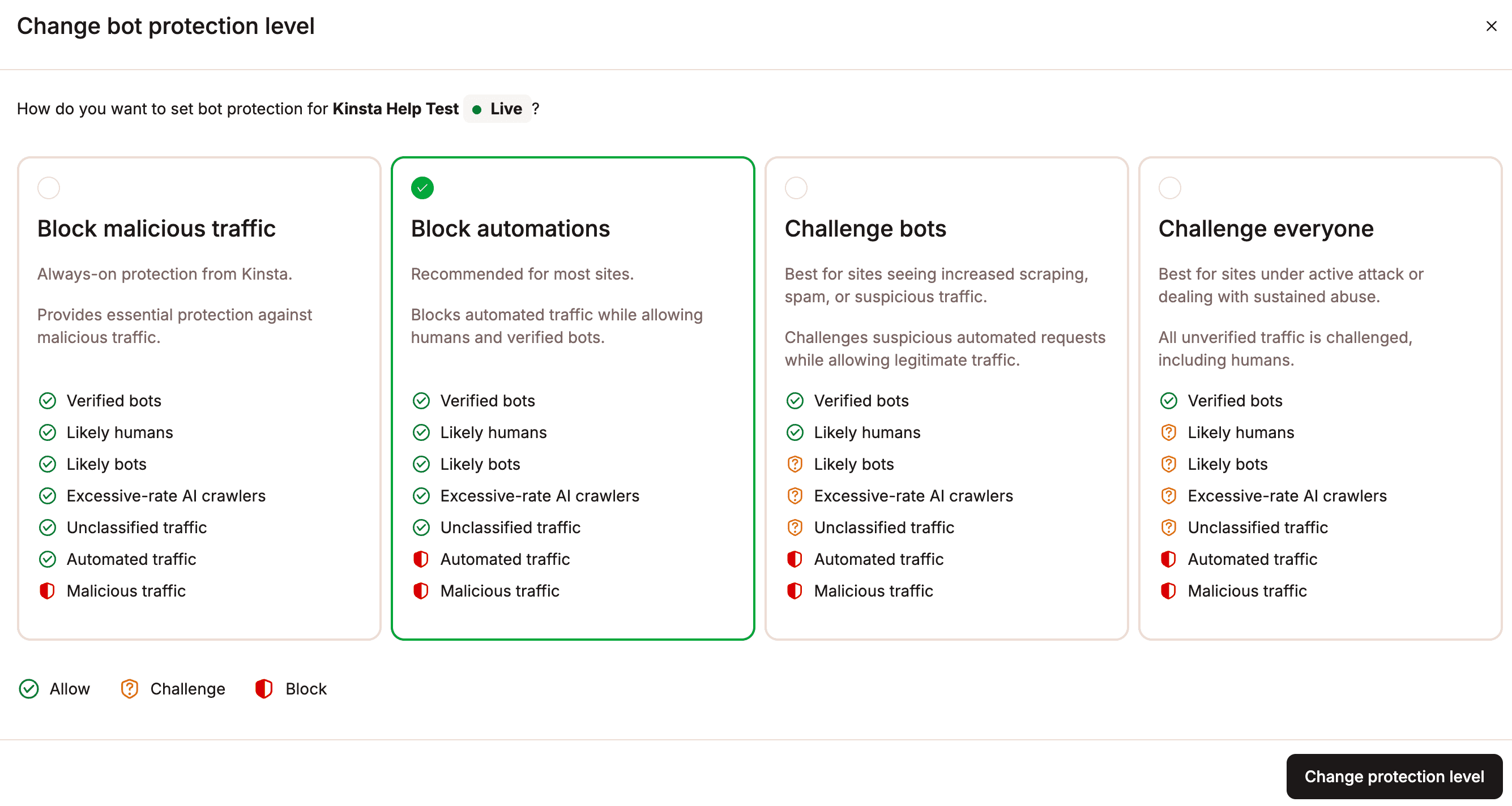
- Block malicious traffic — the default on every site. Handles DDoS mitigation and blocks IPs and endpoints tied to known attack patterns. Every Kinsta site already has this running.
- Block automations — the recommended starting point for most sites experiencing bot load. Blocks confirmed automated and malicious traffic while letting verified bots and real visitors through. Effective for sites seeing repetitive hits on dynamic URLs without wanting to challenge human-facing traffic.
- Challenge bots — adds a verification step for likely bots and unclassified traffic. A visitor who passes the challenge isn’t challenged again for ten days on the same browser and IP. Useful during traffic spikes, sale events, or active scraping periods where the balance between blocking and friction needs more precision.
- Challenge everyone — the strongest setting, designed for short-term use during an active attack or sustained abuse. All unverified traffic is challenged, including likely humans. Not a permanent configuration.
Before raising the level above Block malicious traffic, check that your business-critical integrations appear on Cloudflare’s verified bot directory. At Challenge bots or above, any tool connecting to your site programmatically that isn’t verified will be challenged or blocked.
Block AI crawlers
The Block AI crawlers toggle is a separate control from the protection level. It targets AI crawlers specifically, including verified ones like GPTBot, while leaving Googlebot and Bingbot unaffected. Your search indexing continues normally.
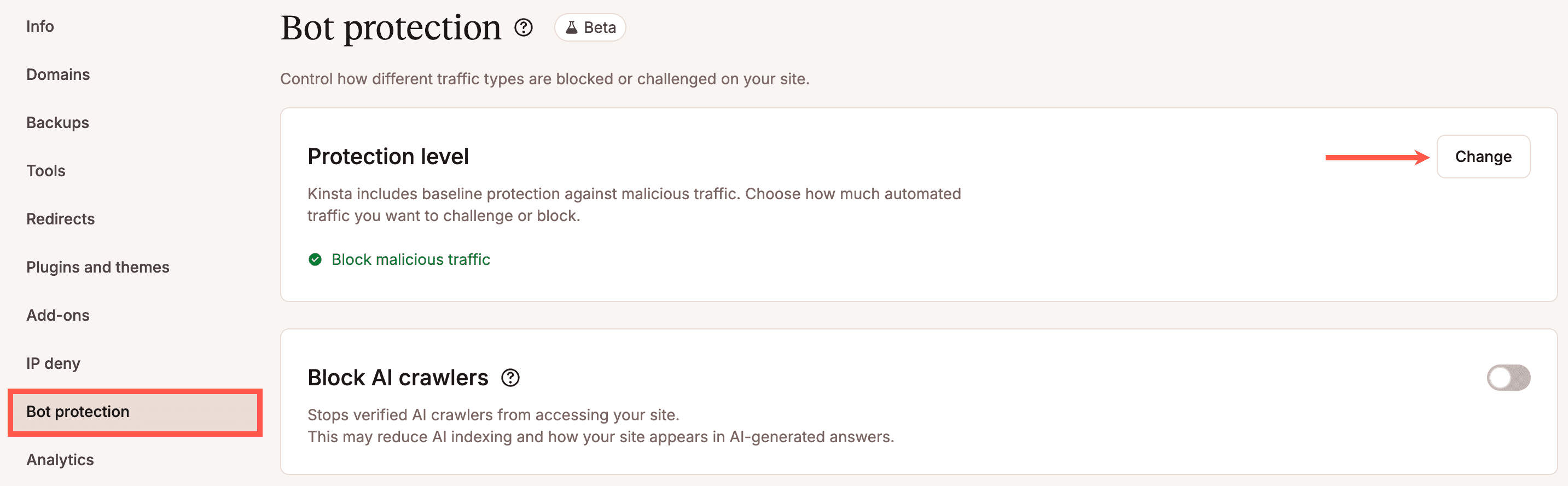
For content-heavy sites, publishers, documentation libraries, and premium content hubs where AI crawlers repeatedly hit article pages, archive pages, and uncached assets at high volume, this toggle removes that load without affecting search visibility.
The tradeoff is real and worth naming: blocking AI crawlers reduces how often your content surfaces in AI-generated answers and summaries. For sites where AI visibility is a strategic priority, staying with Block automations or Challenge bots may be a better fit, as they filter out the worst behavior while remaining indexable. For sites where server resource cost and plan usage matter more than AI visibility, blocking is the cleaner call.
Allow typical WordPress automations
When you raise the protection level above the default, enable Allow typical WordPress automations at the same time.

This switches on a managed allowlist of common WordPress paths and services, such as REST API requests, WooCommerce routes, background tasks, scheduled jobs, and plugin integrations, so that stricter bot filtering doesn’t quietly break workflows the site depends on.
Enable this whenever you move to Block automations or above. The goal is to reduce wasteful traffic, not to interrupt legitimate operations.
Always Allow
Some services should never be challenged regardless of protection level. The Always Allow section lets you add up to 50 custom exceptions by IP address, URL path, or user agent.
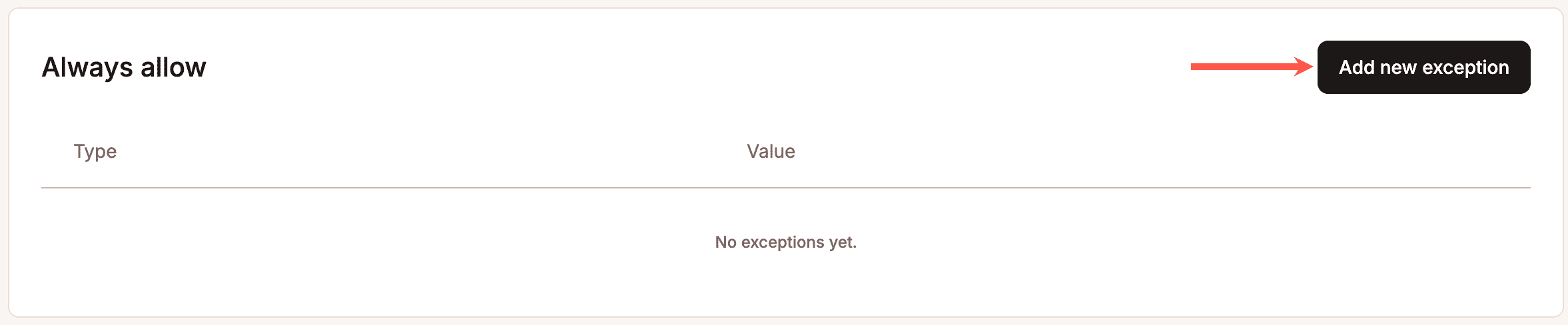
Use it for:
- Payment provider webhooks (Stripe, PayPal)
- Trusted monitoring services (UptimeRobot, Pingdom)
- Known partner integrations or API consumers
- Developer or office IP ranges
- Specific WordPress paths like /wp-json/* or /wp-admin/admin-ajax.php if not already covered by the WordPress automations allowlist
Request breakdown and Bot Protection results
Bot traffic is hard to optimize when teams can’t see how requests are classified or handled.
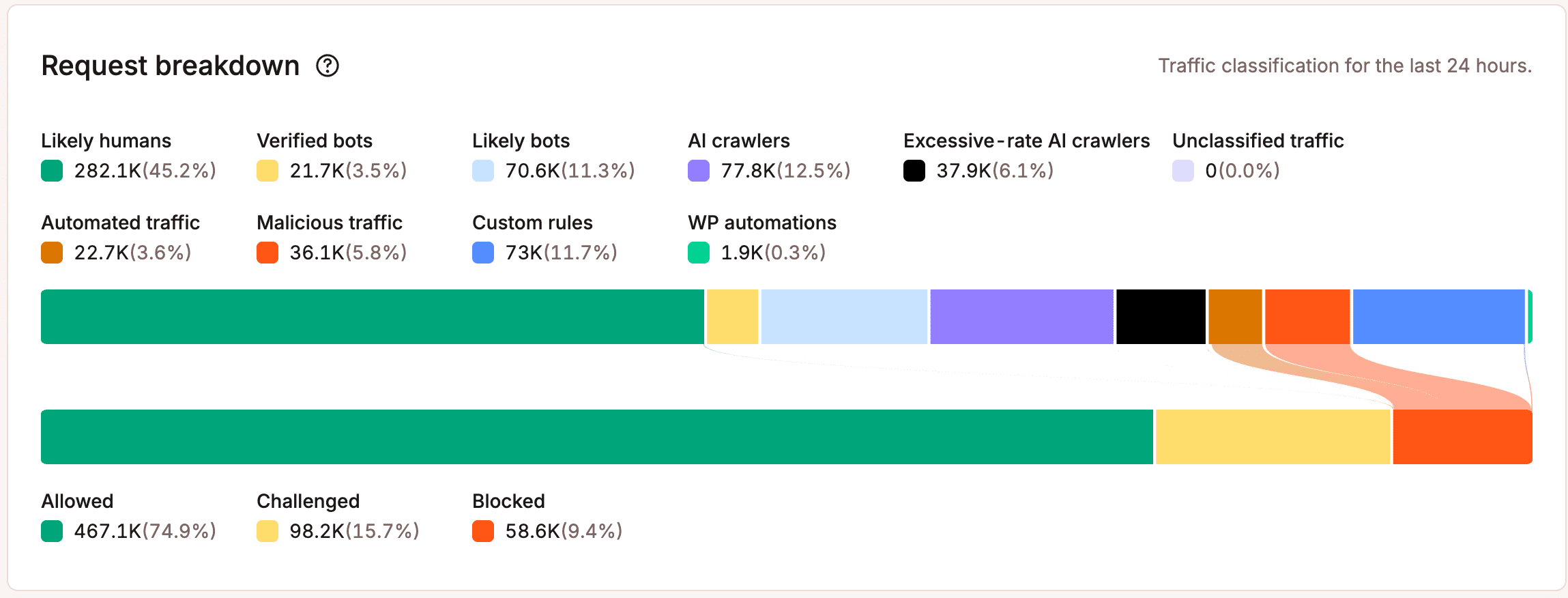
Before adjusting any settings, check the Bot protection screen first. The Request breakdown chart shows every request made to your site in the past 24 hours, classified across seven categories: Likely humans, Verified bots, Likely bots, AI crawlers, Excessive-rate AI crawlers, Unclassified traffic, and Automated traffic.
The question has changed
Hosting has always been evaluated on a short list of visible outcomes: Is the site online? Does it load quickly? Can visitors complete what they came to do?
Those questions still matter. But they don’t tell the full story anymore.
A site can stay online while wasting bandwidth. It can load quickly while bots consume the PHP threads and database connections that real visitors need. It can pass a speed test on a Tuesday afternoon and then struggle under the load of a campaign launch on Thursday, because the headroom that should have been available was already spent processing traffic that never helped the business.
The question is no longer just “Can the site handle the load?” It’s “How much of this load should the site be handling at all?”
Bot traffic doesn’t need to take a site offline to cost something. It needs only to keep hitting the paths that require real processing, and to keep doing it at a volume that looks, in every dashboard, like normal activity.
Getting visibility into that traffic, and having the controls to act on what you see, is what changes the situation. You can’t manage what you can’t see, and you can’t act on what you see if your only options are block everything or leave it alone.
For WordPress teams managing content-heavy sites, WooCommerce stores, or large client portfolios,Kinsta’s managed WordPress hosting puts those controls in MyKinsta, at no additional cost, adjustable per environment without a support ticket. Start with theAI & Bot Traffic Report for the full picture of what’s hitting WordPress infrastructure and what it costs.