Add as a preferred source on Google
Bot traffic is becoming a bigger part of the web, and a bigger consideration for anyone managing a website. That was reinforced by Kinsta’s analysis of more than 10 billion requests in a year when AI-driven bot traffic was reported to have increased some 300%.
With automated traffic growing, bot management should be proactive whenever possible, before unusual activity hurts site performance or consumes excessive resources. But that doesn’t mean blocking every bot. Some automated traffic, such as search crawlers and monitoring tools, is beneficial, while other bots may consume resources without being actively malicious.
At the other end of the spectrum, some bot traffic can create serious performance or security problems and needs to be stopped quickly. The challenge is determining what you’re dealing with and choosing an appropriate response.
It’s better to plan than to panic
The best response isn’t to panic or block everything. Instead, you can follow this repeatable process:
- Assess the impact. Understand what’s happening and which traffic is responsible.
- Stabilize the site quickly if needed.
- Build a more long-term management plan by deciding what to allow, challenge, or block.
- Monitor the results, refine as needed, and document for the future.
Let’s go through it in more detail. At the end, we’ll share a checklist you can use.
1. Figure out what’s happening: Is it a bot problem or an actual attack?
Before taking any action with respect to bot traffic, it’s important to understand what’s happening on your site:
- Is your site dealing with normal bot problems that, while important to handle proactively, are not acute emergencies?
- Is your site actively under attack from a malicious actor? Or, even if it’s not intentionally malicious, is there a specific type of automated traffic that’s consuming too many resources and causing acute problems?
If you determine that it’s a deliberate attack, or some other type of acute issue, your first priority should be to stabilize your site as quickly as possible. We cover how to do that below.
However, even if bot traffic hitting your site is not a problem right now, it’s still better to deal with bots proactively rather than reactively. This approach allows you to deal with bots before they start affecting your site’s legitimate traffic.
Kinsta’s bot traffic analytics can help you understand what kinds of bots are hitting different parts of your site. You can use these insights to understand what’s going on and how to handle different types of bot traffic.
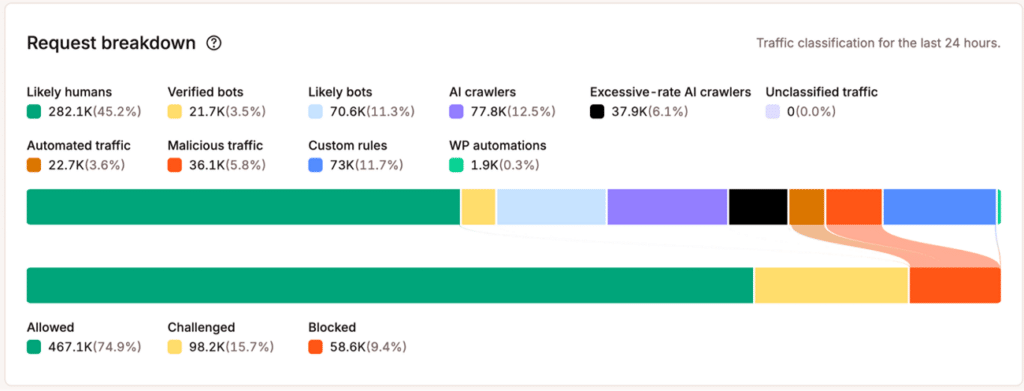
The Request breakdown analytics show you traffic to your site broken down by different categories:
- Likely humans
- Verified bots (as verified by Cloudflare)
- Likely bots
- AI crawlers
- Excessive-rate AI crawlers
- Unclassified traffic
- Automated traffic
- Malicious traffic
- Custom rules configured for your site by Kinsta
- WP automations
If you scroll down to the Top traffic box, you can see the top paths, user agents, countries, and IPs for different classifications of traffic.
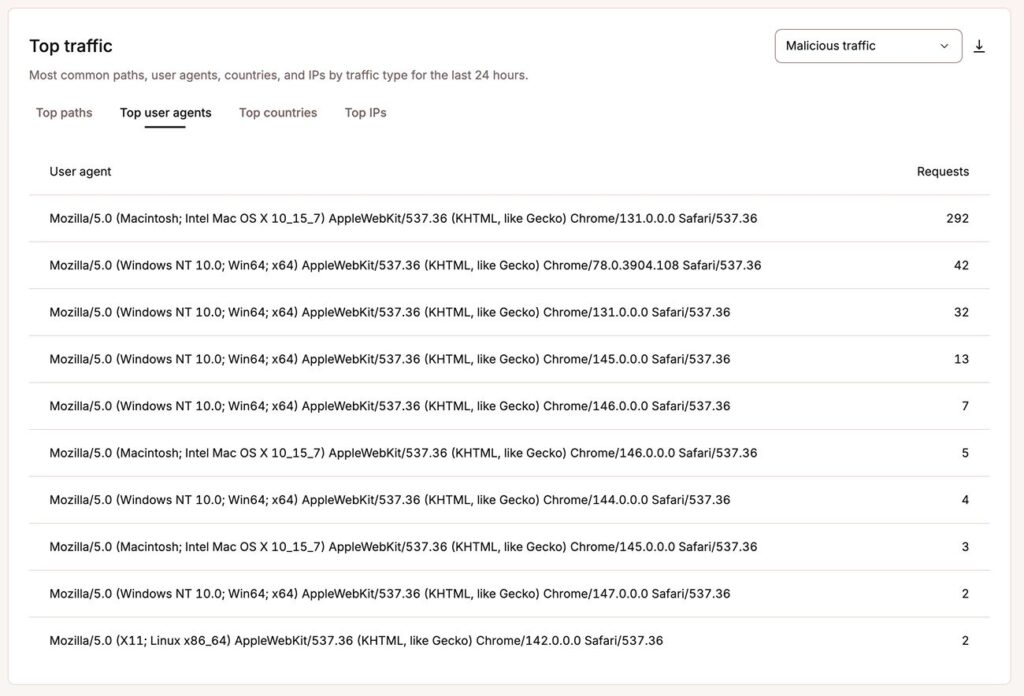
This shows you what types of bots — and even which specific bots — are hitting different parts of your site. Use this information to decide whether your site is receiving legitimate bot traffic or some type of malicious attack.
Is the site under pressure?
Whether or not your site is under pressure is one of the most important factors in assessing the severity of what’s going on.
Check to see if any of the following are happening:
- Slower page loads or errors
- Increased server/PHP/database usage
- Traffic spikes that don’t correspond with legitimate visitors/metrics
- Large numbers of requests hitting the same URLs
If you’re seeing these issues, your site is likely under at least some pressure. Knowing this is important because these problems will have a negative effect on legitimate traffic and require prompt stabilization.
2. Stabilize the site if necessary
If legitimate visitors are already being affected, you don’t need to complete a full investigation before taking action. Stabilize the site first so it’s working for legitimate visitors. Then, refine your rules once the immediate pressure is under control.
On the other hand, if your site isn’t currently experiencing issues and you’re just proactively addressing bot traffic, you can skip ahead for a more in-depth approach to handling bot traffic.
For acute issues that require immediate stabilization, you should consider the following:
- Temporarily increase bot protection. Use tools like Kinsta Bot Protection to quickly protect your site from bots.
- Block clearly abusive traffic. This lets you stop the worst offenders before they reach your site.
- Challenge suspicious traffic. For traffic that you’re on the fence about, you can add challenges to ensure that it’s legitimate. We’ll cover what “challenge” means in more detail in the next section.
- Preserve access for critical crawlers and integrations. This ensures that key website functions and business metrics (such as Google search rankings) aren’t affected.
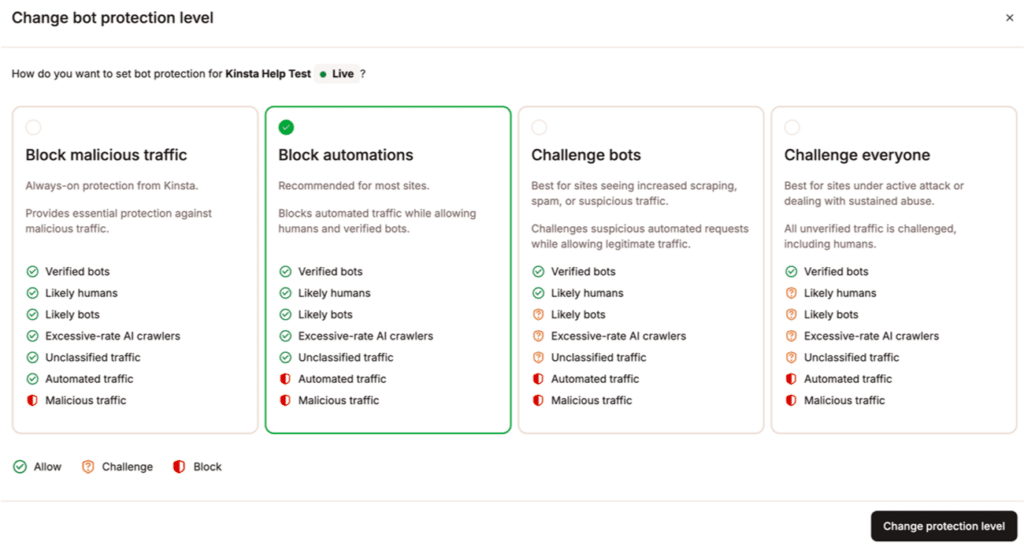
Kinsta Bot Protection offers a quick way to stabilize your site, while still giving you the flexibility to build a strategy that’s optimized for that site.
Kinsta already blocks traffic classified as malicious through its baseline security protections, but stricter bot protection levels can help with automated traffic that isn’t necessarily classified as malicious.
For example, you could challenge all non-verified bots or challenge everyone.
While these approaches are more aggressive than most sites need long term, they are a great way to quickly stabilize your site and get things under control while you develop a more refined strategy.
3. Decide what to allow, challenge, or block
Once you’re confident your site is stable, you can develop a longer-term strategy for handling bot traffic.
You can build this strategy by choosing whether to allow, challenge, or block different types of bots.
Here’s what those terms mean:
- Allow: allows the request access to your site.
- Challenge: requires the request to pass an additional verification step before accessing the site. With Kinsta, a visitor who successfully passes the challenge generally won’t be challenged again for at least 10 days while using the same browser and IP address.
- Block: blocks the request from accessing your site.
When choosing whether to allow, challenge, or block different types of bots, you should think through the following framework:
- Does the bot provide any value? For example, search engine crawlers help your site receive traffic from organic search, and some AI crawlers may support visibility or citations in AI-generated answers. On the other hand, a scraper that doesn’t send any traffic to your site might not provide any value.
- How much is the bot traffic costing you? Analyze what the bot traffic is costing you in terms of server resources (processing, bandwidth, and database queries) and performance for legitimate visitors. Remember that not all requests are equal — a bot hitting a cached blog post usually “costs” a lot less than a bot hitting a dynamic page (such as the WooCommerce cart).
- What happens if you block the bot? Consider the consequences of blocking the bot. For example, blocking Googlebot can prevent Google from properly crawling and indexing your content, which can severely harm your visibility in Google Search. On the other hand, you can block many other bots without consequences for your site.
Here’s how these questions might play out:
- Allow: consider this approach when the traffic is legitimate and valuable.
- Block: consider this approach when the traffic is clearly unwanted, abusive, or creating disproportionate cost.
- Challenge: consider this for situations where the right response isn’t clear.
Importantly, you don’t have to apply these rules universally across your entire site. You might want to allow a class of bots for certain content on your site, but challenge or block them for other content.
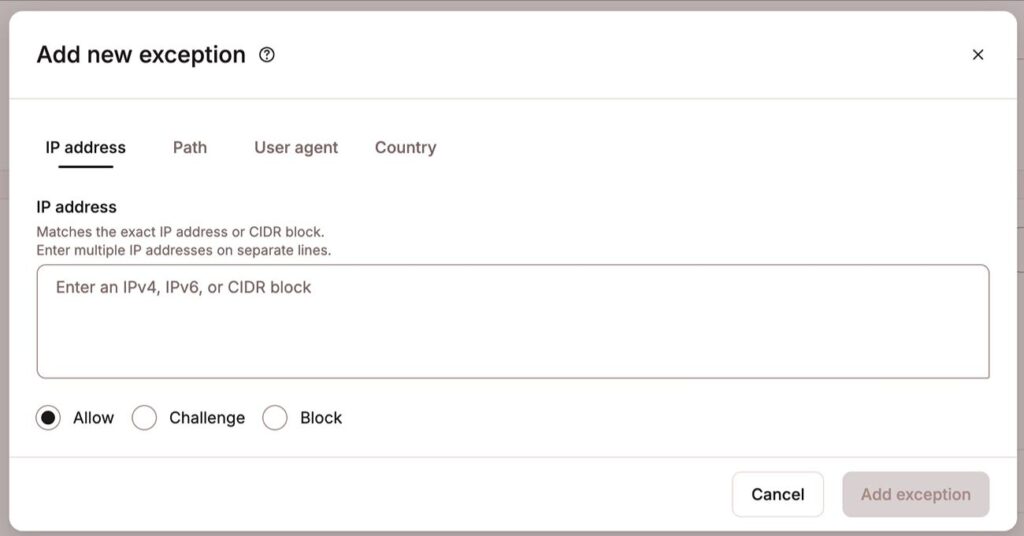
Kinsta Bot Protection helps you implement these flexible bot rules by adding exceptions based on IP address, path, user agent, or country.
Tips for responding to specific bot traffic scenarios
To illustrate how you might apply these frameworks to a WordPress website, let’s look at some common bot scenarios and how you could respond.
This is not a comprehensive list of every situation. Rather, it’s just some common examples to give you an idea of how these principles might work on a real website.
A search engine crawler is generating lots of traffic
If a search crawler is generating lots of requests and you’re worried about server load, here’s how you could address it.
First, answer the following questions:
- Which URLs are being crawled?
- Is the crawler hitting useful indexable content?
- Is it getting stuck in parameters, filters, or dynamic endpoints? Basically, URLs that shouldn’t be indexed.
- Is legitimate performance actually suffering?
Based on those answers, you might respond in the following ways:
- Don’t automatically block the crawler. Investigate crawl issues and inefficiencies rather than blocking the entire crawler.
- Emphasize preserving access to valuable indexable content.
- Restrict or discourage crawling of unnecessary dynamic URL variations.
AI crawlers are consuming significant resources
AI crawlers can generate a lot of requests, but whether they’re providing value can be difficult to assess.
Here are some questions that can help you work it out:
- Do you value AI visibility/citations?
- Is the crawler sending meaningful referral traffic?
- Is it primarily collecting content without obvious benefit? There’s a difference between helping train an AI model for free and boosting your AI visibility/citations.
- Is the traffic consuming significant infrastructure resources?
Remember that you don’t need to treat all AI crawlers the same. You might find some crawlers provide more value than others, and it’s useful to incorporate that into your response. Kinsta’s bot protection tools can help you create separate rules for different crawlers.
Once you’ve answered those questions, you can consider responding like this:
- Allow valuable AI crawlers if their access aligns with your goals.
- Challenge or restrict aggressive crawlers.
- Block AI crawlers if the traffic provides little value and creates meaningful resource costs.
Bots are hitting expensive dynamic endpoints
Bot visits to dynamic endpoints can consume significantly more resources than visits to static, cached pages.
Examples of these endpoints on WordPress can include pages such as shopping carts, checkouts, searches, logins, etc. This can happen often with WooCommerce stores, though it affects other types of sites, too.
While this bot traffic isn’t necessarily malicious, it’s problematic for several reasons:
- Requests can bypass cache.
- PHP processing is required.
- Database queries may run.
- Legitimate customers compete for the same resources.
If you’re experiencing these types of requests, here’s how you might want to respond:
- Protect the specific expensive endpoints.
- Prevent unnecessary crawler access to cart/checkout functionality.
- Don’t block search crawlers from the entire site, as you typically still want them to be able to access other content.
- Investigate URL parameter sprawl and crawl loops.
- Monitor server performance after applying the change.
An unknown scraper is crawling thousands of URLs
In some situations, you might encounter an unidentified bot that’s crawling aggressively and not providing any obvious value to your site.
An unknown bot doesn’t automatically mean something malicious, but it does merit further investigation. This is especially true if the bot is “expensive” and consuming a lot of resources.
Here’s a balanced way that you can respond:
- Check its user agent, IPs, paths, and request behavior.
- Determine whether it is an integration you actually depend on.
- Challenge it if you’re uncertain.
- Block it if the traffic is clearly unwanted and causing issues.
- Monitor for any issues on your site (in case it does turn out to be the bot behind an important service/integration).
- Watch for identity rotation or changing request patterns.
4. Monitor the results and adjust if needed
After implementing your strategy for dealing with bots, it’s important to monitor the results to make sure that your strategy is working as intended.
Pay attention to key data, including traffic analytics, resource usage, search visibility, AI citations/referrals, and other relevant business metrics.
Here are some specific questions to focus on when monitoring your site:
- Did unwanted traffic decrease?
- Did server performance improve?
- Are legitimate crawlers still working?
- Did any integrations break?
- Did you accidentally block valuable traffic?
Based on the answers to those questions, you can determine whether you need to take additional action:
- Everything is acceptable: you can leave your rules as is. Continue to check in occasionally to make sure nothing has changed.
- Still experiencing issues with bots: you might need to further adjust your site’s rules to be more strict about blocking, challenging, and/or rate-limiting bot traffic.
- Legitimate visitors or “good” bots are experiencing issues: you might need to add targeted exceptions or adjust your site’s rules to be more permissive.
Putting it all together: A bot-response checklist
To recap what we’ve covered, let’s end with a clear bot-response checklist you can use to handle bots on your site.
Ideally, you can employ these steps proactively before bots become an issue, but this checklist also applies in a situation where you’re reacting to an immediate issue.
When you first notice unusual traffic
- Is the site actually experiencing performance problems?
- Is the traffic human, automated, malicious, or some combination?
- Which URLs are receiving the traffic?
- Are those URLs cached or dynamically generated?
- Which user agents, IPs, and traffic types are responsible?
If the site is under pressure
- Stabilize the site first.
- Increase bot protection if necessary.
- Challenge or block the traffic causing the immediate problem.
- Preserve essential crawlers and integrations when possible.
Once the site is stable
- Determine whether the traffic provides business value.
- Review its infrastructure cost.
- Decide whether to allow, challenge, or block it.
- Make targeted changes.
- Protect expensive endpoints.
After the incident
- Monitor the results.
- Adjust rules as needed, whether that’s adding exceptions, making rules stricter, etc.
- Document what happened.
- Review the policy periodically.
Kinsta can help with the new normal
Bot traffic is now a normal part of operating a website. However, because some bots play essential roles and bring real value to your site, “block all bots” is not a realistic or desirable strategy for dealing with bot traffic on a site.
Instead, develop a proactive strategy that addresses the value and cost of different bots across different parts of your site.
Kinsta Bot Protection tools and analytics give WordPress site owners and agencies the visibility and controls to manage automated traffic without treating every bot the same way. If you want to try them for yourself, learn more about Kinsta’s hosting plans today.

Steve Bonisteel is a Technical Editor at Kinsta who began his writing career as a print journalist, chasing ambulances and fire trucks. He has been covering Internet-related technology since the late 1990s.