Add as a preferred source on Google
Websites aren’t built just to publish content, and metadata isn’t fine-tuned for fun; it’s all of these activities that work together so your pages can be discovered more easily. For years, Google Search has been the primary gateway to that visibility, thanks largely to its web crawlers.
Since the late 1990s, Googlebot and other traditional crawlers have scanned websites, fetched HTML pages, and indexed them to help people find what they’re looking for. As of January 2024, Google accounted for 63% of all U.S. web traffic, driven by the top 170 domains.
But now, according to a survey by McKinsey, half of customers now turn to AI tools like ChatGPT, Claude, Gemini, or Perplexity for instant answers, and even Google is blending AI-generated summaries into search results through features like AI Overviews.
We’re seeing the same shift from the infrastructure side. In our AI & Bot Traffic Report, we analyzed more than 10 billion requests across Kinsta-managed sites and found that AI bot traffic has grown from about 1 in every 200 web visits a year ago to roughly 1 in 31 today.
Behind these new AI-driven experiences is a growing class of bots known as AI crawlers. If you run a WordPress site, understanding how these crawlers access and use your content is more important than ever.
What are AI crawlers?
AI crawlers are automated bots that scan publicly accessible web pages, similar to search engine crawlers, but with a different purpose. Instead of indexing pages for traditional ranking, they collect content to train large language models or supply fresh information to AI-generated responses.
Broadly, AI crawlers fall into three groups, and the distinction matters more than it used to:
- Training crawlers, such as GPTBot (OpenAI) and ClaudeBot (Anthropic), collect data to teach large language models how to answer questions more accurately.
- Search and answer crawlers, such as OAI-SearchBot (OpenAI) and Claude-SearchBot (Anthropic), build the index that powers citations in ChatGPT search or Claude’s search results. These are separate bots from the training crawlers above, with separate user-agents, which means you can allow one and block the other.
- Live retrieval crawlers like ChatGPT-User access websites in real time when someone asks an AI assistant to read or summarize a specific page right now.
Other crawlers, PerplexityBot or AmazonBot, for example, are building their own indexes or systems to reduce their dependence on third-party sources. And while their goals differ, they all have one thing in common: they fetch and read content from websites like yours.
How AI crawlers work
When an AI crawler visits your site, it typically does the following:
- Sends a basic GET request to the page’s URL (no interaction, scrolling, or DOM events).
- Fetches only the initial HTML returned by the server. It doesn’t wait for client-side JavaScript to load or execute.
- Extracts all
<a href="">,<img src="">,<script src="">, and other resource links, then adds internal (and sometimes external) URLs to its crawl queue. In many cases, it also hits broken links that return 404 errors. - May attempt to fetch linked assets like images, CSS files, or scripts, but only as raw resources, not to render the page.
- Repeats this process recursively across discovered links to map out the site.
How AI crawlers interact with WordPress websites
WordPress is a server-rendered platform that uses PHP to generate full HTML pages before sending them to the browser. When a crawler visits a WordPress site, it usually gets everything (content, headings, metadata, navigation) it needs in the HTML response.
This server-rendered structure makes most WordPress sites naturally crawler-friendly. Whether Googlebot or an AI crawler, they can usually scan your site and easily understand your content. In fact, easily crawlable content is one of the reasons WordPress performs well in both traditional search and newer AI-driven platforms.
That server-rendered strength also has a real cost. AI crawlers don’t just read your marketing pages, they also hit dynamic WordPress and WooCommerce endpoints, and they follow every link and URL variation they find. We cover why that specifically strains infrastructure in why WooCommerce sites are especially vulnerable to bot traffic.
Should you allow AI crawlers to access your content?
AI crawlers can already read most WordPress sites by default. The real question is what you want them to access — and how you can control that visibility.
Content-driven businesses are abuzz with this conversation right now. The subject extends to blog posts, documentation, landing pages … anything written for the web, really. You’ve probably heard advice like “write for the machines” since AI platforms increasingly pull live data and, in some cases, now include links to sources. We all want to show up in LLM output, just as much as we want to show up in Google search results.
For example, in the screenshot below, we ask ChatGPT to tell us some of the latest features released by Kinsta. It searches the web, scans changelogs and linked pages, and provides a summarized answer with direct links back to the source.
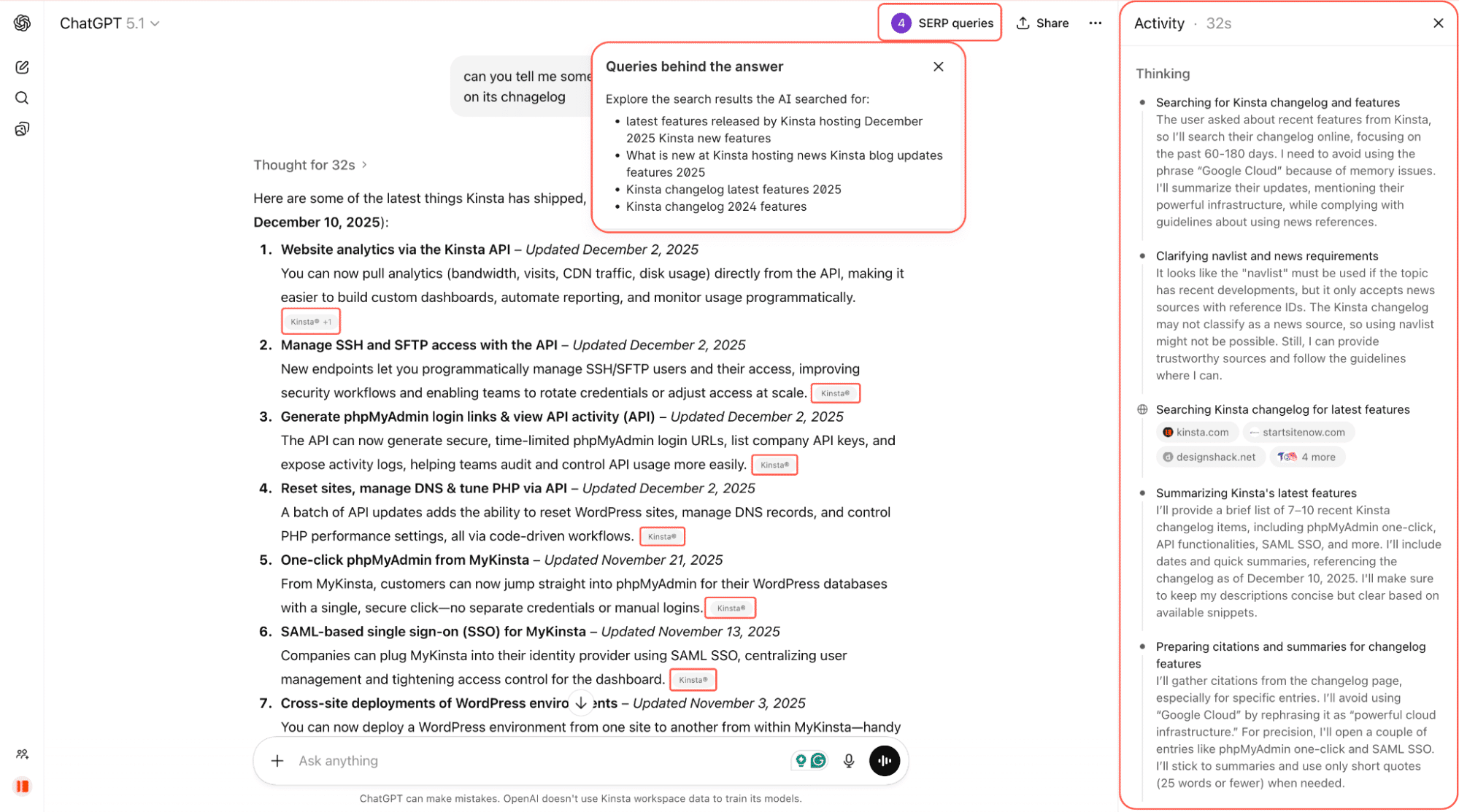
It’s early, but AI crawlers already influence what people see when they ask questions online. And that reach could matter.
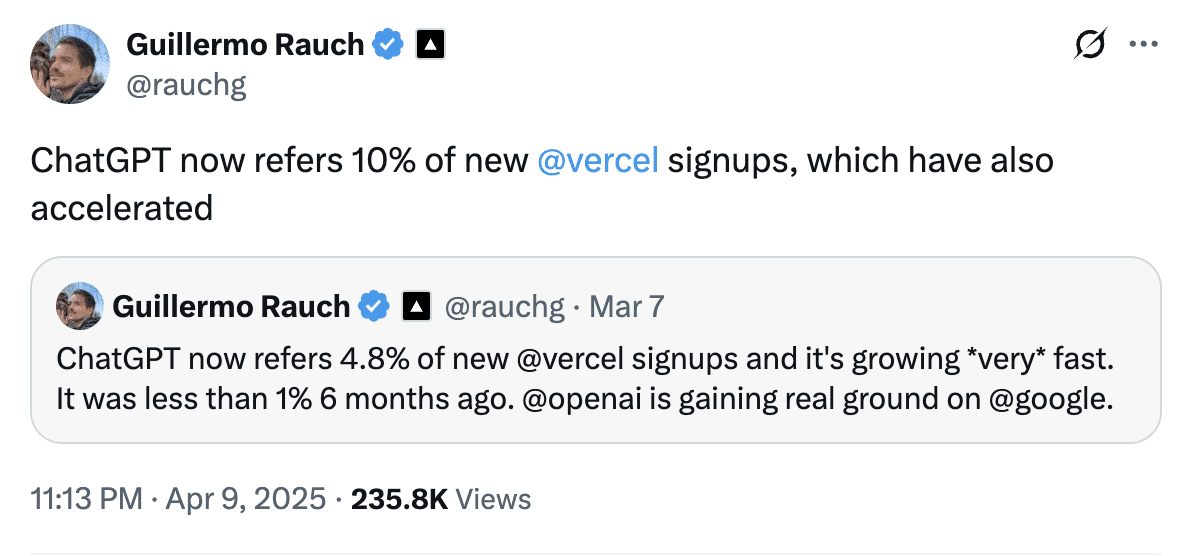
Guillermo Rauch, CEO of Vercel, shared in April that ChatGPT accounts for nearly 10% of new Vercel sign-ups, up from less than 1% just six months earlier. That demonstrates how quickly AI-driven referrals can evolve into a significant acquisition channel.
And AI crawlers are widespread. Cloudflare’s own traffic data shows AI crawler activity has kept climbing since 2024, to the point where it’s now driving default policy decisions: as of 2025, new domains added to Cloudflare are blocked from known AI crawlers unless the owner explicitly opts in, a reversal from the allow-by-default posture the web operated under for years.
So even if you haven’t made a decision yet, AI crawlers are almost certainly visiting your site already, and depending on your setup, some of them may now be blocked by default without you having done anything.
Should you allow or block AI crawlers?
There’s no one-size-fits-all answer. There’s no universal answer, but here’s a framework:
- Block crawlers on sensitive or low-value routes like
/login,/checkout,/admin, or dashboards. These don’t help discovery and only waste bandwidth. - Allow crawlers on “discovery content” such as blog posts, documentation, product pages, and pricing information. These pages are the ones most likely to be cited in AI responses and drive qualified traffic.
- Separate the training decision from the search decision. You can block GPTBot and ClaudeBot (training) while still allowing OAI-SearchBot and Claude-SearchBot (search citations), if you want to stay eligible for AI-answer visibility without contributing to model training.
- Decide strategically for premium or gated content. If your content is your product (e.g., news, research, courses), unlimited access to AI may undercut your business.
New tools are emerging to help. Cloudflare, for example, now runs AI Crawl Control (formerly AI Audit), which gives site owners visibility into which AI services are accessing their content and lets them set per-crawler allow, block, or charge rules. Its Pay Per Crawl feature, which returns an HTTP 402 “Payment Required” response and lets you charge AI companies for access, is still in private beta, but it’s moved from concept to a real, if limited, product since it was first announced.
Cloudflare has also introduced a Content Signals Policy, an addition to robots.txt that lets you specify not just whether a crawler can access your content, but what it’s allowed to do with it afterward.
Others in the search and marketing community are more cautious, since default blocking could unintentionally reduce visibility in AI search results for sites that actually want the exposure. It’s still an evolving space rather than a settled one.
Until these systems mature further, the most practical approach is selective openness. Keep discovery content crawlable, separate training bots from search bots where you can, block sensitive areas, and revisit your rules as the ecosystem evolves.
How to control AI crawler access on WordPress
If you aren’t comfortable with AI crawlers accessing your WordPress site and scanning its content, the good news is that you can take back control.
There are now four ways to do it, and if you’re hosted on Kinsta, the first one is almost always the easiest starting point.
Option 1: Kinsta bot protection
If your site is hosted on Kinsta, you don’t need a third-party plugin or a separate Cloudflare account to manage AI crawler access. Kinsta bot protection is built into MyKinsta, included free on every plan, and includes a dedicated toggle specifically for this:
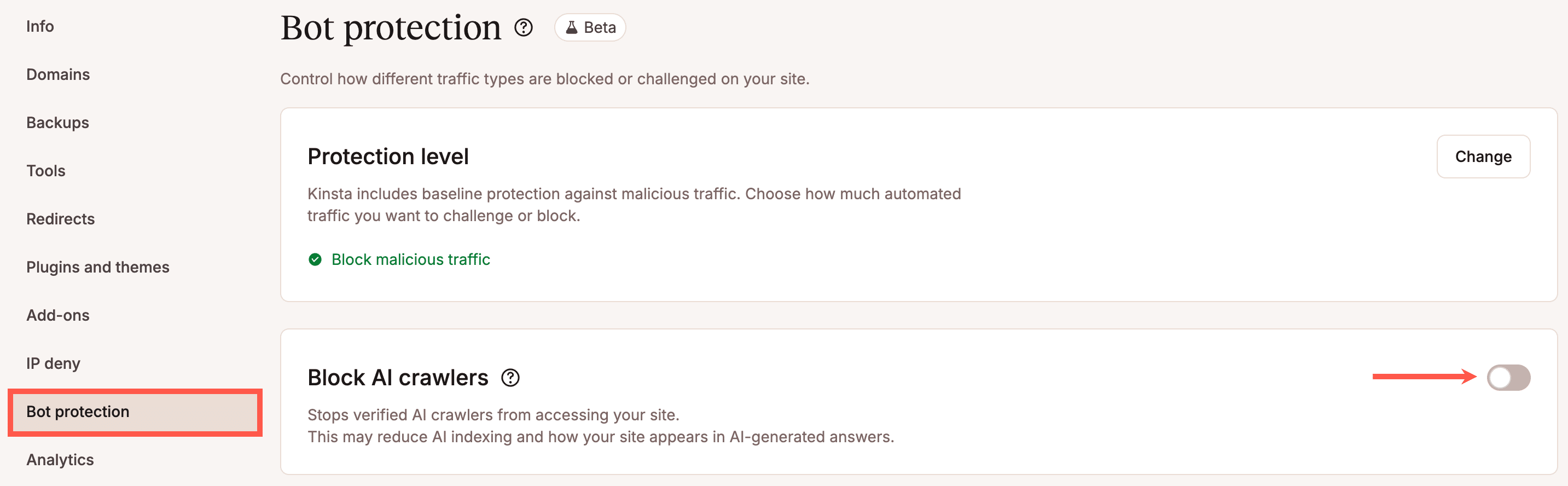
Block AI crawlers stops verified AI crawlers from accessing your site entirely, without touching search engine crawlers like Googlebot or Bing. It’s a single switch, separate from your general bot protection level, because AI crawler traffic and general automated traffic call for different decisions.
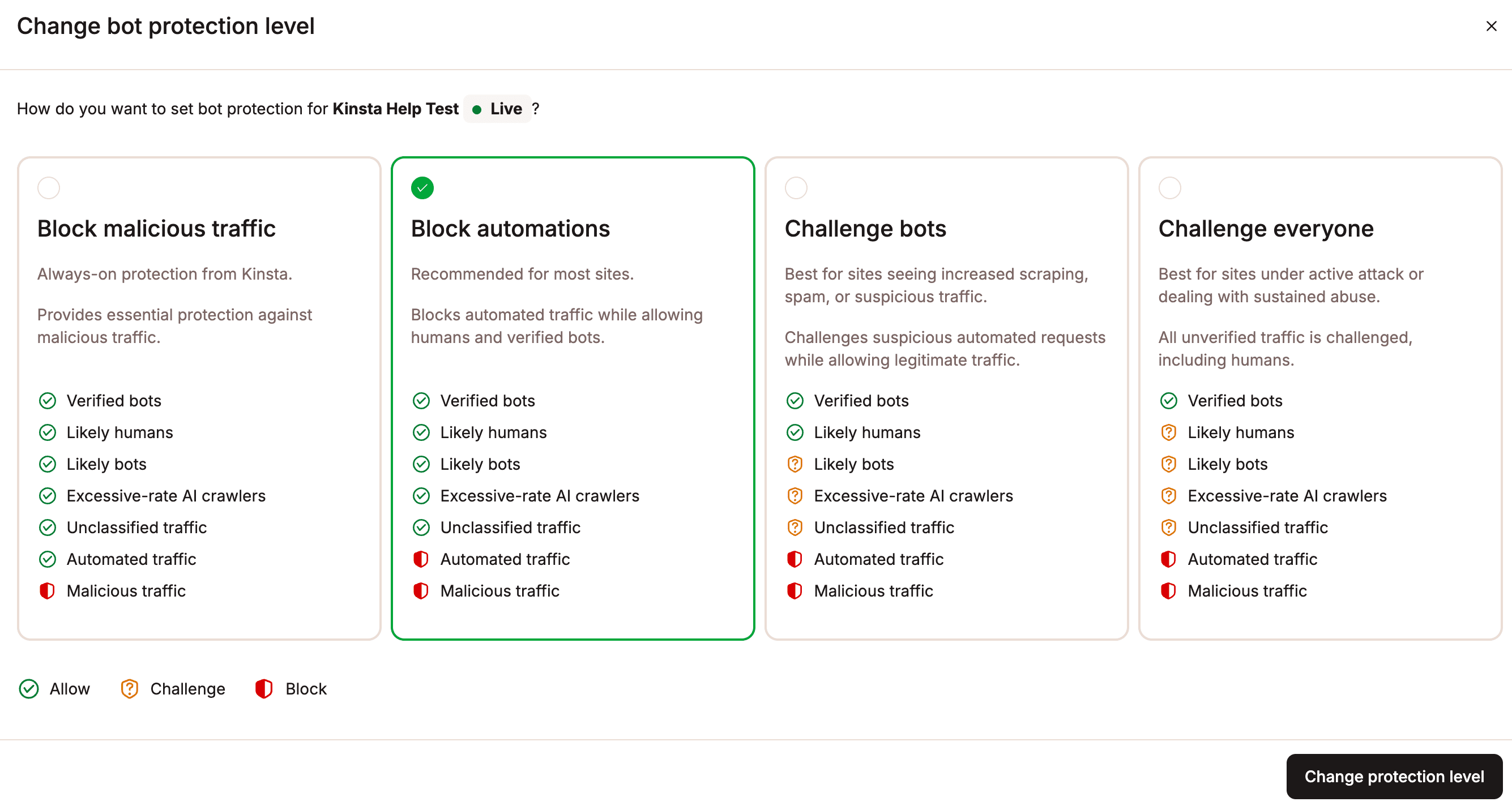
Kinsta Bot Protection also classifies a category called excessive-rate AI crawlers: a crawler that’s technically on a verified bot list but is making requests at an abnormal rate can still be reclassified and challenged. That matters because most AI crawler problems on WordPress sites aren’t caused by malicious bots, they’re caused by verified ones crawling far more aggressively than anything robots.txt alone can slow down.
This won’t give you the training-vs-search bot granularity described above, since it’s an all-or-nothing toggle for AI crawlers as a category, but it’s the fastest way to stop AI crawler load from becoming a performance problem, and it works alongside the robots.txt based approach below if you want more precise, per-bot control.
Option 2: Block AI crawlers manually with robots.txt
Your robots.txt file tells bots what parts of your site they’re allowed to crawl. Most well-known AI crawlers, like OpenAI’s GPTBot, Anthropic’s Claude-Web, and Google-Extended, respect these rules.
You can block specific bots entirely, allow them full access, or restrict access to certain sections of your site. For example, to block only the training crawlers while keeping the search/answer crawlers allowed:
User-agent: GPTBot
Disallow: /

User-agent: ClaudeBot
Disallow: /

User-agent: Google-Extended
Disallow: /

User-agent: OAI-SearchBot
Allow: /

User-agent: Claude-SearchBot
Allow: /
To block everything (not recommended for most sites, since it also removes you from AI search citations):
User-agent: GPTBot
Disallow: /

User-agent: ClaudeBot
Disallow: /

User-agent: Google-Extended
Disallow: /
To block just a section of your site from a specific crawler. For example, your login page, where crawlers add no value:
User-agent: GPTBot
Disallow: /login/
Sensitive routes like /login, /checkout, or /admin don’t help with discoverability and should almost always be blocked. On the other hand, product pages, feature overviews, or your help center are good candidates to keep open to crawlers since they can drive citations and referrals.
You can add this robots.txt file manually by:
- Using MyKinsta’s Files tool (Sites > [your site] > Files).
- Using an SEO plugin like Yoast (Tools > File editor).
- Using a file manager plugin like WP File Manager.
- Or editing your
robots.txtfile directly on the server via FTP.
Option 3: Use a WordPress plugin
If you’re not comfortable editing the robots.txt file directly, or you’re not hosted on Kinsta and don’t have a native bot protection tool available, plugins can do the job for you with a few clicks.
Raptive Ads
The Raptive Ads WordPress plugin includes built-in support for blocking AI crawlers:
- You can toggle which bots to block directly from the plugin’s settings.
- Most AI bots (like GPTBot and Claude) are blocked by default.
- Google-Extended is not blocked by default, but you can check the box if you want to opt out of Google’s AI training.
One key benefit of using this plugin is that blocking Google-Extended does not affect your Google rankings or visibility in regular search results.
Block AI Crawlers
The Block AI Crawlers plugin was built specifically to give WordPress site owners more control over how AI crawlers interact with their content. Here’s how:
- Blocks 75+ known AI bots by automatically adding the right
Disallowrules to your site’srobots.txt. - No configuration is required. Install the plugin, go to Settings > Reading, and check the box labeled Block AI Crawlers.
- Lightweight and open-source, with regular updates pulled from GitHub.
- Designed to work out of the box on most WordPress installations.
The Block AI Crawlers plugin is one of the easiest ways to keep unwanted AI bots off your site, especially if you’re not using advanced SEO plugins.
Option 4: Use your own Cloudflare account’s AI bot controls
If you manage your own separate Cloudflare account in addition to Kinsta hosting, you can also control AI crawlers there, though it’s worth reading our note below on why running this alongside Kinsta Bot Protection needs a bit of care.
Cloudflare’s free-tier Bot Fight Mode and the more configurable Super Bot Fight Mode (available on paid plans) can both catch AI crawler traffic as part of their broader bot categories, and Cloudflare’s dedicated AI Crawl Control tools go further, letting you allow, block, or (in beta) charge specific AI crawlers by name.
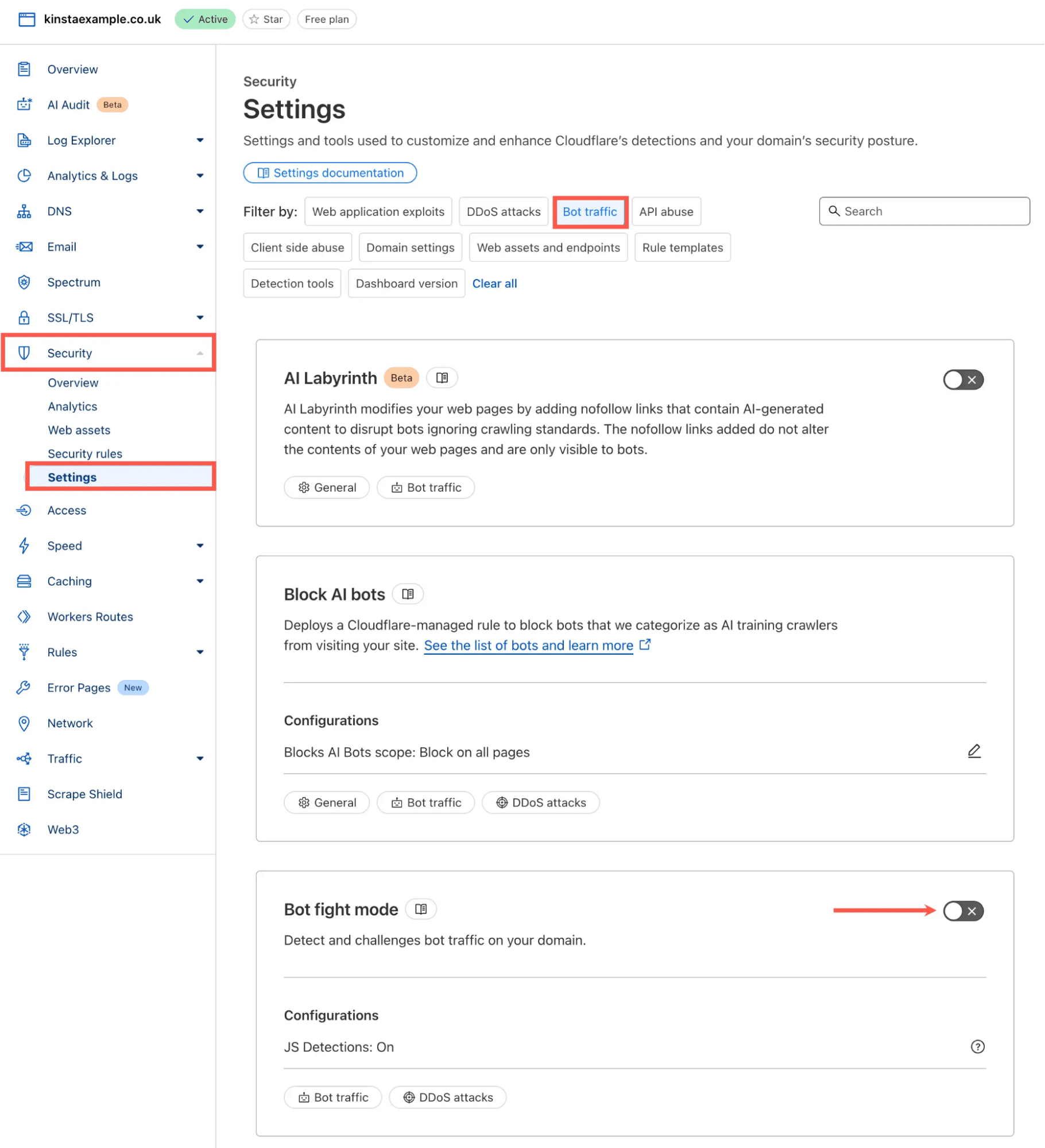
If you want a deeper look at how these tools work together, including Bot Fight Mode, Super Bot Fight Mode, and targeted challenge rules, you can read our full guide on protecting your WordPress site from unwanted bot traffic with Cloudflare.
What this shift means for your WordPress site
AI crawlers are now part of how people discover information online. The technology is still evolving, the rules are still forming, and site owners are deciding how much of their content they want to make available, and to which specific bots.
The good news is that WordPress sites are already in a strong position. Because WordPress outputs fully rendered HTML, most AI crawlers can interpret your content clearly without special handling. The real strategic decision isn’t whether AI crawlers can access your site, it’s how much access helps your goals, and which of the several available control points (robots.txt, bot protection, or both) you use to enforce that decision. And as the mix of traffic types evolves, it’s helpful to have hosting options that make resource usage easier to understand and manage.
Kinsta’s bandwidth-based plans offer a more predictable way to account for total data transfer, regardless of the source of the requests. Combined with Kinsta bot protection AI crawler controls and your own robots.txt rules, you have full control over how your site is accessed, without needing to run a separate service just to manage it.