Organizations rely on countless online apps and services daily, each of which requires different logins, making password management a growing challenge.
Your team can utilize a CRM, an intranet, a work chat, and other third-party services, such as your hosting provider’s dashboard, on a daily basis. If this sounds familiar, you likely need a centralized authentication system that allows your team members to use the same login credentials across numerous websites and platforms.
This is where Single Sign-On (SSO) comes in, as a solution designed to streamline authentication, enhance security, and improve the efficiency of your team’s workflows. For online businesses, SSO is more than just a nice-to-have feature. It is a powerful tool that can help you strengthen your organization’s security and improve business processes.
SSO integration with the MyKinsta dashboard using Security Assertion Markup Language (SAML) is designed specifically for this purpose: it centralizes access control with major Identity Providers, automates the onboarding process via JIT provisioning, and strengthens the security of your hosting account and your customers’ data.
This article explores SAML SSO in its key aspects. You will learn what it is and why it is non-negotiable for adopting a zero-trust policy in your business.
There is a lot to cover, so let’s get started!
What SAML SSO is and how it works
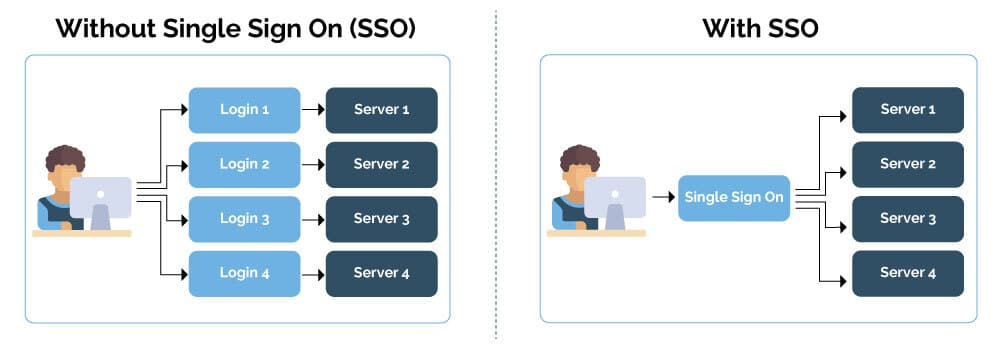
SAML SSO is an authentication scheme that enables a user to securely log in to multiple independent applications or software services using a single set of credentials. Users do not need to store or manage multiple passwords for different services; they only need to log in to one of them to access the others securely.
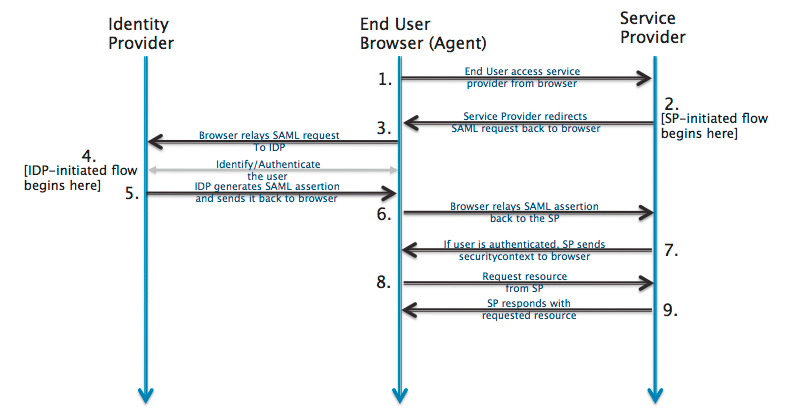
An SSO system has two key actors: the service provider and the identity provider.
- The service provider (SP) is the application, web service, or resource an end-user wants to access. It may be an intranet, a CRM, or a third-party service.
- The identity provider (IdP) is a service or system that creates, maintains, and manages identity information and provides authentication services to third-party services.
Here’s how it works:
- A user attempts to log in to an application, such as a WordPress website or your hosting provider’s dashboard.
- If the application (the SP) detects that the user is not authenticated, it redirects the user to the Identity Provider.
- The IdP then prompts the user to log in with their credentials.
- The IdP verifies the user credentials. If they are correct, the IdP authenticates the user and generates a security token.
- The IdP sends the security token to the SP.
- The SP receives the token, validates it, and grants the user access.
Here are some popular IdPs:
- Microsoft Entra ID: Microsoft’s cloud-based identity and access management service. Designed for seamless integration with Microsoft 365 and Azure services, it can be integrated with thousands of SaaS applications. It supports SAML, OAuth 2.0, and OpenID Connect protocols, as well as a wide range of authentication methods.
- Google Identity Platform: A scalable and secure identity and access management solution based on Google’s global infrastructure. It supports industry-standard authentication protocols, such as SAML, OAuth 2.0, and OpenID Connect.
- Okta: An enterprise-grade identity management service. Okta supports the most common authentication protocols, such as Kerberos, LDAP, OAuth 2.0, RADIUS, and SAML.
- Auth0: Now part of Okta, Auth0 is an identity and access management platform with great flexibility and customization options for developers to build custom applications. It supports industry-standard protocols, including OpenID Connect, SAML, OAuth 2.0, WS-Federation, LDAP, and more.
- Keycloak: An open-source Identity and Access Management (IAM) solution developed by Red Hat and released under Apache License 2.0. It is based on standard protocols and supports OpenID Connect, OAuth 2.0, and SAML.
SAML SSO vs social login
SAML SSO is often confused with social login, but there are key differences between the two. Social login is a specific implementation of single sign-on, but it has important differences and specific use cases.
Similar to Kinsta SAML SSO, social login enables users to access multiple services with a single identity managed by an identity provider. With social login, the identity provider (IdP) is a social network, such as Facebook, Google, or GitHub.
The two authentication systems are similar in that they both use common protocols, such as OAuth 2.0 and OpenID Connect, to enable authentication through a single service provider. In both scenarios, the authentication experience and the administration of access credentials are considerably enhanced, as are system security and the productivity of the IT team.
However, there are significant differences between the two systems.
B2B vs B2C: SSO is an authentication and identity management system designed primarily for businesses. Social login is a type of SSO geared toward consumers and used in third-party applications or websites.
Public platforms vs internal or dedicated IdPs: The type of IdP is also different. For social login, the IdP is a social network or public platform. For enterprise SSO, the identity provider can be an internal system or a dedicated IdP, such as Okta, Auth0, or Microsoft Entra ID.
Accessibility and control: Social login IdPs are consumer platforms accessible to anyone with an account and do not require complex configuration by a skilled IT team.
Conversely, SSO involves system configuration and identity management, which fall within an organization’s responsibility. The organization determines what data to share, which protocols to use, and which security policies to adopt (like two-factor authentication).
Data sharing: With social login, service providers can share user data based on the permissions granted.
On the other hand, traditional SSO only shares the data necessary for authentication and authorization without exposing personal information.
Why SSO is essential for modern organizations
SSO is a key element in today’s digital ecosystem. It enhances security, improves the user experience, and streamlines user management.
Solid security
SSO centralizes identity management in a secure and specialized system: the IdP. To put it simply, thanks to SSO, your site no longer needs to manage the authentication process directly because this responsibility is delegated to the IdP. This reduces the risks associated with the incorrect management of login information and accounts. Let’s take a closer look.
Weak passwords: With SSO, you no longer need to create and store several secure passwords. The only set of credentials you need is from the IdP, which usually has clear and strict password policies, which makes things much more secure.
Credential stuffing: One of the most common password management mistakes is using the same password across different online services. This may increase a system’s overall vulnerability because, if one site is hacked, the same combination of credentials can be used to access other sites. These types of attacks are known as credential stuffing.
Thanks to SSO, users do not need to reuse the same credentials to access multiple web services. When a user logs in to a web service via SSO, that service does not receive or store the user’s password. Therefore, a possible attack would not expose your users’ login credentials. This reduces the attack surface dramatically, eliminating the risk of password theft.
What happens if the IdP is compromised? Since the IdP is the only de-provisioning point, it is also the only control point for disabling hacked accounts. As soon as a breach is detected, the administrator can disable the account, preventing all connected applications (SPs) from being breached.
Theft of credentials from insecure systems: Websites with weak security measures can store passwords in an unencrypted or easily reversible format.
With SSO, you are delegating the responsibility of managing and storing your credentials to the IdP, which specializes in secure storage and employs industry best practices for credential protection.
Phishing and machine-in-the-middle attacks: A phishing attack is an attempt to steal sensitive information, such as usernames, passwords, credit card numbers, or bank details, for use or sale with malicious intent. A similar scenario occurs with a machine-in-the-middle attack, where an attacker inserts themselves into the communication channel between two devices.
Typically, IdPs offer advanced security features, such as multi-factor authentication (MFA) and fraud detection. This means that even if a user provides their credentials to a malicious actor, a second authentication factor blocks access. Additionally, secure protocols like SAML and OIDC protect communications between users, service providers, and identity providers.
Inefficient onboarding and de-provisioning: When a user leaves the organization, some accounts may remain unnecessarily active. This can create weak spots in the system’s security.
With SSO, the de-provisioning process is centralized. Disabling the user in the IdP blocks their access to all connected services.
Improved user experience
With SAML SSO, a single login automatically authenticates users across all services, granting them access to all the resources within the ecosystem.
This also boosts team member productivity. Users can quickly switch between applications without interruption, eliminating the time it takes to enter or retrieve passwords. Fewer logins also mean fewer authentication errors, fewer password resets, and less work for IT departments.
For online business owners, SSO is not just a nice feature to have; it’s a strategic tool that directly impacts business security and user experience.
Increased productivity and reduced operating costs
SAML SSO provides considerable benefits in terms of operational efficiency and long-term business sustainability:
Reduced load on IT departments: One of the most common pitfalls of credential management is users forgetting their passwords or making multiple login attempts with incorrect credentials. This often results in support requests to IT offices for password resets. These requests represent a cost in terms of time and resources.
By implementing SSO, users only need to manage one password. As a result, there are fewer support requests, and the IT team can focus on strategic activities, such as technological innovation and infrastructure security.
Simplified user management: In large, complex organizations, user management is a particularly burdensome task. Consider a company that uses dozens of different applications. Without SSO, every time a new team member joins the organization, they must create a new account for each application in use.
When an employee leaves, you must delete their account from all those services. This process is cumbersome, and inadvertently leaving an active user account on a service can create security gaps. With SSO, there is no need to worry about this. Just create one account, and the user can immediately access all services.
De-provisioning is also fast and secure because you only need to delete one account to disconnect the user from all services in the organization.
Streamlined service integration: User management is an important and complex aspect of application development. Whenever you introduce a new service into your organization, you must develop a new system for authenticating and managing user accounts.
With identity management protocols such as SAML and OpenID Connect, integrating SSO into your system is relatively straightforward because your application does not have to handle identity management, allowing your IT department to focus on the strategic features of your core business.
Centralized access control: With many services in use, controlling who has access to each of these services is a challenging task for IT administrators.
SAML SSO solves this problem by providing a single point of access to all services. From a single central point, admins can monitor user access and activity, as well as detect security holes, all from a single dashboard. The result is an increased capacity to control access and a faster response time in case of incidents.
Kinsta SAML SSO authentication
MyKinsta supports the XML-based SAML protocol to enable the secure exchange of authentication and authorization data between an IdP and an SP.
This means that Kinsta’s client agencies can add single sign-on functionality and security to their hosting dashboard.
Using SSO with MyKinsta is ideal for agencies with growing teams, as it eliminates the hassle of manual access management and streamlines the entire onboarding, user management, and offboarding process.
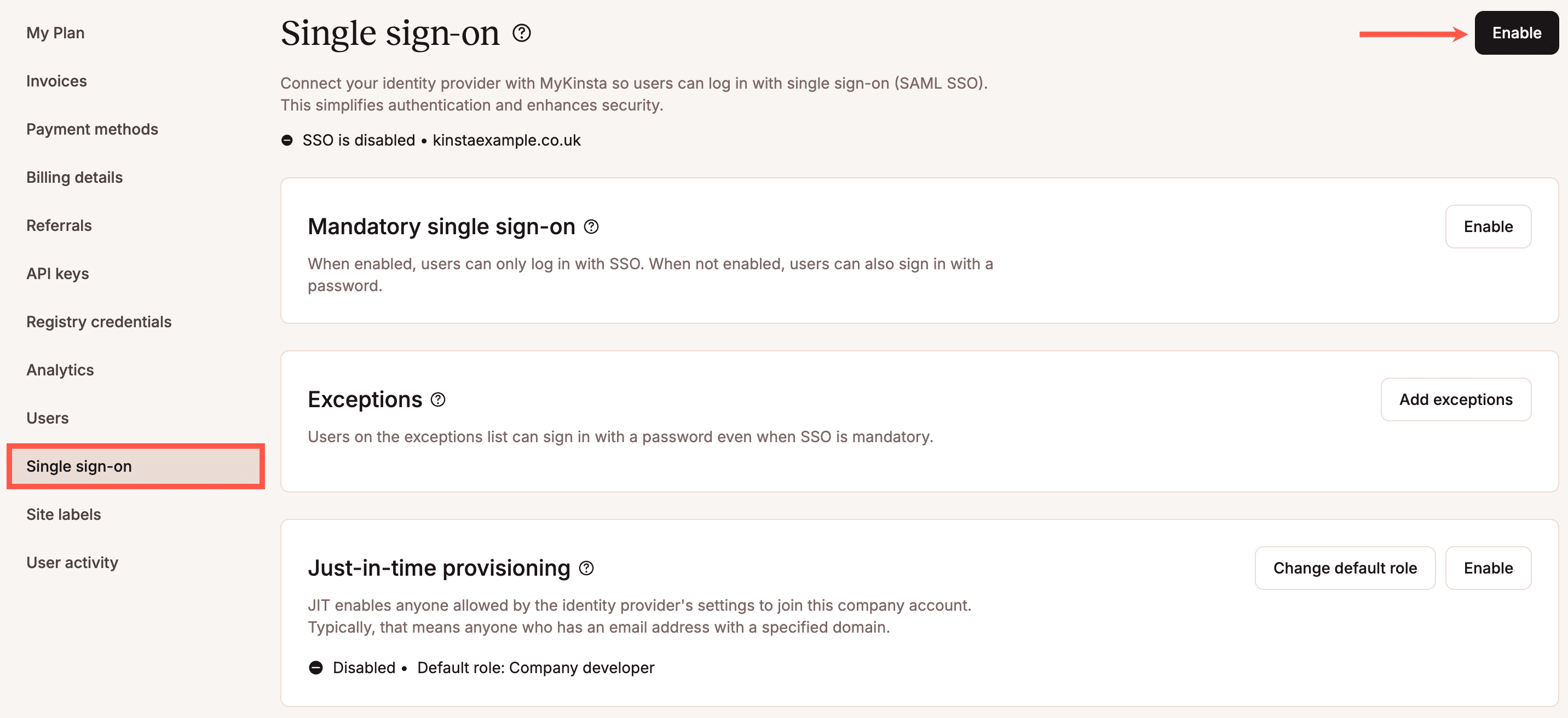
Centralized identity management and granular access control
By enabling Kinsta SAML SSO, agencies can combine centralized identity management with the MyKinsta multi-user dashboard.
The IdP acts as single source of truth. Here, agencies decide which team members can access their Company account in MyKinsta.
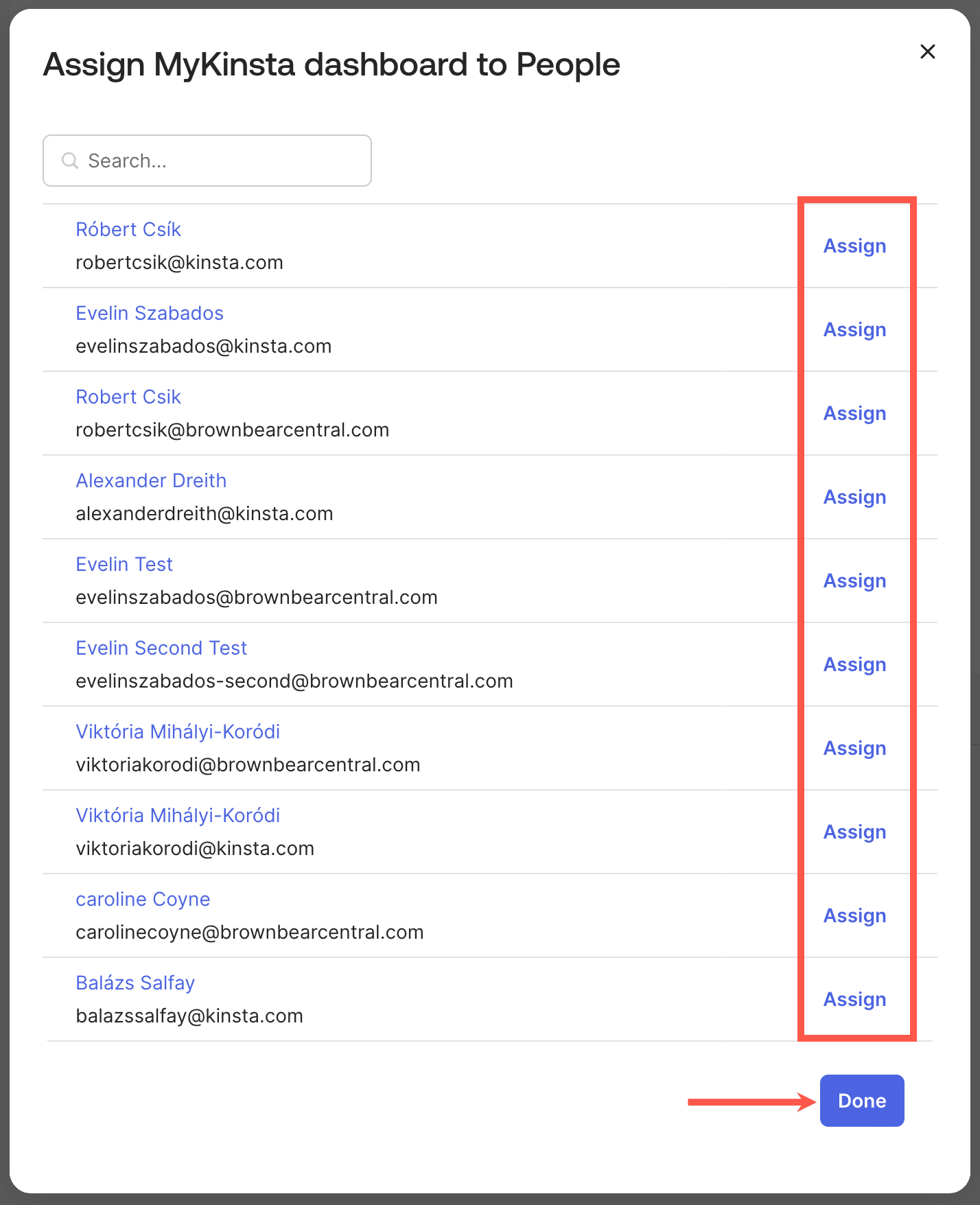
MyKinsta is your center for granular user control. When users log in to MyKinsta, they are assigned a default role. This can be modified later by the Company owner or administrators.
Enabling Kinsta SAML SSO enhances security by protecting your agency account with the IdP’s security policies, including multi-factor authentication and stringent password requirements. Furthermore, Company account users no longer need to use their login credentials, which minimizes the risk of credential theft.
Just-in-time provisioning with Kinsta SAML SSO
MyKinsta supports just-in-time (JIT) provisioning, which allows you to automatically create a new MyKinsta user account when a user logs in for the first time via SAML SSO.
When JIT provisioning is enabled, authorized users at the IdP can directly access MyKinsta without needing a manual invitation or a separate user account. This means authorized users only need an email address with your company’s domain to access your MyKinsta account.
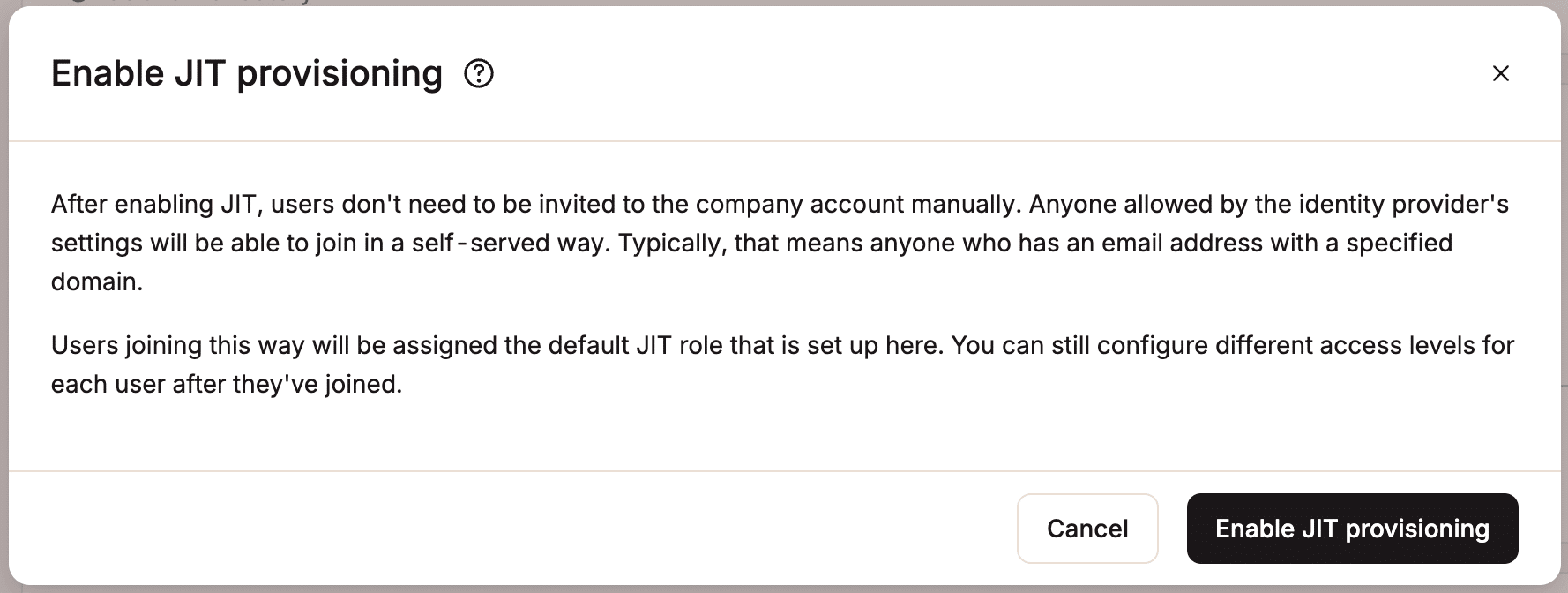
By default, team members who access MyKinsta via JIT provisioning are assigned the Company Developer role. Company owners and administrators can change a user’s role after they join or modify the default role for new JIT-provisioned users before the user joins.
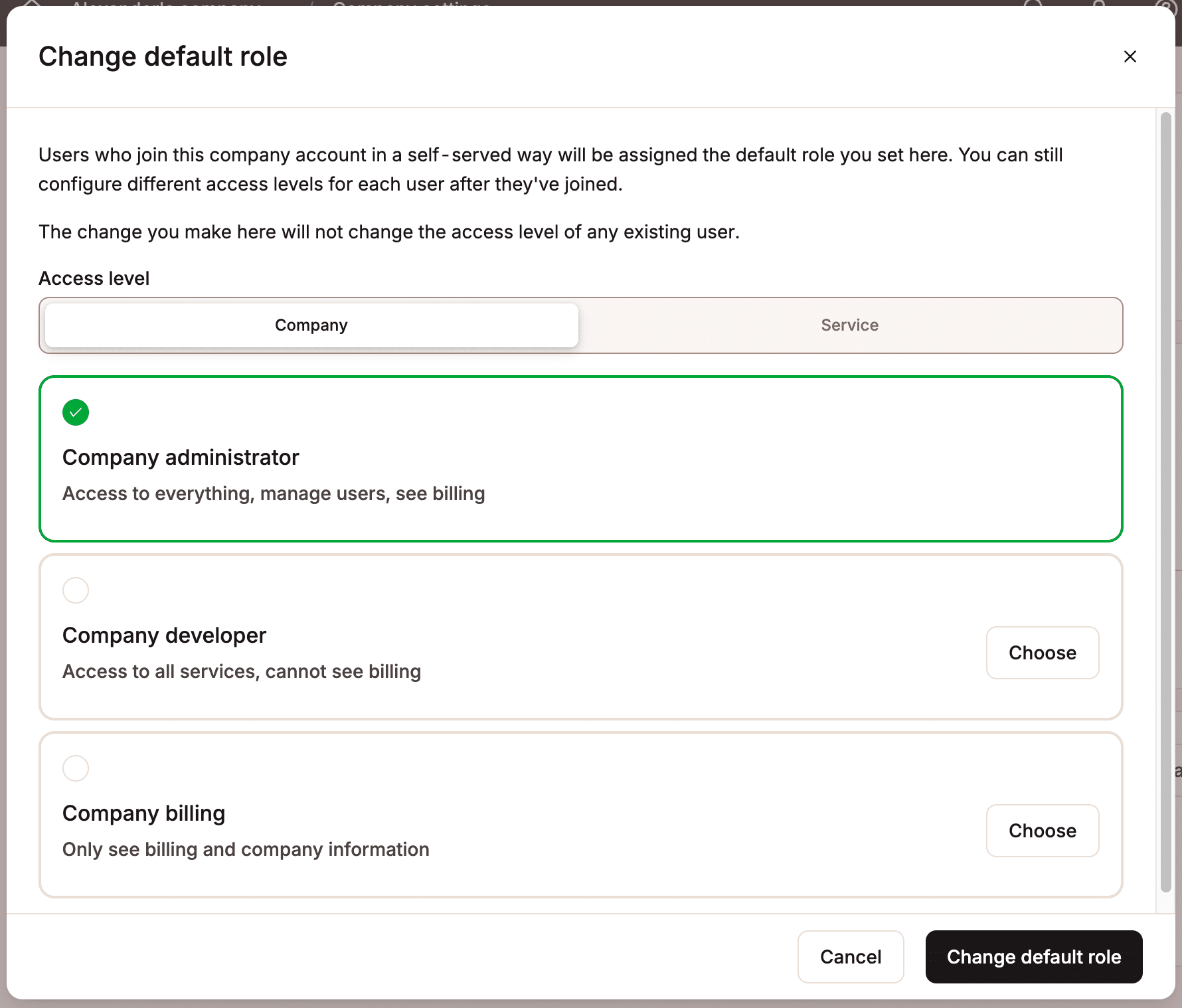
By automating the onboarding process, agencies and other organizations can significantly reduce the time and effort involved in onboarding and user management processes. This enables them to quickly respond to customer requests by scaling their team with minimal effort.
Effective deprovisioning
For an organization that adopts a zero-trust philosophy, it is essential to quickly and securely revoke access for users who leave the organization. Effective deprovisioning is also essential to ensure compliance with data security and privacy regulations.
When a user leaves the organization, the team administrator must delete the user’s account from the identity provider. However, when JIT provisioning is enabled, revoking a user’s access at the IdP is not enough, and you must remove them from both the IdP and MyKinsta. Simply removing them from the IdP will not work, as they will still be able to access your company account with their MyKinsta credentials.
Regulatory compliance
In order to comply with security regulations and obtain certifications such as SOC2 and ISO 27001, organizations must demonstrate that they have strict access control measures in place. Adopting Kinsta SAML SSO ensures compliance with these requirements because it guarantees that security policies are applied consistently across all connected services.
Kinsta SAML SSO is also compatible with regulations such as the GDPR, as it tracks access to personal data and ensures the respect of the principles of data minimization and timely revocation of access through rapid deprovisioning.
Summary
Kinsta’s SAML SSO authentication feature complements the multi-user capabilities of the MyKinsta dashboard. Agencies can streamline their workflows by combining granular user management for the company account with SSO identity and access management, automating much of the onboarding process and enhancing account security.
Account administrators can assign predefined roles to provisioned users, make exceptions to the IdP provisioning process, and block access to specific users. For agencies with dozens of developers and team members in different roles, Kinsta SAML SSO is essential for enhancing security, flexibility, and operational efficiency.
Curious to try our premium managed WordPress hosting? Try Kinsta for free today!

Carlo is a passionate lover of webdesign and front-end development. He has been playing with WordPress for more than 20 years, also in collaboration with Italian and European universities and educational institutions. He has written hundreds of articles and guides about WordPress, published both on Italian and international websites, as well as on printed magazines. You can find him on LinkedIn.