Add as a preferred source on Google
Two people asked us the same question during our bot traffic reality check live event, and we never got to either one live: does an llms.txt file actually stop AI from hammering your site?
We’ve sat with that question because the honest answer isn’t a quick yes or no. It’s that llms.txt was never built to do either of the jobs people hoped it would, and a lot of what’s been published about it this year has quietly led people to believe otherwise.
That confusion isn’t isolated. Across the questions we got, robots.txt, llms.txt, “AI crawlers,” and bot protection kept getting talked about as though they were four settings on the same dial, where turning any one of them gets you the same outcome. They’re not. They sit at completely different points in the request path, they’re enforced by completely different mechanisms (or, in one case, not enforced at all), and mixing them up is exactly how a site owner ends up doing everything “right” and still getting hammered.
And this isn’t just theory. In our AI & Bot Traffic Report, we found AI bot traffic on Kinsta-hosted sites has gone from 1 in 200 web visits a year ago to 1 in 31 today. A sign on the door doesn’t count for much once that many people are trying the handle.
TL;DR
- robots.txt is a request, not a lock. Reputable AI crawlers from OpenAI, Anthropic, Google, and Perplexity generally read and follow it. Some, historically including ByteDance’s Bytespider, haven’t.
- llms.txt doesn’t control access. It’s a content index for AI tools that choose to read it, not a permissions file. Adoption sits around 9–10% of sites, and the major AI crawlers largely aren’t fetching it anyway.
- Bot protection is the only layer that enforces anything. robots.txt and llms.txt work by asking nicely. Kinsta Bot Protection and Cloudflare’s AI Crawl Control are what actually block, challenge, or rate-limit a crawler that ignores your preferences.
Four layers, four jobs, one point of confusion
| Layer | What it actually does | Can it stop a bad actor? |
| robots.txt | States your preference to any crawler that bothers to read it | No |
| llms.txt | Hands AI tools a clean index of your content | No |
| AI crawlers | The bots making the requests | N/A (this is who you’re managing, not a control) |
| Bot protection (Kinsta / Cloudflare) | Detects, classifies, and acts on requests at the infrastructure level | Yes |
Once you see it laid out that way, most of what attendees asked answers itself. So let’s go layer by layer, starting with the one everyone already half-understands.
robots.txt
robots.txt, formalized as RFC 9309, tells crawlers which parts of your site you’d rather they skip. It has no technical enforcement, so it works purely because the crawlers reading it have decided, as a matter of policy, to comply.
The reassuring part is that the crawlers you’re most likely to care about, like OpenAI, Anthropic, Google, and Perplexity, all publish documented user-agents and honor standard directives.
The part that trips people up is assuming each company runs a single “AI bot.” They don’t. Most of them now split training from search, and that split is the single most useful lever in this entire article:
- GPTBot (OpenAI): trains foundation models. Disallow it and your content stops feeding future training runs.
- OAI-SearchBot (OpenAI): indexes pages for citation in ChatGPT search. Disallow it and you lose those citations, but training is unaffected.
- ClaudeBot (Anthropic): training.
- Claude-SearchBot (Anthropic): search indexing for Claude.
- Google-Extended: governs use in AI training and AI Overviews specifically. Blocking it does not touch regular Googlebot indexing or your normal search rankings.
- PerplexityBot: Perplexity’s answer-engine crawler.
So the real decision was never “let AI in or keep it out.” It’s do you want your content training a model, cited in an AI answer, both, or neither? robots.txt already lets you answer that question with precision. Most site owners just haven’t been asking it in those terms.
Here’s what that precision actually looks like in a robots.txt file. Say you want out of training entirely, but still want to show up when someone asks ChatGPT or Claude a question your content could answer:
User-agent: GPTBot
Disallow: /

User-agent: ClaudeBot
Disallow: /

User-agent: Google-Extended
Disallow: /

User-agent: OAI-SearchBot
Allow: /

User-agent: Claude-SearchBot
Allow: /
If you’d rather keep a specific section out of everything, training and search alike, you scope the disallow to a path instead of the whole site:
User-agent: GPTBot
Disallow: /premium-reports/

User-agent: ClaudeBot
Disallow: /premium-reports/
The catch is that compliance is a courtesy, not a requirement. A handful of crawlers have a documented history of ignoring disallow rules outright. There’s also a newer wrinkle: when someone asks ChatGPT or a similar assistant to read one specific page on their behalf right now, that single fetch doesn’t always behave like a crawl, and robots.txt logic doesn’t map cleanly onto it.
llms.txt
A lot of 2026 content has described llms.txt as either an access-control tool or an SEO trick. The honest answer is simpler and less useful than most coverage has suggested.
llms.txt is a plain Markdown file at your root that works like a table of contents for AI tools, pointing them to your most important pages so a model doesn’t have to parse a full rendered page to understand what you do. That’s the entire spec. It says nothing about what a crawler is or isn’t permitted to do.
Here’s roughly what one looks like:
# Acme Analytics

> Acme Analytics is a WordPress plugin for tracking site performance and uptime.

## Docs
- [Getting Started](https://example.com/docs/getting-started): Install and configure the plugin
- [API Reference](https://example.com/docs/api): Full REST API documentation

## Pricing
- [Plans](https://example.com/pricing): Current plans and feature comparison
Notice there is no Allow, no Disallow, no user-agent targeting, nothing that tells a crawler what it can or can’t do.
Here’s what the current evidence says:
- Adoption is thin. Roughly 9–10% of sites have one, even among the largest domains on the web, after well over a year of people telling each other to add it.
- The bots that matter mostly aren’t reading it. Traffic analysis across hundreds of millions of AI requests shows GPTBot, ClaudeBot, PerplexityBot, OAI-SearchBot, and Google-Extended overwhelmingly skip the file and go straight to crawling HTML.
- Google has said no, on the record. Google’s own search advocates have stated flatly that llms.txt isn’t used as a ranking or crawling signal, and have compared it, unfavorably, to the long-dead keywords meta tag.
- No major AI lab has committed to treating it as an access signal, for training or for search.
Where it does earn its keep is as a map for coding agents and developer tools, things like Claude Code or Cursor, that benefit from a clean, structured index of a docs site.
So, llms.txt will not stop your site from being scraped repeatedly. It’s a discovery aid, not a rate limiter, and not a gate.
AI crawlers
“AI crawler” gets used as a catch-all for at least three distinct behaviors, and conflating them is where a lot of bad decisions start:
- Training crawlers that periodically harvest content for a model’s training set: GPTBot, ClaudeBot, Google-Extended, Bytespider, CCBot.
- Search and answer crawlers that build the index an AI answer engine actually cites from: OAI-SearchBot, Claude-SearchBot, PerplexityBot.
- Real-time agent fetches, where a person asks an assistant to go read one specific page right now, and it does, on the spot.
The first two behave like classic crawlers and generally identify themselves with a documented user-agent, which is exactly what makes robots.txt based control possible in the first place. The third looks a lot more like a person clicking a link than a crawl, which is part of why some AI browsing tools now show up in server logs indistinguishable from ordinary visitors, and part of why blunt bot-blocking occasionally catches legitimate, human-directed activity in the same net.
This is also the shape of the point Daniel Pataki made during the webinar: most AI crawler traffic today isn’t malicious, it’s just relentless. It follows every link it finds, including every redundant URL variation a dynamic WordPress or WooCommerce page can generate, and ends up looping through what looks like an attack but is really just a bot that doesn’t know it’s already seen this page nine thousand times.
We go deeper on exactly why that specifically wrecks WooCommerce infrastructure in why WooCommerce sites are especially vulnerable to bot traffic.
The layer with actual teeth: bot protection
Once you accept that robots.txt is voluntary and llms.txt isn’t a control at all, there’s only one layer left that can act on a crawler that refuses to cooperate: bot protection, whether that’s Kinsta Bot Protection, Cloudflare’s tools, or something else entirely.
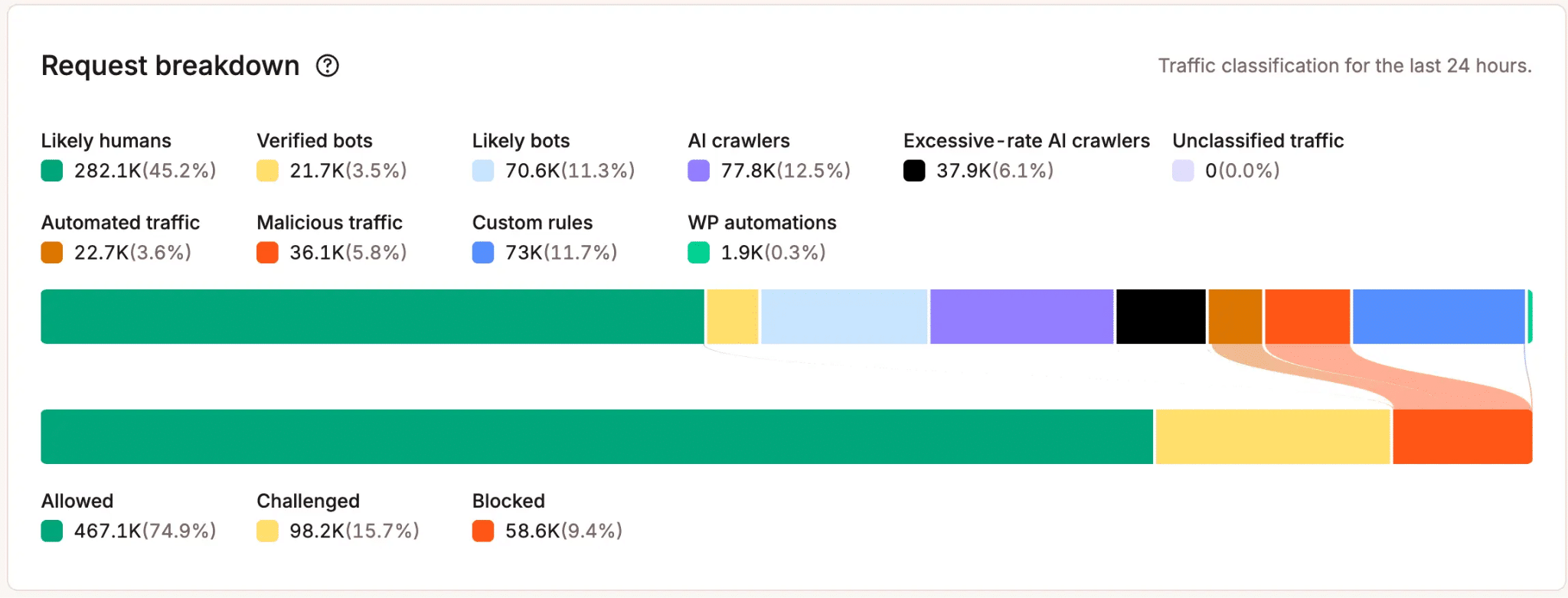
Cloudflare’s side of this has moved fast, but at Kinsta we take a narrower, WordPress-specific route to the same problem: a dedicated Block AI crawlers toggle that stops AI crawlers, including verified ones, without touching Googlebot or Bing, plus an excessive-rate AI crawlers classification that catches a bot that’s technically verified but is hammering your site far harder than a normal crawl ever would.
Laszlo Farkas, our Director of Engineering, put the underlying trade-off this way when we asked him to compare a managed tool to building your own rules from scratch:
If you have the expertise and the time to fine-tune this yourself, that’s probably the better choice for you. If you don’t, I think it’s better to use Kinsta’s, because it’s managed, fine-tuned for WordPress, and maintained for you.
For the fuller comparison of where Kinsta’s tool and Cloudflare’s each fit, see our guide to Kinsta Bot Protection vs. Cloudflare.
The questions we actually got, answered directly
“We want to embrace LLM crawlers but avoid abuse. Is there a reliable way to do this?” Yes, it’s the training-versus-search split, applied deliberately. Allow the search and answer crawlers if you want to be discoverable and cited. Use robots.txt to opt training crawlers out specifically, if that’s the part you object to. Then let bot protection catch volume-based abuse from anything, verified or not, that’s crawling harder than it should.
“We don’t want to block traffic since we want AI to surface our firm. What do we actually do?” Same answer, different framing. Being discoverable in AI answers and controlling resource strain aren’t in tension, because different bots handle each job. Challenge or block the training and high-volume crawlers if that’s your concern, and explicitly leave the search and answer crawlers open.
“Do content paywalls block AI bots from scraping that content?” Partially, and only against crawlers that behave like crawlers. A login wall stops a bot that respects normal page structure and lacks valid credentials, the same as it stops any anonymous human. It does nothing against AI tools that browse more like a real logged-out user, or that reach the same content through a cached copy, an RSS feed, or some other side door that never touches the paywall logic at all. Useful, additional, not a substitute for bot protection.
“Can we stop AI crawlers from looping through our WooCommerce store filters?” This is a caching and URL-structure problem wearing a bot-protection costume. Crawlers follow every link they encounter, and dynamic filter and sort parameters generate near-infinite distinct URLs for what is, to a human, the same page. Blocking those parameter patterns in robots.txt is a sane first move:
User-agent: *
Disallow: /*?*filter_
Disallow: /*?*orderby=
Where a crawler ignores it anyway, which some will, rate-based rules in bot protection are what actually break the loop.
Where this leaves you
Stop thinking of these four as competing options and start treating them as a stack, applied in order:
- robots.txt states your intent, splitting training crawlers from search and answer crawlers based on what you actually want from each.
- llms.txt, if you bother with it, is a courtesy to the tools that read it, not a lever for reducing or controlling crawl volume.
- “AI crawlers” covers training bots, search bots, and live agent fetches, and each one may deserve a different answer.
- Bot protection is where enforcement actually lives, because it’s the only layer here that can act on a request that ignores everything you’ve asked for.
If the question on your mind is less “how do I control this” and more “how do I get found by it,” our guides to AEO for WordPress and GEO vs. AEO vs. SEO pick up where this one leaves off. To explore the controls covered here, see Kinsta Bot Protection.