Managing complex WordPress sites means dealing with plugin-heavy architectures, thousands of concurrent users, and clients who expect consistent performance. When you handle dozens of high-traffic builds for enterprise clients, standard hosting infrastructure breaks down.
Kinsta provides an infrastructure built for developer-led teams handling those workloads. This post explains how containerized hosting, enterprise developer tools, and powerful Cloud infrastructure help agencies support complex builds without the overhead of server administration.
When standard hosting can’t handle complex WordPress builds
Complex WordPress builds share specific characteristics that distinguish them from standard sites. For example, you might manage:
- WooCommerce stores with thousands of products and custom taxonomies
- Membership platforms serving tens of thousands of users
- Publishing sites handling millions of monthly pageviews
These builds often rely on many plugins, custom post types at scale, and traffic patterns that change from hour to hour. To keep them fast and stable, you need predictable performance and full control over your development workflow.
Many managed hosts simplify their platforms by removing essential developer tools. That may work for beginners, but it limits agencies that depend on SSH access, WP-CLI, Git-based deployments, or custom caching rules. When those tools aren’t available, you lose time working around platform constraints instead of delivering features.
Shared hosting environments introduce another challenge: unpredictable performance. Multiple sites compete for the same resources, so a traffic spike or resource-heavy process on one site can slow down every other site on the server. This “noisy neighbor” effect makes it difficult to guarantee consistent performance for high-value clients.
Server self-management and missing developer tools
To avoid shared hosting limits, many agencies turn to virtual private servers (VPS). These VPS environments provide full control, but they also create additional maintenance work that can distract from development.
You must keep the server up to date, renew SSL certificates, optimize databases, and apply security patches. Over time, this adds technical debt and increases the risk of configuration issues.
Developers also expect certain tools as part of their daily workflow: SSH, WP-CLI, Git integration, and staging environments. When these tools require manual installation or custom setup, they slow down delivery and increase the chance of mistakes. The more time you spend maintaining your servers, the less time you spend shipping work to clients.
Kinsta’s developer tools: built for professionals
Kinsta provides developer-ready tools on every site, without limitations or extra setup.
SSH and WP-CLI
SSH access comes standard across all Kinsta plans, giving you command-line control over your WordPress installations without restrictions.
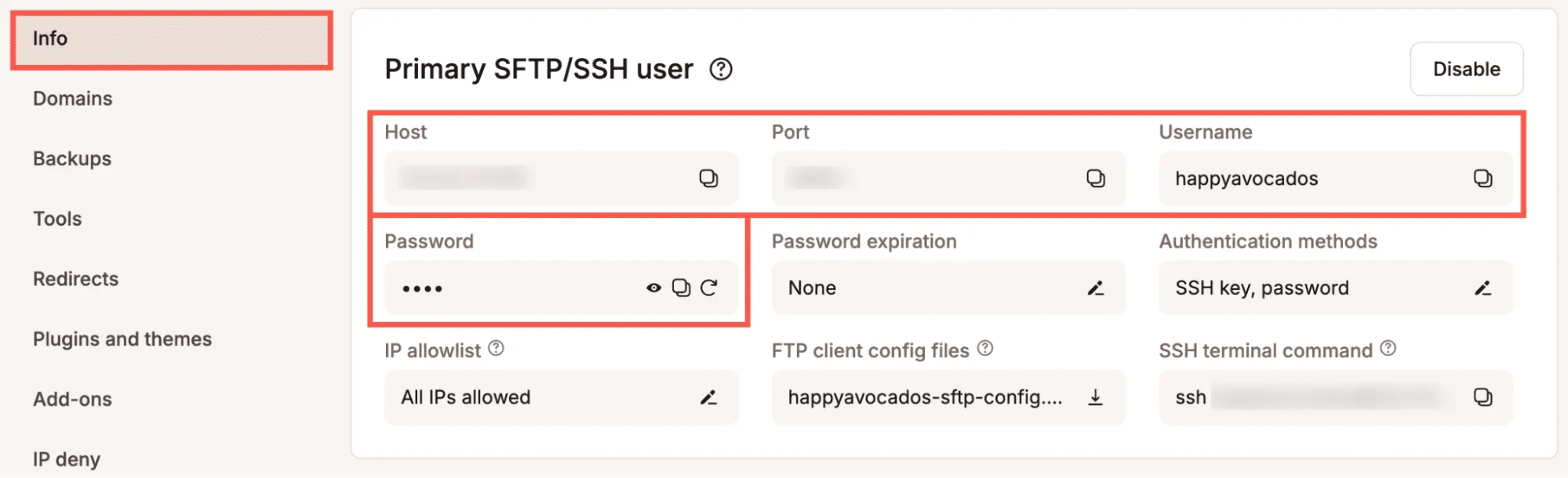
This access supports the workflows that developers expect, including running custom scripts, managing files through secure connections, and executing maintenance tasks without relying on web-based interfaces.
WP-CLI is also pre-installed on every Kinsta server, ready for use the moment you connect via SSH. This eliminates the setup time and compatibility issues that come with installing WP-CLI manually on other hosting platforms.
For individual site management, WP-CLI provides powerful commands for common tasks. For example:
# Update all plugins on a single site
wp plugin update --all

# Check which plugins have available updates
wp plugin list --update=available

# Update specific plugins
wp plugin update woocommerce akismet

# Verify WordPress core file integrity
wp core verify-checksums

# Clear all caches (requires Kinsta MU plugin)
wp kinsta cache purge --all
If you need to run operations across multiple sites, WP-CLI supports batch operations through command-line scripting. However, MyKinsta’s built-in bulk actions could provide enough for most agency workflows.
Git integration for modern deployment workflows
Git support comes built into Kinsta’s infrastructure without requiring plugins or workarounds. You can connect to your sites using SSH and pull from repositories hosted on GitHub, GitLab, Bitbucket, or any Git server you maintain.
Authentication for private repositories and two-factor authentication work through a typical Git credential process. You generate SSH keys or personal access tokens on your Git hosting platform, then configure them on your Kinsta sites. This approach maintains security without adding complexity to your deployment process.
DevKinsta for local development and site sync
DevKinsta lets you create local WordPress development environments that mirror your production infrastructure. You can spin up local sites with matching PHP versions, database configurations, and server settings.
This consistency between local and production environments reduces deployment issues caused by configuration differences.
The tool also lets you pull production sites to your local machine for development or testing. You make changes locally, verify they work as expected, and push updates through your deployment workflow. This approach keeps your production environment stable while you develop new features or troubleshoot issues.
Performance tools for complex WordPress sites
Complex WordPress builds need more than developer access. They need tools that keep them fast under heavy load.
Redis object caching for database-heavy sites
Object caching becomes critical when your WordPress sites make repetitive database queries. For example, a WooCommerce store that serves thousands of product queries constantly queries the database to display product information, check inventory levels, and calculate pricing.
Redis caching reduces database load by storing query results in memory. When WordPress needs to retrieve information, Redis serves it from cache rather than hitting the database. This reduction in database queries improves response times and allows your sites to handle higher traffic volumes without performance degradation.
Kinsta offers Redis as an add-on that integrates directly with your WordPress installation, accessible from a site’s Add-ons screen within MyKinsta.
For sites using Redis object caching, you can monitor cache performance through WP-CLI:
# View Redis cache statistics
wp redis info

# Check cache hit rate
wp redis status
These insights help you verify cache usage and optimize performance.
Kinsta APM for diagnosing slow queries and plugins
Kinsta APM (Application performance monitoring) helps you identify why sites run slowly without guessing at the cause. The APM functions without requiring external services or New Relic subscriptions. You enable this through the MyKinsta dashboard:
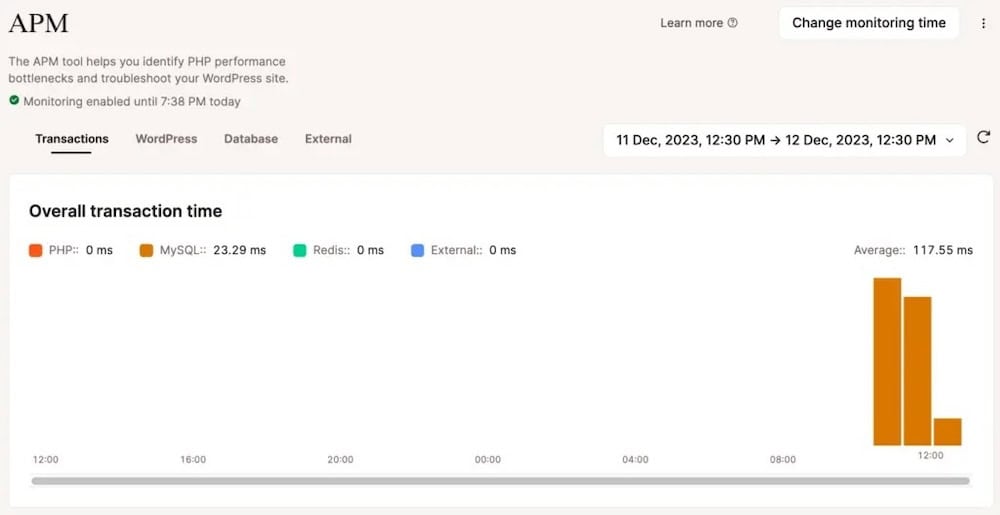
The APM tool identifies slow database queries, plugin conflicts, and theme inefficiencies that impact page load times. As a result, you can see which specific functions consume the most execution time, which queries take longest to complete, and which external API calls create delays. This visibility makes troubleshooting straightforward rather than speculative.
Cloud infrastructure designed for scale
Every WordPress site on Kinsta runs inside an isolated software container with dedicated CPU, memory, and system resources. This eliminates the noisy-neighbor problem and ensures predictable performance.
The platform is powered by a powerful cloud infrastructure that provides fast global routing, automatic scaling, and strong resource isolation. Agencies get enterprise-grade performance without managing servers.
Neuralab, a development agency that manages complex WordPress builds, leverages this scalability by improving load times over its previous hosting and achieving greater speed than other server architectures.
Scaling and PHP performance
Complex WordPress sites require infrastructure that can handle both heavy workloads and sudden traffic surges. Kinsta supports this through a vertical scaling model that increases the resources available to each site.
Vertical scaling adds more CPU, memory, and PHP processing power to the site’s container. This helps with tasks such as image processing, large imports, resource-intensive plugins, and database-heavy operations.
You can also increase PHP workers and memory allocation using the PHP Performance add-on. This allows your site to handle more simultaneous PHP requests, improving performance during high-traffic periods without requiring architectural changes to WordPress itself.
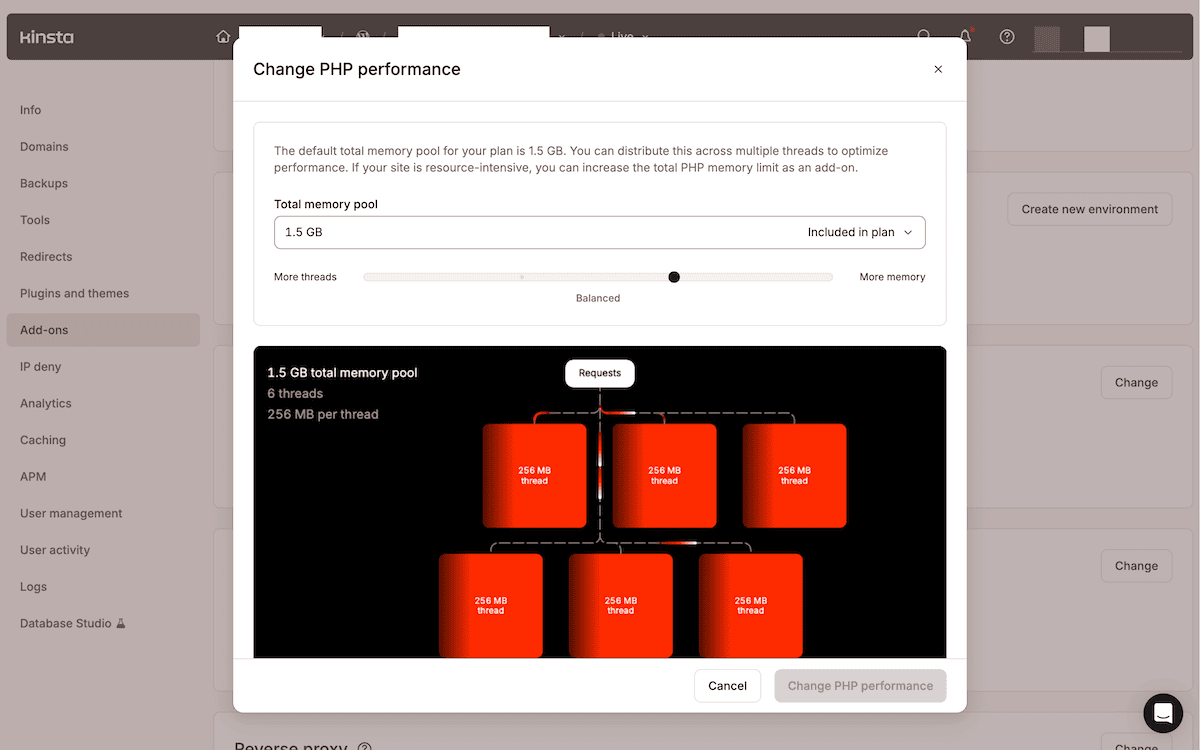
Kinsta’s underlying infrastructure also provides enough capacity headroom to absorb traffic spikes without degrading performance, even though WordPress sites do not use multiple load-balanced containers.
Premium staging and selective pushing
Kinsta offers two staging environment types: standard staging, included with all plans, and premium staging available as an add-on.
Standard staging environments provide basic resources suitable for testing theme changes, plugin updates, and content modifications. However, premium staging matters when you need to performance-test functionality under production-like conditions or when your development workflow includes running automated tests that require substantial resources. Complex builds and high-value client sites often benefit from premium staging.
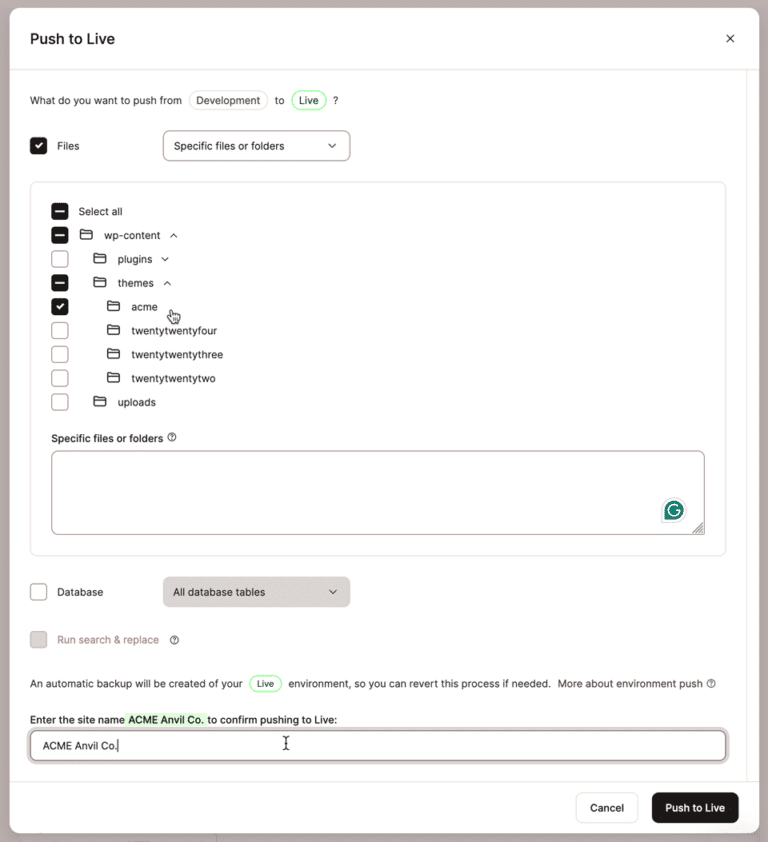
You can selectively push either file, database tables, or everything from staging to production. This selective deployment gives you precise control over which changes move to production, reducing the risk of an unintended update affecting your live site.
Managing agency portfolios with MyKinsta and the Kinsta API
MyKinsta’s functionality has several aspects that enable you to manage multiple client sites. For example, bulk actions allow you to perform common tasks across multiple sites without needing to log in to individual WordPress admin panels.
The plugin and theme update actions show you the exact components each site has installed, so you can make informed decisions about which updates to apply. This visibility helps you avoid updating plugins on sites where they might cause conflicts.
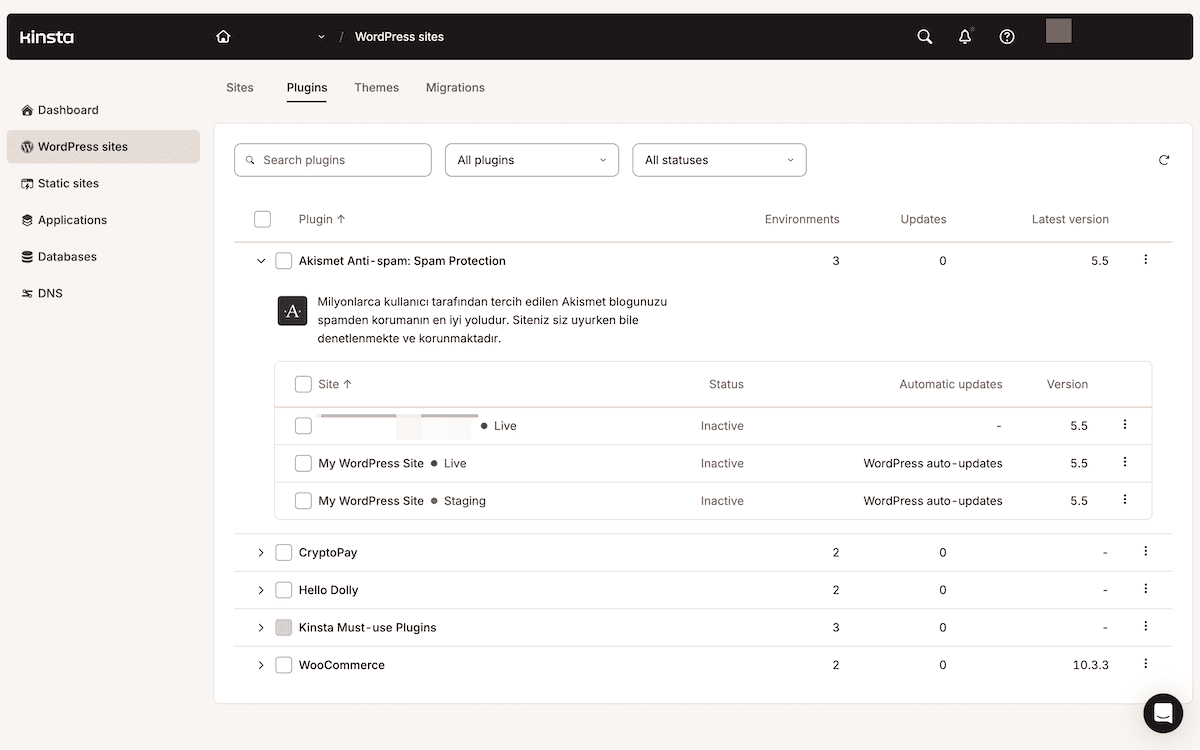
For agencies managing dozens or hundreds of sites, these simple bulk actions can save hours of repetitive work.
If you need programmatic control beyond what the MyKinsta interface provides, the Kinsta API offers endpoints for building custom bulk operation tools. Agencies such as Straight Out Digital use the API to manage hundreds of sites with custom internal dashboards and automation workflows.
Conclusion
Complex WordPress sites need infrastructure that keeps them fast, scalable, and reliable while supporting modern developer workflows. Kinsta delivers this through containerized hosting, advanced performance tools, and a powerful cloud foundation that eliminates maintenance overhead.
If you’re ready to see how Kinsta supports complex WordPress builds, explore our agency hosting solutions designed for developer-led teams.