Add as a preferred source on Google
Most guides about AEO (Answer Engine Optimization) for WordPress tell you to structure your content better, add schema markup, and write clearer answers. That advice is not wrong. But it misses the layer that determines whether any of that work gets seen.
AI systems retrieve, parse, extract, and synthesize content in real time. That process depends less on how well your article is written and more on whether the page can be reliably fetched, rendered, and read by a machine. Server response time, caching configuration, JavaScript rendering, CDN rules, and bot access settings are the variables that determine whether an AI crawler can reach your content at all.
While monitoring how AI bots interact with WordPress sites at the infrastructure level, the most common failure we see at Kinsta is a site that can’t be reliably retrieved, not missing schema or poorly structured content.
That’s the lens this guide uses. The content side matters, and we cover it fully. But the infrastructure side is where most WordPress sites are quietly losing ground and where Kinsta has something specific to say.
AEO vs. SEO vs. GEO: Understanding the difference
AEO, SEO, and GEO (Generative Engine Optimization) are terms often used interchangeably and sometimes treated as completely different disciplines. Neither framing is quite right.
We have a detailed guide explaining the difference, but the short version is that SEO gets your pages ranked in traditional search results. AEO gets your content extracted as a direct answer in featured snippets, voice results, and AI Overviews. GEO is about being cited by generative AI systems like ChatGPT, Perplexity, and Gemini.
The most important thing is that none of these three is a separate strategy.
“There’s a lot of noise around these acronyms, but the basics haven’t changed. You still need to be crawlable (SEO), be clear (AEO), and be trusted across the web (GEO). You still need to write for humans and machines. The difference now is that it’s not just about rankings, it’s about whether your content can be extracted and reused by AI. If you get this right, you’re already most of the way there. — Antonio Tinoco, SEO Team Lead at Kinsta”
Why WordPress is both an advantage and a trap
WordPress produces clean, well-structured HTML out of the box. Its category and taxonomy system maps naturally to the topic clusters AI engines favor. It has a plugin ecosystem that has moved fast to support AEO-specific needs. And because WordPress powers over 40% of the web, AI engines crawl installations of the CMS constantly, so we can say they know how to read it.
That’s genuinely useful, but it also creates a false sense of security. Because WordPress handles so much automatically, site owners often assume they’re covered. They install Yoast, see the green circle, and move on. That’s not enough anymore.
The pillars that make a site AEO-ready go well beyond what SEO plugins handle by default. For example, specific schema types, AI-friendly content formatting, llms.txt files, AI crawler management, and a technical foundation that can handle aggressive bot traffic without degrading.
Let’s go over these pillars one by one.
Pillar 1: Retrieval-ready content
AI engines don’t read a page the way a human does. They don’t skim the intro, appreciate the storytelling, or pick up on an implied conclusion. They extract text based on the HTML structure, like headings, paragraphs, and lists, and how those elements relate to each other.
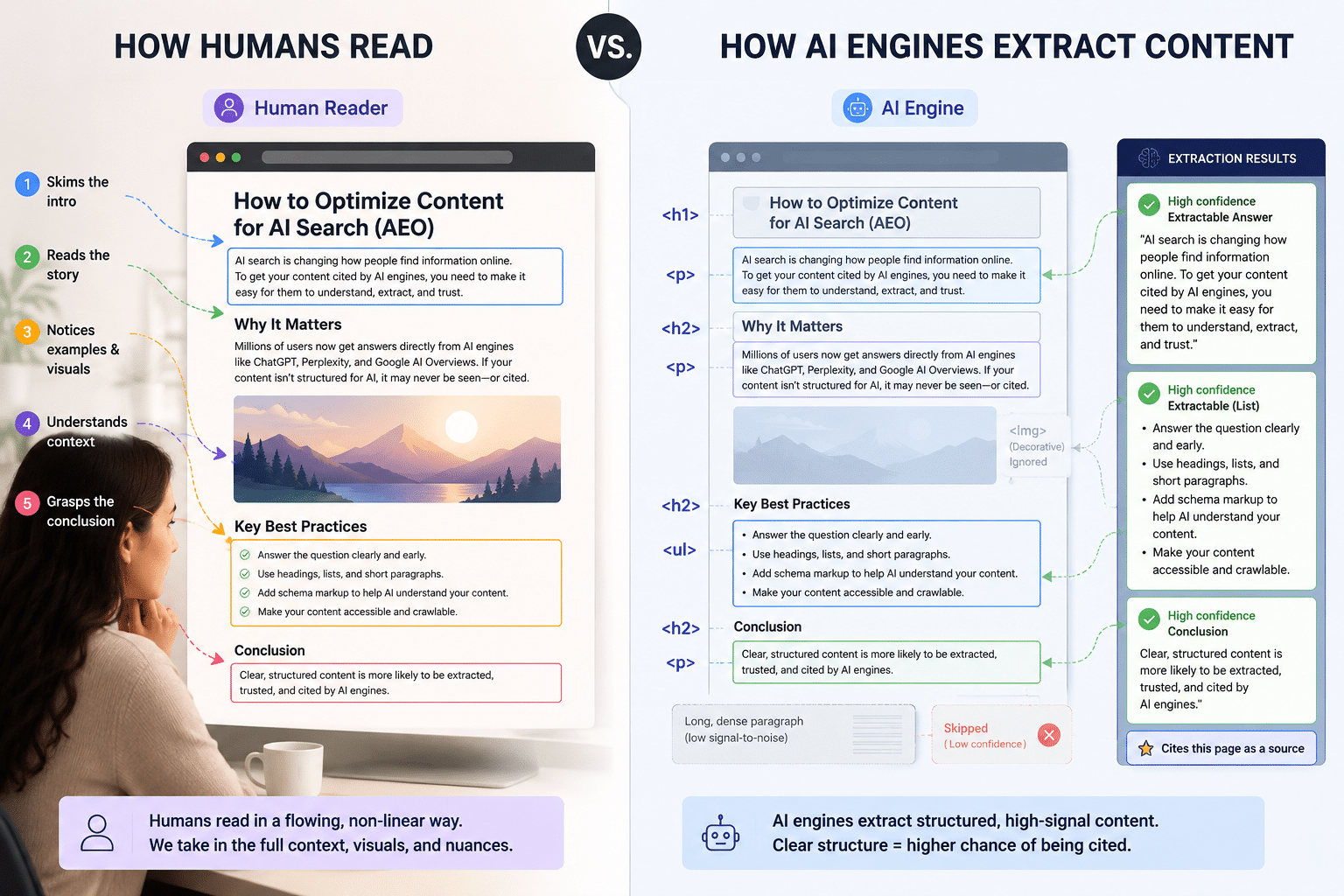
Think about what AI needs to do: someone asks a question, it scans your page for a clear, quotable answer, and decides whether it’s confident enough to cite you. If the answer is buried halfway down a dense paragraph, the AI either misses it or picks an easier source.
As an example, let’s look at two different versions of the same content:
The vague version: “When we talk about featured snippets, there’s a lot to consider. Google has been evolving how it surfaces information for years, and understanding how answers get selected requires looking at several factors, including content structure, relevance signals, and how questions are phrased in your headings.”
The extractable version: “A featured snippet is a short excerpt Google pulls from a webpage to answer a query directly in search results. To appear in one, your content needs to answer the question clearly, early, and in plain language.”
The second version is quotable. The first requires interpretation. AI systems favor the second not because it’s more optimized, but because the answer is up front and unambiguous.
Here’s how to apply this across your content:
- Start with the answer, then expand. The first one or two sentences after each subhead (usually an H2 tag) should state the answer directly. AI systems prioritize content that appears early on the page.
- Write headings as questions people actually ask. “What Is Answer Engine Optimization?” beats “Overview.” When someone asks ChatGPT, “What is AEO?”, a heading that mirrors that question is a strong alignment signal.
- Keep paragraphs short. One to two sentences. Long paragraphs contain multiple ideas, and AI systems can’t always determine which sentence is the actual answer. Short, self-contained blocks extract cleanly.
- Use tables for comparisons, lists for steps. Both formats are structured in a way that flowing prose isn’t. AI Overviews pull list and table content frequently because the format already does the organizational work.
- Don’t hide content behind interactive elements. AI crawlers only read what’s in the HTML when the page loads. They don’t click or expand anything. So if your FAQ answers live inside accordion blocks or tabs, make sure the answer text is still present in the page’s HTML, not just visible after a user interaction.
Pillar 2: Machine-readable structure
Schema markup (JSON-LD structured data) is how you explicitly tell AI systems what your content is, using a vocabulary they’re built to read. Instead of the AI guessing that your page answers questions, you’re declaring it directly.
Without structured data, AI systems work harder to understand your page. And when they’re processing thousands of sources, they consistently choose the one that makes their job easier.
For example, if your competitor’s FAQ page has the FAQPage schema, it may often win the citation over your better-written page with no schema.
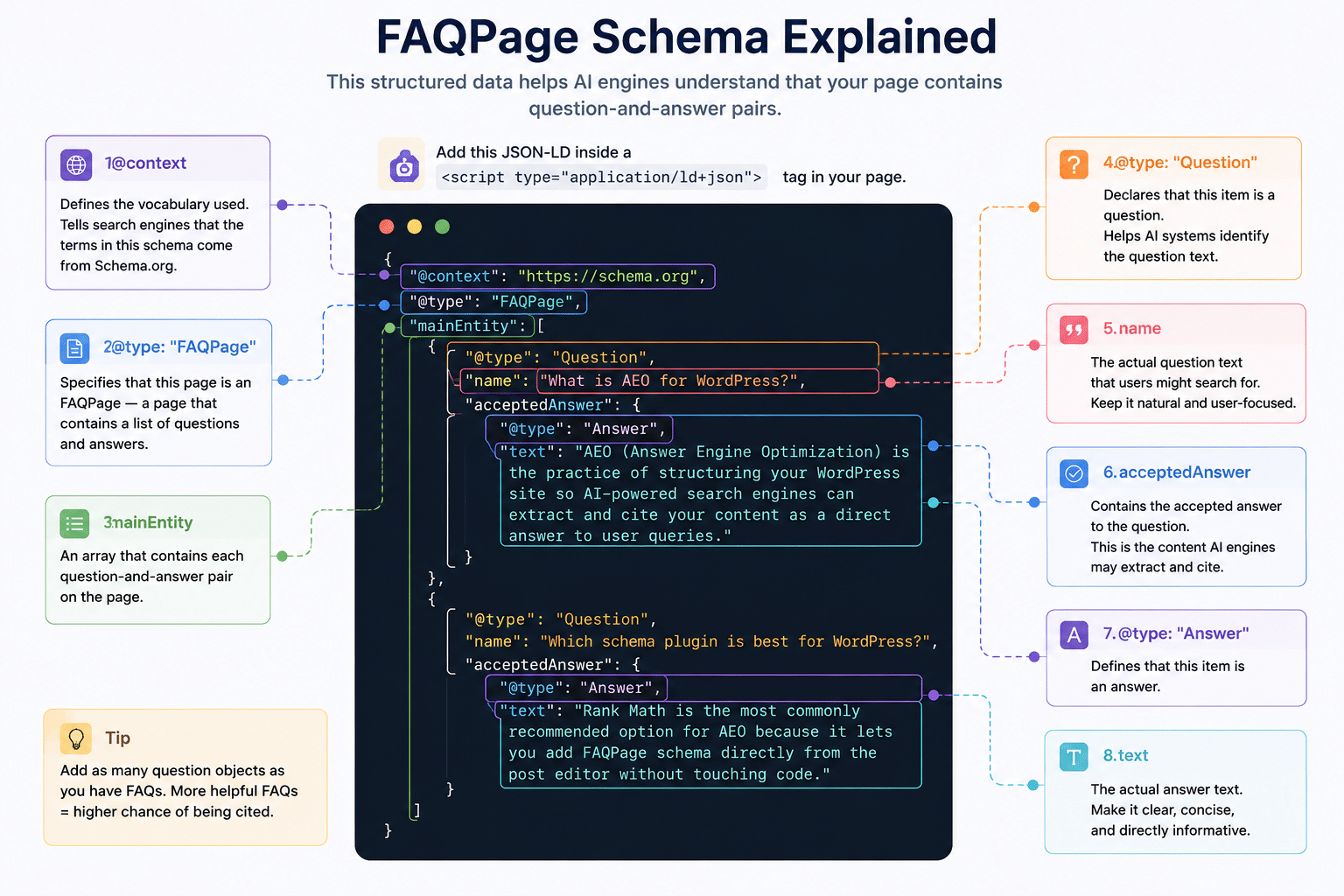
The schema types that matter most for AEO are:
- FAQPage marks up specific Q&A pairs. It’s a high-impact schema for AEO as pages with it are significantly more likely to appear in AI Overviews.
- Article declares the content type, author, publish date, and last-updated date. These are core trust signals.
- HowTo is powerful for step-by-step content. The steps are declared explicitly in the structured data, so AI systems don’t have to interpret your formatting.
- Organization establishes your brand as a recognizable entity with a name, logo, website, and social profiles. AI systems build models of entities, not just pages. Organization schema feeds that model directly.
For WordPress, the Rank Math plugin has the most straightforward schema setup. For custom JSON-LD, the WPCode plugin lets you add schema markup to specific pages without modifying theme files.
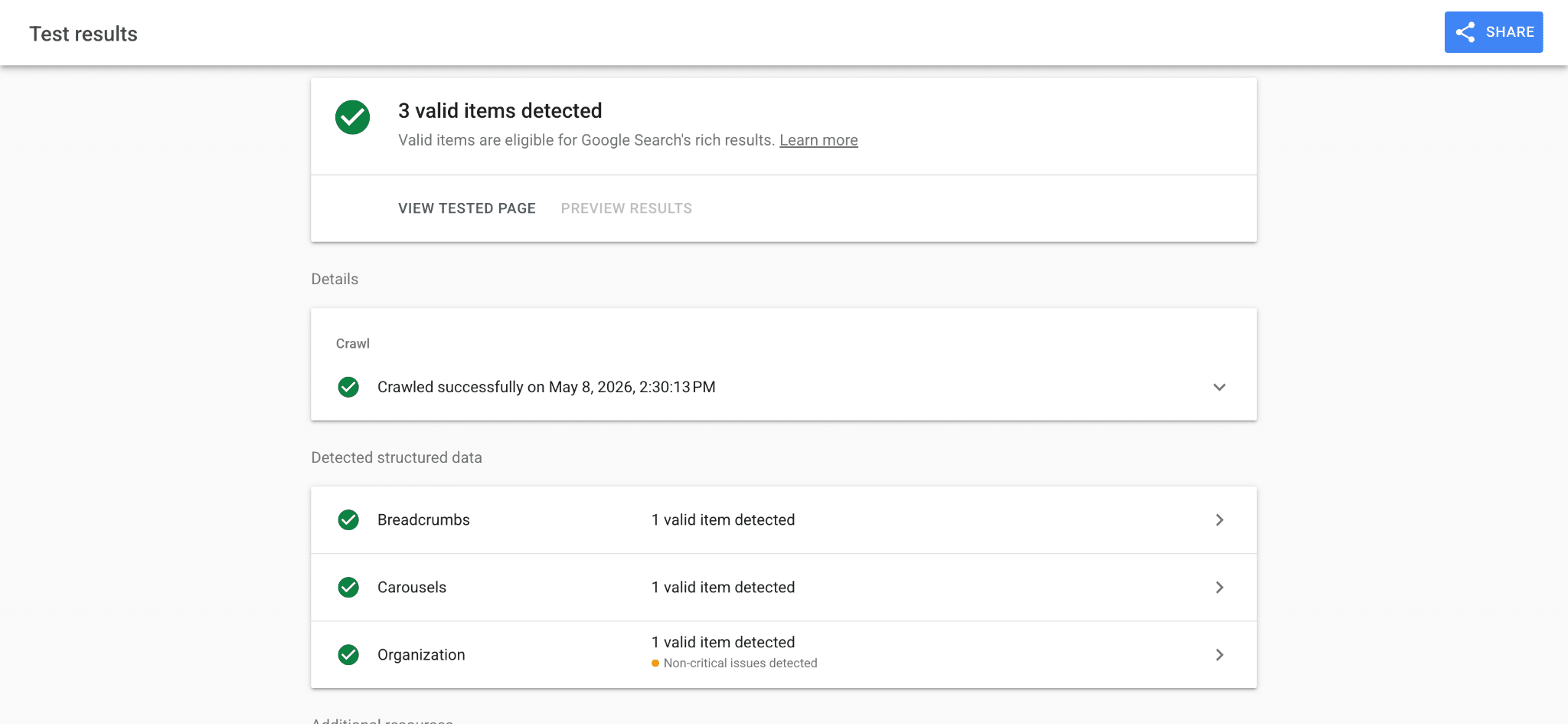
You can run the page through Google’s Rich Results Testing tool to see the types of Schema your post is eligible for.
Pillar 3: AI content signaling with llms.txt
The plain text file llms.txt lives at your domain root, and it’s written specifically for AI systems. Where robots.txt tells crawlers what they can access, llms.txt tells AI systems what’s actually worth reading.
The concept was proposed by Jeremy Howard of Answer.AI in 2024 and has since been adopted by companies like Anthropic, Cloudflare, and Stripe. It’s not an official standard yet, but adoption is growing fast enough that getting it in place now is worth the hour it takes.
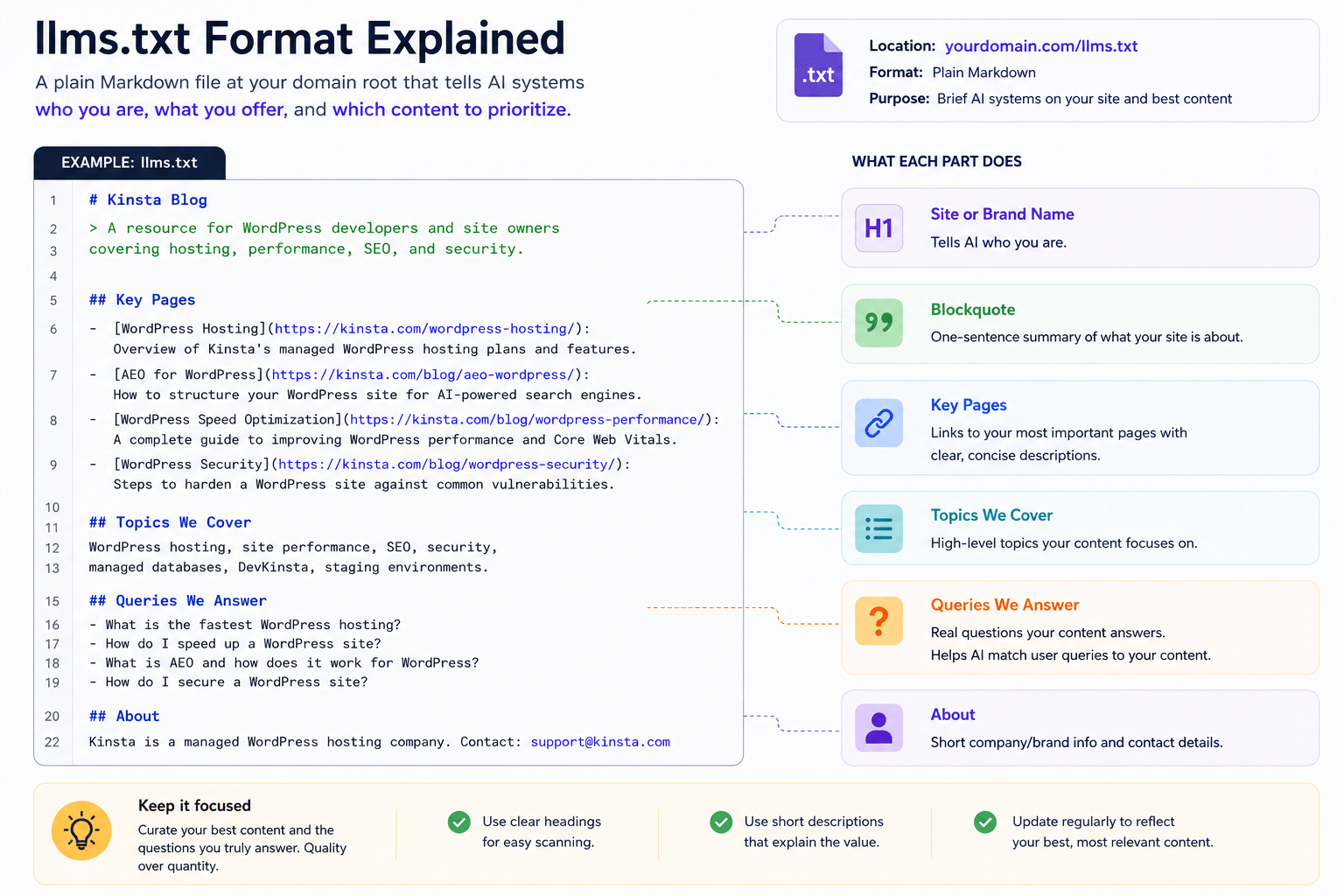
How to add llms.txt in WordPress
There are three practical ways to add an llms.txt file to a WordPress site:
- Using Yoast SEO (easiest if you already have it). As of June 2025, Yoast includes built-in
llms.txtgeneration in both free and premium versions. Yoast generates the file automatically based on your content. - Using the Website LLMs.txt plugin. This plugin has over 30,000 active installs and is the most purpose-built option for WordPress. Once activated, it automatically generates both
llms.txtandllms-full.txtat your domain root. - Manually via FTP or File Manager. Create a plain text file named
llms.txt, write it in the format above, and upload it to your site’s root directory (usuallypublic_html) via FTP or your hosting file manager.
How to verify llms.txt is working
Visit yourdomain.com/llms.txt in your browser. You should see your file rendered as plain text. For example, the image below shows that of Perplexity.ai:
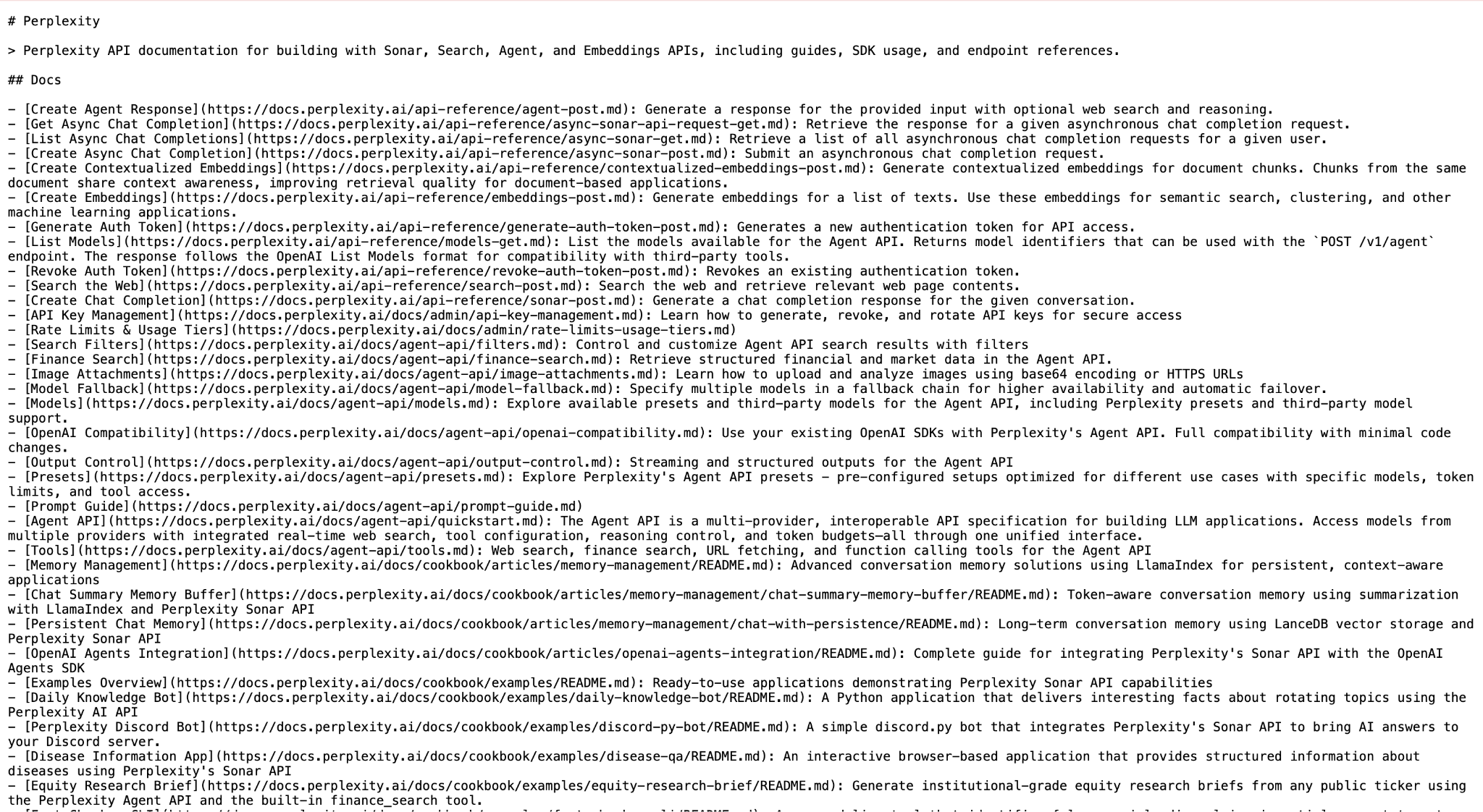
If you get a 404 error, your server is blocking the display of the file. Make sure to clear your cache first, and if it still reports 404, check whether a caching plugin or your CDN is intercepting that URL.
Pillar 4: Crawl accessibility and AI bot governance
AI search engines send their own crawlers, separate from Googlebot. These bots read your content to power AI-generated answers. The main ones are GPTBot (OpenAI), ClaudeBot (Anthropic), PerplexityBot, and Google-Extended (Gemini).
Your robots.txt file controls which of these can access your site. If you’ve never added explicit AI crawler directives, you might be accidentally blocking them. And if they can’t crawl you, they can’t cite you.
If you use Cloudflare, you may want to be sure that AI crawler access is not disabled. Check your Cloudflare Bot Fight Mode settings specifically.
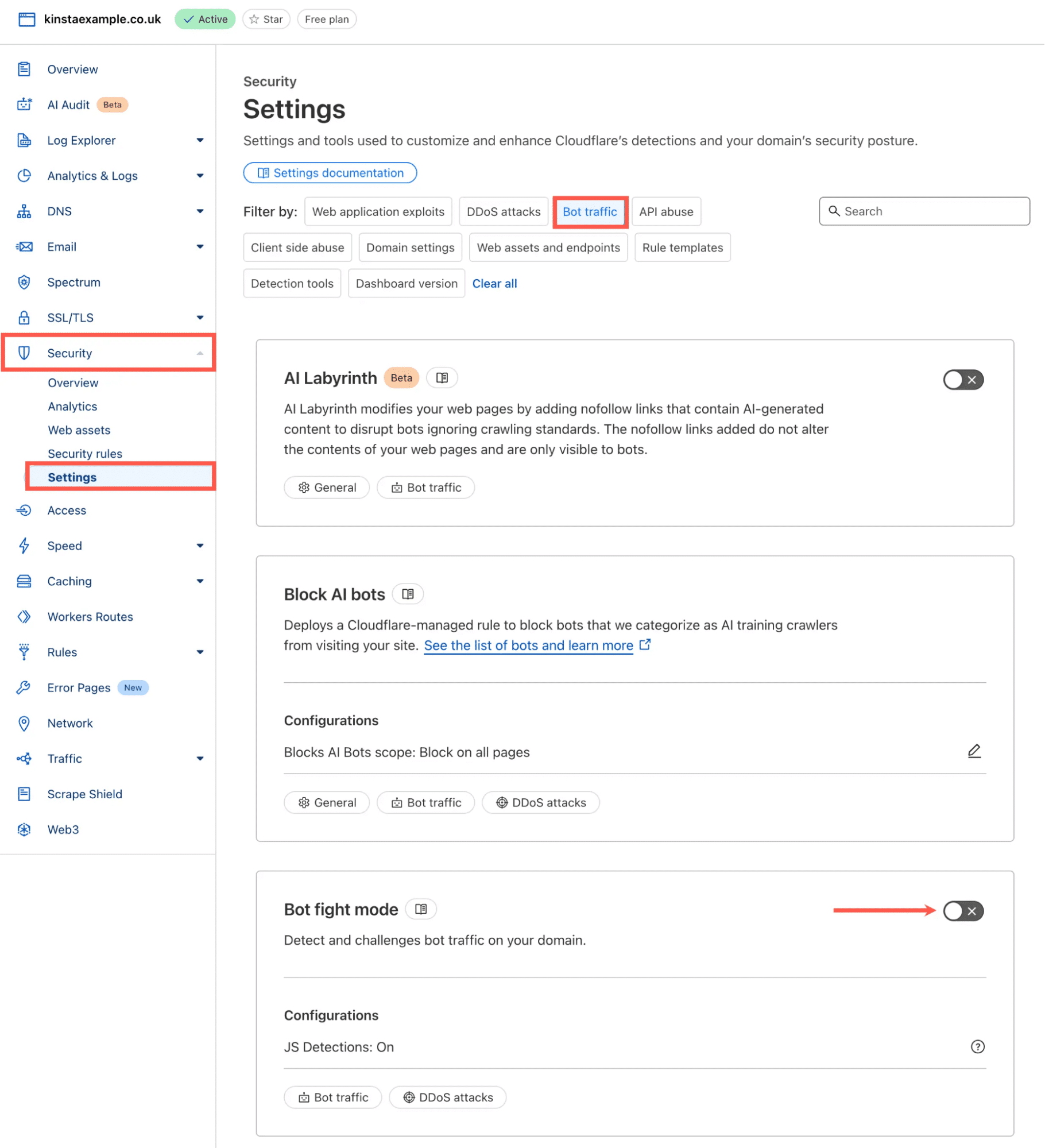
Security plugins are another common culprit. Some add broad bot-blocking rules designed for spam bots that end up catching AI crawlers too. If you’re running aggressive bot filtering, verify that GPTBot and PerplexityBot aren’t being flagged.
The more nuanced approach is to distinguish between search-oriented AI bots, which power answer results and can drive referral traffic, and training-only bots, which scrape content for model training without sending traffic back. You can allow one while blocking the other. Kinsta customers can do this in MyKinsta via the Bot protection tool.
Pillar 5: Infrastructure reliability
This is the pillar that determines whether everything else in this guide actually works. It’s also the one most AEO advice skips entirely.
AI systems don’t just rank pages, they retrieve them. That retrieval process is active and time-constrained. When a user asks ChatGPT a question, the system sends a bot to fetch relevant pages, parse the HTML, extract the answer, and synthesize a response.
That entire process has a time budget. Pages that respond slowly, return errors, or require JavaScript execution to reveal their content don’t make the cut. The bot moves on, and your content doesn’t appear in the answer. This is not because it wasn’t good enough, but because it wasn’t reachable fast enough.
What we observe at the infrastructure level
Across Kinsta-hosted WordPress sites, the pattern is consistent: faster, more stable environments attract more frequent and more complete AI crawls. Slower sites get fewer visits, fewer indexed pages, and fewer citations as a direct result.
The bots are working through a priority queue, so well-performing sites get revisited regularly, while sluggish ones fall down the list.
This means your hosting isn’t a background concern for AEO: it’s a primary variable. A slow server response time affects every other optimization in this guide.
The WordPress-specific failure points
- Plugin bloat. Every active plugin adds execution overhead to every page request, including requests from bots. A WordPress installation running 30 or more plugins is likely to generate significant server load on every crawl. You should audit your plugin list and remove anything you don’t actively use. The performance improvement is immediate and directly affects how thoroughly AI crawlers can traverse your site.
- Heavy themes. A theme that loads multiple external script files, large CSS frameworks, and web fonts to render a blog post wastes crawler time on assets that bots don’t use and can’t render. From a retrieval standpoint, page weight matters. Lighter pages are faster to fetch, faster to parse, and more likely to be fully indexed on each crawl visit.
- JavaScript-rendered content. This is the most significant technical failure point for AI retrieval. If your WordPress site uses a JavaScript-heavy page builder, a block theme with client-side rendering, or any setup where content populates after the browser executes scripts, AI crawlers likely see an incomplete page. They read the HTML your server returns, not the result after rendering. To check, open any important page in your browser, right-click, and select View Page Source. If the article text isn’t visible in that raw HTML, AI crawlers can’t read it. The fix is ensuring your content is present in the server response, not assembled client-side.
- Misconfigured caching. A well-configured cache means bots get fast, consistent responses, and pages are served from cache rather than generated on demand. But there’s a failure mode specific to AI crawlers: if bots bypass your cache layer and hit dynamic WordPress endpoints instead, they’re triggering full PHP execution and database queries on every request. Under the aggressive request patterns of AI crawlers, this can generate significant server load, slowing responses, triggering rate limiting, and resulting in incomplete crawls. The goal is to ensure that AI crawlers are served from cache, not routed around it.
- CDN configuration. A CDN should accelerate AI crawler access by serving cached content from edge nodes geographically close to the crawler. But some CDN configurations, particularly aggressive bot management rules, can accidentally throttle or block AI crawlers the same way they block malicious bots. If you’ve recently changed your CDN settings or enabled bot management features, verify that AI crawlers are still getting clean, fast responses.
- Canonical URLs. Every piece of content should resolve to exactly one URL. Duplicate pages, such as www vs. non-www variations, URL-parameter versions, and pagination, split the AI system’s attention and signals across multiple versions of the same content. Clean canonicalization means the crawler’s confidence is concentrated on a single definitive page rather than diluted.
- XML sitemap currency. Some AI crawlers use sitemaps as a discovery mechanism for content they haven’t reached through internal links. A stale sitemap means newly published content may go undiscovered for weeks. Most SEO plugins handle sitemap generation automatically, but confirm new posts appear promptly after publication.
Getting the infrastructure right doesn’t guarantee citations, as the content still has to earn them. But getting it wrong quietly limits how much of your optimized content gets read in the first place.
The full picture
We’ve covered five pillars that form the core of AEO for WordPress. Most AEO guides treat this as a content-and-schema problem.
On the infrastructure side, the most common failure is a site that can’t be reliably retrieved. Fast hosting, clean crawl access, server-rendered content, and proper schema working together is what actually gets you cited.
WordPress can handle all of it. The question is whether every layer has been deliberately set up.
If you want the infrastructure side handled for you, Kinsta’s managed hosting for WordPress is built for exactly this. You enjoy fast server response times, full-page caching out of the box, and an architecture that holds up under aggressive AI crawler traffic without degrading for your actual visitors.