We hate to nag, but we really do put a lot of effort into letting you know when there’s something wrong with your WordPress site. From unexpected errors to news of security holes in software you are using, we’ve got a notification for that.
When it comes to vulnerabilities in your site’s plugins and themes, we even highlight those right up front in the MyKinsta dashboard and provide you with tools to stay up to date with security fixes from their developers.
The problem is, there’s always a gap between the discovery of a WordPress vulnerability and the availability of a fix. Malicious hackers are keen to leverage that window of opportunity, and now AI is helping them be better at it.
That’s why Kinsta is rolling out a whole new level of WordPress security: Vulnerability Protection powered by Patchstack that runs interference for vulnerable code before it’s even fixed.
Kinsta Vulnerability Protection offers a virtual patch for a security hole in WordPress core or the many plugins and themes as soon as an issue is discovered and logged in Patchstack’s database. A virtual patch doesn’t touch the code on your website, but it can block attempts by hackers to exploit those specific vulnerabilities.
Not only is Kinsta Vulnerability Protection powerful and fast, it’s also free. And it’s in addition to efforts we already make with firewalling, DDoS mitigation, hardware firewalls, traffic monitoring, and our new Bot Protection service.
All new WordPress environments created at Kinsta now come with Vulnerability Protection enabled. Starting October 14, we’ll be rolling out the service to all existing sites.
With Vulnerability Protection enabled, your site’s installed plugins, themes, and WordPress core version are checked against Patchstack’s vulnerability database. Malicious requests that try to exploit the vulnerability are blocked until you are able to update with a security release.
“How will I know when Vulnerability Protection is installed?”
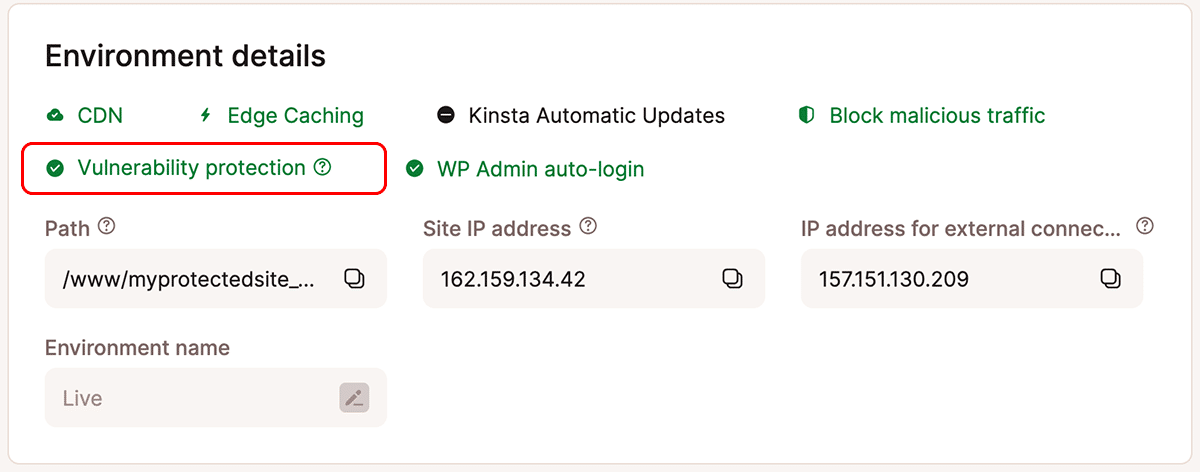
You can confirm that Vulnerability Protection is enabled in MyKinsta by navigating to Sites > sitename to reach the Site Information page and then scrolling down to view Environment Details. Environments will display a green checkmark beside Vulnerability Protection when it is enabled:
In WordPress, Kinsta’s Vulnerability Protection is installed as another Must-Use plugin. You can confirm its installation in the WordPress Admin dashboard by selecting Plugins in the left-hand menu and then choosing the Must-Use tab:
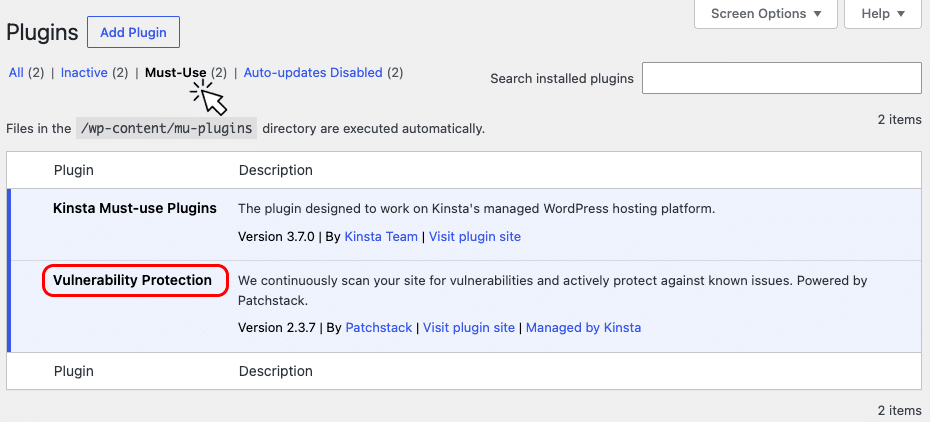
There are no deactivate or delete options for plugins in the Must-Use list.
“Does this mean I can slack off on those WordPress updates?”
The Patchstack technology powering Kinsta’s Vulnerability Protection could prove crucial in protecting your WordPress site from attacks targeting newly discovered vulnerabilities. But it’s not an alternative to keeping up with security updates for plugins, themes, and WordPress core.
Vulnerability Protection is safety gear for your site’s security, not an invitation to be careless. It’s still essential to stay on top of software updates for your WordPress site, particularly those that close security holes. If you don’t have time to handle that task manually, Kinsta Automatic Updates and the updaters built in to WordPresss can help.
“I’ve already installed Patchstack on my site”
If you’re a Kinsta customer who is already using Patchstack, congratulations on being serious about protecting your WordPress site! When adding Vulnerability Protection to existing WordPress environments, we will skip those where the Patchstack plugin is already in place. You can continue to use the instance of Patchstack you have already licensed.
Kinsta’s systems regularly scan for sites without Vulnerability Protection. If you remove your own installation of the Patchstack’s plugin, we’ll install our implementation (usually within 12 hours). So, you can switch to Kinsta’s free Vulnerability Protection simply by deactivating and deleting your own Patchstack plugin.
On the other hand, if Kinsta’s Vulnerability Protection is enabled on your site, but you’d prefer to manage Patchstack yourself, you can purchase a license and install the plugin. Kinsta will detect that you’ve installed Patchstack and automatically disable our implementation.
Learn more about Vulnerability Protection
We’ve got the whole story on Kinsta Vulnerability Protection in our documentation.