Vulnerability Protection
Kinsta’s Vulnerability protection plugin, powered by Patchstack, is a WordPress security service focused on preventing attacks before they happen. Instead of waiting for a site to be infected and then cleaning it up, it continuously checks your WordPress core, plugins, and themes against an up-to-date vulnerability database. It also blocks attempts to exploit known vulnerabilities, even before the plugin or theme developer releases an official fix.
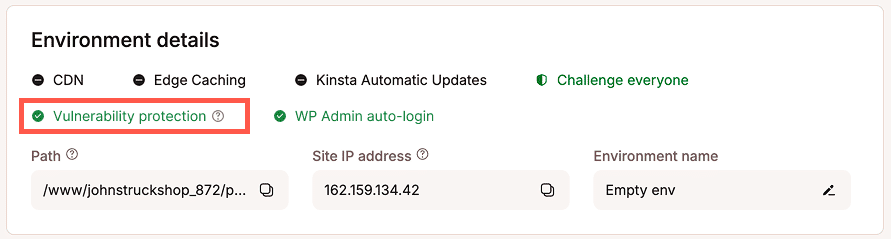
The Vulnerability protection plugin is installed automatically on WordPress sites hosted with Kinsta. It is installed as a must-use plugin, so it doesn’t appear in your main list of installed plugins in WordPress and can’t be deactivated or removed. You can view it in Plugins > Must-Use. You can check that it’s installed and active on your site’s Info page in MyKinsta.
Why Vulnerability protection matters
Attacks on WordPress sites are becoming more common, and most of them target known vulnerabilities in plugins and themes. New vulnerabilities are disclosed every week, and there’s often a gap between a vulnerability becoming public and a fix being available and applied. That gap is when sites are most at risk.
A single compromise can be costly. Recovering from a hacked site can take days or weeks. During that time, you could face lost orders and revenue, exposed customer data, and lasting damage to your reputation. Vulnerability protection is designed to close that gap by blocking attempts to exploit known vulnerabilities, often before an attacker can reach your site.
How Vulnerability protection works
- Detection: Your installed plugins, themes, and WordPress core version are checked against Patchstack’s vulnerability database, and newly discovered issues affecting your site are identified quickly.
- Protection: When a vulnerability is found, malicious requests that try to exploit it are blocked. Your plugin and theme files aren’t modified, and your site stays protected even before the developer releases an update.
- Early warning: Patchstack works directly with plugin developers and security researchers, meaning vulnerabilities are often found and fixed by developers before they’re publicly disclosed.
WordPress features Vulnerability protection doesn’t change
Kinsta’s Vulnerability protection focuses only on blocking attempts to exploit known vulnerabilities. It doesn’t apply Patchstack’s additional hardening settings, so it won’t change how the following WordPress features work on your site:
- Application Passwords
- XML-RPC
- The plugin and theme file editor
- User and author lookups through the REST API
- The WordPress version meta tag
- Security headers
Vulnerability protection also doesn’t log site activity or failed login attempts.
These settings are applied only while Kinsta’s Vulnerability protection plugin is active. They don’t modify your database and don’t interfere with other plugins.
Vulnerability protection and Kinsta’s existing security
Every site hosted with Kinsta already benefits from platform-level security. This includes Cloudflare’s enterprise-level firewall, DDoS mitigation, hardware firewalls, continuous traffic monitoring, and automatic blocking of traffic from IP addresses and sources linked to known threats. You can also use Bot protection in MyKinsta to control how automated and suspicious traffic is allowed, challenged, or blocked on your site.
These protections focus on who is sending traffic to your site. They filter out requests from known malicious sources, attack traffic, and bots, often before they reach your server.
Vulnerability protection adds a different layer that focuses on what a request is trying to do. It knows which versions of WordPress core, plugins, and themes your site runs and which known vulnerabilities affect them. It can then block requests that try to exploit those specific vulnerabilities, even if the request comes from a source that looks legitimate and passes network-level checks.
The two work together. Platform security and bot protection reduce the volume of malicious traffic that reaches your site, and Vulnerability protection guards against targeted attacks on the specific software your site runs.
Plugin and theme updates
Vulnerability protection is compatible with all WordPress plugins. If a plugin on your site has a known vulnerability, Vulnerability protection blocks attempts to exploit it, so you can keep using the plugin while you wait for a fix.
Vulnerability protection keeps your site safe in the meantime, but it isn’t a replacement for updates. When a developer releases a fix for a vulnerable plugin or theme, update it as soon as possible. Updates fix the underlying issue in the code, while protection rules only block known ways of exploiting it.
Troubleshooting Vulnerability protection
Vulnerability protection is part of Kinsta’s security for WordPress sites and can’t be disabled, and the plugin can’t be removed. If you suspect it’s causing an issue on your site, contact our Support team, and we’ll investigate.
Sites with an existing Patchstack plugin
If your site already has its own Patchstack plugin installed, Kinsta’s Vulnerability protection isn’t enabled on that site. Kinsta checks for this twice a day, so any changes take effect within 12 hours:
- If you install your own Patchstack plugin after Vulnerability protection is activated, Kinsta disables Vulnerability protection and removes its Patchstack license from your site. To keep using your own Patchstack plugin, you’ll need your own Patchstack license.
- If you remove your own Patchstack plugin, Kinsta automatically activates Vulnerability protection.
If you use your own Patchstack plugin, Patchstack’s default settings apply, which may include hardening features that disable WordPress features such as Application Passwords or XML-RPC. You can change these in your Patchstack settings.
To switch to Kinsta’s Vulnerability protection, remove your own Patchstack plugin, and Vulnerability protection will be activated within 12 hours. If you have any issues, contact our Support team.
Multisite networks
On a WordPress Multisite network, only one Patchstack installation can be active across the entire network at a time. Vulnerability protection covers all sites in the network, so you don’t need to install or activate Patchstack on individual subsites.
Custom directory structures and deployments
Kinsta’s Vulnerability protection plugin is stored on your site’s container, outside your WordPress code directory, and is loaded automatically through PHP hooks. This means you won’t find the plugin files in your site’s code, but it still appears in WordPress under Plugins > Must-Use, and your site is still protected.
Because the plugin is separate from your site’s code, custom directory structures such as Bedrock, Composer-based setups, and deployment processes don’t need any special handling or exclusions. Vulnerability protection is loaded automatically, regardless of how your site’s code is managed.
Live and staging environments
Vulnerability protection is installed on all your site’s environments, including live and staging environments. It protects each environment only while WordPress is installed and running there.
Sites created without WordPress
Vulnerability protection works only on WordPress sites. If you create a site without installing WordPress, Vulnerability protection won’t protect it.
What Vulnerability protection doesn’t cover
Vulnerability protection is focused on prevention, not cleanup. It doesn’t scan for or remove existing malware. If your site has already been compromised, see Malware Removal.
FAQs
When will my site have Vulnerability protection enabled?
New sites created on or after October 8, 2026, have Vulnerability protection enabled automatically. For existing sites, we’re starting a gradual rollout on October 14, 2026. Because we’re enabling it across a large number of sites, it may take some time before it reaches yours. There’s no action needed on your part; it will be turned on automatically once your site is included in the rollout.
Will there be any downtime during the rollout?
No. The rollout won’t cause any downtime on your site.
How do I know if Vulnerability protection is active on my site?
Go to your site’s Info page in MyKinsta. A status indicator shows whether Kinsta’s Vulnerability protection is installed and active.
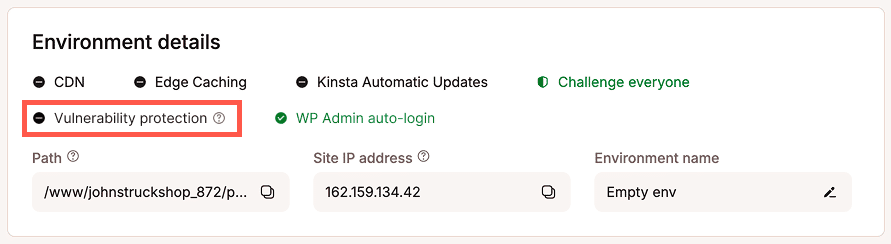
If Vulnerability protection is not yet active or your site uses its own Patchstack plugin, the indicator will show Vulnerability protection disabled. If you’ve recently removed your own Patchstack plugin, the indicator may show as disabled until Kinsta’s next check installs and activates Vulnerability protection.
How can I tell if I’m using Kinsta’s Vulnerability protection or my own Patchstack plugin?
Go to your site’s Info page in MyKinsta. If the status indicator shows Vulnerability protection is active, your site is using Kinsta’s Vulnerability protection. If it doesn’t, log in to your WordPress dashboard and go to Plugins to check whether your own Patchstack plugin is installed. Your own Patchstack plugin appears in the main plugins list, but Kinsta’s Vulnerability protection is a must-use plugin, so it appears only under Plugins > Must-Use.
Can I disable Vulnerability protection?
No. Vulnerability protection is part of Kinsta’s security for WordPress sites and can’t be disabled or removed. However, if you’d prefer to use your own Patchstack plugin, you can install it, and Kinsta will remove its Vulnerability protection plugin at the next regular check. If you later remove your own Patchstack plugin, Kinsta automatically reinstalls and activates Vulnerability protection. For more information, see Sites with an existing Patchstack plugin. If you suspect Vulnerability protection is causing an issue, our Support team can also temporarily disable it while they investigate.
I already have a security plugin. Why do I need this too?
If your site already has its own Patchstack plugin, we won’t enable Vulnerability protection on that site. If you use a different security plugin, Vulnerability protection is still installed as part of Kinsta’s security. It works alongside your existing tools by blocking attempts to exploit known vulnerabilities in the specific plugins, themes, and WordPress version your site runs.
Will I be charged extra for Vulnerability protection?
No. Vulnerability protection is included with your Kinsta hosting at no extra cost.
What’s the difference between Vulnerability protection and Patchstack?
Vulnerability protection is Kinsta’s security service, powered by Patchstack, and it’s included with your hosting. Patchstack also offers its own plugin, which you install and manage separately through a Patchstack account.
How is Vulnerability protection different from bot protection?
Bot protection focuses on who is sending traffic to your site, filtering out requests from known malicious sources and bots. Vulnerability protection focuses on what a request is trying to do, blocking attempts to exploit known vulnerabilities in your site’s software, even from sources that look legitimate. For more details, see Vulnerability protection and Kinsta’s existing security above.
Does Vulnerability protection disable Application Passwords?
No. Kinsta’s Vulnerability protection doesn’t change Application Passwords, XML-RPC, or other WordPress features. For more information, see WordPress features Vulnerability protection doesn’t change. If Application Passwords are missing on your site, check whether another plugin or your own Patchstack plugin is disabling them.
Is Vulnerability protection compatible with my plugins?
Yes. Vulnerability protection works with all WordPress plugins. If a plugin has a known vulnerability, Vulnerability protection blocks attempts to exploit it, and you can keep using the plugin. We recommend updating your plugins regularly.