Add as a preferred source on Google
The Abilities API, introduced in WordPress 6.9, establishes a shared language, allowing all WordPress components—both core and plugins—to expose their functionality in a unified, understandable way for humans and machines alike. This makes your WordPress site ready for integration with external automation tools in a standardized and secure manner.
If you are wondering what some use cases for the Abilities API might look like, think of an AI model that guides a user through the purchasing process and even allows them to complete the purchase without visiting your e-commerce website. Or think of a CI/CD pipeline on GitHub Actions that processes text extracted from an audio or video file and sends it to WordPress for publication. The use cases are endless.
The Abilities API changes the very role of WordPress within the ecosystem. It is no longer just a blog, nor even a CMS; today, WordPress acts as a distributed execution engine that can be orchestrated from the outside, like a sort of operating system, fully ready for autonomous agents.
Curious to learn more? Let’s dive in.
What an ability is intended for
An ability is a discoverable, actionable capability on a WordPress site that enables specific operations for external entities (such as AI models) or internal components.
The API can be used for things like:
- Searching for content or executing specific database operations
- Reading site configuration settings
- Creating a post
- Converting a JSON structure into Gutenberg blocks
Exposing an ability means making a specific functionality interoperable. Before an ability can be discovered and used, it must be registered in a centralized catalog. Only then can WordPress and AI models discover it, understand its intent, and invoke it when needed.
By default, your plugins’ functionality is fully isolated. By registering an ability, you declare that the underlying logic is available as a service for the entire ecosystem.
Let’s look at an example. If your plugin has a function that converts an initial JSON object into structured content ready for Gutenberg blocks, you can register it as an ability. This allows other tools with the required permissions to trigger the exact same function.
In our previous tutorial on the WordPress AI Client, the plugin handled the core logic of sending an audio file to the AI model, which returned a JSON-structured response to generate Gutenberg blocks. However, that functionality remained restricted to our plugin. By registering this process as an ability, you decouple the execution, and any external entity can trigger the entire plugin logic by simply passing a JSON object containing an audio file ID.
An ability serves as a formal contract between the underlying PHP logic and any entity that requests its execution. The contract specifies the data the ability expects as input, its intent, and the data schema it returns as output.
When you register an ability, it is added to your site’s ability registry. From that moment on, WordPress acts as a secure gateway: it verifies authentication and validates incoming data against the schema established by the contract. WordPress routes the request to the underlying PHP function only if the payload strictly complies with the contract.
An ability is agnostic. WordPress does not need to know the specific entity requesting access; it only verifies that the request is authorized and meets the contract’s constraints.
By registering an ability, your plugin is no longer just an extension with its own internal logic; it becomes a service provider for the entire ecosystem. Whether it is a mobile app, an automation script like Make.com or Zapier, an AI agent, or a server communicating via the MCP protocol, these entities will know exactly how to trigger structured operations on your site.
Working with the Abilities API
The Abilities API provides a comprehensive set of functions that allow you to discover registered abilities on your site, activate them, and both register and unregister abilities.
Work with your site’s abilities
You can retrieve a list of all registered abilities or fetch an individual ability object. You can also verify conditions, such as whether a specific ability is registered or if the agent has the permissions to trigger it.
Get a list of the abilities registered on your site
The wp_get_abilities() function returns an array of all registered abilities. You can test it using WP-CLI. Once you connect to your site via SSH, navigate to the site’s root directory, where your wp-config.php file lives, using the following commands:
cd /path/to/your/site
ls wp-config.php
Next, make sure WP-CLI recognizes your site installation:
wp core is-installed
wp option get siteurl
If you get your site URL, you are ready to go and run the following command:
wp eval '$abilities = wp_get_abilities(); foreach ( $abilities as $a ) { echo $a->get_name() . PHP_EOL; }'This command executes PHP code in your terminal. The PHP requests the names of every registered ability on your site, and by default, it should provide the following response:
core/get-site-info
core/get-user-info
core/get-environment-info
You could request a more complete set of data with the following command:
wp eval '
$all_abilities = wp_get_abilities();

foreach ( $all_abilities as $ability ) {
	echo "Ability Name: " . esc_html( $ability->get_name() ) . "\n";
	echo "Label: " . esc_html( $ability->get_label() ) . "\n";
	echo "Category: " . esc_html( $ability->get_category() ) . "\n";
	echo "Description: " . esc_html( $ability->get_description() ) . "\n";
	echo "---\n";
}
'
When you run this command on a fresh WordPress 7.0 site, the terminal will show the following response:
Ability Name: core/get-site-info
Label: Get Site Information
Category: site
Description: Returns site information configured in WordPress. By default returns all fields, or optionally a filtered subset.
---
Ability Name: core/get-user-info
Label: Get User Information
Category: user
Description: Returns profile details for the current authenticated user to support personalization, auditing, and access-aware behavior. By default returns all fields, or optionally a filtered subset.
---
Ability Name: core/get-environment-info
Label: Get Environment Info
Category: site
Description: Returns core details about the site's runtime context for diagnostics and compatibility (environment, PHP runtime, database server info, WordPress version). By default returns all fields, or optionally a filtered subset.
---
Get an ability object
The wp_get_ability() function returns a single ability object by its name. You can test it in WP-CLI with the following command:
wp eval '
$ability = wp_get_ability( "core/get-site-info" );

if ( ! $ability ) {
	echo "Ability not found\n";
	exit( 1 );
}

echo "Name: " . $ability->get_name() . "\n";
echo "Label: " . $ability->get_label() . "\n";
echo "Category: " . $ability->get_category() . "\n";
echo "Description: " . $ability->get_description() . "\n";
echo "\nInput Schema:\n";
var_dump( $ability->get_input_schema() );
echo "\nOutput Schema:\n";
var_dump( $ability->get_output_schema() );
echo "\nMeta:\n";
var_dump( $ability->get_meta() );
'
If the ability is correctly registered on your site, you will receive the following response in your terminal:
Name: core/get-site-info
Label: Get Site Information
Category: site
Description: Returns site information configured in WordPress. By default returns all fields, or optionally a filtered subset.

Input Schema:
array(4) {
  ["type"]=>
  string(6) "object"
  ["properties"]=>
  array(1) {
	["fields"]=>
	array(3) {
	  ["type"]=>
	  string(5) "array"
	  ["items"]=>
	  array(2) {
		["type"]=>
		string(6) "string"
		["enum"]=>
		array(8) {
		  [0]=>
		  string(4) "name"
		  [1]=>
		  string(11) "description"
		  [2]=>
		  string(3) "url"
		  [3]=>
		  string(5) "wpurl"
		  [4]=>
		  string(11) "admin_email"
		  [5]=>
		  string(7) "charset"
		  [6]=>
		  string(8) "language"
		  [7]=>
		  string(7) "version"
		}
	  }
	  ["description"]=>
	  string(81) "Optional: Limit response to specific fields. If omitted, all fields are returned."
	}
  }
  ["additionalProperties"]=>
  bool(false)
  ["default"]=>
  array(0) {
  }
}

Output Schema:
array(3) {
  ["type"]=>
  string(6) "object"
  ["properties"]=>
  array(8) {
	["name"]=>
	array(3) {
	  ["type"]=>
	  string(6) "string"
	  ["title"]=>
	  string(10) "Site Title"
	  ["description"]=>
	  string(15) "The site title."
	}
	["description"]=>
	array(3) {
	  ["type"]=>
	  string(6) "string"
	  ["title"]=>
	  string(7) "Tagline"
	  ["description"]=>
	  string(17) "The site tagline."
	}
	["url"]=>
	array(3) {
	  ["type"]=>
	  string(6) "string"
	  ["title"]=>
	  string(18) "Site Address (URL)"
	  ["description"]=>
	  string(94) "The public URL where visitors access the site. May differ from the WordPress installation URL."
	}
	["wpurl"]=>
	array(3) {
	  ["type"]=>
	  string(6) "string"
	  ["title"]=>
	  string(23) "WordPress Address (URL)"
	  ["description"]=>
	  string(83) "The URL where WordPress core files are served. May differ from the public site URL."
	}
	["admin_email"]=>
	array(3) {
	  ["type"]=>
	  string(6) "string"
	  ["title"]=>
	  string(28) "Administration Email Address"
	  ["description"]=>
	  string(37) "The site administrator email address."
	}
	["charset"]=>
	array(3) {
	  ["type"]=>
	  string(6) "string"
	  ["title"]=>
	  string(12) "Site Charset"
	  ["description"]=>
	  string(28) "The site character encoding."
	}
	["language"]=>
	array(3) {
	  ["type"]=>
	  string(6) "string"
	  ["title"]=>
	  string(13) "Site Language"
	  ["description"]=>
	  string(42) "The site locale in dash form (e.g. en-US)."
	}
	["version"]=>
	array(3) {
	  ["type"]=>
	  string(6) "string"
	  ["title"]=>
	  string(17) "WordPress Version"
	  ["description"]=>
	  string(48) "The WordPress core version running on this site."
	}
  }
  ["additionalProperties"]=>
  bool(false)
}

Meta:
array(2) {
  ["annotations"]=>
  array(3) {
	["readonly"]=>
	bool(true)
	["destructive"]=>
	bool(false)
	["idempotent"]=>
	bool(true)
  }
  ["show_in_rest"]=>
  bool(true)
}
Check if an ability is registered
The wp_has_ability() function allows you to check whether an ability is registered. In WP-CLI, you can use it like this:
wp eval '
if ( wp_has_ability( "core/get-site-info" ) ) {
	echo "✓ core/get-site-info is registered\n";
} else {
	echo "✗ core/get-site-info not found\n";
}
'
If the ability has been registered, the following message will appear on the terminal:
✓ core/get-site-info is registeredCheck agent permissions
You can check whether the current user has the permissions to execute an ability by using the check_permissions() method of the $ability object. This returns true, false, or a WP_Error object. Let’s try to call this method from the terminal using the following WP-CLI command:
wp --user=1 eval '
$ability = wp_get_ability( "core/get-site-info" );
if ( $ability ) {
	$has_permissions = $ability->check_permissions();
	if ( true === $has_permissions ) {
		echo "You have permissions to execute this ability.";
	} else {
		if ( is_wp_error( $has_permissions ) ) {
			error_log( "Permissions check failed: " . $has_permissions->get_error_message() );
		}
		echo "You do not have permissions to execute this ability.";
	}
} else {
	echo "Ability not found.";
}
'
Here we have set --user=1, which is why you will receive the following response:
You have permissions to execute this ability.Register an ability
It is now time to register an ability. To demonstrate a real-world use case, we will extend the plugin described in our article on the WordPress AI Client. The plugin sends an audio file to the AI model to extract the text and trigger the generation of Gutenberg blocks. In this section, we will look at how to register this process as an ability so that any entity with the necessary permissions can discover and use it.
Before registering a new ability, you must register a new ability category.
For this, you will need to hook the wp_register_ability_category() function into the wp_abilities_api_categories_init hook.
The function accepts a unique category slug and an associative array of arguments.
Here is how to register your ability category:
function aicb_register_ability_category(): void {

	if ( ! function_exists( 'wp_register_ability_category' ) ) {
		return;
	}

	wp_register_ability_category(
		'content-generation',
		array(
			'label'       => 'Content Generation',
			'description' => 'AI-powered content transformation and structuring abilities',
		)
	);
}
add_action( 'wp_abilities_api_categories_init', 'aicb_register_ability_category' );
The next step is to register the ability. To do this, you will hook the wp_register_ability() function into the wp_abilities_api_init action.
The function accepts two arguments: the name of the ability, including its namespace, and an array of arguments for the ability’s configuration.
Here is the ability registration for the AI Content Builder plugin:
function aicb_register_audio_to_gutenberg_blocks_ability(): void {

	if ( ! function_exists( 'wp_register_ability' ) ) {
		return;
	}

	$input_schema = array( ... );

	$output_schema = array( ... );

	wp_register_ability(
		'ai-content-builder/audio-to-gutenberg-blocks',
		array(
			'category'            => 'content-generation',
			'label'               => 'Audio to Gutenberg Blocks',
			'description'         => 'Transcribes audio and converts the content into WordPress Gutenberg-compatible block objects.',
			'input_schema'        => $input_schema,
			'output_schema'       => $output_schema,
			'execute_callback'    => 'aicb_audio_to_gutenberg_blocks_callback',
			'permission_callback' => static function (): bool {
				return current_user_can( 'edit_posts' );
			},
			'meta'                => array(
				'show_in_rest' => true,
				'annotations'  => array(
					'readonly'     => false,
					'destructive'  => false,
					'idempotent'   => false,
					'instructions' => 'Processes an audio attachment: transcribes it, generates structured blog content via AI, and returns Gutenberg-ready block objects.',
				),
			),
		)
	);
}
add_action( 'wp_abilities_api_init', 'aicb_register_audio_to_gutenberg_blocks_ability' );
In the wp_register_ability function call, we configured the following arguments:
category: The category to which the ability belongs.label: The display name of the ability.description: A brief description of what the ability does and its purpose.input_schema: The data schema for the incoming input arguments.output_schema: The data schema provided and returned by the ability.execute_callback: The callback function to be executed when the ability is triggered.permission_callback: A callback function executed to verify that the agent has the required permissions to run the ability.meta: An array of additional metadata fields for the ability.show_in_rest: Determines whether or not to expose the ability within the WordPress REST API.annotations: An array of descriptive elements defining the ability’s behavior.
input_schema is an array that defines the ability’s input contract. It represents the JSON Schema definition for validating the ability’s input. In our specific use case, it is defined as follows:
$input_schema = array(
	'type'       => 'object',
	'properties' => array(
		'audio_id' => array(
			'type'        => 'integer',
			'description' => 'The ID of the audio attachment to process and convert into Gutenberg blocks.',
		),
	),
	'required'   => array( 'audio_id' ),
);
This JSON Schema represents the format that the input data must follow to use this ability.
output_schema is the output contract returned by the ability. In our example, each item is an object representing a JSON block:
$output_schema = array(
	'type'       => 'object',
	'properties' => array(
		'title'      => array( 'type' => 'string' ),
		'sections'   => array(
			'type'  => 'array',
			'items' => array( 'type' => 'object' ),
		),
		'blocks'     => array(
			'type'  => 'array',
			'items' => array( 'type' => 'object' ),
		),
		'transcript' => array( 'type' => 'string' ),
	),
	'required'   => array( 'blocks' ),
);
The next step is to define the callback function that executes when the ability is triggered (see the full code on GitHub):
function aicb_audio_to_gutenberg_blocks_callback( array $args ) {

	// missing code
	// see GitHub
	...

	$structured_json = wp_ai_client_prompt( $prompt )
		->using_system_instruction( $instructions )
		->using_temperature( 0.4 )
		->as_json_response( $schema )
		->generate_text();

	if ( is_wp_error( $structured_json ) ) {
		return $structured_json;
	}

	$structured = json_decode( (string) $structured_json, true );
	if ( ! is_array( $structured ) ) {
		return new \WP_Error(
			'invalid_ai_json',
			'Could not parse structured AI response.',
			array( 'status' => 500 )
		);
	}

	// Normalize the output.
	$normalized = aicb_normalize_structured_post( $structured );

	if ( '' === $normalized['title'] && empty( $normalized['sections'] ) ) {
		return new \WP_Error(
			'empty_structured_content',
			'The AI provider returned empty structured content.',
			array( 'status' => 500 )
		);
	}

	// Convert to Gutenberg blocks.
	$blocks = aicb_sections_to_blocks( $normalized['title'], $normalized['sections'] );

	return $blocks;
}
This function invokes two custom functions. The first one (aicb_normalize_structured_post) normalizes the AI’s output into a predefined format and sanitizes data:
function aicb_normalize_structured_post( array $structured ): array {
	$title = isset( $structured['title'] )
		? sanitize_text_field( (string) $structured['title'] )
		: '';

	$sections = array();

	if ( isset( $structured['sections'] ) && is_array( $structured['sections'] ) ) {
		foreach ( $structured['sections'] as $section ) {
			if ( ! is_array( $section ) ) {
				continue;
			}

			$heading = isset( $section['heading'] )
				? sanitize_text_field( (string) $section['heading'] )
				: '';

			$level = 2;

			$paragraphs = array();
			if ( isset( $section['paragraphs'] ) && is_array( $section['paragraphs'] ) ) {
				foreach ( $section['paragraphs'] as $paragraph ) {
					$clean_paragraph = trim( sanitize_textarea_field( (string) $paragraph ) );
					if ( '' !== $clean_paragraph ) {
						$paragraphs[] = $clean_paragraph;
					}
				}
			}

			$bullet_points = array();
			if ( isset( $section['bullet_points'] ) && is_array( $section['bullet_points'] ) ) {
				foreach ( $section['bullet_points'] as $bullet_point ) {
					$clean_bullet_point = trim( sanitize_text_field( (string) $bullet_point ) );
					if ( '' !== $clean_bullet_point ) {
						$bullet_points[] = $clean_bullet_point;
					}
				}
			}

			if ( '' === $heading || empty( $paragraphs ) ) {
				continue;
			}

			$sections[] = array(
				'heading'       => $heading,
				'level'         => $level,
				'paragraphs'    => $paragraphs,
				'bullet_points' => $bullet_points,
			);
		}
	}

	return array(
		'title'    => $title,
		'sections' => $sections,
	);
}
The function accepts a structured array of JSON objects, normalizes and sanitizes the data, and returns an array containing the title and sections.
The second function (aicb_sections_to_blocks) converts the normalized data into block descriptor objects and is defined as follows:
function aicb_sections_to_blocks( string $title, array $sections ): array {
	$blocks = array();

	foreach ( $sections as $section ) {
		if ( ! is_array( $section ) ) {
			continue;
		}

		$heading = isset( $section['heading'] ) ? trim( (string) $section['heading'] ) : '';
		if ( '' === $heading ) {
			continue;
		}

		$paragraphs = array();
		if ( isset( $section['paragraphs'] ) && is_array( $section['paragraphs'] ) ) {
			foreach ( $section['paragraphs'] as $paragraph ) {
				$clean = trim( (string) $paragraph );
				if ( '' !== $clean ) {
					$paragraphs[] = $clean;
				}
			}
		}

		if ( empty( $paragraphs ) ) {
			continue;
		}

		$blocks[] = array(
			'name'       => 'core/heading',
			'attributes' => array(
				'content' => $heading,
				'level'   => 2,
			),
		);

		foreach ( $paragraphs as $paragraph ) {
			$blocks[] = array(
				'name'       => 'core/paragraph',
				'attributes' => array(
					'content' => $paragraph,
				),
			);
		}

		if ( isset( $section['bullet_points'] ) && is_array( $section['bullet_points'] ) ) {
			$bullet_items_html = '';

			foreach ( $section['bullet_points'] as $bullet_point ) {
				$clean_bullet = trim( sanitize_text_field( (string) $bullet_point ) );
				if ( '' === $clean_bullet ) {
					continue;
				}

				// core/list expects HTML in the `values` attribute.
				$bullet_items_html .= '<li>' . esc_html( $clean_bullet ) . '</li>';
			}

			if ( '' !== $bullet_items_html ) {
				$blocks[] = array(
					'name'       => 'core/list',
					'attributes' => array(
						'values' => '<ul>' . $bullet_items_html . '</ul>',
					),
				);
			}
		}
	}

	return $blocks;
}
Here are the key highlights of this function:
- The function accepts 2 arguments: a string representing the post title and an array of the sections generated by the AI model.
- For each section, the function generates a heading and at least one paragraph.
- If bullet points are present, it generates a corresponding number of list items.
- The function returns a
$blocksarray of block descriptor objects, which is the output contract returned by the ability ($output_schema).
Note that the function’s output is not the raw block markup. This will be generated client-side using the JavaScript createBlock function.
For example, the heading element of a section is represented by the following object:
if ( '' !== $heading ) {
	$blocks[] = array(
		'name'       => 'core/heading',
		'attributes' => array(
			'content' => $heading,
			'level'   => ( 3 === $level ) ? 3 : 2,
		),
	);
}
Once you have registered your ability, you can run the same WP-CLI commands seen above in your terminal to get the details. The following code will generate the input schema for your ability:
wp --user=1 eval '
$ability = wp_get_ability( "ai-content-builder/audio-to-gutenberg-blocks" );

if ( ! $ability ) {
    echo "Ability not found\n";
    exit( 1 );
}

echo "Input Schema:\n";
var_dump( $ability->get_input_schema() );
'
Here is the result in the terminal:
Input Schema:
array(3) {
	["type"]=>
	string(6) "object"
	["properties"]=>
	array(1) {
		["audio_id"]=>
		array(2) {
			["type"]=>
			string(7) "integer"
			["description"]=>
			string(76) "The ID of the audio attachment to process and convert into Gutenberg blocks."
		}
	}
	["required"]=>
	array(1) {
		[0]=>
		string(8) "audio_id"
	}
}
In the same way, you can retrieve the output schema of the ability:
wp --user=1 eval '
$ability = wp_get_ability( "ai-content-builder/audio-to-gutenberg-blocks" );

if ( ! $ability ) {
    echo "Ability not found\n";
    exit( 1 );
}

echo "Output Schema:\n";
var_dump( $ability->get_output_schema() );
'
You can also display the complete object of your ability with the following command:
wp eval '
$ability = wp_get_ability( "ai-content-builder/audio-to-gutenberg-blocks" );

if ( ! $ability ) {
	echo "Ability not found\n";
	exit( 1 );
}

echo "Name: " . $ability->get_name() . "\n";
echo "Label: " . $ability->get_label() . "\n";
echo "Category: " . $ability->get_category() . "\n";
echo "Description: " . $ability->get_description() . "\n";
echo "\nInput Schema:\n";
var_dump( $ability->get_input_schema() );
echo "\nOutput Schema:\n";
var_dump( $ability->get_output_schema() );
'
Executing an ability
To run an ability, you will use the execute() method of the $ability object. You can try running the following PHP code via WP-CLI to trigger the core/get-site-info ability:
wp --user=1 eval '
$ability = wp_get_ability( "core/get-site-info" );

if ( ! $ability ) {
	echo "Ability not found\n";
	exit(1);
}

$result = $ability->execute();

if ( is_wp_error( $result ) ) {
	echo "ERROR: " . $result->get_error_message() . "\n";
	exit(1);
}

echo json_encode( $result, JSON_PRETTY_PRINT | JSON_UNESCAPED_SLASHES ) . "\n";
'
When you run this command, the ability will provide a JSON object similar to the following:
{
	"name": "WordPress 7.0",
	"description": "",
	"url": "http://yoursite.kinsta.cloud",
	"wpurl": "http://yoursite.kinsta.cloud",
	"admin_email": "[email protected]",
	"charset": "UTF-8",
	"language": "en-US",
	"version": "7.1-alpha-62550"
}
The above is just a simple example of an ability that provides data for your site.
As mentioned above, an ability can require input data, perform operations on that data, and return a structured output. We can see an example of this with the ability we registered in the previous section.
Still in your terminal, navigate to your site’s root directory and run the following PHP code:
wp --user=1 eval '
$ability = wp_get_ability( "ai-content-builder/audio-to-gutenberg-blocks" );

if ( ! $ability ) {
	echo "Ability not found\n";
	exit( 1 );
}

$input = array( "audio_id" => 1755 );

$result = $ability->execute( $input );

if ( is_wp_error( $result ) ) {
	echo "ERROR: " . $result->get_error_message() . "\n";
	exit( 1 );
}

echo json_encode( $result, JSON_PRETTY_PRINT | JSON_UNESCAPED_SLASHES ) . "\n";
'
The execute method passes the structured input data to the ability, which returns an array of objects ready to be converted into Gutenberg blocks:
[
	{
		"name": "core/heading",
		"attributes": {
			"content": "A Well-Deserved Rest Day in Marrakech",
			"level": 2
		}
	},
	{
		"name": "core/paragraph",
		"attributes": {
			"content": "On April 24th, our group of seven motorcyclists took a break from the open road..."
		}
	},
	{
		"name": "core/heading",
		"attributes": {
			"content": "Exploring Jemaa el-Fnaa and the Medina",
			"level": 2
		}
	},
	{
		"name": "core/paragraph",
		"attributes": {
			"content": "Our journey led us straight to Jemaa el-Fnaa, the legendary main square of Marrakech..."
		}
	},
	{
		"name": "core/list",
		"attributes": {
			"values": "<ul><li>Navigating the bustling souks and narrow alleys of the ancient Medina.</li><li>Savoring traditional Moroccan and Berber dishes.</li><li>Experiencing the vibrant street performances and food stalls of Jemaa el-Fnaa at night.</li></ul>"
		}
	},
	...
]
REST API Integration
The WordPress Abilities API provides a unified routing structure that allows external agents to programmatically query available ability categories (/categories), inspect specific ability contracts (/abilities/{name}), and execute a specific ability using the standard run endpoint (/abilities/{name}/run).
Here, for example, is a GET request that returns the list of categories from our test site:
https://yoursite.kinsta.cloud/wp-json/wp-abilities/v1/categories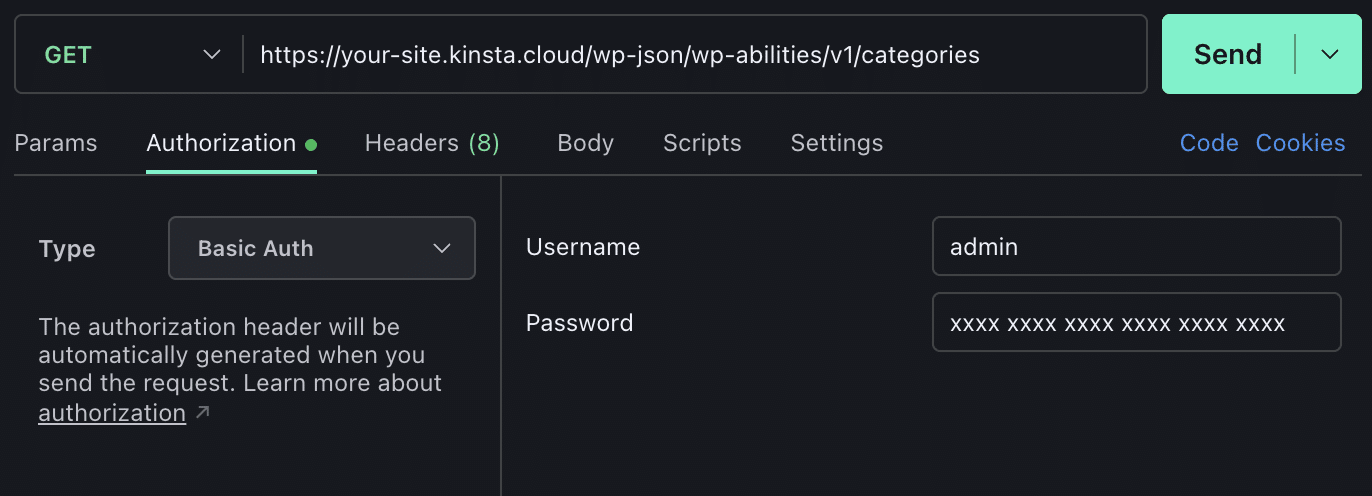
When we registered the ability in the previous example, we set the show_in_rest parameter to true. By doing so, we made our ability automatically accessible via these native WordPress REST API endpoints under the centralized core namespace (wp-abilities/v1).
This means that you don’t need to manually register custom routes from scratch to invoke an ability from an external environment. External agents can discover and execute your ability using standard HTTP requests.
You can inspect the specific contract of our ability with the following GET request:
https://yoursite.kinsta.cloud/wp-json/wp-abilities/v1/abilities/ai-content-builder/audio-to-gutenberg-blocksFinally, you can trigger the ability with an authenticated POST request:
https://yoursite.kinsta.cloud/wp-json/wp-abilities/v1/abilities/ai-content-builder/audio-to-gutenberg-blocks/runWhen sending this type of request, make sure you have specified the input data. For our example, we have set the following JSON in the request body:
{
	"input": {
		"audio_id": YOUR_AUDIO_ID
	}
}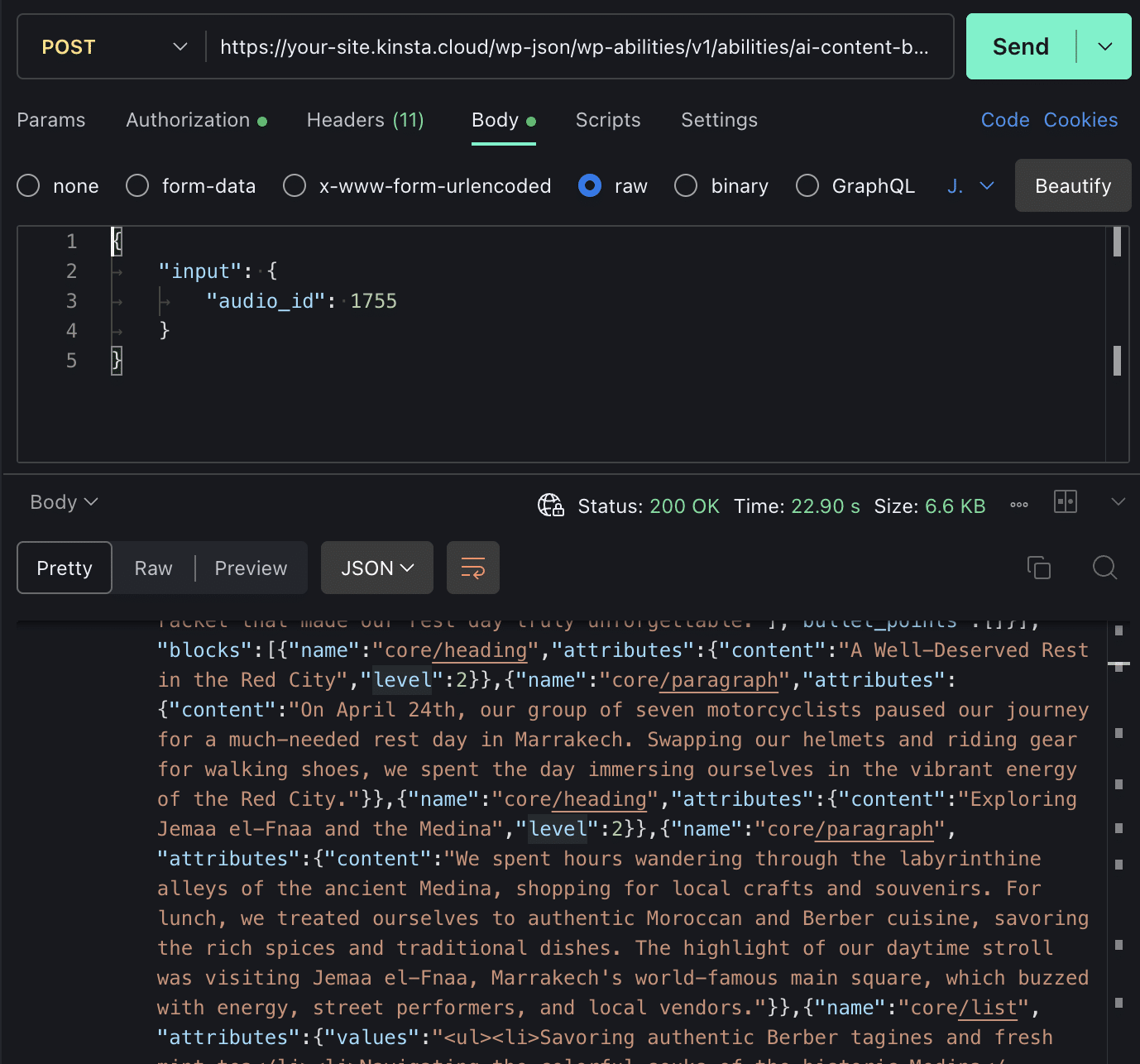
Our ability processed the audio and dispatched it to the AI model configured on the site. The model returned a structured output that was subsequently normalized and sanitized, finally returning the following array of objects containing the block attributes:
{
	"blocks": [
		{
			"name": "core/heading",
			"attributes": { "content": "A Welcome Rest Day in Marrakech", "level": 2 }
		},
		{
			"name": "core/paragraph",
			"attributes": { "content": "On April 24, our group of seven motorcyclists paused our journey..." }
		}
	]
}
And this is precisely the outcome we were aiming for.
The future of WordPress is agentic
While the AI Client and the new connector architecture bring AI processing capabilities inside WordPress, the Abilities API redefines how WordPress interacts with the outside world. We are witnessing a drastic paradigm shift, moving from a traditional web architecture—based on manual user interaction where every integration required custom endpoints and manual mapping—to an intent-driven architecture designed from the ground up for automation.
For WordPress developers, the new Abilities API represents an architectural turning point, characterized by decoupling functionality from plugins that contain its logic, enforcing security through the input/output contract, and enabling native interoperability across the entire ecosystem.
Taken together, these features ensure that the Abilities API is not just another API, but a true distributed execution engine that offers a glimpse into an increasingly agentic future for WordPress.

Carlo is a passionate lover of webdesign and front-end development. He has been playing with WordPress for more than 20 years, also in collaboration with Italian and European universities and educational institutions. He has written hundreds of articles and guides about WordPress, published both on Italian and international websites, as well as on printed magazines. You can find him on LinkedIn.