Add as a preferred source on Google
If you’re ready to start a new website, you’ll need to choose which software to build it on. WordPress is a safe bet, but between WordPress.com vs WordPress.org, which is the better option for you? You may be unsure how these two choices compare.
Fortunately, it’s relatively easy to distinguish between WordPress.com vs WordPress.org. By evaluating factors such as potential monetization, customization options, and price, you can decide which platform is better suited for your website.
This article will explain the critical differences between WordPress.com and WordPress.org. Then we’ll evaluate each CMS based on nine crucial criteria to help you decide if it fits your website’s needs.
Let’s get started!
What Is WordPress.com?
WordPress.com is a managed hosting platform that operates on top of the software from WordPress.org.

It is owned by Automattic, the powerhouse behind other well-known platforms such as WooCommerce and the Jetpack plugin. Additionally, it operates as a for-profit business that can host and manage various aspects of your website.
With a WordPress.com account, you’ll get access to a website builder, hosting account, and domain name all in one. You’ll manage everything from the software’s dashboard, and (depending on what plan you purchase) you can extend your site using a variety of themes and plugins.
Pros:
- Is user-friendly and has an easier learning curve
- Includes automatic site maintenance
- Comes with built-in hosting
Cons:
- Has limited monetization options
- Offers fewer options for customization and scalability
- Has limited Search Engine Optimization (SEO) and analytics tools, particularly on the free plan
This is a brief overview of the advantages and disadvantages of WordPress.com. However, we’re going to dive deep into the pros and cons of its different features later in this article.
What Is WordPress.org?
WordPress.org is an open-source Content Management System (CMS). It is the source of the software that WordPress.com is built on.

This free open source platform enables you to use, change, and contribute to the core software. Its dashboard has a similar appearance to WordPress.com, and you’ll get access to a wealth of plugins and themes for customizing your site’s look and functionality.
Although WordPress.org is free to use, you’ll need to pay for hosting and a domain name to make your website live. You’ll also have greater control over your site, with the option to change every single aspect if you like.
Pros:
- Offers multiple monetization opportunities
- Is flexible and has many customization options
- Enables you to create membership and ecommerce stores
Cons:
- Has a steeper learning curve
- Needs more manual maintenance in most cases
- Doesn’t include a domain name or hosting
We’ll take a deeper look at the features, pros, and cons of WordPress.org vs WordPress.com in the next section.
WordPress.com vs WordPress.org: Which Is Better for Your Site?
Now that we’ve presented a general overview of each platform, let’s dig deeper into WordPress.com vs WordPress.org. There are several vital considerations when choosing one of these platforms for your new site.
1. Ease of Use
If you’re building a new website, user-friendliness is likely one of your highest priorities. If you’re looking for the simplest possible platform, you might prefer WordPress.com.
When creating a WordPress.com site, you need to sign up for an account and walk through several steps. You’ll then have to choose your website’s type, pick a theme, and customize a few other details during the process.

If you use WordPress.org, you’ll need to purchase hosting and a domain name and then install the WordPress software on your hosting provider’s dashboard. Some hosts may take care of the installation process for you. Still, WordPress.org has a steeper learning curve.
The two platforms have very similar-looking dashboards once you start working with them. However, there are fewer features on offer with WordPress.com, so you’re less likely to feel overwhelmed. At the same time, it’s worth noting that WordPres.org is still built with usability in mind and is reasonably beginner-friendly.
2. Ecommerce Sites
If you want to create an online store with WordPress.com, you’ll need to purchase a dedicated ecommerce package. This pricing plan enables you to accept international payments, connect with shipping companies, and customize the design elements of your online shop.
None of these features are available with the cheaper WordPress.com packages. As such, you’ll need to make a larger monetary investment to get your store off the ground. However, you’ll still have access to free ecommerce plugins such as WooCommerce.

Since you don’t need to pay for a WordPress.org account, it can be a more affordable option for running an ecommerce store. The CMS includes access to multiple ecommerce plugins, both paid and free. Additionally, you can integrate third-party payment providers such as PayPal or the Stripe platform.
Which platform is better for full‑featured ecommerce?
Both platforms support ecommerce, but they differ dramatically in flexibility, control, and cost.
WordPress.com:
- Ecommerce functionality is only available on the Business or Commerce plans.
- You can use WooCommerce, but only on eligible paid plans.
- Third‑party payment gateways and extensions may be restricted depending on your plan.
- It’s easier to get started, but complex stores can feel limited.
WordPress.org:
- You get unrestricted access to WooCommerce, Easy Digital Downloads, and hundreds of ecommerce plugins.
- You can integrate any payment provider or fulfillment system.
- Store performance is tied to your hosting quality, giving you full control over speed and scalability.
- Ideal for advanced stores or businesses with custom requirements.
WordPress.com is fine for simple stores with predictable needs, but WordPress.org is the superior choice for serious ecommerce operations that require customization, integrations, and growth flexibility.
3. Monetization Opportunities
If you want to make money from your website, WordPress.org is likely the better option. You won’t have any restrictions on the monetization strategies you can use, such as adding affiliate links to your content or creating a membership website.
Furthermore, you can use advertising plugins such as Advanced Ads to manage all of your campaigns from your WordPress dashboard.

In contrast, WordPress.com makes it more challenging to monetize your site. For starters, you’ll need to have the Business plan or higher to access features such as ecommerce capabilities and Google Adsense.
Moreover, WordPress.com puts some restrictions on affiliate marketing. The user guidelines stipulate that you cannot use the platform primarily for promoting affiliate products. Although the policy’s wording is ambiguous, WordPress.com also states that any rules are subject to its interpretation.
Finally, WordPress.com does not allow websites with a “vast majority” of sponsored content. Again, these guidelines are subject to interpretation, so you’ll need to be careful when monetizing your site.
4. Technical Support
Even if you’re a WordPress expert, you’ll likely run into technical issues from time to time. As such, helpful and available technical support is essential to running your website.
With WordPress.com, you can access varied levels of technical support depending on your plan. All packages come with email assistance, but you’ll need a Premium plan or higher for live chat help. Business and ecommerce accounts also come with priority chat access.

If you have a free WordPress.com account, you have limited access to technical support. However, there is a knowledge hub with helpful articles.

WordPress.org doesn’t include dedicated technical support. Instead, you can read through the provided documentation or head to the support forums. These discussions are run by volunteers and can be sources of helpful information.

If you’re looking for more personalized assistance, you’ll need to use a third-party company for premium help. If you’re a Kinsta customer, keep in mind that you can access 24/7 support for any problems or questions!
5. Learning Web Development
If you plan to become a developer, WordPress.org is likely the better fit for you. Its open-source software enables you to create new plugins and themes and develop applications using the REST API.
Furthermore, WordPress.org has various resources to help new and experienced developers alike. For example, you can read the coding standards, access code references, and learn to run commands from detailed documentation.

In contrast, WordPress.com provides limited opportunities for developers. It has a REST API, developer console, and some resources for development. However, when compared to WordPress.org, there are few resources available. Additionally, some features (such as design resources) are still in the works.
6. Customization Possibilities
WordPress.org has thousands of plugin and theme options. A mixture of free and paid software is available, enabling you to customize your site according to your budget.
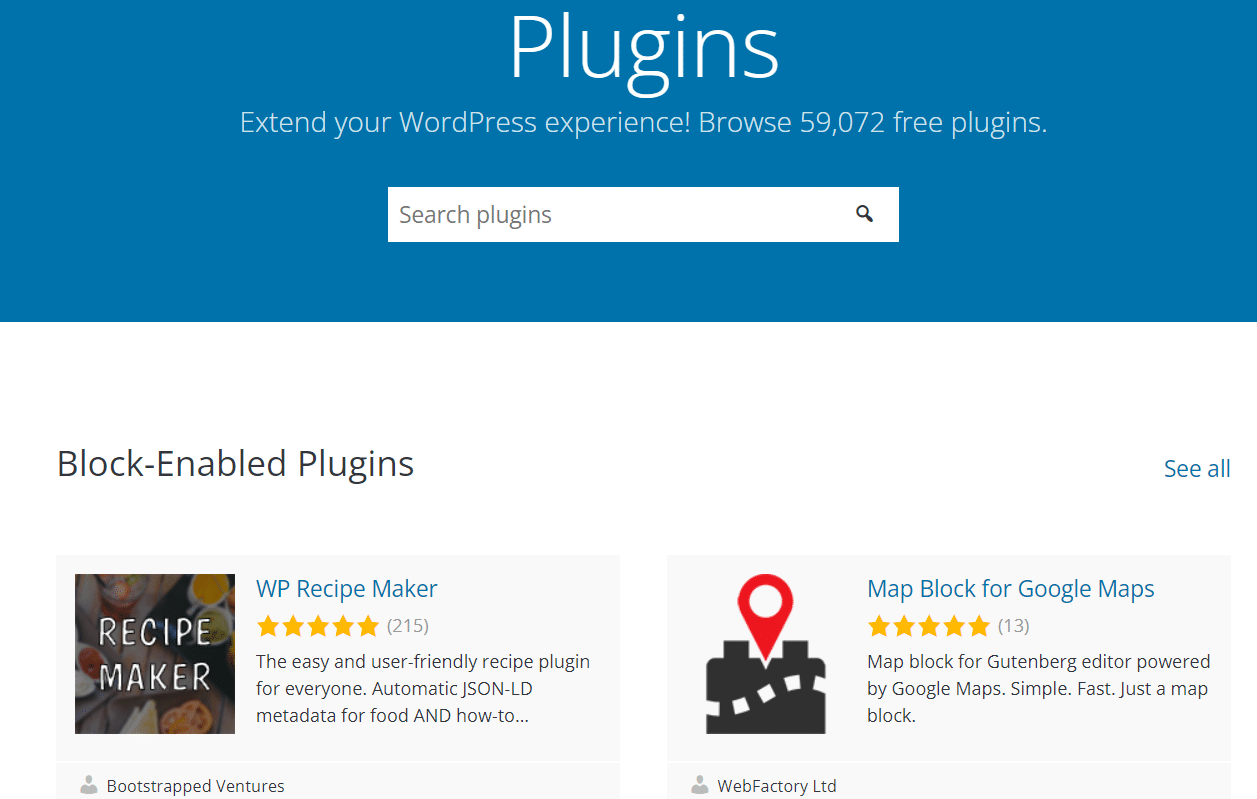
Additionally, you can directly edit your WordPress.org site’s HTML or add CSS classes to adjust its appearance and functionality further. As such, you can easily tweak small details and make your website fit your needs.
In contrast, you cannot use plugins with WordPress.com unless you have a Business plan or higher. You cannot use advanced design customization features without a Premium package or higher. Therefore, cheaper sites are very limited in their customization and scalability potential.
Theme and design customization differences
While both platforms allow you to customize the look and feel of your site, the degree of design freedom varies significantly.
WordPress.com:
- You can choose from a curated set of free and premium themes.
- On lower‑tier plans, CSS customization is limited or unavailable.
- Full Site Editing (FSE) is supported, but with restrictions depending on your plan.
- Advanced theme editing tools, including code access, require a paid plan.
WordPress.org:
- You can install any theme from the official WordPress directory or any third‑party source.
- You have full access to theme files, enabling custom PHP, CSS, and JavaScript edits.
- Full Site Editing and block themes can be extended or modified without limitations.
- Developers can build custom themes from scratch and deploy them freely.
Bottom line: WordPress.org is the clear winner if design flexibility, code editing, or custom theme development matters. WordPress.com suits users who prefer a more guided, less technical design environment.
7. Pricing
Choosing between WordPress.com vs WordPress.org is crucial if cost is a significant factor.
WordPress.com has multiple pricing options. Although we don’t recommend this for business sites as it adds WordPress branding, you can start with a completely free plan.
Alternatively, you can choose from one of the paid plans:
- Personal (around $4/month, billed annually): This plan is designed for hobby websites and includes hosting, email support, and the option to take payments.
- Premium (around $8/month, billed annually): This builds upon the Personal plan by offering live chat support, video capabilities, the ability to use ads, and integration with Google Analytics.
- Business (around $25/month, billed annually): This package includes the full library of plugins, SEO tools, automatic site backups, and Secure File Transfer Protocol (SFTP).
- Ecommerce (around $45/month, billed annually): This plan is geared toward online stores and includes international payment gateways, shop design features, and shipping integrations.
In contrast, WordPress.org is free to use. However, you’ll need to pay independently for hosting and your domain name. Therefore, your ongoing costs can vary dramatically, depending on your chosen provider.
8. Security
Both WordPress.com and WordPress.org can be vulnerable to security threats. From 2018 to 2019, the number of cyberattacks increased by 11 percent. Evidence also suggests that this statistic continues to rise.
Furthermore, the culprit is usually outdated WordPress software. Roughly 40 percent of hacks happen to websites that are not using the latest software version. Third-party plugins and themes can also leave your site vulnerable to attacks.
If you use WordPress.com, your site will automatically update themes and plugins. Furthermore, the core software updates will also happen behind the scenes.
However, WordPress.org does not automatically update its software. You’ll need to enable these upgrades and keep an eye out for any changes. As such, WordPress.org might not be the best option if you don’t want to monitor your site constantly.
9. SEO
SEO is one area where choosing between WordPress.com vs WordPress.org can make a huge difference. After all, using an effective SEO strategy is crucial to make your site more visible in search engine results. Without decent SEO rankings, you might struggle to attract new readers and grow your website.
Using WordPress.org, you have almost complete control over your SEO strategies. You can use plugins such as Yoast SEO to optimize your posts and pages for chosen keywords.

Additionally, you can use Google Analytics to view various data about your website, such as traffic sources, conversions, and your best-performing content. Then you can use that information to adjust your strategies and attract more readers.
In contrast, WordPress.com has limited SEO options. You’ll need at least a Premium plan for Google Analytics integration. Moreover, advanced SEO tools aren’t available unless you have a Business plan or higher. As such, you won’t optimize websites with cheaper packages.
There’s also a long-term SEO consideration that’s easy to miss early on. Free plan sites on WordPress.com use a WordPress.com subdomain (for example, yoursite.wordpress.com) rather than a custom domain. Any authority your site builds over time goes to the WordPress.com domain, not to yours. If you move to a custom domain or switch platforms down the line, you’re effectively starting from scratch in terms of domain authority. With WordPress.org, your site lives on your own domain from day one, so every link and every month of growth works in your favor.
Understanding the Key Limitations of Each Platform
Before choosing between WordPress.com and WordPress.org, it’s helpful to understand their inherent limitations.
Limitations of WordPress.com:
- Advanced customization requires a paid plan.
- Plugin installation is restricted on lower-tier plans.
- Ecommerce functionality is locked behind higher‑priced subscriptions.
- Server-level configurations, like caching, PHP versioning, or database tuning, cannot be controlled.
- Monetization options may be limited unless you upgrade.
Limitations of WordPress.org:
- You’re responsible for hosting, maintenance, backups, and security.
- Costs can add up depending on hosting quality, themes, and plugins.
- Beginners may face a learning curve when managing updates or troubleshooting.
- Poor hosting choices can lead to slow performance or reliability issues.
WordPress.com’s limitations revolve around flexibility and cost, while WordPress.org’s limitations revolve around responsibility and management. Choosing the right platform depends on which trade‑offs you prefer.
Can You Move Between WordPress.com and WordPress.org?
This is one of the more practical questions people have once they’ve been using a platform for a while, and the answer is yes, you can move in either direction.
Moving from WordPress.com to WordPress.org is something many users end up doing as their site grows and they start running into plan limitations.
If you’re on a Business plan or above, the process is fairly straightforward. You can export your content from WordPress.com and import it into a self-hosted WordPress.org installation. Most managed WordPress hosts, Kinsta included, offer migration assistance that handles most of the technical side for you.
One thing worth knowing before you migrate: premium plugins purchased through the WordPress.com marketplace cannot be transferred to a self-hosted setup. You would need to repurchase those licenses directly from the plugin developers.
Moving the other direction, from WordPress.org to WordPress.com, also works. You can import your content, though you should verify that the plugins and themes you rely on are permitted on your chosen WordPress.com plan.
The main takeaway here is that switching platforms is not a one-way, permanent decision. That said, if WordPress.org is where you ultimately want to be, committing to it earlier saves you the migration work later.
FAQ
1. Is WordPress.com completely free?
WordPress.com does have a free plan, but it comes with real limitations. Free sites run on a WordPress.com subdomain rather than a custom domain, display ads that you don’t earn revenue from, and offer very limited customization options. For anything beyond a basic personal site, you’ll need a paid plan.
2. Which platform is better for ecommerce?
WordPress.org is the stronger choice for most ecommerce projects. You get full access to WooCommerce and hundreds of other store plugins, with the freedom to integrate any payment provider. WordPress.com supports ecommerce on its Business and Commerce plans, but restrictions on plugins and server-level configurations can limit more advanced stores.
3. Can I monetize a free WordPress.com website?
Not really. Free plan sites cannot display third-party ads, and WordPress.com has restrictions on affiliate marketing and sponsored content. If monetization is part of the plan, WordPress.org gives you full control over how you make money from your site with no platform-level restrictions.
4. Can I move from WordPress.com to WordPress.org later?
Yes, and it’s more manageable than most people expect. You can export your content from WordPress.com and import it into a WordPress.org installation. Keep in mind that premium plugins purchased through WordPress.com cannot be transferred and would need to be repurchased separately from their developers.
5. Does WordPress.com affect my SEO compared to WordPress.org?
On the free plan, yes. Sites on a WordPress.com subdomain cannot build domain authority on their own domain, which has a real long-term impact on search performance. On paid plans with a custom domain, the SEO differences between the two platforms come down more to which tools you have access to than the platform itself.
6. What happens if my site violates WordPress.com’s terms of service?
WordPress.com can suspend or remove sites that violate its terms, including rules around advertising, sponsored content, and certain monetization practices. With WordPress.org, you are only bound by your hosting provider’s terms and the laws of your jurisdiction, which gives you significantly more flexibility.
Summary
Before you build anything, you need to pick the right foundation, and the choice between WordPress.com and WordPress.org really comes down to what kind of site you’re building and how much control you need over it.
Choose WordPress.com if:
- You want a site that’s quick to launch with no server management on your end
- You’re building a personal blog or hobby project with no plans to monetize
- You’re comfortable paying for the Business plan and value the convenience of fully managed hosting
- Simplicity is more important to you than flexibility
Choose WordPress.org if:
- You plan to monetize through ads, affiliate marketing, or selling products or services
- You want full control over plugins, themes, and code
- You’re building an ecommerce store or a membership site
- You want to grow domain authority on your own domain from the start
- Budget is a consideration, since even premium managed WordPress hosting is typically more affordable than WordPress.com’s Business or Commerce plans
If WordPress.org sounds like the right fit, Kinsta’s managed hosting and free migration service can help you move your site seamlessly and start growing right away.