Add as a preferred source on Google
If you want your site to appear in AI search, allowing crawlers can seem like the obvious choice. But if automated traffic consumes too many server resources, blocking it seems just as reasonable. The problem is treating those two options as mutually exclusive.
You don’t need to give every bot the same level of access. Some crawlers help your content appear in search or AI results, while others may hit your site heavily without doing much for visibility. Once you know which is which, you can decide where to keep access open and where to tighten it.
“AI crawler” is becoming too broad a category
Not every AI crawler does the same job, so treating them all the same can create unnecessary tradeoffs between visibility and performance.
Cloudflare now groups AI traffic into three broad categories:
- Search crawlers index content for future search results.
- Agent traffic comes from tools acting in real time on a user’s behalf.
- Training crawlers collect content to train or fine-tune AI models.
The traffic mix shows why those distinctions matter. Cloudflare reports that AI training accounts for 52% of crawler requests as of June 2026, while mixed-use crawlers account for more than 36%. Search-only crawling accounts for a smaller share but still plays an important role in discoverability.
Crawler identity alone also tells you only so much. One company may operate several bots for different purposes, and a single crawler may perform multiple functions. Even verified bots can create performance problems if request volume gets too high.
That makes blanket allow-or-block policies less useful. If you want to stay visible in search and AI-powered discovery, focus on what each crawler actually does and what value it provides. Understanding how AI crawlers behave gives you a better basis for deciding what to allow, restrict, or monitor.
Start by asking what the crawler gives you in return
Once you separate crawlers by purpose, the next question is what their activity gives you in return.
Automated traffic supports traditional search rankings, AI citations, product discovery, recommendations, and research performed on your behalf. Some of those interactions can eventually send visitors to your site. Others may increase visibility without producing a click you can easily measure.
The potential return varies considerably. Cloudflare’s crawl-to-referral data shows just how wide the gap can be. Throughout 2025, Anthropic sometimes crawled tens of thousands of pages for every referral it sent to a website. OpenAI’s ratio generally reached into the thousands, while Perplexity often remained below a few hundred crawls per referral.
Those figures change over time, so they work better as evidence of the disparity than as a permanent ranking of AI platforms. They also don’t capture every form of value. Cloudflare notes that traffic from native AI apps may not include a traditional Referer header, which means some visits don’t get attributed to the platform. AI citations can also expose a brand or piece of content to users who never click through.
Still, the basic question remains useful: What are you getting in exchange for the requests your site serves?
You can evaluate that tradeoff by looking at a few factors:
| Question | What you’re trying to establish |
| Does the crawler support search or AI discovery? | Potential visibility |
| Does it send measurable referral traffic? | Direct return |
| Which pages or endpoints does it request? | Infrastructure cost |
| How frequently does it crawl? | Operational impact |
| Does a user trigger the request? | Immediate user value |
| Would blocking it remove an important discovery channel? | Visibility risk |
Ten thousand crawler requests don’t carry the same value simply because they come from automated systems. Looking at both the return and the cost gives you a better basis for deciding which traffic to preserve.
Protect expensive requests instead of treating all bot traffic as equally harmful
The type of crawler matters, but so does what it requests once it reaches your site. A bot that periodically loads cached articles creates a very different workload from one that repeatedly hits WordPress search results, filtered product pages, cart and checkout URLs, REST API endpoints, or URLs with changing query parameters. Those requests can require WordPress to generate a fresh response instead of serving content from cache.
That difference adds up quickly. In Kinsta’s analysis of bot activity, automated traffic generated 7.67 million requests to add-to-cart URLs in a single 24-hour period. ClaudeBot accounted for 3.75 million of them. The problem wasn’t simply that an AI crawler visited the sites. It was that millions of requests targeted dynamic URLs where each visit had the potential to require more work from the application.
We’ve covered the relationship between bot traffic and WordPress server load in more detail elsewhere, as well as the infrastructure cost that excessive automated traffic can create. The important point here is that crawler access doesn’t have to mean equal access to every part of a site.
It may make sense to let an AI service read a public article or product page if that helps your content show up in search or AI results. But there’s little benefit in letting the same crawler repeatedly hit cart URLs, internal search pages, or other parts of the site that are expensive to load and don’t improve discovery.
That gives you another way to think about bot protection. Instead of asking only which crawlers you should block, also ask which requests are worth serving.
Build your bot policy around the traffic you want to preserve
Once you know which requests are putting the most strain on your site, it’s easier to decide what to allow and what to limit. A single allowlist or blocklist usually isn’t enough because different crawlers serve different purposes and don’t all bring the same value.
Traditional search crawlers
You’ll usually want to keep legitimate search crawlers like Googlebot and Bingbot. They still matter for organic search, and the same search indexes are also being used to power more AI-driven search experiences.
Kinsta treats major search crawlers as verified bots, and its Block AI crawlers setting does not block Googlebot or Bingbot. That separation really helps because protecting your site from AI crawler traffic does not automatically mean removing it from traditional search.

AI search and retrieval crawlers
If AI visibility matters to your business, search and retrieval crawlers deserve a different policy from bots that primarily collect training data.
These crawlers can access current content so AI tools can answer questions, perform research, recommend products, or point users toward useful pages. Allowing them does not guarantee a citation or referral, but blocking them can remove one of the ways an AI system finds or retrieves your latest content.
For sites actively pursuing visibility in AI search, the practical approach is to allow this traffic where it provides value and monitor how it behaves.
Training crawlers
Training crawlers create a different tradeoff. They collect content to train or fine-tune models, so their activity has a less direct connection to whether someone can find your latest article or product through AI search.
That does not mean every site should automatically block them. Your decision may depend on how much they crawl, the resources those requests consume, your content strategy, and whether you want your content used for model development.
If training traffic creates substantial load while providing little measurable or strategic return, restricting it becomes easier to justify.
Unknown or excessive automated traffic
Even a legitimate crawler can become a problem when its request rate gets high enough.
Kinsta’s Bot Protection classifies excessive-rate AI crawlers separately from ordinary AI crawler traffic. That includes verified crawlers when their activity reaches levels that could affect site performance. Depending on the protection level you choose, Kinsta can challenge that traffic rather than treating verification as permanent permission to make unlimited requests.
Your crawler rules can change as traffic changes. You may be comfortable allowing certain bots most of the time, then tightening access if they start using too many resources or affecting site performance.
Kinsta gives you several controls, not one AI on/off switch
A selective bot policy works best when you adjust how your site handles different types of automated traffic. Kinsta’s Bot Protection gives you several controls to do that, rather than reducing the decision to a single allow-or-block setting.
Kinsta provides four protection levels:
- Block malicious traffic blocks known malicious requests while allowing other traffic through.
- Block automations adds restrictions for confirmed automated traffic.
- Challenge bots applies a challenge to traffic Kinsta identifies as automated or likely automated.
- Challenge everyone applies the strictest protection level and challenges all visitors.
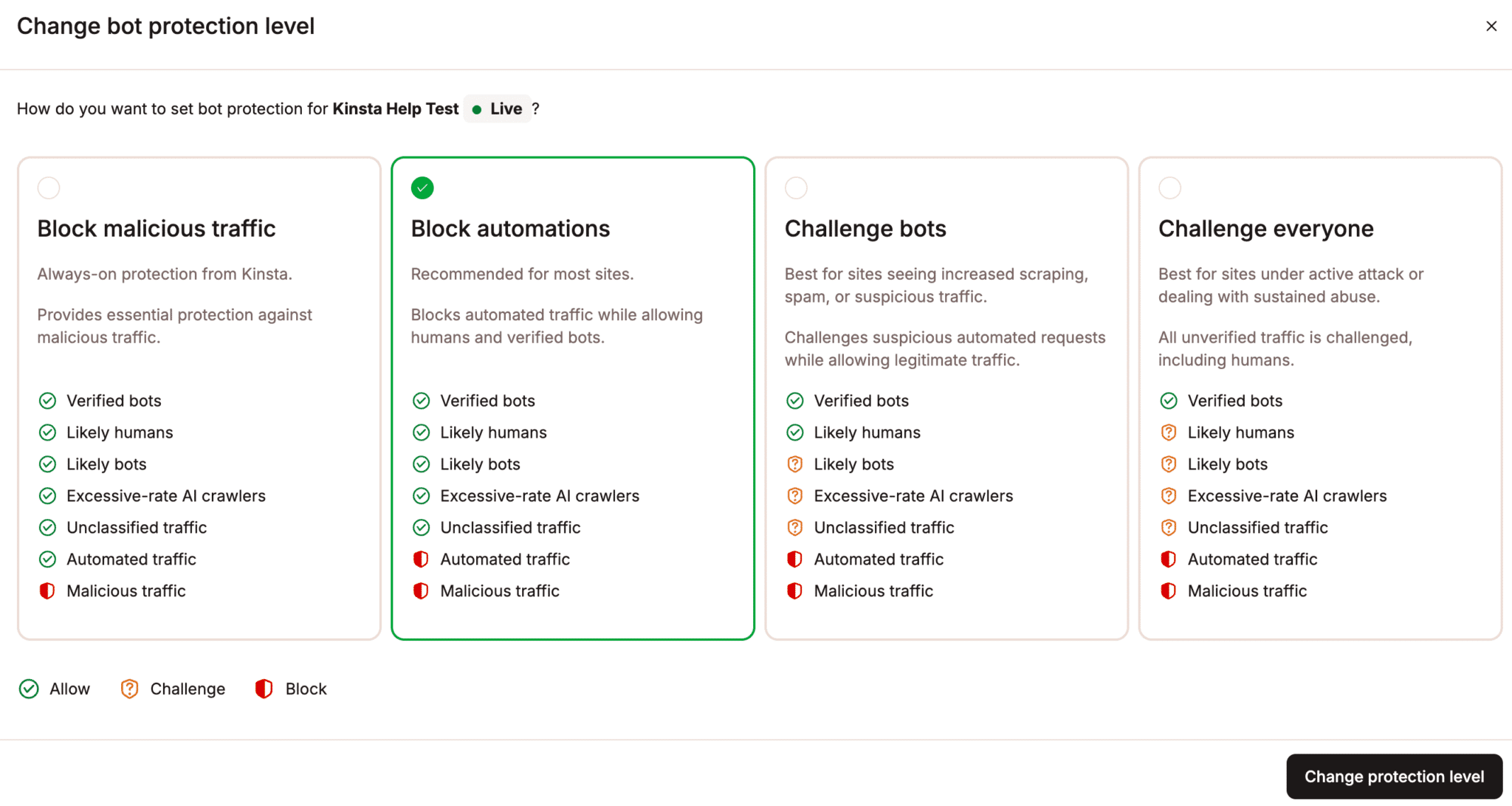
Those levels let you increase enforcement when bot traffic becomes a problem without manually building rules for every crawler or user agent.
As previously noted, Kinsta also provides a separate Block AI crawlers setting. When enabled, it blocks supported AI crawlers, including verified AI crawlers, but does not block Googlebot or Bingbot. That makes it possible to restrict some AI-specific crawling without cutting your site off from traditional search.
Stricter protection does create another concern: legitimate automation. WordPress sites rely on scheduled tasks, REST API requests, plugin integrations, payment services, monitoring tools, and other automated processes that you do not want to interrupt. Kinsta’s Allow typical WordPress automations option helps preserve that activity when you use stronger protection levels.

For anything that needs more specific treatment, Always Allow exceptions let you permit traffic based on an IP address, path, or user agent.
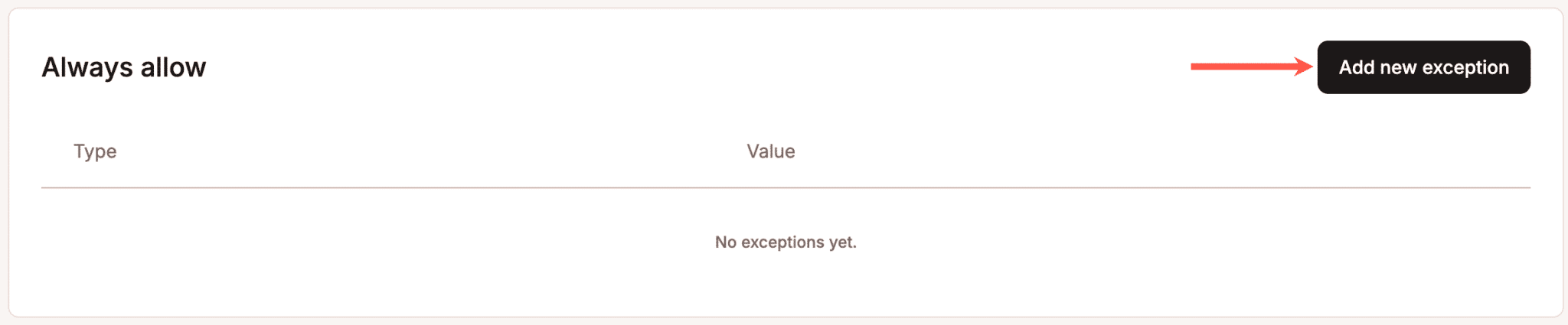
Together, these controls give you room to adjust your response as traffic changes. You can keep useful search and automation traffic moving, restrict AI crawlers when the tradeoff makes sense, and increase protection when automated activity starts placing too much pressure on the site.
Measure whether your balance is actually working
Bot protection works best as an ongoing process and not just a one-time configuration. After you adjust how your site handles automated traffic, you need to check whether the change actually improves performance without cutting off useful discovery channels.
Start by comparing what happens before and after you make a change. Look at:
- AI crawler request volume
- Excessive-rate AI crawler activity
- Top requested paths
- Allowed, challenged, and blocked requests
- Site performance during crawler spikes
- Organic search traffic
- AI referral traffic where you can measure it
- Conversions or other valuable actions from AI-referred visitors
Kinsta gives you several ways to investigate that activity in MyKinsta. The Request breakdown view groups requests into categories, including verified bots, AI crawlers, excessive-rate AI crawlers, automated traffic, and likely bots. The Top traffic report can then help you identify which paths, user agents, IP addresses, and countries generate the most requests.
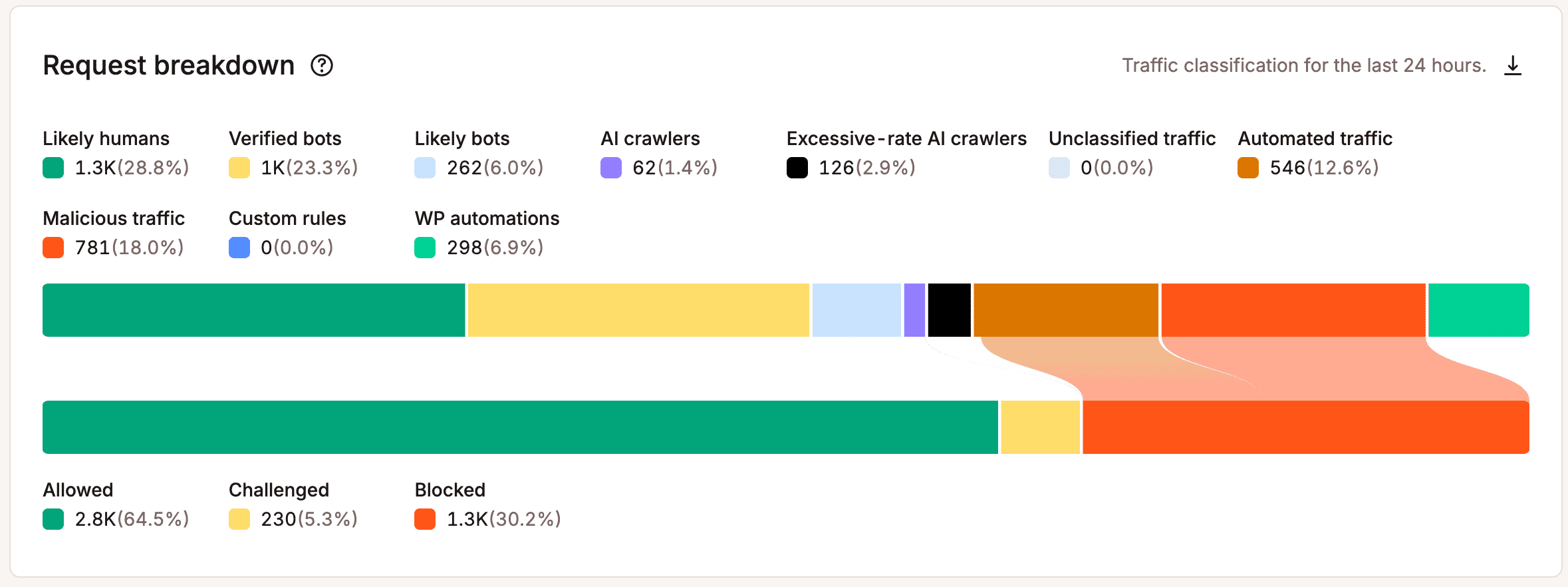
Those views become especially useful after you change a protection level or block a category of crawlers. If server load drops while search traffic and AI referrals remain stable, the change may be doing exactly what you intended. If useful traffic falls with it, you have a reason to revisit the setting or add a more targeted exception.
The same applies when conditions change. A crawler that causes little trouble today may increase its request rate later, while an AI discovery channel that sends little measurable traffic now may become more valuable over time.
A simple cycle works well: observe, adjust, compare, then keep or reverse the change.
Cloudflare’s new AI controls show where bot management is headed
Cloudflare’s recent changes point to the same broader strategy: manage automated traffic based on what it does rather than applying the same rule to every AI crawler.
In July 2026, Cloudflare replaced its single AI bot approach with separate controls for Search, Agent, and Training traffic. Site owners can allow each category, block it across the site, or block it only on pages that display ads. Starting September 15, new domains use defaults that allow Search while blocking Agent and Training traffic on pages with ads. Cloudflare also changes how its policies apply to mixed-purpose crawlers that combine activities like Search and Training.
The change matters because it recognizes a problem that site owners already face. You may want a crawler to index content for discovery without giving the same operator unrestricted access for model training. A single “AI bots” switch can’t express that preference very well.
If you host with Kinsta, be careful about layering extra bot protection on top of what’s already there. If you’re also using your own Cloudflare setup with custom WAF or bot rules, Cloudflare handles those requests first. In some cases, that can mean legitimate traffic gets blocked before Kinsta ever sees it.
Cloudflare’s changes are useful less as a new set of rules every WordPress site should copy and more as a sign of where bot management is going. The binary approach is giving way to controls that let you preserve useful automated traffic while restricting activity that provides less value.
Agencies need a policy, not one setting for every client
For agencies, there’s no single bot policy that works for every client. A publisher may be willing to allow more AI crawler activity if it helps with discovery, while a high-traffic WooCommerce site may need tighter limits when those requests start competing with shoppers for server resources.
A case study of work done with Hall shows why those differences matter. One of the agency’s WooCommerce clients struggled with downtime during traffic spikes before moving to Kinsta. As the business grew from $3 million to more than $50 million in annual revenue, reliable performance during peak demand became increasingly important.
Bot rules should reflect how each site actually works. Figure out which crawlers matter to the client, which ones are putting the most pressure on the site, and which automated services need to stay accessible. Then adjust the rules over time as traffic changes and the client’s needs change with it.
Control access without disappearing
You don’t have to choose between making your site visible to AI systems and protecting it from excessive automated traffic. The better question is which activity deserves access, where that access makes sense, and what it costs your site to serve it.
Keep the search and AI traffic that helps people find your site, but pay attention to what happens once those crawlers get there. If a bot starts using a lot of resources without much benefit, you can limit its access. Just be careful not to interfere with WordPress automations or other services your site depends on.
Those decisions may change as crawler behavior, AI referral patterns, and your own priorities evolve. The important thing is having enough visibility to see what is happening and enough control to respond.
Learn more about Kinsta Bot Protection and explore the findings in our AI & Bot Traffic Report.

Carlo is a passionate lover of webdesign and front-end development. He has been playing with WordPress for more than 20 years, also in collaboration with Italian and European universities and educational institutions. He has written hundreds of articles and guides about WordPress, published both on Italian and international websites, as well as on printed magazines. You can find him on LinkedIn.