Infrastructure Upgrades
At Kinsta, we power every WordPress site with high-performance, enterprise-grade infrastructure designed for speed, reliability, and scalability. Our platform operates on premium hardware and a global network, delivering exceptional performance regardless of your visitors’ location.
To maintain these high standards, we occasionally perform infrastructure upgrades. These upgrades enable us to leverage the latest technologies, enhance security, optimize system performance, and ensure your sites continue to run on the most advanced and reliable hosting environment available.
When infrastructure upgrades are scheduled, we’ll email you in advance to notify you of the upgrade’s scheduled date for your sites. All upgrades are performed during our standard maintenance window, between 2 a.m. and 5 a.m. local time for your site’s data center region, to minimize any potential disruption.
In some cases, we may need to make adjustments to your site to ensure full compatibility with the upgraded infrastructure. If so, we’ll inform you ahead of time and provide clear details of any required changes. These may include:
- Relocating your site to the nearest available data center region for improved performance and reliability.
- Updating your site’s external IP address.
Our team takes every precaution to ensure these upgrades are seamless and transparent, allowing your site to continue running smoothly with minimal impact.
If your site relies on a fixed IP address or uses a reverse proxy setup, please contact our Support team as soon as you receive the upgrade notification email. Our team will coordinate the process and handle your site’s upgrade individually to ensure a smooth transition.
FAQs
Why do the infrastructure upgrades require a maintenance period?
Infrastructure upgrades require a maintenance period to ensure they’re completed safely, efficiently, and with minimal or no disruption to your sites. During this time, we perform critical tasks such as moving sites to new hardware, updating network configurations, or deploying improved infrastructure components.
By scheduling these upgrades during dedicated maintenance windows, we can minimize downtime risk, verify that all systems are operating correctly, and ensure your site benefits from the latest performance, reliability, and security improvements.
Will my website go down?
Your site may experience a brief period of downtime during the scheduled upgrade. To minimize any impact, all upgrades are performed during our designated maintenance window, when traffic is typically at its lowest.
How long will my website be offline?
In most cases, your site will be offline for less than a minute during the upgrade. We work to ensure that any downtime is as brief as possible and occurs only within the scheduled maintenance window.
When do the upgrades start?
We’ll notify you by email 1–2 weeks before your scheduled upgrade. The email will include information about when the upgrade will take place, so you’ll know when to expect it.
How do I know if my site has been upgraded?
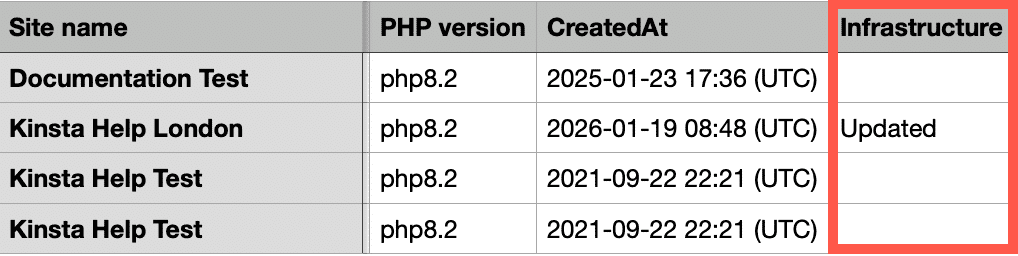
If you export your sites as a CSV, the download will include a new Infrastructure column with the following possible values:
- Empty: The site has not yet been upgraded to the new infrastructure.
- Updated: The site has been upgraded to the new infrastructure.
If the Infrastructure column is missing from the CSV file, it means none of the sites have been upgraded.
Can I opt out of the infrastructure upgrades?
No, it isn’t possible to opt out of infrastructure upgrades. These upgrades are essential to maintain the high performance, security, and reliability of our hosting platform. They enable us to implement the latest technologies and improvements, ensuring your sites continue to run on the fastest and most secure infrastructure available.
Will my server location change?
In some cases, region changes are required because our new infrastructure is powered by Oracle Cloud Infrastructure (OCI), which uses different data center locations than our previous Google Cloud setup. When a region change is necessary, we carefully select the optimal OCI data center based on both geographic proximity and performance data to ensure the best possible experience for your site.
You’ll be notified in advance via email with full details about the move, including the new data center location. If the new region presents an issue for your setup, please contact our Support team, and we’ll do our best to accommodate your site in another available region. Please note that your current data center region may no longer be available in some cases after the upgrade.
Will the available server locations change when I add a new site?
When adding a new site, you may notice that some regions you previously used are no longer available. This is due to our upgrade to Oracle Cloud Infrastructure (OCI), which offers a different set of data center locations compared to our former Google Cloud setup. If your old region isn’t listed, simply select the closest available data center to your target audience to ensure optimal latency and performance. For a complete list of current regions, please refer to Data Center Locations.
Will my IP address change?
Your site’s external IP address will change during the infrastructure upgrade. If your site relies on a fixed IP address, please contact our Support team as soon as you receive the upgrade notification email. Our team will coordinate the process and handle your site’s upgrade individually to ensure a smooth transition.
Do I need to make any changes to my DNS settings?
No DNS changes are required for this upgrade. Most sites will transition automatically without any action needed on your part.
Will my SFTP/SSH settings change?
Yes, the Host (IP address) and Port values in your SFTP/SSH settings will change as part of the upgrade. All other settings will remain the same. If you connect to your site via SFTP or SSH, you’ll need to update these connection details after the upgrade.
Will I still be able to access backups?
Yes, all MyKinsta backups will remain fully accessible, and no data will be lost during the infrastructure upgrade.
What if there are issues with my site after the upgrade?
If you encounter any issues following the upgrade, please contact our Support team. We take a complete snapshot of your site before every upgrade, so we can quickly restore or resync it if needed, ensuring it runs smoothly.