Add as a preferred source on Google
If you want to establish an online presence, it’s essential to understand what web hosting is. Whether you’re building a website yourself or like to learn more about the topic, we’re here to help you with everything you need to know about how web hosting works.
Let’s dive right in!
What Is Web Hosting?
Web hosting is the process of purchasing online space to store your website on the internet. Signing up for a web hosting service empowers you to publish your website online.
How Does Web Hosting Work?
When you create a WordPress website, you need two things: a domain name and a hosting option.
WordPress, the world’s top content management system (CMS), is free to use but requires a web host — which serves and stores your website files — and a domain name, which is your website’s address.
A web server a computer on which your website runs. Whenever someone types your website’s address into their browser, the server transfers the data needed to fulfill that request.
Besides storing and delivering files, hosting services usually help you with website maintenance. That can include backups, security, and uptime monitoring. Since hosting providers’ features and prices can vary widely, choosing a hosting plan that fits your needs is crucial.
Web Hosting and Domain Name System
We mentioned that WordPress websites require a host and domain name.
When users want to access your website, they type your domain name into their browser. Their computer sends a request to connect to the web server holding your files.
Before reaching your web server, the request passes through a network of nameservers, which make up the domain name system (DNS). The DNS matches domain names with server IP addresses.
In short, the DNS makes sure the browser connects to the correct server.
You can think of the web server as the location of your home, and the domain name as its address. Your home can be anywhere globally, but the domain name allows people to locate you.
The DNS was born because websites communicate through those IP addresses, strings of numbers that are hard to memorize. Tying an easy-to-remember domain name to a website’s IP address makes navigating the web simpler.
Website owners can buy domain names from domain name registrars.
Types of Web Hosting
Now that you know what web hosting is, we’ll look at the different types of web hosting plans out there.
Different clients have different needs. An online business that uses multiple media files and receives numerous visitors has more hosting requirements than a personal website used for blogging.
Hosting providers consider speed, storage space, and price for their hosting plan offerings. Each option has different payoffs.
Surprisingly, about 1 in 3 hosting customers abandon their website before launching, often due to confusion or feeling overwhelmed. That’s why it’s important to understand the basics of each hosting type before making a decision.
Let’s look at the most popular options available.
1. Shared Hosting

As you learn what web hosting is, you’ll likely hear about shared web hosting. Shared hosting is best for entry-level functions. Because it’s targeted at beginners, shared hosting packages often come with website builders, templates, and email features.
With shared hosting, you share server resources such as disk space and bandwidth with other websites, making it the most affordable option. However, because you share space with multiple websites on one server, risks are involved.
Shared hosting can affect website performance. For example, if one of the other websites experiences heavy traffic, it will slow down your website. There are also security risks with shared hosting that could lead to a hacked website.
Websites on a shared host can also share an IP address. If a neighboring website with the same IP performs an illegal activity and is blocked for security reasons, your site would also be blocked.
Best for: New websites that receive minimal web traffic, such as personal blogs or hobby projects. Small businesses are often pointed here by default for the low price, but a business site usually needs more than shared hosting can reliably deliver once it’s actually representing you to customers or taking payments.
Pros:
- Low-cost
- Pre-configured server options
- Requires little to no technical knowledge
- Host takes care of server maintenance
Cons:
- Shared resources with other websites can affect security and speed
- Shared IP address
- Little to no control over server configuration
2. Dedicated Hosting

Dedicated hosting is on the opposite end of shared hosting. It’s usually the most expensive type of hosting because it gives website owners the most control over their servers.
With dedicated hosting, you rent the whole server, so you’re in charge of everything from choosing its operating system to maintaining all the software required to support its web-hosting functions.
Best for: Website owners who have high traffic levels or need control over their servers.
Pros:
- Dedicated server space
- Faster website speed
- Scalable and customizable
Cons:
- Most expensive type of hosting
- Requires technical expertise
3. Virtual Private Server (VPS) Hosting

Virtual private server (VPS) hosting is the middle ground between shared hosting and dedicated hosting.
VPS hosting mimics dedicated hosting because each website has its own space on the server, but websites on VPS hosting still share server space with others.
Best for: Website owners who require more control over their servers but don’t necessarily need a dedicated server.
Pros:
- Provides dedicated server space without the hefty price tag
- Website owners can configure their server space
- Doesn’t require much technical knowledge
Cons:
- Unable to handle high traffic levels or spikes
- Performance is still affected by other websites on the server
4. Cloud Hosting
What is web hosting’s most reliable option? Cloud hosting. Unlike regular hosting, which takes a centralized approach by storing multiple websites’ data on a physical server, cloud hosting operates on virtualization.
With virtualization, data appears to be stored on one server, but multiple storage devices share the physical server’s capacity. Because data is stored in various locations, it can be easily backed up and retrieved. It’s also more flexible since it’s easier to add storage space.
Best for: High-traffic websites that need plenty of processing power, bandwidth, and disk space, such as ecommerce stores.
Pros:
- Little to no downtime
- Pay-on-demand
- Resources scale to users’ needs
Cons:
- Difficult to estimate actual costs because it varies monthly
- Dependent on the internet
Web hosting is often comprised of one of those four plans, but hosting packages also cater to specific markets.
5. Hosting for WordPress
To deliver hosting for WordPress, servers are configured specifically for that CMS, so your website runs faster and more smoothly. Hosting plans also include special features, such as:
- Pre-installed plugins.
- One-click WordPress installation.
- Pre-designed WordPress templates.
- Drag-and-drop builders.
- Customer support team knowledgeable with WordPress.
6. E-commerce Hosting

With the prevalence of online shopping, many hosting providers support e-commerce hosting.
Like WordPress hosting, e-commerce hosting offers unique features tailored to the business. These often include:
- Free SSL certificates
- Help setting up payment gateways
- Extra security
WooCommerce hosting is a subtype of both WordPress and e-commerce hosting that you may want to consider if your site features a WooCommerce-powered shop.
What to Consider Before Signing Up for Web Hosting?
Now that we’ve covered what web hosting is and the different hosting plans, we’ll weigh in on each feature to help you choose the right web hosting service provider — and why Kinsta is a top choice over other web hosts.
Choosing the right hosting plan and company is essential to ensure your business’s success. Both affect your website’s speed, security, scalability, and usability.
That’s why it’s worth noting that Kinsta was named best web host in G2’s user-review-based software awards for 2026.
Here are some standard features hosting plans offer and what to look for when choosing a host.
1. Disk Space
What is web hosting without disk space?

All hosting plans offer a certain amount of disk space that you can use to store your files.
We recommend determining your website’s storage requirements before choosing a hosting plan. By doing so, you can better estimate which plan to use.
Different websites have different storage requirements. If your website is media-rich, invest in a plan with extra storage, as those files take up a lot of space.
If you can’t estimate your storage requirements yet, plan for growth by choosing a hosting provider that lets you buy more disk space.
The Kinsta Advantage: Add-On Disk Space
At Kinsta, not only do we offer multiple hosting plans, but you also have the option to purchase add-on disk space — which not all hosting companies do.
Purchasing disk space at Kinsta is simple: You request additional disk space through the MyKinsta dashboard, the same place you monitor disk space usage.
2. Bandwidth
A web hosting service isn’t complete without bandwidth.
Bandwidth allowance (also loosely referred to as “data transfer” or “traffic”) is the measure of a server’s capacity to transfer data within a specific time frame. It’s expressed in megabytes per second (MB/s) or gigabytes per second (GB/s).
Bandwidth is a critical feature if you want your website to run faster, because bandwidth size determines the maximum amount of data transmitted from your site to your users.
If you want higher bandwidth, you need your server, or one that shares its resources with fewer websites. But remember, higher bandwidth comes at a higher price, since there are fewer users to split the cost of renting the server.
Hosting packages offer a set amount of bandwidth per month. Before choosing a hosting plan, determine the suitable bandwidth for your website by estimating your website’s size and the number of visitors.
3. Uptime and Downtime
The best web hosting can run without downtime or interruption, so your website is always available to visit.
If the server does fail, high-performance hosting plans can get it back up and running quickly.
Uptime measures the percentage of time your website is up and available to visitors — the closer to 100% uptime, the better. Kinsta offers a 99.9% uptime guarantee.
The Kinsta Advantage: Private Cloud Hosting
Kinsta’s entire infrastructure is built on a cloud platform, which allows server capacity to be shared by multiple devices. Because data is stored in various locations, should the server hosting your website go down, your website will be back up in no time.
4. Website Speed
Users expect websites to load in five seconds or less.
Besides affecting user experience, website speed also impacts SEO. Not all web hosting companies can guarantee quick website speeds.
One of the things that makes Kinsta’s hosting plans stand out is that we don’t fall in any of the traditional hosting categories. Instead, our web hosting is built in such a way that every website hosted on our platform runs in an isolated virtual container that contains all the software needed to run your website (including the Linux OS, NGINX, and PHP, MySQL).
The isolated software container ensures each software is 100% private and not shared even between your websites. In addition to the security benefits, customers have reported significant speed increases after migrating to Kinsta from other providers.
The Kinsta Advantage: Multiple Global Data Centers
Kinsta ensures website speeds by letting you choose between different data center locations for your websites. That enables you to place your website close to your visitors, ensuring low latency and time to first byte (TTFB), and fast load times.
All these features combined with HTTP/3 CDN and the latest versions of PHP ensure you’ve got the best performance stack in the industry.
5. Security

Website security is no laughing matter.
Besides disk space and bandwidth, websites also need the security offered by hosting providers.
Although WordPress is secure, its popularity has made it a target for data breaches.
We recommend comparing each hosting plan’s default security features if you’re not tech-savvy. Many cheap or free web hosting plans may provide some default security features but offer advanced features as add-ons.
All websites hosted on Kinsta come with a free SSL certificate. We also support two-factor authentication and IP geolocation blocking. We enforce strong passwords for all new installs and automatically ban IP addresses that have more than six failed login attempts in a minute.
We even offer a malware security pledge. If your website gets compromised, we’ll fix it for free.
And because no website is 100% hack-proof, we also automatically create two weeks’ worth of backups.
The Kinsta Advantage: Cloudflare’s Enterprise-Level Firewall
Kinsta leverages Cloudflare’s enterprise-level firewall to protect customer websites. Cloudflare’s firewall lets us block malicious traffic, and our Cloudflare integration includes free distributed denial of service (DDoS) protection. That means better protection for your site.
6. Control Panel
While it doesn’t directly affect website performance, you should also look into your hosting account’s control panel.
Control panels enable you to control server processes. You can find different tools to:
- Upload and manage web pages, domains, and subdomains
- Manage privacy and security
- Redirect visitors to another location
- Install applications
- Create and manage email accounts
- Back up data
- Protect directories
Control panels also allow you to access the file transfer protocol (FTP), which transfers files between your computer and an online server.
When you shop around for hosting plans, don’t forget to read reviews on the usability of the company’s control panel. You won’t be able to explore or maximize your website’s functions if it’s complicated or confusing to use.
The Kinsta Advantage: MyKinsta
MyKinsta is Kinsta’s control panel. It was developed as an alternative to cPanel or Plesk with WordPress in mind.
MyKinsta empowers you to:
- Easily manage multiple WordPress websites
- Pre-install plugins
- Migrate your WordPress website
- Clone your existing sites
- Add and manage domains
- Track performance and analytics
Should You Choose Managed Hosting for WordPress?
There is no right or wrong path here. You should do your research to make the right choice for your business. Perhaps you start with shared hosting and upgrade to managed hosting after growing.
Or you could invest in managed hosting, to begin with, and focus all of your efforts on growing your business.
This isn’t just an option for businesses that have already scaled up: Kinsta’s small business hosting is built for exactly this earlier stage, so you’re not paying for downtime or lost customers while you wait to “grow into” better hosting.
Check out 9 reasons this method can benefit you today.
1. You Get Superior Support
The number one reason you should choose managed hosting for WordPress is superior support. Managed hosting for WordPress providers usually only deal with the WordPress platform. This means they don’t mess with Drupal, Magento, or any other type of platform or software. Typically, support teams that focus on one area will become experts in that area, even if they aren’t, to begin with!
The support team at Kinsta are all WordPress developers and Linux Engineers, contribute to WordPress Core and other open source projects, and use WordPress daily. As a result, the expertise of our support department is second to none. Nothing is worse than launching a chat session and feeling like you know more than the person on the other end. That will never happen at Kinsta!
When Kinsta first began, we knew the industry was broken regarding how WordPress support is handled. This is why our team is structured completely differently. We don’t have separate levels or tiers. The support team member that helps you is fully qualified to fix every type of problem, all the way to resolution. There is no bouncing around between different reps, as we think this is a massive waste of time. Everyone gets to chat to the same support team members that back our Fortune 500 and enterprise clients! 👏
I’ve tried many different hosts – LiquidWeb, SoftLayer, WP Engine, Web Synthesis, Rackspace, etc. Out of all of them, Kinsta has been the best in terms of support, speed, and pricing. I’m very impressed with the knowledge and skill of the support team, as well as response times and not having to deal with your typical ‘level 1’ support. Expert fast support, what more can you ask for? WordPress site runs fast with Kinsta, and it was tough to find the necessary expertise with these other companies. Additionally, I love that I can up-scale a server for a week during peak traffic times to handle the load. Amazing.

So when it comes to choosing a host with a reliable and knowledgeable support team, providers of managed hosting will often be a level above the rest, simply because they live and breathe WordPress daily. Kinsta also includes premium uptime monitoring for all clients via Sentry. We check the status of all the websites we host every 3 minutes. That translates to 480 checks for each of your sites every day. However, we also provide tools for monitoring your sites’ health yourself.
This means that if your website goes down, we will be the first ones to be notified, and our support team will hop on it! To help you diagnose performance-related issues, we also support your own custom New Relic tracking.
2. Optimized for High Performance
The second reason to choose a managed hosting provider is that their environments are fine-tuned to work with WordPress.
If you go with a shared host or the DIY route, they will typically be on more barebone machines, and you will need to spend time installing software and optimizing to obtain the same speeds that a provider of managed hosting for WordPress offers out of the box. Or, in some cases, on a shared host, there won’t be anything you can do to achieve the speeds you need.
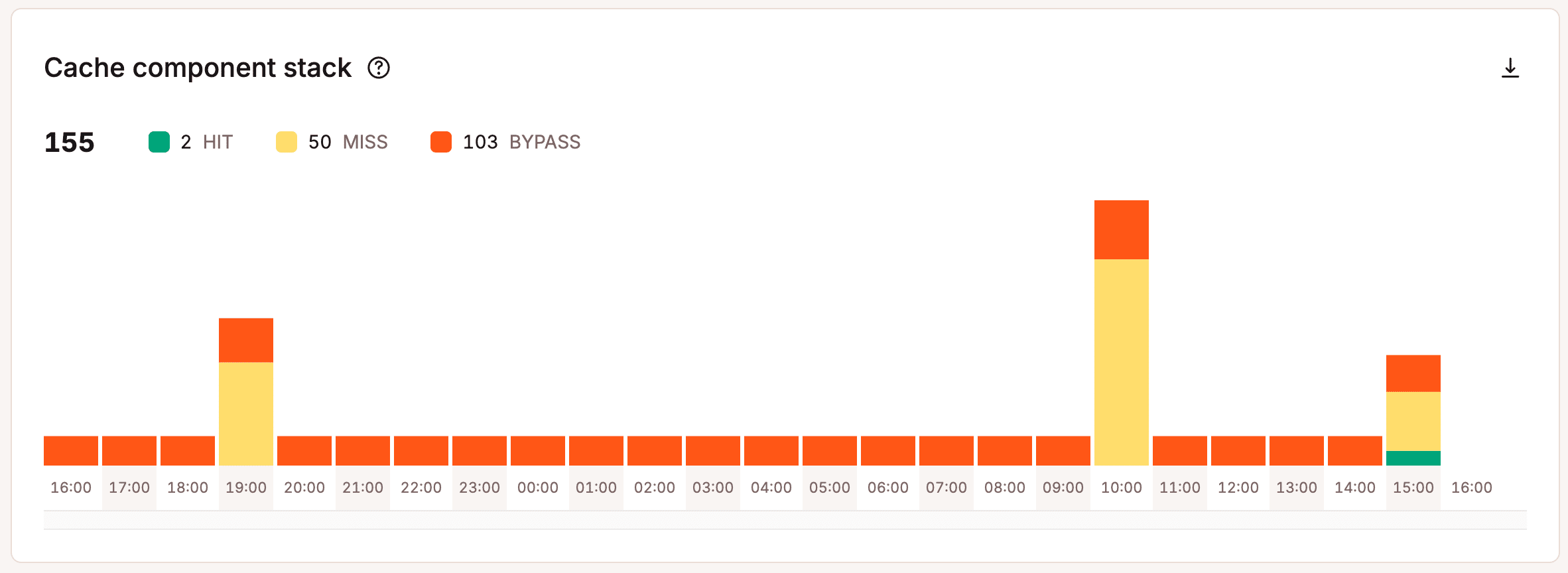
For example, many managed hosting providers, including us here at Kinsta, implement server-level caching and/or full page caching. What that means is we handle that caching. There’s no need to hassle figuring out the fastest caching plugin because you won’t need one. This alone can save you a lot of frustration as caching plugins are never fun to deal with. And in most scenarios, server-level caching is much faster than any plugin.
You must deliver as many assets as possible from the cache during surges of traffic. This reduces the load on the server and ensures things are delivered lightning fast. At Kinsta, you can use our Cache Analysis report to ensure the bulk of your WordPress site is serving from the cache.
A high-performance managed hosting providers should also provide you with the latest and greatest architecture and technology. This includes utilizing the latest versions of PHP, MariaDB, HTTP/3, and NGINX, which have all been proven to be one of the fastest combinations for WordPress.
If your WordPress host is taking ages to release the latest versions of PHP, they are holding you back! That doesn’t fly with us. Kinsta released PHP 8.5 within weeks of its final and tested release. This allows clients to start testing earlier and take advantage of free and instant performance gains.
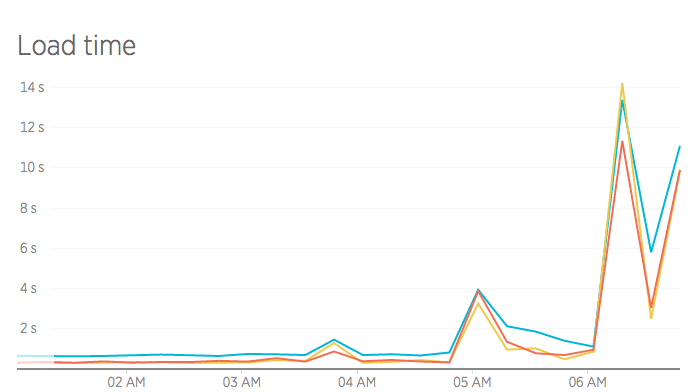
And here is an example of what happened when someone migrated away from Kinsta to shared hosting. Their load time went from 300 ms to 14 seconds! The shared host was just not able to handle the large traffic site.
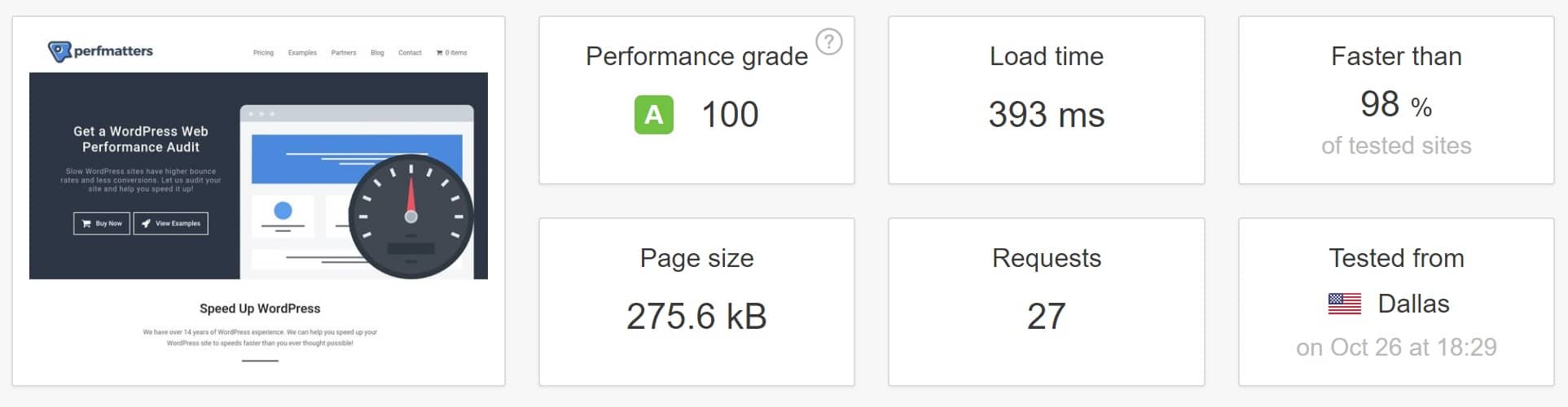
Here is another example of our test site running on Kinsta. As you can see, it loads in under 400 ms with a performance grade of 100. That is fast!
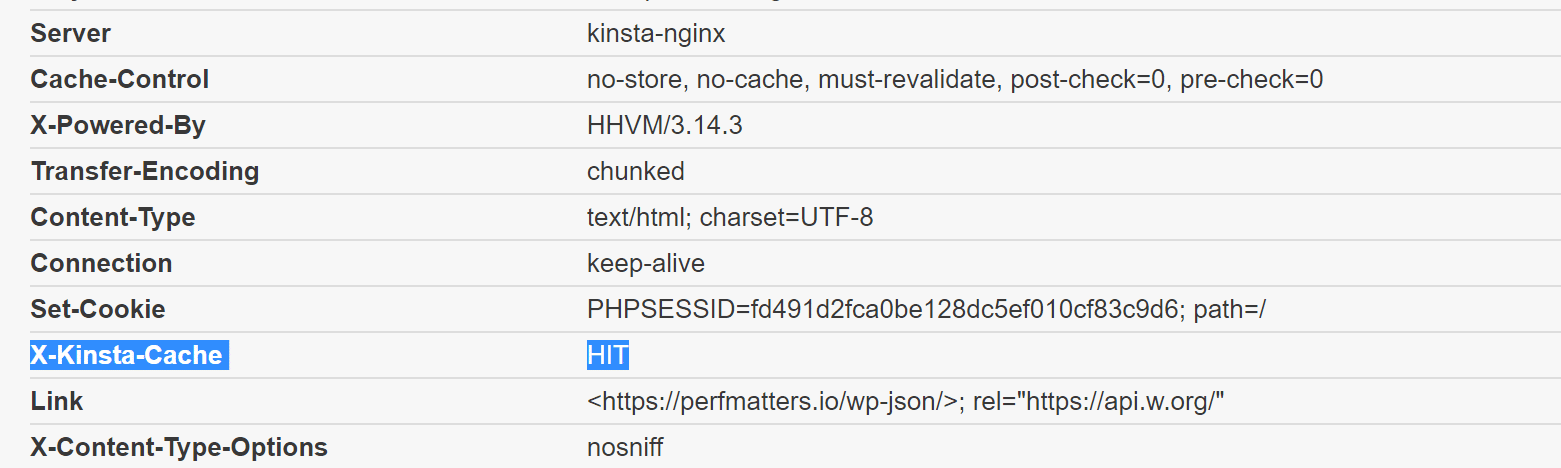
If we look at the HTTP header, we can see it is being served up from the Kinsta cache on a server-level, and there is no caching plugin running.
You can check out this detailed post if you would like to learn how Kinsta designed the fastest WordPress hosting stack on the market.
3. Strategically Located Data Centers for Global Reach
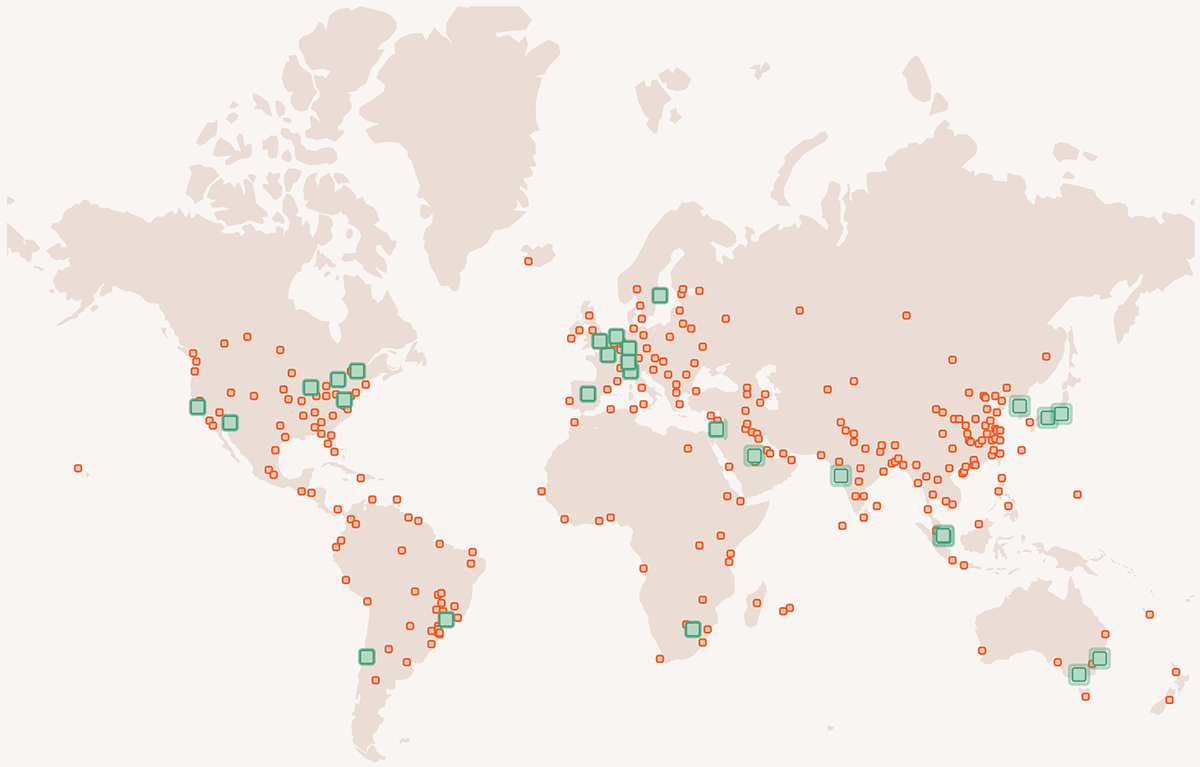
Besides server-level performance, managed hosting providers typically have a larger infrastructure designed for global reach. We have 30 different regions here at Kinsta from which you can choose to host your WordPress site. This includes locations across the USA, Canada, Europe, Asia-Pacific, and South America. Strategically placing your site closer to your visitors and customers decreases network latency, TTFB, and ensures faster page load times.
Latency refers to the time and or delay involved in data transmission over a network. The further the distance, the greater the latency. For example, if you run a local WooCommerce shop in Sydney, Australia, you should be hosting your site in Australia. If you were to host your site in the USA, customers would see a much longer first-time page load. The initial DOC load comes from your host server, so having the ability to place your site where your customers are is very important!
Utilizing a content delivery network (CDN) can help speed up the rest of your site’s media. Kinsta CDN, in particular, is blazingly fast since it takes advantage of Cloudflare’s network, which spans 300+ locations worldwide. It also comes for free with all plans.
4. Automatic Backups (Never Lose Your Data)
What would you do if you suddenly lost everything? You should always be prepared for the worst-case scenario, including always having backups of your WordPress site. A quality managed hosting provider should always include automatic backups for no additional charge.
With shared hosts, backups are generally only included in higher-cost plans. And if you go the DIY route with a VPS, usually you have to set up your backup system, as well as VPS snapshots, which also cost extra.

Whether you’re backing up a WooCommerce shop or just making a copy of your database, Kinsta makes it easy. We include six different types of backups with all plans:
- Daily
- Hourly
- Manual
- System-generated
- Downloadable
- External (to Amazon S3 or Google Cloud Storage)
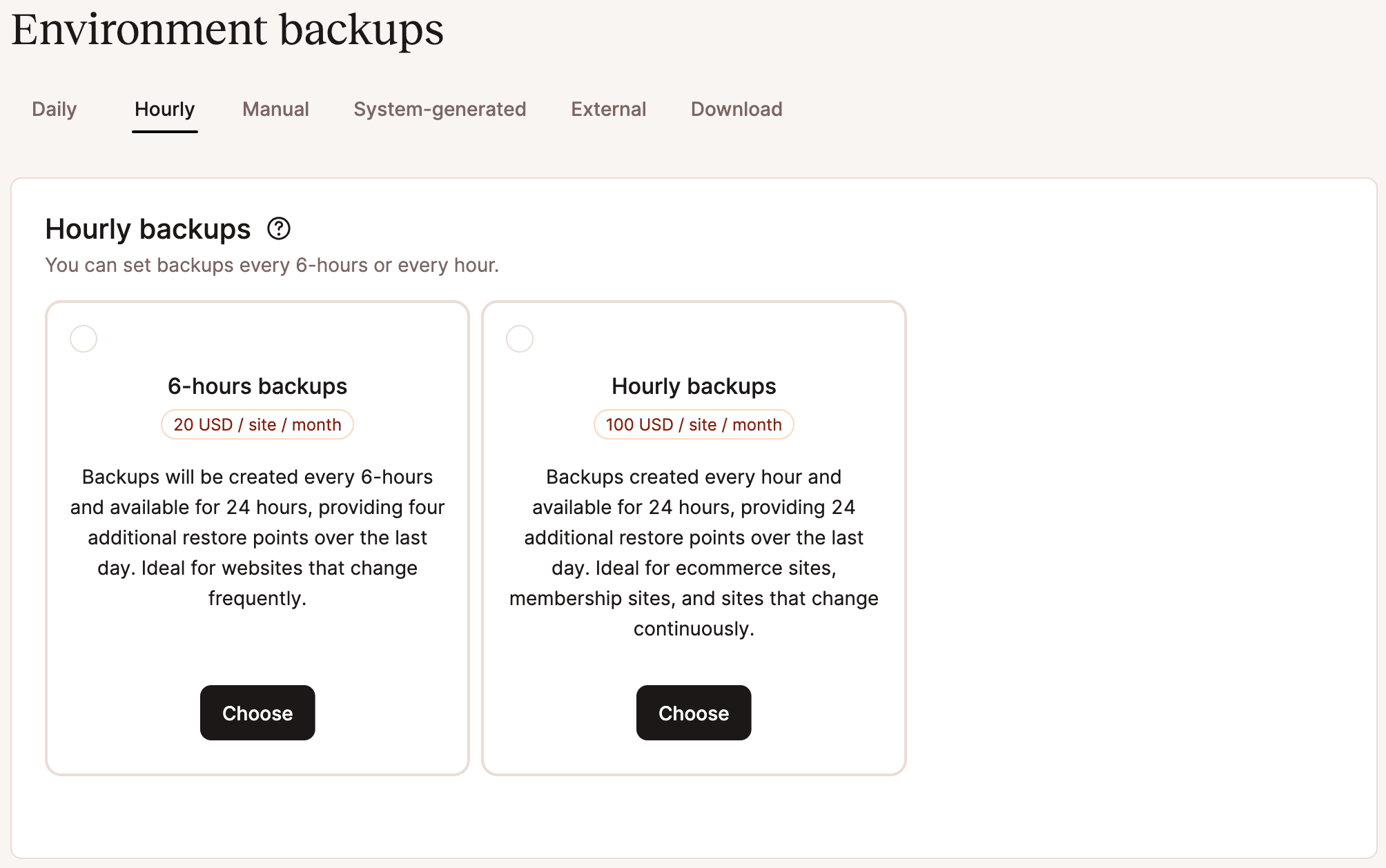
You can also restore backups to staging or production.
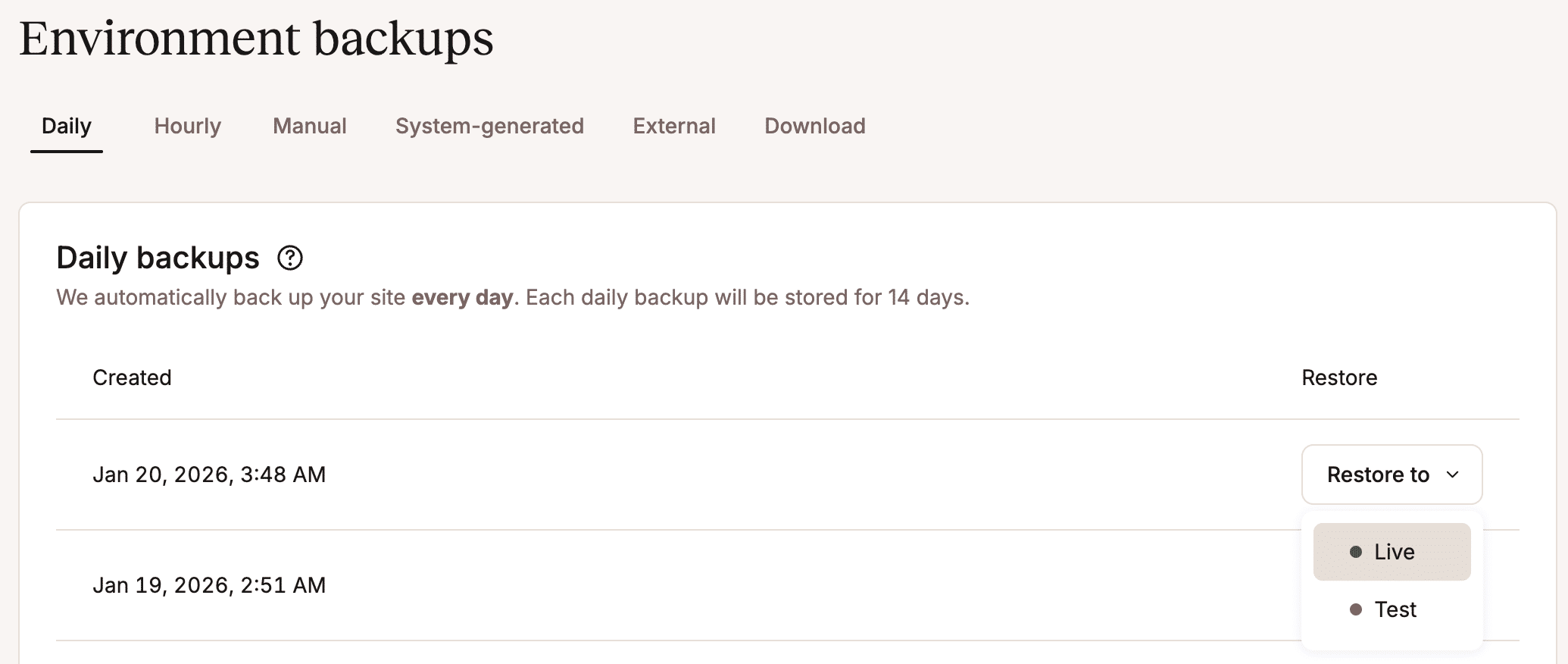
Having multiple options for your WordPress backups can save you a lot of time as you don’t have to mess with backup plugins, cPanel, FTP, or phpMyAdmin.
5. Standard and Premium Staging Environments
Testing, testing, testing. You can’t afford your website to go down, so you should constantly be testing new changes, plugins, PHP versions, and updates on a development site, not your production site! However, with most web hosting providers, testing involves a complex and time-consuming process of copying your site locally, testing, and then figuring out how to migrate the changes back.
Many managed hosting for WordPress providers include staging environments for WordPress specifically to make testing a breeze. With most hosts, your dev site is accessible via a test URL, and you can also access it via all the typical methods such as FTP, SSH, phpMyAdmin, etc. You can then quickly push your changes to production from within the dashboard.
Kinsta takes this concept one step further by offering Premium Staging Environments that can be added on to each account. You can have up to five Premium Staging Environments at once, offering many more possibilities and combinations for testing than a single standard staging environment can provide.
6. Developer-Friendly (SSH, Git, WP-CLI)
Another advantage that managed hosting for WordPress provides is that you usually have access to additional developer-friendly features that you might not get with a shared host. This includes SSH access, Composer, HeidiSQL, Sequel Pro, and Git. Typically, shared hosts won’t give you SSH access, meaning you can’t use any of the above features. These can usually be set up if you use a DIY VPS, but it might require additional work.
Here at Kinsta, you can easily access your SSH connection information via your MyKinsta dashboard, along with these additional developer features:
- Ability to run different versions of PHP between sites and staging sites.
- Support for custom setups such as Bedrock and reverse proxy configurations.
- Faster performance with our Redis add-on.
WP-CLI is another tool that is becoming very popular in the WordPress community. WP-CLI is a command line tool for managing many-many aspects of a WordPress installation. It can add/remove users, posts, categories, insert test data, search and replace in the database, and much more. For a lot of developers, WP-CLI is a dream come true! And Kinsta’s architecture supports WP-CLI out of the box.
7. Security Is Taken Seriously
And you can’t forget security! Typically, they don’t provide any assistance in shared hosting environments if you’re hacked or encounter malware. This goes for the DIY VPS route as well. If your WordPress site is hacked, you’re responsible. Many managed hosting for WordPress providers include support if your site is hacked, and they have systems to protect you from different types of malware.

Beyond the server-level security, your account security is also critical. You should ensure that they offer two-factor authentication no matter which hosting route you go. If someone gets access to your account, they could change your passwords, delete your websites, change DNS records, and do all sorts of horrible things. Here at Kinsta partnered up with Authy and have two-factor authentication available from within your MyKinsta dashboard.
If you pick a web hosting provider that offers the above features, not only will it save you time, but it will also give you peace of mind knowing that if anything ever happens that the host has your back! It’s essential to invest in secure WordPress hosting.
8. Built With Scalability in Mind
Another critical aspect for any host is scalability. When it comes to shared hosting, your only option is to upgrade to a higher plan when you outgrow your resources. And this is if they haven’t already suspended you. Eventually, with a shared host, you will reach a point where they will force you to migrate to a dedicated server. This can simply be time-consuming in itself as you’re constantly having to worry about watching your limits. And moving to a better server might require time on your part.
The DIY VPS route is much easier to scale, but sometimes this requires a little more server knowledge to expand disks, etc. Managed hosting for WordPress providers usually handle all of this for you. If you’re going over their pre-defined limits, they will simply notify you, and if required, an upgrade is just a click away.
A very cool and unique feature we have at Kinsta is the ability to scale your site because we use Google Compute Engine servers. For example, other WordPress hosting providers are typically constrained to 2-6 CPUs per machine. We actually can let the site’s container scale to as many CPUs as needed when there’s a traffic surge. For sites with a large amount of un-cacheable activity or substantial traffic surges, we have a dedicated server solution that allows PHP threads to be scaled beyond the limits on our regular plans.
With our isolated software container technology, hardware resources are automatically allocated to each site container by our virtual machines on an as-needed basis. No resources are shared between sites. The result is a hosting configuration that is secure and private by design while simultaneously allowing server resources to scale up or down as needed based on the demands of the site.
9. Premium DNS (Faster, More Reliable Lookup Times)
And last but not least, you should be using a premium DNS provider. You won’t get that with shared hosting providers or the DIY VPS method. You would have to sign up separately for the service. There aren’t many managed hosting providers that even offer this, but Kinsta does! We include premium DNS on all plans via Amazon Route 53.
Like with web hosting, there are slow DNS providers and fast ones. Amazon has one of the largest networks in the world. Going with a fast DNS provider will ensure shorter DNS lookup times.
Typically, the free DNS provided by domain registrars like GoDaddy and Namecheap is very slow. It also might not be consistent, and lookup times can vary. The best DNS providers out there are companies like Amazon, Cloudflare, Dyn, and DNS Made Easy, which all have extensive infrastructures specifically designed for DNS.
Another reason a reliable DNS provider is important is to protect you from DDoS attacks.
Web Hosting FAQs
It can be tough to find straight answers to questions about web hosting. To help make things easier, we’ve given our solutions to some of the most-asked questions on the subject.
1. What Is Managed Hosting for WordPress?
Managed Hosting for WordPress is streamlined explicitly for websites that run on the WordPress platform. The “managed” portion means that the host manages basic administrative tasks for you, like installing updates and setting up automatic backups.
2. What Is Shared Hosting for WordPress?
Shared hosting for WordPress refers to a hosting setup in which multiple WordPress websites share space on the same server. This is in opposition to dedicated WordPress hosting, where each WordPress site gets its private server.
3. What Is VPS Hosting for WordPress?
VPS hosting for WordPress uses virtual private servers to give each WordPress site its own fully compartmentalized space on a server, often with full access to backend server tools.
With VPS WordPress hosting, you must manage all hosting maintenance responsibilities, like updates and installations, yourself — a benefit for some, a drawback for others.
4. Which Is the Best Web Hosting Service?
There are so many options out there, it can be challenging to choose. But the best host for you will:
- Improve your website’s performance
- Perform server and platform updates and upgrades automatically
- Offer easy migration options
- Give you room to scale up
- Have a rapid-response support team made up of experts
Kinsta ticks all those boxes, and then some. Check out what else customers get when they sign up for a Kinsta hosting plan.
5. How Do I Choose the Best Web Hosting?
As with any online ecosystem, the world of hosting doesn’t stand still long. To choose the best web hosting, it’s wisest to do your own, fresh research.
Check online reviews for each host and get a feel for how users feel about their services. Determine which hosts have the tools and offerings to save you the most time. And be sure to familiarize yourself with their support processes and availability.
Kinsta works to offer the best managed hosting for WordPress platform by constantly innovating.
Among competitors like SiteGround, WP Engine, and Flywheel, our incredible support team helps us rise above the rest.
6. Is Managed Hosting Worth It?
In almost all cases, yes — managed hosting is worth it. It comes down to need vs budget, but generally, you’ll get far more out of a managed solution than you will by sinking time into managing your own.
7. What Are the Benefits of Managed Hosting for WordPress?
Some of the benefits of managed hosting for WordPress include:
- Reliability
- High speeds and performance
- Automated server management (backups, installations, updates, etc.)
- Modern hosting stack
- Heavy security protocols
- Scalability
- Staging environments
- Access to helpful development tools
- Support from WordPress experts
And the list goes on.
8. What Is the Difference Between Hosting for WordPress and Managed Hosting for WordPress?
Managed hosting for WordPress is hosting for WordPress sites where the host handles many administrative server duties for you.
On the other hand, plain hosting for WordPress can mean any type of host that can serve up a WordPress-based website, including those that don’t handle those duties for you.
Summary
Now that you know what web hosting is, the different types, and what to consider before you sign up for a plan, it’s time to build your website.
Whether you plan to create a personal website or manage an agency, Kinsta has the perfect plan for you.
All of Kinsta’s WordPress plans include:
- Free WordPress installation
- Free SSL certificates
- Enterprise Cloudflare integrations
- Premium Staging Environments
- 24/7 uptime monitoring
- Technical support
Get all that and much more with a 30-day money-back guarantee. Check out our happy customers or contact us to find the right plan for you.

Maddy Osman creates engaging content with SEO best practices for marketing thought leaders and agencies that have their hands full with clients and projects. Learn more about her process and experience on her website, The Blogsmith and read her latest articles on Twitter: @MaddyOsman.