Add as a preferred source on Google
WordPress powers more than 41% of all websites on the internet. It’s the most popular content management system and website building software in the world.
But is it still the right choice in 2026?
WordPress has real competition now. Wix has gotten better. Squarespace looks nicer out of the box. Shopify owns ecommerce for a lot of sellers.
If you’re picking a platform, you’re not short of options. But here’s why most people still end up on WordPress anyway, and why that’s usually the right call.
1. The Software is Free and Open-Source
Both WordPress.com and WordPress.org are completely free to use.
You can learn about the difference between the two here, but in short, WordPress.org is a self-hosted version where you control more of your site and take advantage of advanced plugins. WordPress.com works great for complete beginners, but it’s not exactly the best for a business that plans on making money so moving away from WordPress.com makes sense. It does have higher paid plans, but we recommend it for personal and hobby blogs.
But moving on, WordPress is free for anyone to download. It’s an open-source project that’s been around since 2003. This means that WordPress is developed by a collection of contributors.
Open-source projects are typically free, with large communities. The users often take part in this community as beta testers or simple brand advocates, but there’s really no requirement for any participation if that’s not your style.
Warning: Although the WordPress software is free, you will most likely end up spending a bit of money. WordPress is self-hosted, so hosting is required. This can start at around $3 per month, for the really cheap shared servers, and go all the way to up to a few hundred per month for those needing ultimate speed and performance (like with Kinsta).
You can typically find themes and plugins for free, but the premium (paid) ones often provide better features and quality support.
Finally, many WordPress users end up paying for additional services, whether it be from freelancers or agencies. For instance, you might pay a freelancer to design a logo for you or adjust some of the CSS code on your site. Other WordPress users are keen on keeping graphic designers or maintenance experts on call. It all depends on your experience and the scale of your website.
But overall, you can absolutely keep your WordPress costs to a minimum. Many webmasters end up only paying for hosting.
See it in Action:
When you navigate to the WordPress.org download page, you can see the new release, which is updated frequently depending on the newest version (currently WordPress 7.0), along with proper instructions to install the software on your own.
If you’re looking for an even easier installation method, we recommend looking towards your hosting company.
The most reputable hosts have one-click installation buttons for getting WordPress running within minutes. At Kinsta, installing WordPress is as easy as clicking on “Add Site.”
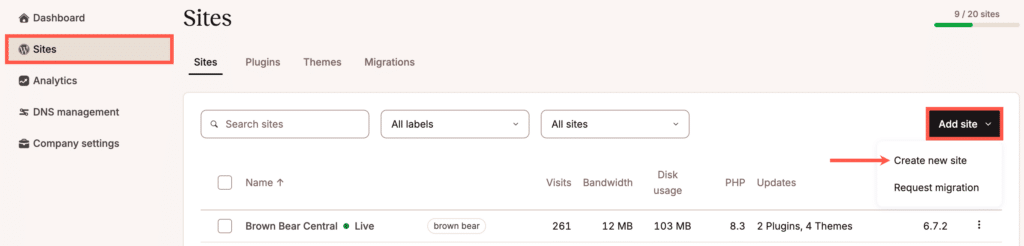
That way there’s no need to manage files and upload them through an FTP. Managed WordPress hosting companies take it a step further by handling the entire installation, maintenance, security, and backups down the road.
As for updates, you don’t have to go back to the download page every time a new WordPress version is released. Instead, WordPress lets you know about the update in the dashboard, where you can usually complete the process in less than one minute.
2. It Adapts So You Can Make Any Type of Website
One of the common misconceptions about WordPress is that it’s mainly for building blogs.
At one point in time that was, in fact, the case. WordPress was developed as a blogging platform, but that has changed drastically with the various new releases over the years.
In fact, WordPress is at an advantage due to its blogging roots. It’s by far one of the cleanest, fastest ways to write and publish blog posts, and that’s all included right from the start.
Some website building tools think about design and apps first, then the blogging interface comes in as an afterthought. That’s not the case with WordPress, so you can create a beautiful ecommerce site and know that the blog is an integral part of the development process.
See it in Action:
The list is endless, but here’s a taste of the types of websites you can make with WordPress:
- Blogs
- Business websites
- Portfolios
- Forums
- Ecommerce sites
- Ratings websites
- Membership sites
- eLearning modules
- Chatrooms
- Galleries
- Personal websites for self-promotion
- Job boards
- Business directories
- Q&A websites like Quora
- Non-profit websites for collecting donations
- Wikis and knowledgebases
- Media-centric sites like YouTube
- Auction and coupon sites
Clearly, the list goes on and on. The good news with WordPress is that the functionality for things like forums and ecommerce websites is achieved with simple plugins and themes.
So, for instance, if I wanted to make an online portfolio for my web design business, I could go with the theme below. All it would require is a small one-time fee, an upload of some demo data, and whatever changes I wanted to make myself.
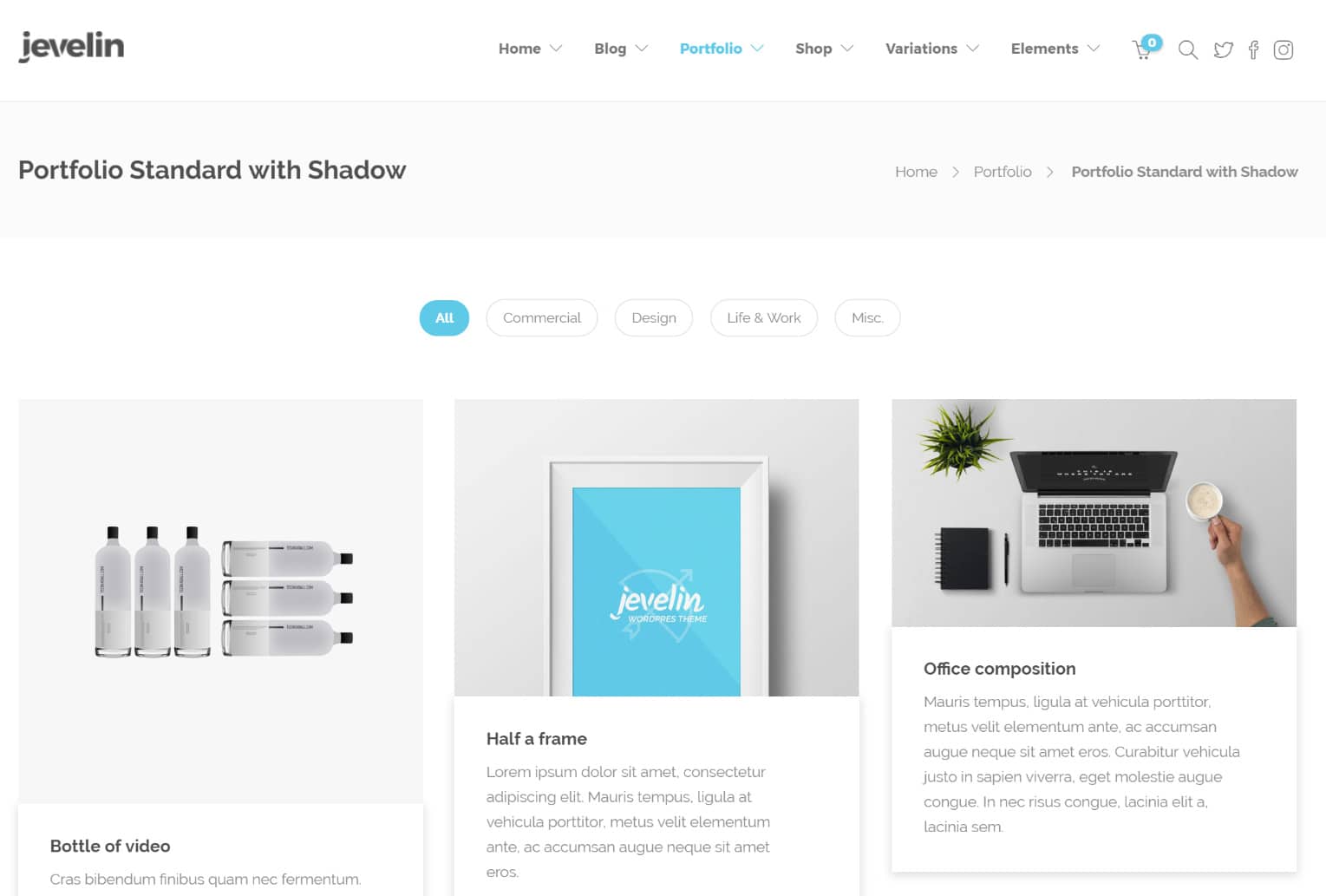
The screenshot below is a rather popular ecommerce theme that pairs with the WooCommerce plugin. WooCommerce is one of the primary ways you turn your regular WordPress website into a functioning online store, with payment processing, a shopping cart, and product galleries. Check out this in-depth tutorial on how to install WooCommerce.
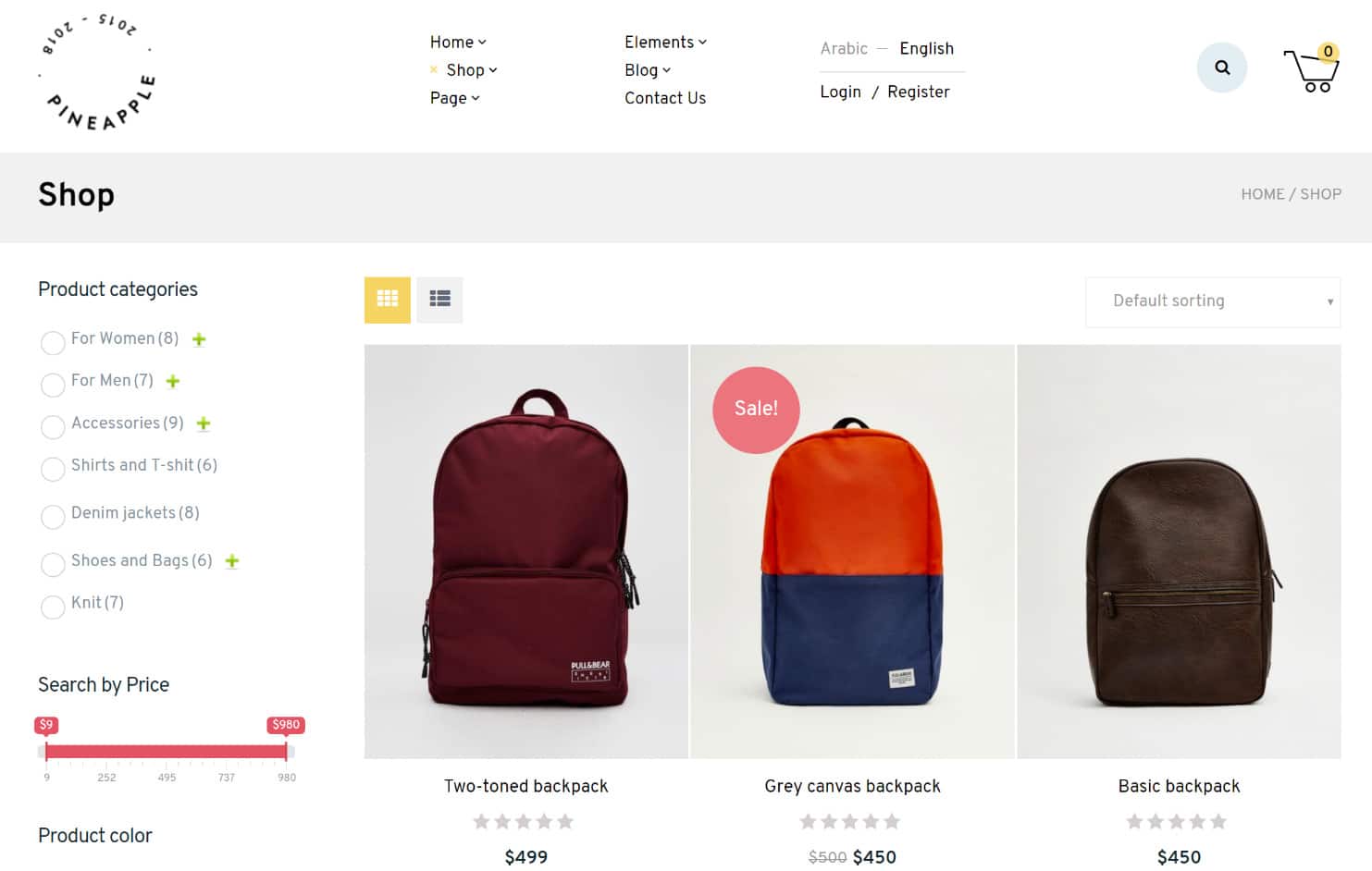
There are also plenty of other eCommerce plugins like Easy Digital Downloads (typically used for selling digital products) and WP Ecommerce.
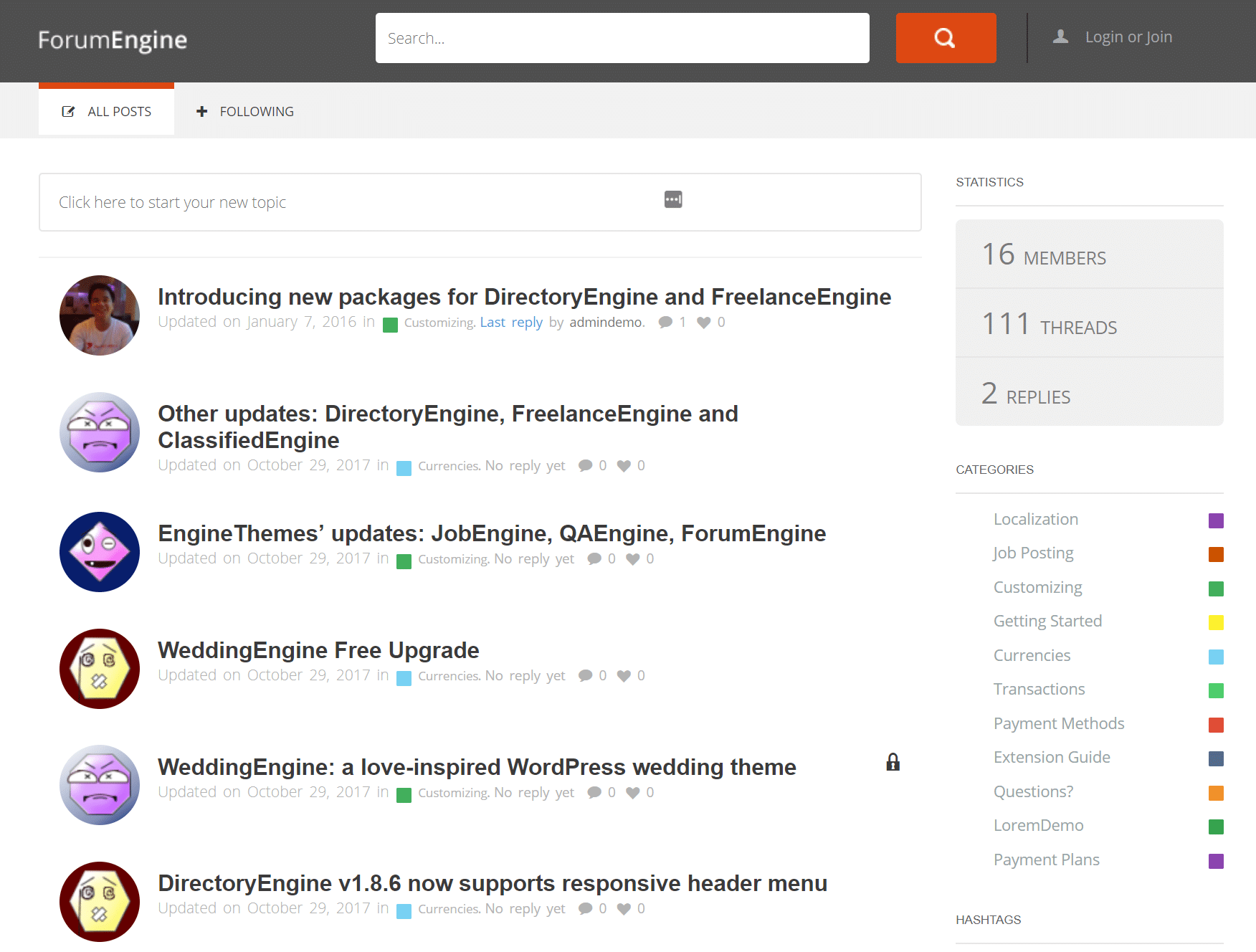
The final example below shows a forum. This website was constructed using a theme, but you might also consider looking around the internet for some forum plugins. Several are available if you already have a cool theme picked out but it doesn’t have forum functionality.
And that’s exactly how to accomplish different types of websites with WordPress. Write down the feature you need, then go to Google and see if there are any plugins or themes to fit your needs. I’ll bet you’ll always find good results.
3. It Supports Numerous Media Types
Feel free to check out the long list of accepted file types for WordPress, but know that the following primary categories are all accepted:
- Images
- Documents
- Audio
- Video
In my own experience, I’ve never had WordPress tell me that a file is not supported. You can expect to upload common files like .jpg, .png, .gif .pdf, .doc, .pptx, .mp3, .m4a, .mp4, .mov, .wmv, and .avi. Along with that, you won’t have any problems with more obscure file types like .odt, .key, .ogg, and .3gp.
And while there are some file formats, such as SVGs, that aren’t allowed, there are good solutions to get around this. Check out this tutorial on how to safely upload SVGs in WordPress.
In short, if you’d like to put a photo, gif, video or document on your website, it’s usually fair game with WordPress. It’s even common to host documents and presentations on a website without publishing them on a specific page.
A word of warning: you should follow the rules and only legally use media that’s either owned by you, open for free downloads, or usable when credit is given. Here are some places to find legal media such as photos and video:
Check out this full list of places to find free images for WordPress.
4. It’s Easy to Learn and Has a Huge Community
As an open-source software, WordPress can be used by anyone. The user base isn’t limited by pricing, premium customer support, or even skill level.
Sure, there are plenty of things to learn about WordPress, but any person could play around with the dashboard for ten minutes and start to absorb how the interface works.
And since there aren’t many roadblocks to gaining access to the software, users have made blogs, forums, online courses, seminars, webinars, and books, all outlining different aspects of the WordPress platform.
Then there’s the more official customer support from WordPress. You can either pay extra money for dedicated support or work through the WordPress forums.
It’s truly incredible how many resources there are for learning about WordPress or having quick development questions answered. For instance, you might follow a blog like this to receive a consistent flow of WordPress tips in your email inbox.
On the other hand, you can also search Google to locate immediate solutions.
There are more tutorials, YouTube walkthroughs, forums, and Stack Overflow threads about WordPress than any other CMS. When something breaks at 11pm, someone has already solved it and posted the fix.
5. You Can Scale Up and Expand Your Website with Themes and Plugins
We’ve already discussed how the WordPress themes and plugins make it easy for you to construct a website, but these elements are also essential for scaling up.
For a standard blog, you’ll install a theme, adjust the design, then start blogging. The same goes for a business website or portfolio.
It’s common for the themes to serve as the site’s foundation. After that, the design work is minimal besides some color changes, logo additions, and of course, the new pages and blog posts.
But every once in a while you realize that something new needs to be added to your website. Maybe your customers are clamoring for a membership section of your site, or maybe you realized that a monthly quiz is a great way to get customers to interact with your brand.
In both of these situations, a plugin rectifies the issue.
For instance, there are plenty of excellent membership plugins that convert part of your site into a community. Some of them are free, while others you have to pay for.
The same goes for quiz plugins. We have a list of the best quiz plugins on the market, and that’s only a taste of the selection.
Important: site expansion isn’t only done with plugins. It’s common for growing websites to get new themes for the following reasons:
- A fresh look is needed.
- It’s required to switch from a free theme to a more powerful premium one.
- The website owner wants better customer support from the theme developer.
- There has been a shift in what the business offers online.
- The site owner needs different tools that plugins can’t deliver.
See it in Action:
Looking for a WordPress theme is as simple as completing a Google search.
You can find an onslaught of lists covering the different categories of WordPress themes. Try searching “real estate WordPress themes” or “flat WordPress themes,” and you’ll see plenty of choices.
However, your best bet is to pick from a trusted WordPress theme shop and/or developer. This ensures you get quality support, fast and well optimized code, and updates for the long haul.
Here’s a list of some reputable and well-known theme hotspots:
- The WordPress Theme Directory
- ThemeIsle
- Proteus Themes
- Themify
- Elegant Themes
- MH Themes
- Meridianthemes
- MyThemeShop
- StudioPress
There are also online theme marketplaces. However, be careful with these as sometimes developers will drop off the face of the planet, leaving you with an unsupported theme. But they also have a large variety, and high-quality themes do exist, you just have to look a little harder:
Plugins are similar to themes in that you can find both free and premium versions. The only difference is that free plugins are far more commonly used by actual business websites.
Free themes are nice for personal and beginner blogs, but the pros usually spend the $50-$100 to get a much nicer premium theme. Read our in-depth post on WordPress free vs paid themes for a little more insight into which might be better for you.
That’s not always the case with plugins though, since many of the best plugins have always been free.
You can search for new plugins through your WordPress dashboard or go to the WordPress plugin library. This library has over 66,000 plugins, most of which are free (or in some form of a freemium business model).
The library has everything from caching to forum plugins, and spam to social media plugins. Installing a plugin takes no more than a few minutes, and each of the plugin pages include screenshots, feature lists, and even some demos.
Many premium plugins are sold throughout the internet as well. The main difference between a free and premium plugin is that you often get better customer support with a paid plugin.
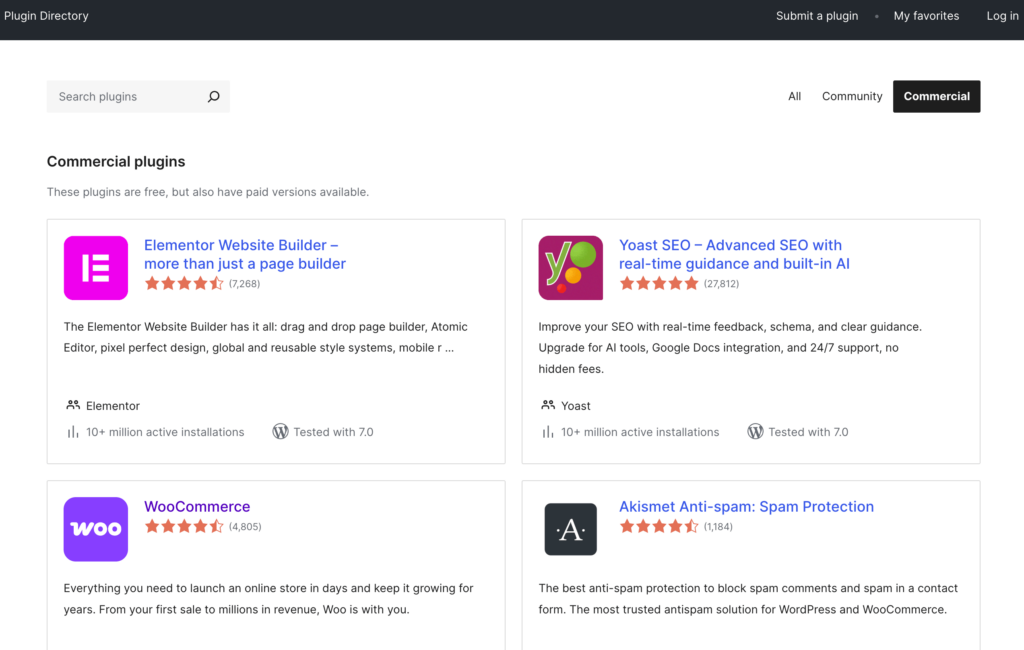
Here are some great places to search for premium plugins:
6. It Doesn’t Take a Genius to Manage
Website development companies often sell pricey packages where they ask for an upfront down payment and recurring monthly payment for maintenance.
The only problem is that WordPress isn’t all that difficult to manage if you learn the ropes and go through the proper training.
Website management typically involves a few things:
- Making sure the server is okay.
- Keeping checks on security.
- Running backups.
- Updating plugins, themes, and the WordPress software.
- Managing spam.
- Testing for functionality and broken links.
- Making improvements in speed and SEO.
You don’t personally check on the server, so it’s more about you getting a good host and seeing if the site is running at all times.
Security and WordPress site backups are either handled with plugins or through a managed WordPress hosting plan.
Everything else on the list only needs to be done on occasion. For example, here at Kinsta backups are automatically taken every day, stored for 14 days, and can be restored with a click of a button.
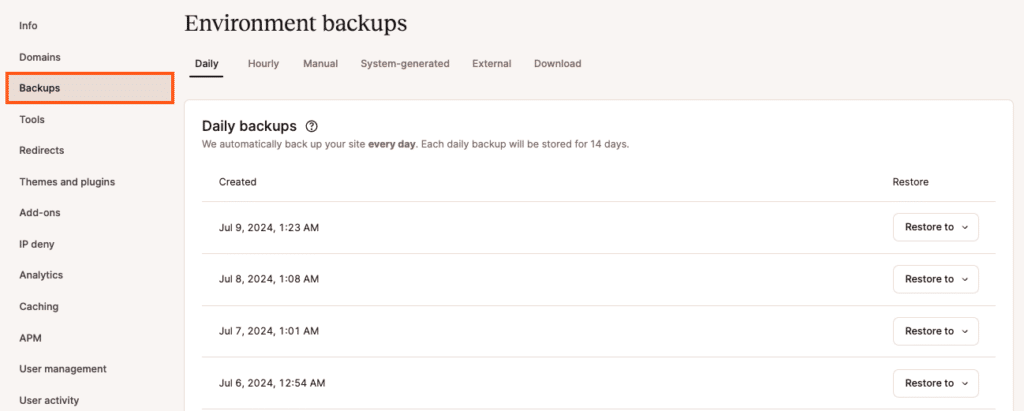
For instance, you’ll probably want to install a caching plugin to help with website speed. The same goes for SEO. Managing spam is completed with the Akismet plugin, and there are some plugins out there for broken links.
See it in Action:
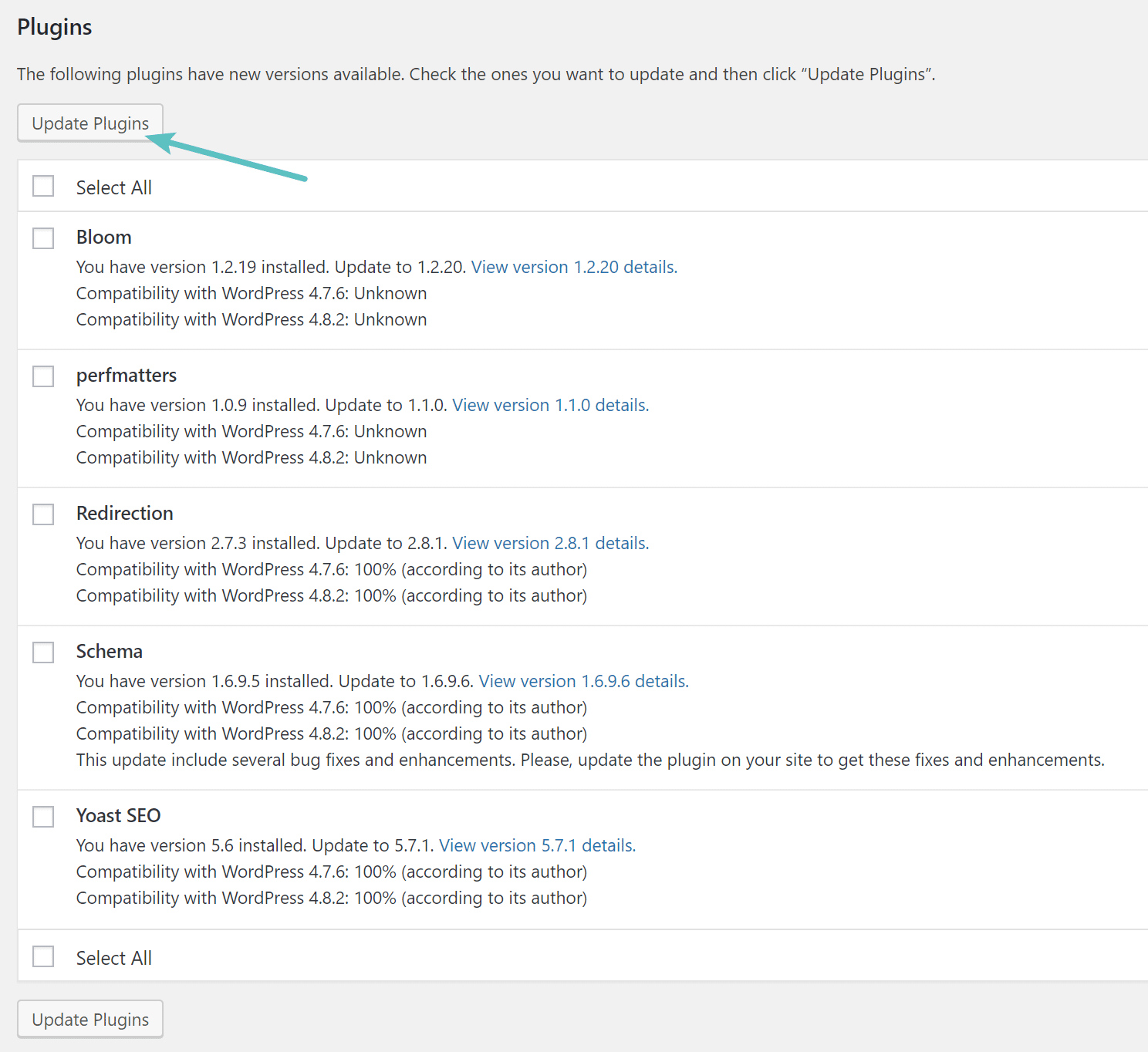
One of the only manual maintenance tasks is updating plugins, themes, and WordPress itself.
The good news is that WordPress notifies you when updates are released. Therefore, you make the updates whenever you see the warnings. It usually takes less than a minute for any updates, then you can get back to work.
Everything else (like SEO, backups, speed, security, broken links, and spam) can be managed using plugins.
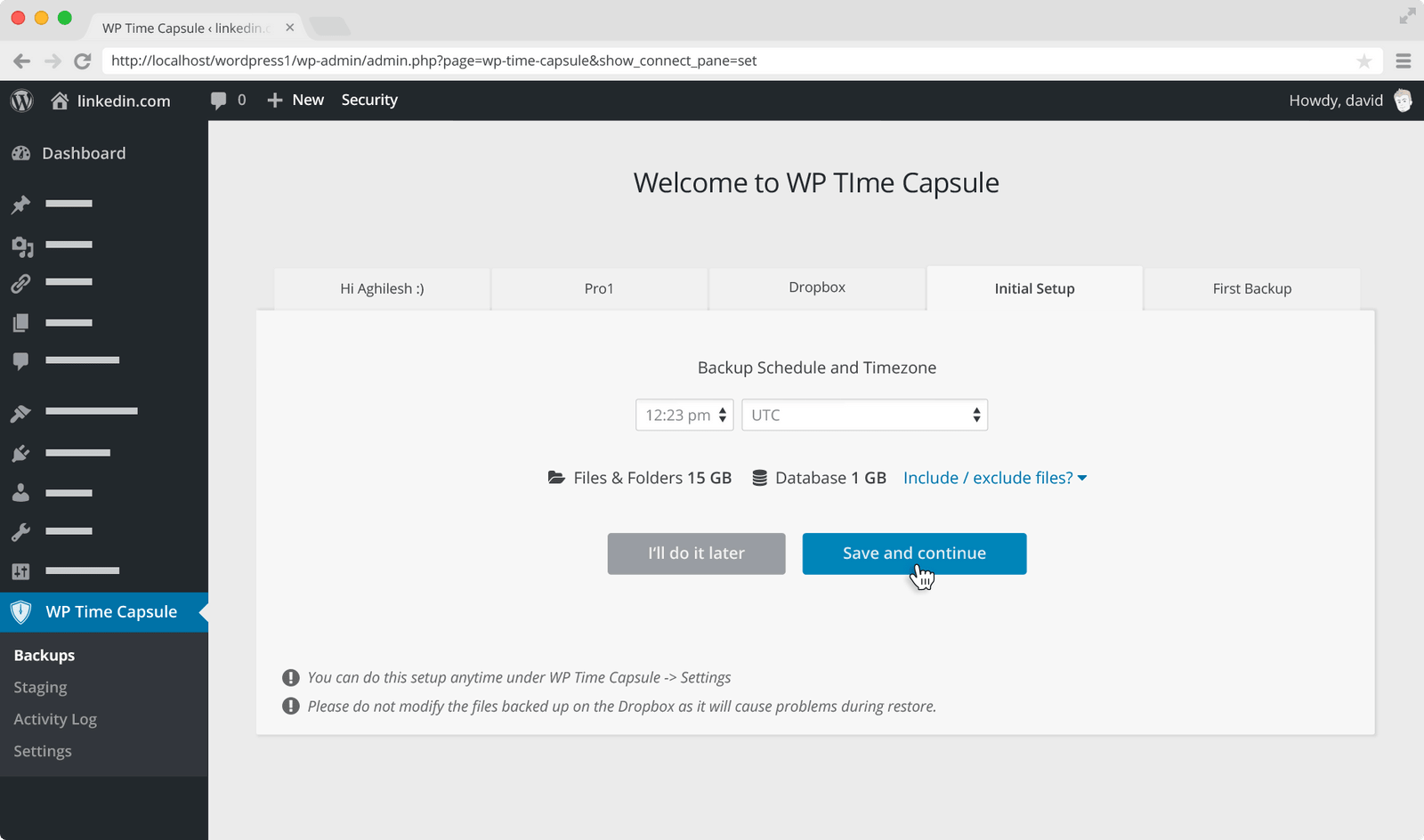
For instance, the WP Time Capsule plugin is a wonderful tool for setting both incremental file and database backups. The plugin runs in the background. If a file gets corrupted, or your site crashes, the restore function is there to solve the problem.
7. SEO Comes First
WordPress is known for having SEO built into the platform.
In fact, WordPress automatically generates title tags and meta descriptions for all of your pages and posts. This lets search engines know about your content, and it will get you indexed and potentially moved up in the rankings.
WordPress also generates clean URL structures, supports breadcrumb navigation, and makes it easy to implement structured data for rich results. No other website builder gives you this level of control without touching code.
As with everything in WordPress, there are also more advanced features offered by plugins and online tools.
Here are some SEO favorites to consider:
See it in Action:
The Yoast SEO plugin is also a must-have for any WordPress site. The default SEO tools in WordPress are great, but Yoast takes it to the next level.
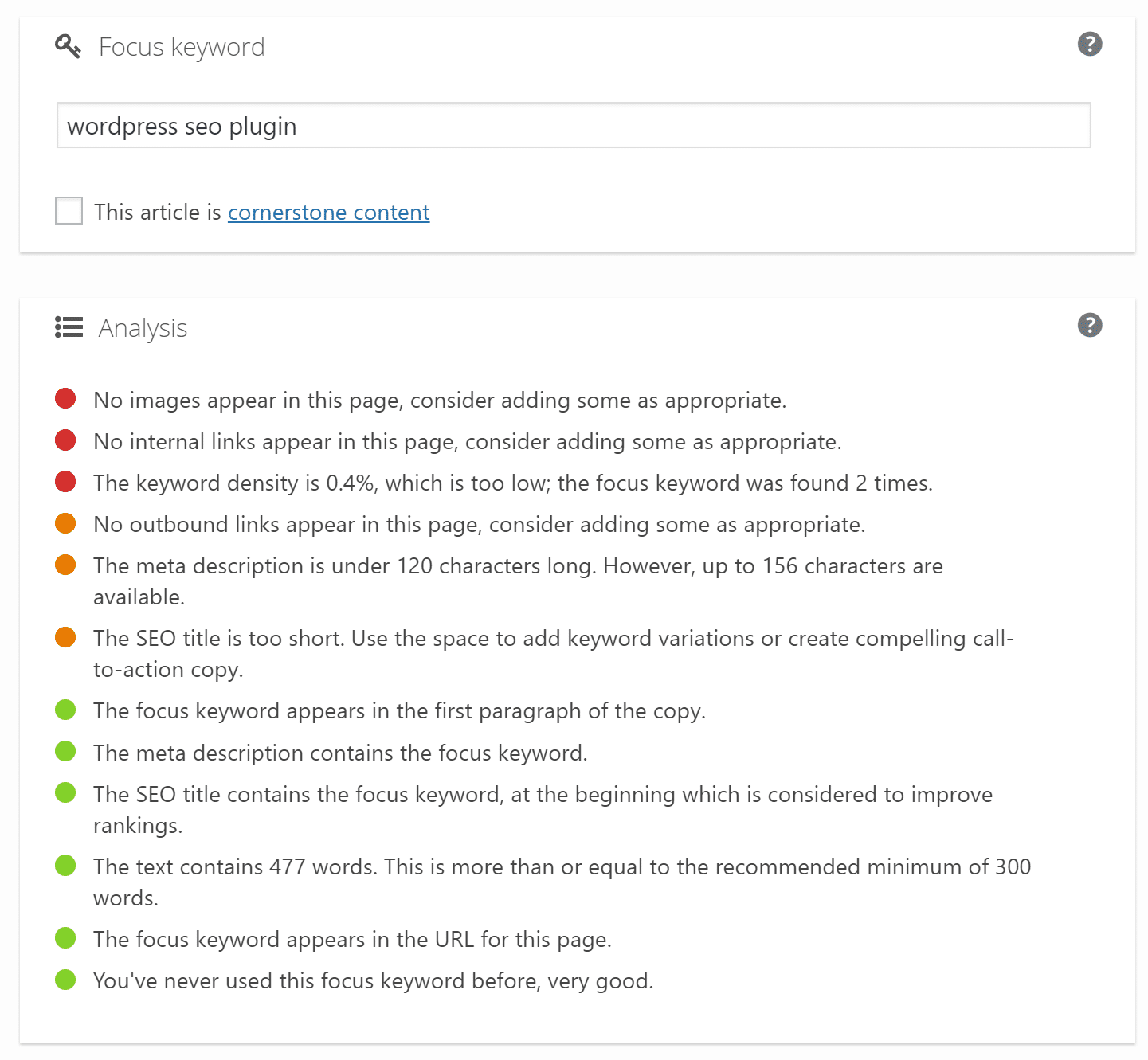
Below is one section of Yoast that asks you for a focus keyword. This could be for either a page or blog post. Upon targeting that focus keyword, Yoast analyses the current post or page and shares how effective you are at targeting the keyword.
You’ll see the keyword density, thoughts on the keyword locations, SEO title mentions, page title suggestions, and more. It’s basically a giant checklist for you to make your SEO the best it can be on every page.
8. You Have Full Control of Your Website
A Google search for “website builders” or “website platforms” will reveal all sorts of results.
WordPress will most likely be on all website building lists, along with competition like WIX, Squarespace, Joomla, Magento, Shopify, Weebly, and Jimdo.
All of these are perfectly fine for making websites, but the non-open-source ones, like Squarespace, Shopify, and WIX, limit your control to whatever features are offered in the premium packages.
That leaves you with some limitations like the following:
- The ecommerce functionality is usually built-in, so there’s not much you can do about expanding with plugins.
- You’re typically stuck with whatever hosting is provided. You don’t have the freedom to test hosts and go with the best value or highest performing.
- Adjusting code is limited to what the companies share with you. Even worse, you get stuck with a completely unique coding language, like with Shopify (it uses a language called Liquid). In short, it almost guarantees that you have to hire a specialized developer for changes you can’t handle yourself through the editor.
- You don’t technically have full ownership of your site and content. You’re renting the website from these companies. So when you stop paying, all of those files and pages are either lost or held by the company. With WordPress, you own the files, and no one can prevent you from moving them to other hosts.
See it in Action:
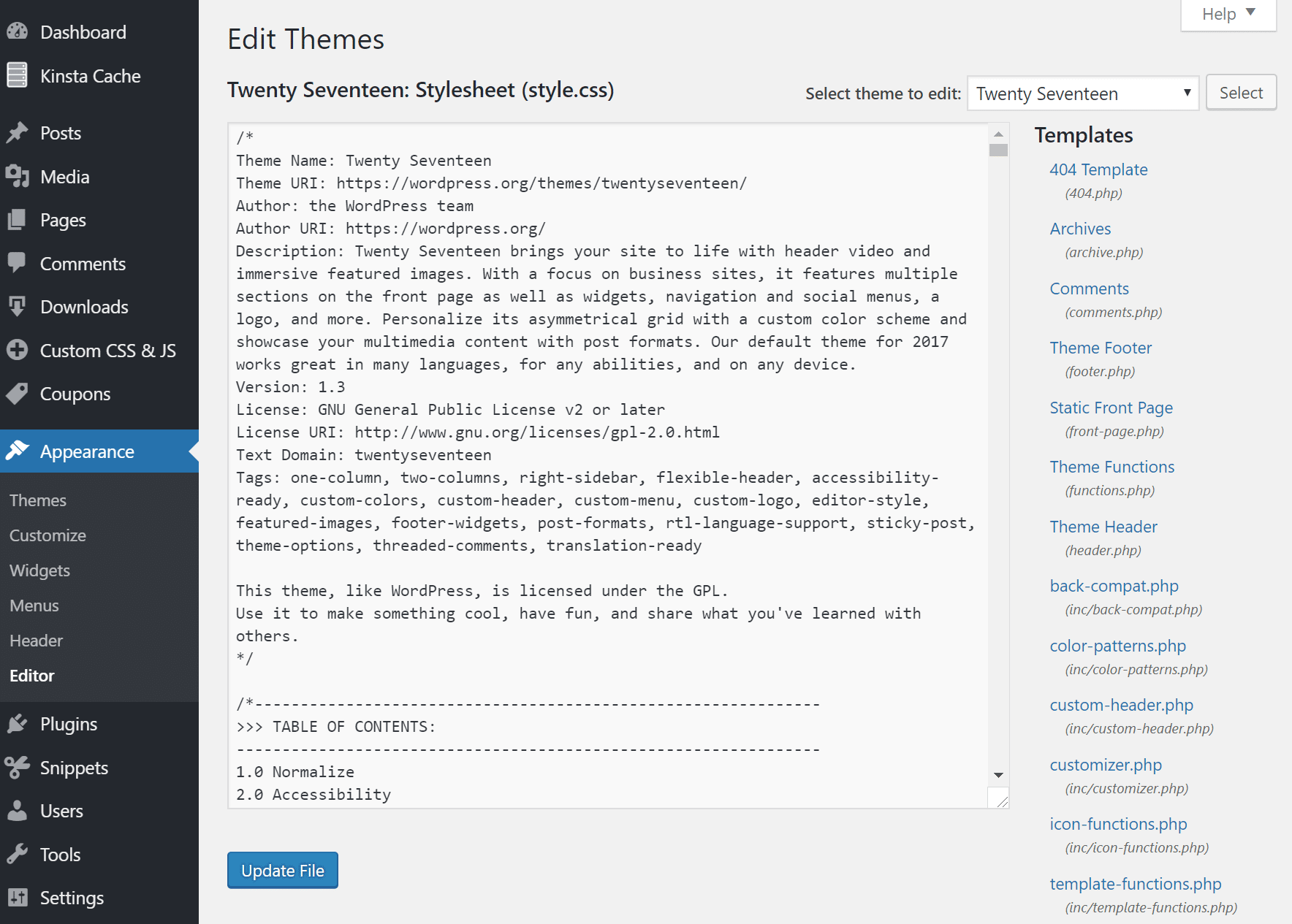
The Appearance tab is the control center for all customizations in WordPress.
It’s where you have free rein over themes, fonts, colors, widgets, menus, logos, and code. Just about anything you can think of can be adjusted in this area.
It’s great for beginners, intermediates, and advanced users, since it limits the amount of code you touch, while also speeding up the development process.
Furthermore, several themes have their own customization modules, or you could install a drag-and-drop editor to almost remove the need for coding.

As for the advanced edits, all website files are accessible through the WordPress dashboard, your hosting account, or through a local environment.
Whether you’re trying to insert a snippet of code for Google Analytics, or you’re attempting a complete overhaul of the landing page’s CSS, WordPress has you covered.
9. The Blogging is Hands Down the Best in the Business
WordPress was born as a blogging platform. It’s had its competitors, but nothing currently compares to the power, elegance, and advanced tools you find in the WordPress blogging engine.
Options like Tumblr, Medium, Ghost, and Blogger are all perfectly fine for hobbyists, but the pros go for WordPress. An incredible set of tools is located inside the WordPress blog editor.
You can run a simple, one-author blog by taking advantage of the formatting and media tools. There’s also the option to build a full online magazine by scheduling posts far in advance and setting multiple user types for contributors and editors.
Along with options for previewing, editing everything in the post, and keeping code completely out of the equation, you really can’t beat WordPress.
See it in Action:
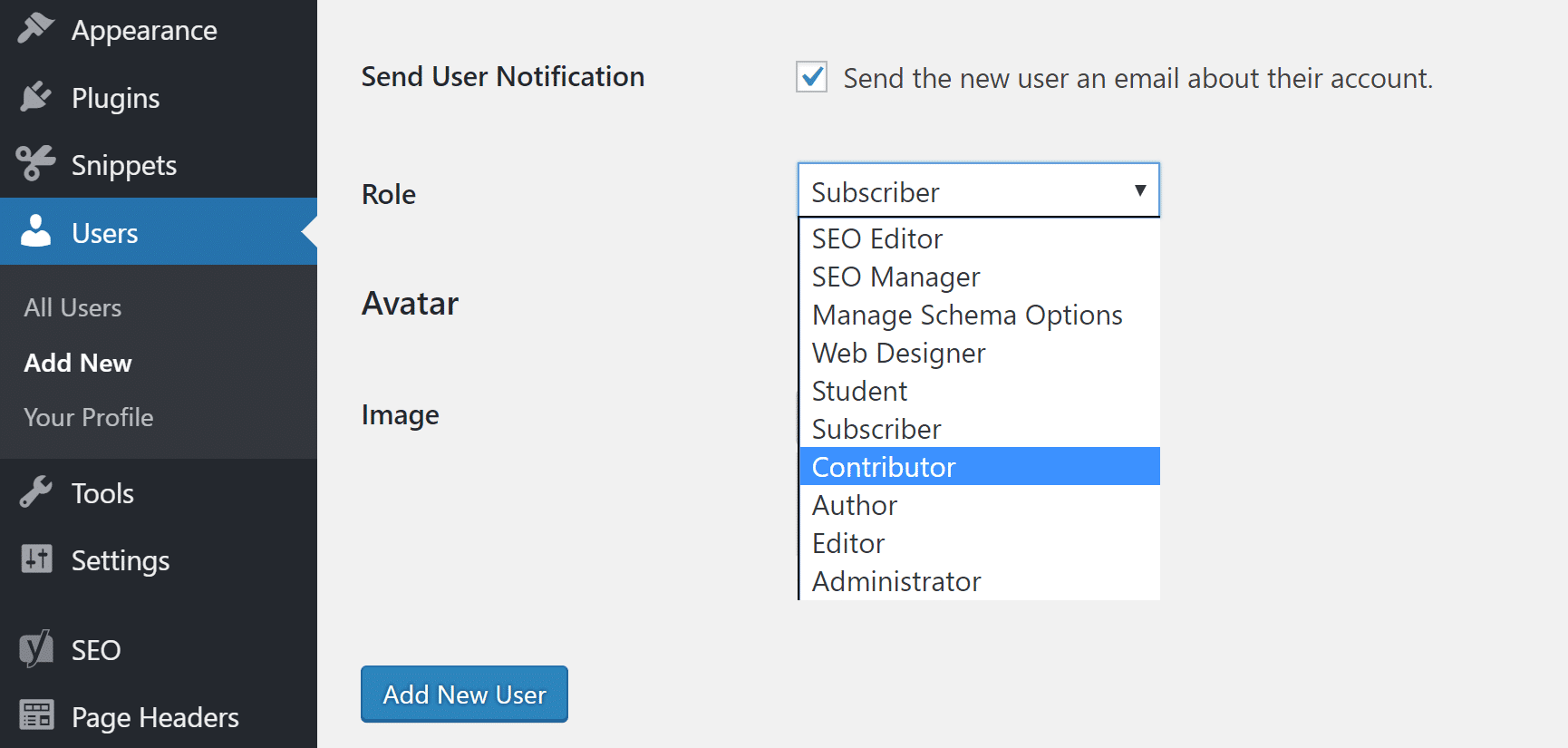
One advantage of the WordPress blogging platform is the permissions or user roles.
Let’s say you run the site as an administrator. This means you have access to the files, all plugins, SEO, and security tools. You hire an editor and three writers to create content for the blog. The only problem is that you don’t want them messing with anything besides the blog posts.
Therefore, you can set one person as an Editor role and the others as Contributors. The Editor can now edit and publish posts, while the Contributors can create posts but not publish them.
We can also look at the blogging interface to see how powerful and well-organized it is.
You can add media and change formatting with the click of a button. It lets you change the title and permalink at the top, and there are options for categories, tags, and readability.
Revisions are displayed for going back and recovering past versions, and the Preview and Publish buttons are waiting for you until the very end.
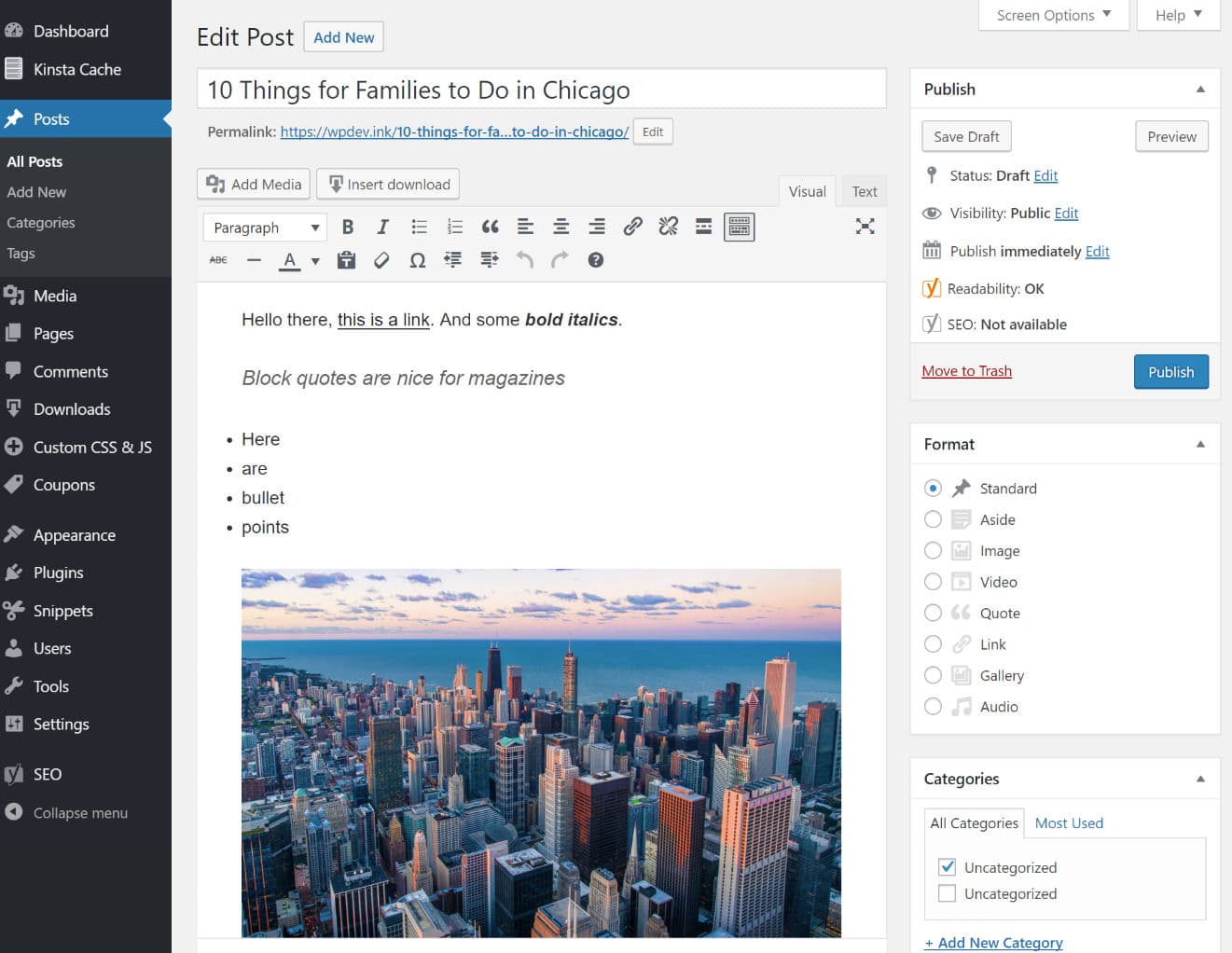
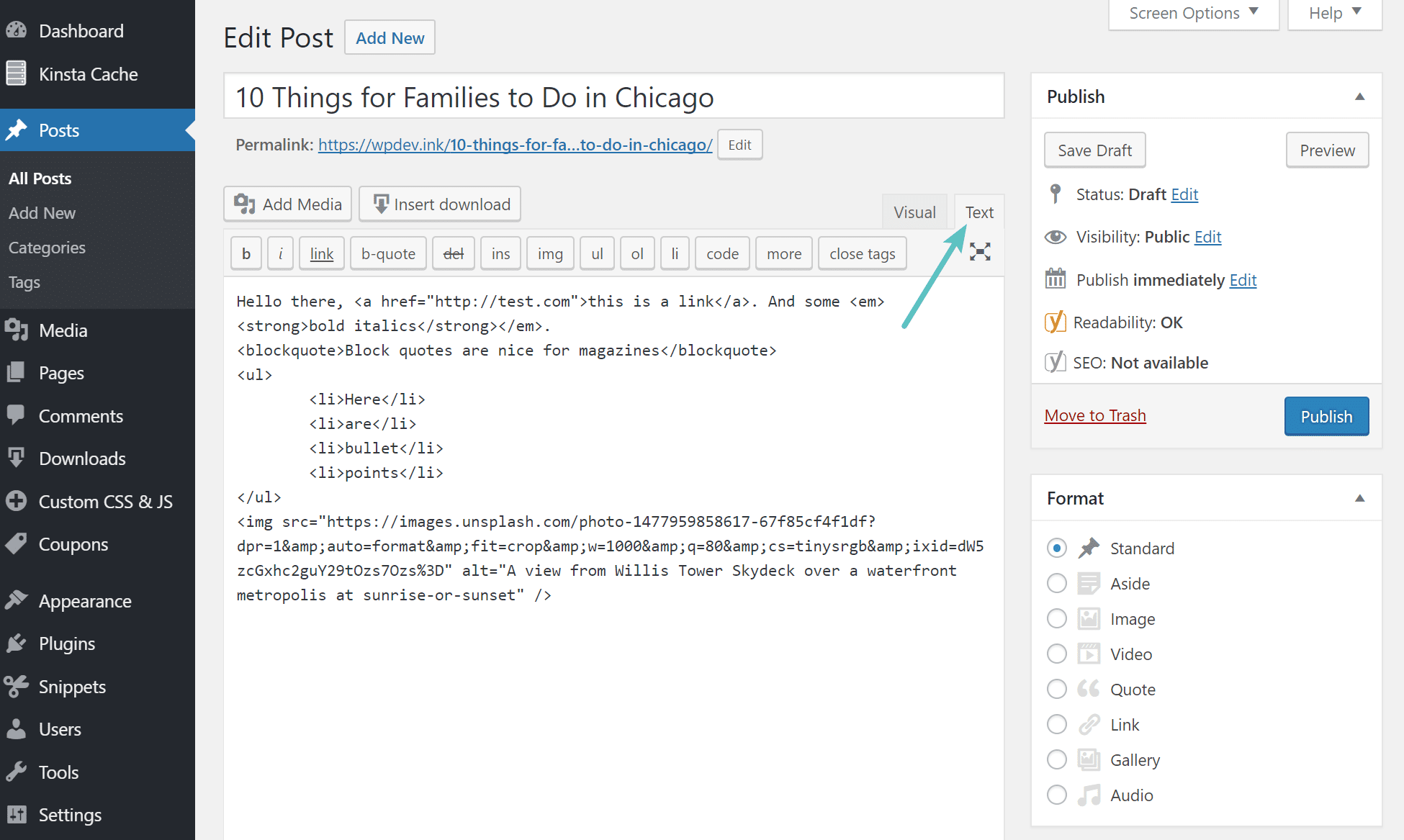
The Visual view renders the HTML, similar to what the end users are going to see. You can also switch to the Text view, which reveals all your post content in HTML format.
10. Everyone is Doing It
So jump off the bridge with them!
Okay, just because everyone else is doing something isn’t always the greatest reason to follow along. But WordPress has proven itself time and again, so the word has gotten out about its performance, expandability, and ease-of-use.
There’s a reason why over 41.5% of all websites on the internet use WordPress.
Patrick Coombe, a well-known SEO, asked a question for website owners and marketers on inbound.org: “If you could start your website over, what would you change?” Here’s what Larry Kim, the founder of WordStream, had to say:

You can read more about the two platforms here: WordPress vs Drupal.
Clearly, WordPress is doing something right. You also don’t have to sacrifice much to test it out. As mentioned, the WordPress software is free, and most hosting companies have some sort of money back guarantee.
Most experienced WordPress users will praise the developers for their constant updates and improvements. What’s cool is that whenever an update is released there’s an informational page that outlines how the update will improve the WordPress experience.
See it in Action:
WordPress has a full showcase of brands using WordPress, which includes everything from the Houston Zoo, the Obama Foundation, and even Toyota.
Some other notables include The Tribune Media Group, jQuery, Plesk, The Chicago Sun-Times, Dyn, Nginx, TechCrunch, and many more. Check out this list of the top 130+ sites using WordPress.
11. It Is Ready for the AI Era
This one is newer, but it matters. The web today looks different than it did five years ago. AI tools generate content, AI crawlers index it, and AI assistants surface it in search.
WordPress is ahead of most platforms here, not behind. Plugins like Yoast and Rank Math now include AI-assisted writing and schema tools. The REST API makes WordPress content readable by external AI tools and headless setups.
And because WordPress is open-source, AI tool developers build integrations for it first.
There’s also a hosting dimension. AI-generated content drives significantly more bot traffic than human-written content. Kinsta’s own infrastructure data shows AI bots now account for a substantial share of server requests on WordPress sites, sometimes enough to affect performance.
A managed hosting environment built for WordPress handles that load. A shared host or a website builder’s infrastructure often doesn’t.
If you’re building a site that’s meant to be found, indexed, and surfaced in AI-assisted search in the years ahead, WordPress gives you more control over how that happens than any closed platform.
So Why Choose WordPress?
WordPress has a strong following all over the world. Some developers would rather use other platforms, but that often has to do with learning certain coding languages and throwing themselves into less user-friendly environments.
As for bloggers, business owners, developers with clients, and ecommerce professionals, WordPress is the right choice. Not only do you maintain complete control over your site, but you also receive great advantages like plugins, themes, free tools, and full media support.
Hopefully, we’ve answered your question with this blog post.
Since WordPress is free to download and free to use, what you really need is hosting. That’s where the cost decision actually happens, and it’s worth getting right from the start.
Kinsta’s managed WordPress hosting handles the infrastructure, security, backups, and performance so you can focus on building. Check it out. New customers get their first month free.

Brian has a huge passion for WordPress, has been using it for over a decade, and even develops a couple of premium plugins. Brian enjoys blogging, movies, and hiking. Connect with Brian on Twitter.